Building a Secure Password Hint Manager in Python: Tkinter, SQLite, and Fernet Encryption Explained
A code walkthrough of azario0's PasswordHintManager — a Tkinter desktop app that stores encrypted password hints in SQLite using PBKDF2 key derivation and Fernet symmetric encryption.
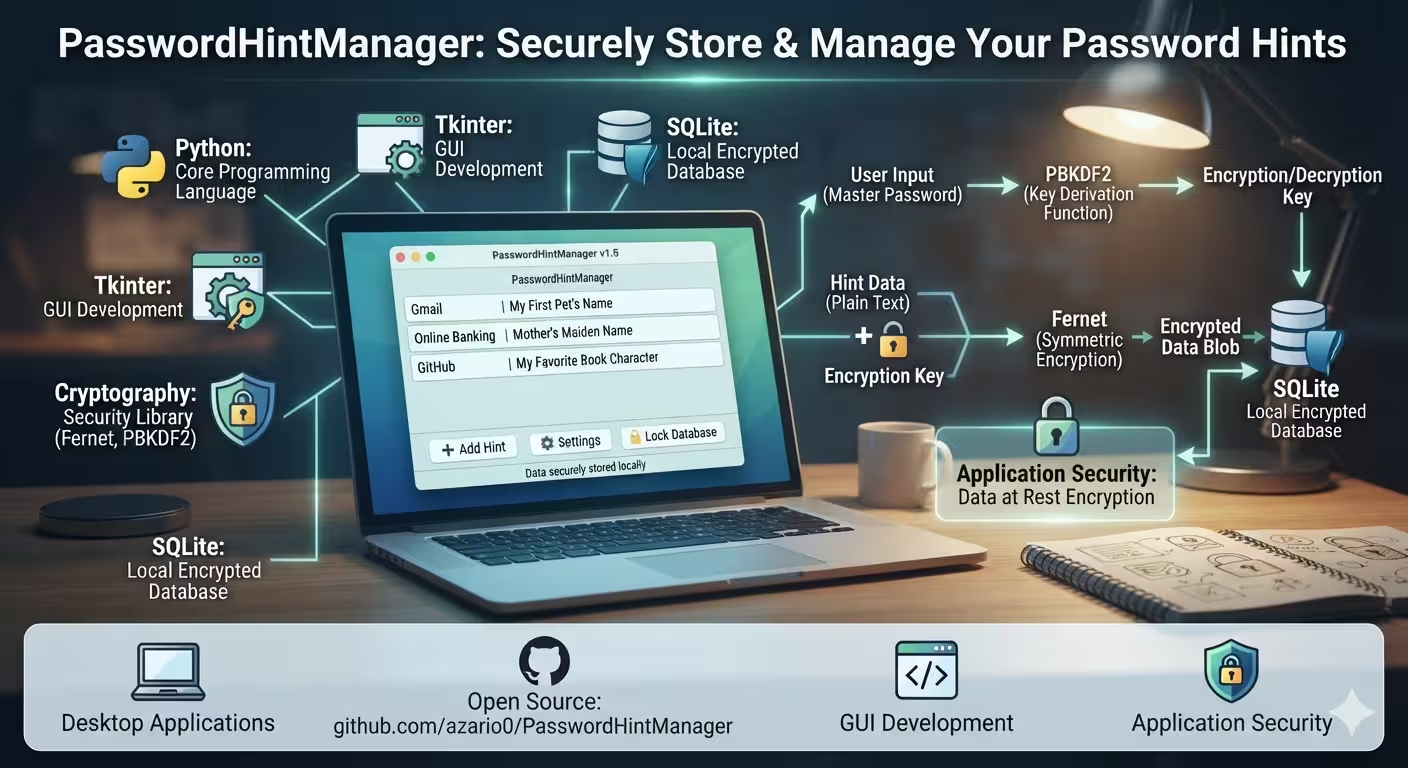
Building a Secure Password Hint Manager in Python: Tkinter, SQLite, and Fernet Encryption Explained
PasswordHintManager by azario0 is a compact, single-file desktop app (about 700 lines in password_hint_manager.py) that stores hints about your passwords — not the passwords themselves — behind a master password, encrypted at rest in a local SQLite database. It’s a good example project to study because it touches four things advanced Python devs deal with constantly: GUI state management, local persistence, key derivation, and symmetric encryption — all without any external framework beyond the standard library plus the cryptography package.
This walkthrough covers how the pieces fit together, and flags a couple of design choices worth knowing about if you build on top of it.
Stack at a glance
- GUI: Tkinter +
ttkfor themed widgets (clamtheme) - Storage: SQLite3, stdlib, single file
password_hints.db - Key derivation:
hashlib.pbkdf2_hmac(for the login check) andcryptography’sPBKDF2HMAC(for the encryption key) - Encryption:
Fernet— authenticated symmetric encryption (AES-128-CBC + HMAC)
1. Bootstrapping: schema and window setup
Everything lives in one class, PasswordHintManager. The constructor (__init__) builds the root Tk window, centers it on screen, then calls three setup methods: setup_styles(), init_database(), and create_login_frame().
init_database() (L83–108) creates two tables if they don’t exist:
CREATE TABLE IF NOT EXISTS hints (
    id INTEGER PRIMARY KEY AUTOINCREMENT,
    service TEXT NOT NULL,
    username TEXT,
    hint TEXT NOT NULL,
    category TEXT,
    created_date TEXT,
    modified_date TEXT
)

CREATE TABLE IF NOT EXISTS master_password (
    id INTEGER PRIMARY KEY,
    password_hash TEXT NOT NULL,
    salt TEXT NOT NULL
)
Note that hint is stored as TEXT — it holds the encrypted value, not plaintext. master_password is a single-row table (id is always 1), used purely to verify the master password on login; it never stores the password itself, only a salted hash of it.
2. First run vs. returning user
create_login_frame() (L110–131) checks check_master_password_exists() — a SELECT COUNT(*) FROM master_password — and branches into two forms:
create_setup_form: first launch, asks for a new master password twice (with a 6-character minimum).create_login_form: subsequent launches, asks for the existing master password, with a “Reset Password” escape hatch.
3. Deriving and verifying the master password
This is the core security logic, and it’s split across two different KDF calls that are worth distinguishing.
Setting the password (setup_master_password, L177–208):
salt = os.urandom(32)
password_hash = hashlib.pbkdf2_hmac('sha256', password.encode(), salt, 100000)

cursor.execute(
    "INSERT OR REPLACE INTO master_password (id, password_hash, salt) VALUES (1, ?, ?)",
    (base64.b64encode(password_hash).decode(), base64.b64encode(salt).decode())
)
A fresh, random 32-byte salt is generated per install and PBKDF2-HMAC-SHA256 (100,000 iterations) turns the password into a hash. Both the hash and salt are base64-encoded and stored — this is a textbook “verifier” pattern: you can check a password against it without ever storing the password itself.
Verifying on login (verify_master_password, L210–237) re-derives the hash from the entered password and the stored salt, then compares it to the stored hash with ==. (Worth noting: this is a non-constant-time comparison, which in a strict threat model could theoretically leak timing information — hmac.compare_digest would be the safer choice here, though for a purely local single-user app the practical risk is low.)
4. Deriving the encryption key — and a design trade-off to know about
Once the master password is verified, setup_encryption() (L252–263) derives the actual key used to encrypt/decrypt hints:
def setup_encryption(self):
    password_bytes = self.master_key.encode()
    salt = b'stable_salt_for_consistency'  # In production, use random salt per user
    kdf = PBKDF2HMAC(
        algorithm=hashes.SHA256(),
        length=32,
        salt=salt,
        iterations=100000,
    )
    key = base64.urlsafe_b64encode(kdf.derive(password_bytes))
    self.cipher_suite = Fernet(key)
This is a separate PBKDF2 derivation from the one used for password verification — and here the salt is hardcoded (b'stable_salt_for_consistency') rather than randomly generated. The comment in the code candidly flags this as a shortcut. The reason it has to be deterministic is functional: the same master password must always produce the same Fernet key, or previously encrypted hints become unreadable after a fresh login. The fix used in most production password managers is to generate a random salt once at setup time, store it alongside the hint data (salts aren’t secret), and reuse that stored salt on every subsequent derivation — giving you both determinism and per-installation uniqueness. As shipped, every install of this app derives the same key from the same password, which is fine as a portfolio/learning project but worth fixing before trusting it with real data.
The resulting key feeds into Fernet, which is AES-128 in CBC mode with a SHA256 HMAC for authentication — so tampered ciphertext is detected on decrypt rather than silently producing garbage.
5. CRUD operations: encrypt on write, decrypt on read
Every hint that touches the database is encrypted or decrypted right at the boundary:
# add_hint() — L406-434
encrypted_hint = self.cipher_suite.encrypt(hint.encode()).decode()
cursor.execute('''
    INSERT INTO hints (service, username, hint, category, created_date, modified_date)
    VALUES (?, ?, ?, ?, ?, ?)
''', (service, username, encrypted_hint, category, current_time, current_time))
update_hint() (L436–468) mirrors this for edits, keyed off self.editing_id, which gets set when a row is double-clicked in the Treeview (load_hint_for_editing, L536–567).
Reading back is a try/except around cipher_suite.decrypt():
try:
    decrypted_hint = self.cipher_suite.decrypt(encrypted_hint.encode()).decode()
except:
    messagebox.showerror("Error", "Failed to decrypt hint")
    return
This shows up in both view_hint() (L569–622) and load_hint_for_editing(). Because Fernet includes an HMAC, decryption fails loudly (raises InvalidToken) rather than returning corrupted plaintext — which is exactly the behavior you want, though catching a bare except swallows the specific exception type, making it harder to distinguish “wrong key” from other unexpected errors.
All queries throughout — inserts, updates, deletes, search — use parameterized ? placeholders rather than string formatting, which is the correct way to avoid SQL injection in sqlite3. That discipline is consistent across the whole file.
6. Search and the list view
refresh_hints_list() and search_hints() (L482–534) populate a ttk.Treeview from SQLite SELECT queries. Note that search filters on service, username, and category only:
cursor.execute('''
    SELECT id, service, username, category, created_date
    FROM hints
    WHERE LOWER(service) LIKE ? OR LOWER(username) LIKE ? OR LOWER(category) LIKE ?
    ORDER BY created_date DESC
''', (f'%{search_term}%', f'%{search_term}%', f'%{search_term}%'))
The hint column itself is deliberately excluded from search — since it’s encrypted at rest, you can’t LIKE against ciphertext anyway, and decrypting every row on every keystroke just to support search would be both slow and would momentarily hold a lot of decrypted secrets in memory.
The Treeview’s row tags field is repurposed to smuggle the row’s database id alongside the displayed columns (tags=(hint_id,)), which is how view_hint(), delete_hint(), and load_hint_for_editing() know which row was selected without needing a second lookup by displayed text.
7. Export and reset
export_hints() (L647–677) decrypts every hint and dumps them to a timestamped JSON file for backup purposes — worth flagging that this file is plaintext once exported, so it should be handled like any other secrets backup.
reset_master_password() (L239–250) is a deliberately destructive escape hatch: since there’s no password-recovery mechanism (by design — the encryption key is derived from the password, there’s nothing to “reset” it to), forgetting the master password means the encrypted hints are unrecoverable. The reset option just wipes both tables so the user can start over.
Takeaways
This project is a solid, readable reference for wiring up Tkinter + SQLite + cryptography in a single file, and it gets the fundamentals right: parameterized queries, authenticated encryption via Fernet, PBKDF2 for key stretching, and a clear separation between “verify the password” and “derive the encryption key.” The one thing worth internalizing if you extend it is the hardcoded encryption salt — swapping it for a randomly generated, per-install salt stored in the database is a small change that meaningfully improves the security posture, and it’s a useful exercise in understanding why KDF salts need to be unique in the first place.
Repo: github.com/azario0/PasswordHintManager · License: MIT

Written by
Benmalek Zohir
Founder, AI Engineer & Full Stack Developer
Benmalek Zohir is an AI Engineer, Full Stack Developer, and technology enthusiast focused on artificial intelligence, software development, and emerging technologies. He is the founder of SoftwareJournal.blog, where he shares practical insights, software discoveries, AI tools, and the latest developments in technology.
Related reading
- Inside Advanced Screen Recorder: Building a Desktop Screen Capture App with Python, Tkinter, and OpenCV11 min
- GithubApp: Building a Desktop GitHub Repository Manager with Python, Tkinter, and PyGithub11 min
- Dir-To-Txt Explained: How This Python Tkinter App Merges an Entire Folder Into One TXT File6 min