Optimizing Teacher Schedules with Python and the Hungarian Algorithm
A deep dive into the TeacherSchedulerApp, an open-source Python project that uses SciPy, NumPy, and Tkinter to generate conflict-free, preference-optimized weekly teaching schedules for school administrators.Learn how to solve the classic assignment problem in Python. This article walks through an open-source Teacher Scheduling Application using Tkinter and the Hungarian algorithm to maximize teacher satisfaction.
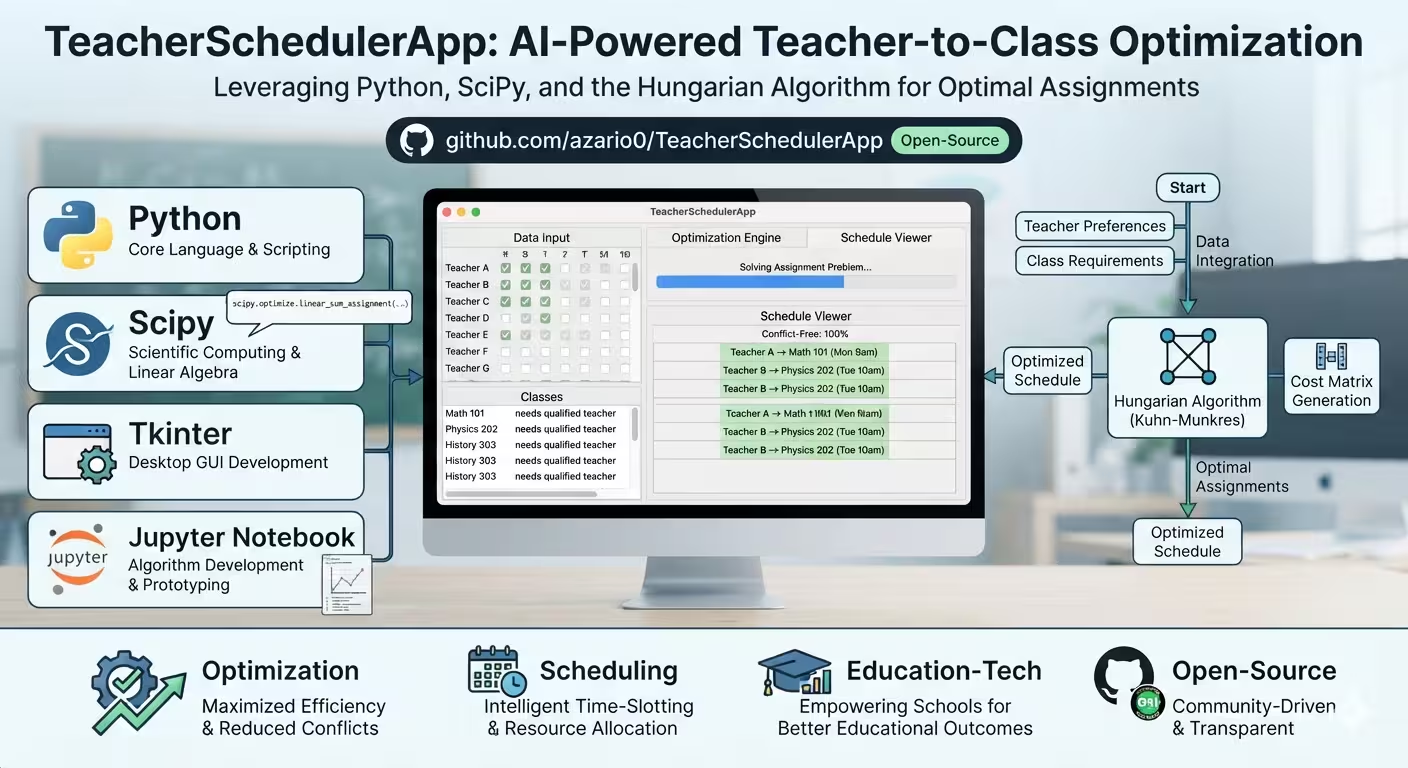
Optimizing Teacher Schedules with Python and the Hungarian Algorithm
Creating a weekly teaching schedule is a notorious administrative headache. School administrators must balance teacher preferences, avoid double-booking, and ensure every time slot is covered. What if this process could be mathematically optimized to guarantee the highest possible overall teacher satisfaction?
Enter the TeacherSchedulerApp, an open-source Python project that elegantly solves this classic “assignment problem” using the Hungarian Algorithm.
In this article, we’ll break down how this application works, from the mathematical prototyping in a Jupyter Notebook to the fully functional Tkinter desktop application.
🧠 The Core Problem: The Assignment Problem
At its heart, scheduling is an optimization problem. You have:
- N teachers (agents)
- M time slots (tasks)
- A “preference rating” (0 to 10) for each teacher-time slot pair.
The goal is to assign each teacher to at most one time slot per day, and each time slot to at most one teacher, such that the sum of all preference ratings is maximized.
Brute-forcing every possible combination is computationally expensive (factorial time complexity). Instead, we use the Hungarian Algorithm, which solves this in polynomial time ($O(N^3)$).
📓 Phase 1: Prototyping the Logic (notebook.ipynb)
Before building a user interface, the core logic was prototyped and tested in a Jupyter Notebook. You can view the full notebook here: notebook.ipynb.
The Mathematical Trick
The scipy.optimize.linear_sum_assignment function is designed to minimize cost. However, we want to maximize teacher satisfaction. The clever workaround? Negate the ratings.
By converting preference ratings into negative numbers, minimizing the “cost” mathematically equates to maximizing the original positive rating.
import numpy as np
from scipy.optimize import linear_sum_assignment

def find_schedule_optimal(teachers, time_slots):
    teacher_names = list(teachers.keys())
    ratings_matrix = np.array([teachers[name] for name in teacher_names])

    # Maximize rating by minimizing its negative
    cost_matrix = -ratings_matrix

    # Solve the assignment problem
    teacher_indices, time_indices = linear_sum_assignment(cost_matrix)

    # ... (mapping indices back to names and calculating total rating)
Robust Testing
The notebook doesn’t just stop at the happy path. It includes rigorous test cases to ensure the algorithm handles real-world edge cases:
- More teachers than time slots: The algorithm gracefully leaves the lowest-scoring teachers unassigned for that day.
- Fewer teachers than time slots: It assigns available teachers to their absolute best slots, leaving some slots empty.
- Unavailable teachers: Teachers with a total rating of
0for a day are filtered out before the matrix is built, preventing invalid assignments.
💻 Phase 2: Building the Desktop App (app.py)
Prototypes are great, but end-users need an intuitive interface. The app.py file wraps the SciPy logic in a clean, modern, tabbed Tkinter GUI.
The application is divided into three logical tabs:
1. ⚙️ Setup Tab
Here, the administrator defines the constraints:
- Number of Teachers (1 to 20)
- Start Hour and End Hour (in 24-hour format, e.g., 8 to 16 for an 8 AM to 4 PM schedule).
Clicking “Initialize Schedule” dynamically generates the data structures and unlocks the next tab.
2. 📝 Input Ratings Tab
This is where the data entry happens.
- A dropdown allows the user to select a day of the week (Monday–Friday).
- A scrollable grid displays every teacher against every time slot.
- Administrators (or teachers) input a rating from 0 (unavailable) to 10 (highly preferred) using spinboxes.
- The app saves these values to a nested dictionary in real-time:
self.teacher_ratings[teacher][day][time_index].
3. 📊 Generated Schedule Tab
Once ratings are entered, clicking “Generate Optimal Schedule” triggers the Hungarian algorithm. The app then:
- Iterates through each day, building the negative cost matrix for available teachers.
- Calls
linear_sum_assignment. - Displays a beautifully formatted, color-coded schedule (green for high ratings ≥ 8, yellow for ≥ 6, red for < 6).
- Calculates and displays the Daily Total Rating and the Grand Total Weekly Rating.
- Provides a “Export Schedule” button to save the results as a cleanly formatted
.txtfile.
🚀 How to Run the Project
Getting the app running on your local machine is straightforward. You can find the full instructions in the README.md, but here is the quick-start guide:
-
Clone the repository:
git clone https://github.com/azario0/TeacherSchedulerApp.git cd TeacherSchedulerApp -
Create and activate a virtual environment (recommended):
python -m venv venv source venv/bin/activate # On Windows: venv\Scripts\activate -
Install dependencies (NumPy and SciPy):
pip install -r requirements.txt -
Launch the application:
python app.py
🌟 Why This Project Stands Out
- Mathematically Guaranteed Optimal: Unlike heuristic or greedy algorithms that might get stuck in “local maxima,” the Hungarian algorithm guarantees the absolute best global assignment for the given inputs.
- Separation of Concerns: The project beautifully separates the mathematical proof-of-concept (
notebook.ipynb) from the production-ready application (app.py). - User-Centric Design: The Tkinter interface is styled with custom colors, scrollable frames, and clear instructions, making it accessible to non-technical school staff.
🙏 Contributing
The project is licensed under the MIT License and is open to contributions. Whether you want to add a feature to export to Excel/CSV, implement a dark mode, or refine the algorithm for multi-class assignments, the GitHub repository is ready for your pull requests.
Have you ever had to build a scheduling tool? What optimization challenges did you face? Let me know in the comments below!

Written by
Benmalek Zohir
Founder, AI Engineer & Full Stack Developer
Benmalek Zohir is an AI Engineer, Full Stack Developer, and technology enthusiast focused on artificial intelligence, software development, and emerging technologies. He is the founder of SoftwareJournal.blog, where he shares practical insights, software discoveries, AI tools, and the latest developments in technology.