Inside a Real-World ML Pipeline: Building a Car Price Predictor with Scikit-learn and Flask
A code walkthrough of azario0/car_price_predictor — a full regression pipeline that engineers features, compares four models with ColumnTransformer and Pipeline, and serves the winning RandomForest model through a Flask web app.
Inside a Real-World ML Pipeline: Building a Car Price Predictor with Scikit-learn and Flask
Most “predict X with ML” tutorials stop at model.fit(). What’s more instructive is a project that goes one step further: train several candidate models, pick a winner using real metrics, persist the entire preprocessing + inference pipeline, and wrap it in something a non-technical user could click through in a browser.
That’s exactly what azario0/car_price_predictor does. It’s a small repo, but it packs in a complete, production-shaped workflow: a Jupyter notebook for experimentation, and a Flask app for serving. Let’s walk through it end to end.
Project layout
car_price_predictor/
├── notebook.ipynb                     # training & evaluation
├── README.md
└── car_price_predictor/
    ├── app.py                         # Flask inference server
    ├── requirements.txt
    └── templates/
        └── index.html                 # the prediction form
Language & stack: Python 3, with pandas and NumPy for data handling, scikit-learn for preprocessing and modeling, joblib for serialization, and Flask for the web layer. Front end is plain HTML templated with Jinja2 and styled with Bootstrap 5 via CDN — no build step, no JS framework.
The dataset
Training data comes from Kaggle’s Mock Dataset of Second Hand Car Sales, loaded straight into a DataFrame:
import pandas as pd
df = pd.read_csv('car_sales_data.csv')
Columns: Manufacturer, Model, Engine size, Fuel type, Year of manufacture, Mileage, Price. The notebook runs df.isnull().sum() and df.info() first — a quick sanity check for missing values and dtypes before doing anything else. Nothing exotic here, but it’s the habit that prevents a ColumnTransformer from blowing up three cells later on a NaN it wasn’t expecting.
Feature engineering: Year → Age
The one deliberate feature-engineering step in the project:
df['Age'] = 2024 - df['Year of manufacture']

X = df.drop(columns=['Price', 'Year of manufacture'])
y = df['Price']
This is a small but important modeling choice. Year of manufacture is a treated as a raw number by most regressors, which don’t inherently know that “2024” and “2010” imply a distance relevant to depreciation. Age = current_year - year reframes the same information as a linear-ish signal a model can use more directly, and it also means the model doesn’t silently become obsolete as soon as the calendar rolls over (well — it still hardcodes 2024, more on that in the caveats section below).
Preprocessing: ColumnTransformer + Pipeline
This is the part worth studying closely if you haven’t used scikit-learn’s composition tools before.
from sklearn.compose import ColumnTransformer
from sklearn.preprocessing import StandardScaler, OneHotEncoder

numerical_features = ['Engine size', 'Mileage', 'Age']
categorical_features = ['Manufacturer', 'Fuel type', 'Model']

preprocessor = ColumnTransformer(
    transformers=[
        ('num', StandardScaler(), numerical_features),
        ('cat', OneHotEncoder(handle_unknown='ignore'), categorical_features)
    ],
    remainder='passthrough'
)
ColumnTransformer lets you apply different transformations to different column subsets and get back a single combined feature matrix. Here:
- Numerical columns (
Engine size,Mileage,Age) go throughStandardScaler, which centers each feature to zero mean and unit variance — mostly there to help the linear models (LinearRegression,Ridge), since tree-based models are scale-invariant. - Categorical columns (
Manufacturer,Fuel type,Model) go throughOneHotEncoder, turning each category into a binary indicator column.handle_unknown='ignore'is the detail that matters most in practice: if the deployed app ever sees a manufacturer or model it wasn’t trained on, the encoder emits an all-zero row instead of throwing an exception at inference time.
The preprocessor is then wrapped together with an estimator inside a Pipeline:
pipeline = Pipeline(steps=[
    ('preprocessor', preprocessor),
    ('regressor', model)
])
pipeline.fit(X_train, y_train)
The payoff of this pattern is that pipeline becomes a single object that owns scaling, encoding, and prediction. Save it, load it, call .predict() on raw, unprocessed input — there’s no separate “remember to scale the input the same way” step for the serving code to get wrong later. That property is exactly what makes the Flask app in this repo simple.
Training and comparing four models
models = {
    "LinearRegression": LinearRegression(),
    "Ridge": Ridge(),
    "RandomForest": RandomForestRegressor(n_estimators=100, random_state=42, n_jobs=-1),
    "GradientBoosting": GradientBoostingRegressor(n_estimators=100, random_state=42)
}

X_train, X_test, y_train, y_test = train_test_split(X, y, test_size=0.2, random_state=42)

for name, model in models.items():
    pipeline = Pipeline(steps=[('preprocessor', preprocessor), ('regressor', model)])
    pipeline.fit(X_train, y_train)
    y_pred = pipeline.predict(X_test)
    mae = mean_absolute_error(y_test, y_pred)
    r2 = r2_score(y_test, y_pred)
    joblib.dump(pipeline, f'saved_models/{name}_pipeline.joblib')
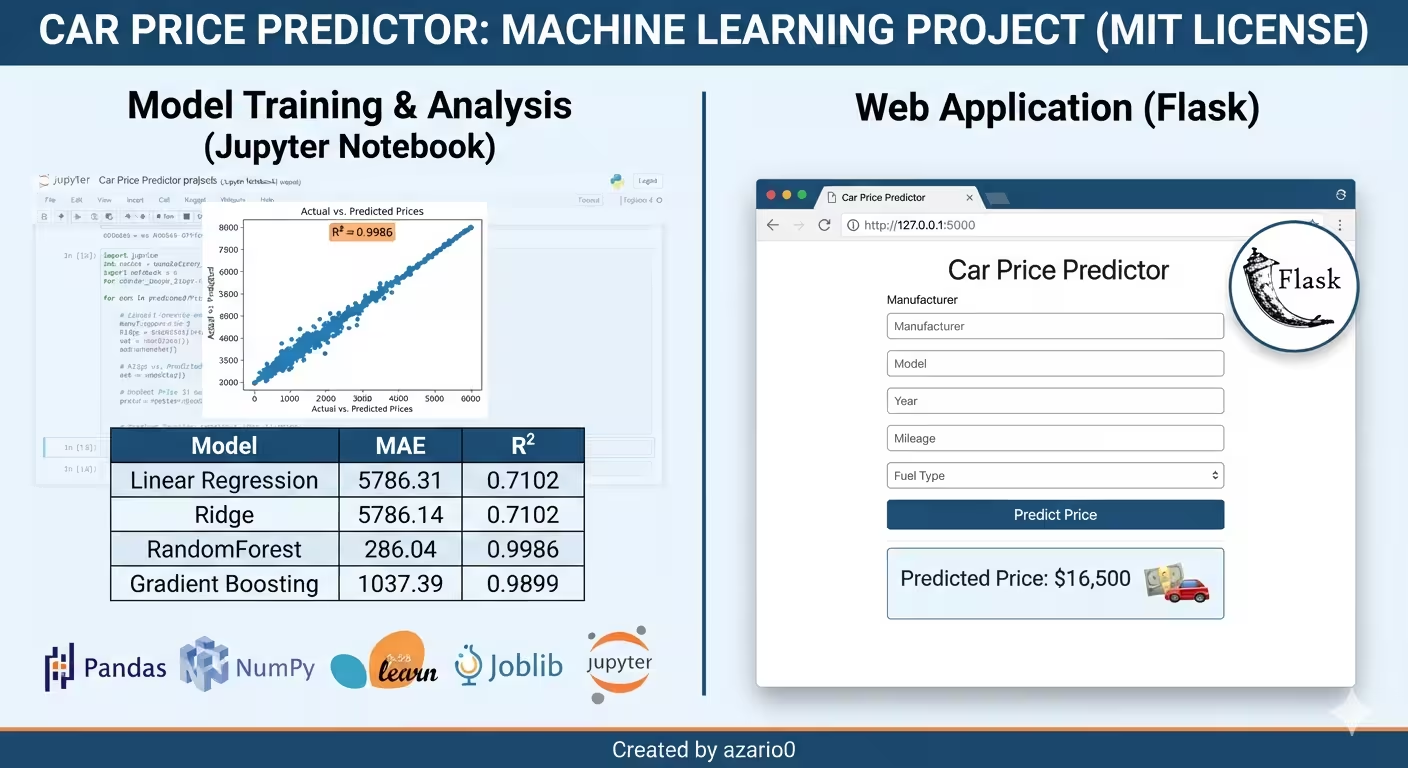
Two linear methods (LinearRegression, Ridge) against two ensemble methods (RandomForestRegressor, GradientBoostingRegressor), each scored with MAE and R². The results from the README:
| Model | MAE | R² |
|---|---|---|
| Linear Regression | 5786.31 | 0.7102 |
| Ridge | 5786.14 | 0.7102 |
| Random Forest | 286.04 | 0.9986 |
| Gradient Boosting | 1037.39 | 0.9899 |
The gap is stark, and it’s diagnostic. Both linear models land around R² ≈ 0.71 — they can’t capture the non-linear, interaction-heavy way that manufacturer, model, mileage, and age combine to determine price (a 15-year-old Porsche isn’t priced by the same rule as a 15-year-old Ford). The tree ensembles handle that easily, with RandomForest edging out GradientBoosting here. Note that R² = 0.9986 on a mock/synthetic Kaggle dataset is unusually clean — real-world used-car pricing data would almost certainly show more noise and a smaller gap between the ensemble methods.
Every trained pipeline — not just the winner — gets serialized with joblib.dump, which is the standard choice over pickle for objects containing large NumPy arrays (it compresses better and loads faster for this use case).
Sanity-checking the saved model
Before touching Flask, the notebook reloads the winning pipeline and runs it on fabricated examples:
loaded_pipeline = joblib.load('saved_models/RandomForest_pipeline.joblib')

new_data = pd.DataFrame({
    'Manufacturer': ['BMW', 'Ford', 'Toyota'],
    'Model': ['X5', 'Focus', 'Camry'],
    'Engine size': [4.4, 1.6, 2.5],
    'Fuel type': ['Gasoline', 'Gasoline', 'Hybrid'],
    'Mileage': [35000, 80000, 15000],
    'Age': [4, 7, 1]
})

predicted_prices = loaded_pipeline.predict(new_data)
This step matters more than it looks: it verifies the deserialize-then-predict path works on data the pipeline never saw during training, in the exact schema the Flask app will need to reproduce (raw, unscaled, un-encoded columns).
Serving it: the Flask app
app.py loads the pipeline once at process start:
model = joblib.load('saved_models/RandomForest_pipeline.joblib')and defines a single route that handles both the initial page load and form submission:
@app.route('/', methods=['GET', 'POST'])
def home():
    prediction_text = ""
    if request.method == 'POST':
        manufacturer = request.form.get('manufacturer')
        model_name = request.form.get('model')
        year = int(request.form.get('year'))
        mileage = int(request.form.get('mileage'))
        engine_size = float(request.form.get('engine_size'))
        fuel_type = request.form.get('fuel_type')

        age = 2024 - year   # must mirror the notebook's feature engineering

        input_data = pd.DataFrame({
            'Manufacturer': [manufacturer],
            'Model': [model_name],
            'Engine size': [engine_size],
            'Fuel type': [fuel_type],
            'Mileage': [mileage],
            'Age': [age]
        })

        prediction = model.predict(input_data)
        prediction_text = f"Predicted Price: ${prediction[0]:,.2f}"

    return render_template('index.html', ..., prediction_text=prediction_text)
A few things worth calling out for anyone building similar serving code:
- Single-column DataFrame, not a raw array.
pipeline.predict()needs a DataFrame with the exact column names theColumnTransformerwas fit on ('Manufacturer','Model','Engine size', etc.), not a bare list of values. Because the whole preprocessing pipeline is embedded in the loaded object, this one DataFrame is the entire interface between the web form and the model — no manual scaling or encoding logic duplicated inapp.py. - The
Agecalculation is duplicated. It’s recomputed here from2024 - year, matching the notebook. Duplicating derived-feature logic between training and serving code is a classic source of train/serve skew — cheap to get away with in a small demo, worth centralizing (e.g., in a sharedpreprocessing.py) in anything larger. - Constrained dropdowns, not free text.
MANUFACTURERS,MODELS, andFUEL_TYPESare hardcoded lists rendered into<select>elements inindex.htmlvia Jinja2 loops. This sidesteps typos entirely, though it does mean the UI’s valid options have to be kept in sync by hand with whatever categories existed in the training data —OneHotEncoder(handle_unknown='ignore')is the safety net if that sync ever drifts. - Errors are caught and shown, not thrown. The whole prediction block sits in a
try/except, and both a missing model and a bad prediction surface as a message string rendered back into the same page rather than a 500 error.
Running it
pip install -r requirements.txt
python car_price_predictor/app.py
then visiting http://127.0.0.1:5000 gives you the form: pick manufacturer, model, fuel type, enter year/mileage/engine size, submit, get a price back — all backed by the RandomForest pipeline trained in the notebook.
What this project demonstrates well — and where it would need hardening
Good patterns to borrow:
- Comparing multiple model families before committing, with the same preprocessing pipeline held constant across all of them — an apples-to-apples comparison.
- Bundling preprocessing inside the persisted model object via
Pipeline, so serving code can’t accidentally skip or mismatch a transformation step. handle_unknown='ignore'on the encoder as a deliberate defense against unseen categories at inference time.
What’s missing for production use:
- The reference year (
2024) is hardcoded in two places instead of computed fromdatetime.now().yearor passed as a config value — theAgefeature will silently drift out of date. - No cross-validation or hyperparameter tuning (e.g.
GridSearchCV) — models are trained once on a single train/test split, so the reported R² of 0.9986 is a point estimate, not a validated one. - No input validation beyond Python’s own type casting (
int(),float()will raise on bad form input, which is caught, but there’s no user-facing field-level validation). - The dropdown lists and the
Ageformula live independently inapp.pyandnotebook.ipynb, which is a maintenance hazard if the training data or feature set ever changes.
None of that undermines what the repo is: a clean, readable reference for the shape of a real preprocessing-to-deployment ML workflow, which is a more useful thing to study than a bigger project that hides the pipeline plumbing.
Source code: github.com/azario0/car_price_predictor Author: azario0 Dataset: Mock Dataset of Second Hand Car Sales (Kaggle) License: MIT

Written by
Benmalek Zohir
Founder, AI Engineer & Full Stack Developer
Benmalek Zohir is an AI Engineer, Full Stack Developer, and technology enthusiast focused on artificial intelligence, software development, and emerging technologies. He is the founder of SoftwareJournal.blog, where he shares practical insights, software discoveries, AI tools, and the latest developments in technology.