GithubApp: Building a Desktop GitHub Repository Manager with Python, Tkinter, and PyGithub
A code walkthrough of GithubApp, an open-source Tkinter desktop client that wraps the PyGithub library to browse, edit, upload to, and manage GitHub repositories — including its threading model, recursive delete logic, and the companion Jupyter notebook it's built on.
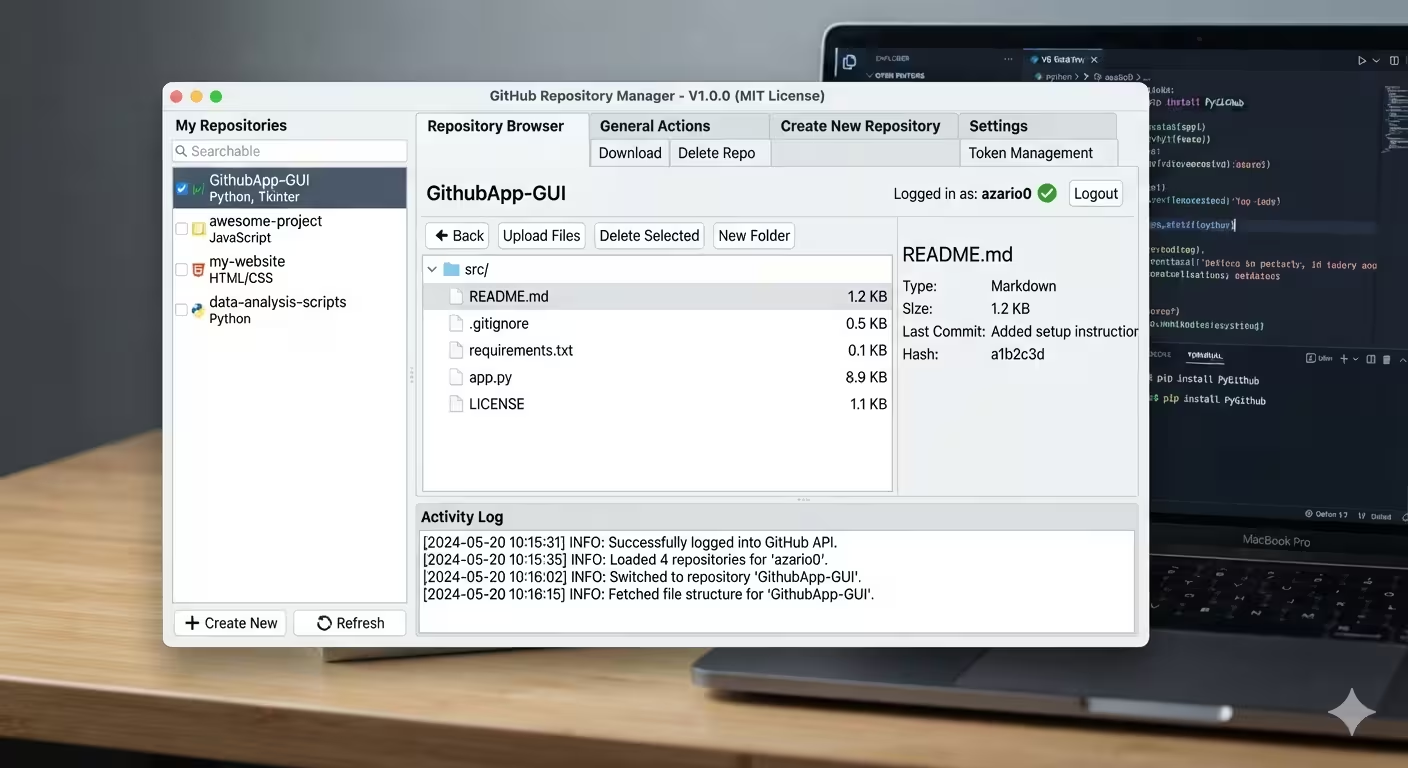
GithubApp: Building a Desktop GitHub Repository Manager with Python, Tkinter, and PyGithub
Repository: github.com/azario0/GithubApp
GitHub’s own web UI is fine for most workflows, but sometimes you want direct, scriptable, offline-friendly access to your repositories without leaving a native window — no browser tab, no page reloads. GithubApp is a small, single-file desktop application that does exactly that: a Tkinter GUI wrapped around the PyGithub library, giving you repository listing, a remote file browser, in-place file editing, bulk uploads, and repository creation/deletion — all authenticated with a GitHub Personal Access Token (PAT).
This article walks through how the app is built, the libraries it leans on, and the more interesting implementation details — including a few rough edges worth learning from. It’s based on both the app’s source (app.py) and the author’s companion notebook.ipynb, which contains the raw PyGithub snippets the GUI is built on top of.
Stack and Dependencies
The project is intentionally minimal:
- Language: Python 3.6+
- GUI toolkit:
tkinter/tkinter.ttk(themed widgets), plusfiledialog,messagebox, andscrolledtext— all from the standard library, so there’s zero GUI dependency to install. - GitHub access:
PyGithub— a full-featured wrapper around the GitHub REST API, used here for authentication, repo listing/creation/deletion, and file CRUD operations (get_contents,create_file,update_file,delete_file). - HTTP:
requests, used only for one thing — downloading a repository’s zip archive from the signed URL that PyGithub’sget_archive_link()returns. - Concurrency:
threadingfrom the standard library, to keep the GUI responsive during network calls. base64is imported at the top ofapp.pybut never actually called anywhere in the file — PyGithub handles content encoding internally when you pass it a string or bytes, so this import is dead weight. It’s a small but real example of the kind of leftover you’ll find in real-world scripts (probably from an earlier version that manually encoded file content before PyGithub abstracted it away).
There’s no requirements.txt referenced in the tree at the time of writing, though the README lists PyGithub and requests as the two third-party dependencies to pip install.
Application Architecture
Everything lives in one class, GithubApp(tk.Tk), in a single ~720-line app.py. The layout is a classic three-region Tkinter window:
- Top frame — token entry, “Save Token” checkbox, Login button, and a status label.
- Main paned window (
ttk.PanedWindow, horizontal) split into:- A left pane: a
tk.Listboxofowner/repofull names, with a refresh button. - A right pane: a
ttk.Notebookwith three tabs — Repository Browser, General Actions, and Create New Repository.
- A left pane: a
- Bottom frame — a persistent, scrollable log (
tk.Text, read-only) that every operation writes status/error lines to.
State is kept directly on the instance: self.github_api (the Github client), self.user (the authenticated AuthenticatedUser), and self.current_repo_browser_path (where the file browser currently is inside the selected repo).
UI state management
_update_ui_state(busy=False) is called after essentially every action. It re-derives which buttons should be enabled from three booleans — logged in, repo selected, tree item selected — rather than toggling individual widgets ad hoc from each handler. It also flips the whole window’s cursor to "watch" while busy=True. This centralization is a good pattern in Tkinter apps: it avoids the common bug where a button stays enabled (or disabled) because one code path forgot to update it.
Authentication
Login is a two-step deal:
self.github_api = Github(token)
self.user = self.github_api.get_user()
self.user.login  # forces a request; raises if the token is invalid
Github(token) doesn’t itself validate anything — it just stores the token — so the app deliberately accesses self.user.login to trigger a real API call and confirm the PAT actually works before declaring success.
If “Save Token” is checked, the token is written in plaintext to github_token.txt next to the script, and reloaded automatically on the next launch (_load_token, called from __init__). This is a pragmatic convenience for a local tool, but worth flagging explicitly if you fork this: a PAT with repo and delete_repo scopes sitting in an unencrypted file is a real credential-exposure risk if the machine or the working directory is ever shared, backed up, or committed by mistake.
Keeping the GUI Responsive: the Threading Pattern
Tkinter’s main loop is single-threaded — any network call made directly inside a button handler freezes the whole window until it returns. GithubApp handles this with a small, reusable helper:
def _run_in_thread(self, target_func, *args, **kwargs):
    self._update_ui_state(busy=True)
    thread = threading.Thread(target=target_func, args=args, kwargs=kwargs)
    thread.daemon = True
    thread.start()
    self._check_thread(thread)

def _check_thread(self, thread):
    if thread.is_alive():
        self.after(100, lambda: self._check_thread(thread))
    else:
        self._update_ui_state(busy=False)
Every network-bound “logic” method (_login_logic, _list_repos_logic, _download_repo_logic, etc.) runs on a background daemon thread. _check_thread polls every 100ms via self.after() — Tkinter’s own event-loop-safe scheduler — and flips the UI back to idle once the thread finishes.
The one rule this pattern depends on: worker threads never touch Tkinter widgets directly. Any UI update from a background thread is wrapped in self.after(0, callback), which hands the update back to the main thread’s event queue. You can see this throughout — e.g. _log() schedules append_log via self.after(0, ...) instead of writing to self.log_text inline, and _list_repos_logic builds the repo_names list on the worker thread but calls self.after(0, update_listbox) to actually populate the Listbox. This is the standard safe pattern for any GUI toolkit with a non-thread-safe canvas — Tkinter, Qt, etc. all require it.
The Repository Browser
The most substantial feature is the “Repository Browser” tab: a ttk.Treeview configured to show Name, Type, Size, and a hidden Path column (width=0, stretch=tk.NO) that carries the full repo-relative path for each row without cluttering the display. This is a nice small trick — using a treeview column purely as hidden state instead of a separate dictionary keyed by item ID.
Navigation logic:
_browse_repo(path="")kicks off_browse_repo_logic, which callsrepo.get_contents(path)— PyGithub returns either a singleContentFileor a list of them depending on whetherpathis a file or directory.- Results are sorted directories-first, then alphabetically:
sorted(contents, key=lambda c: (c.type != 'dir', c.name.lower())). - Double-clicking a directory row browses into it; double-clicking a file opens the editor.
_browser_go_upusesos.path.dirnameon the current path to compute the parent — a neat reuse of a filesystem-path helper for what is really a virtual/remote path.
Viewing and editing files
_view_file_logic fetches a file’s content via get_contents(path) and tries file_content.decoded_content.decode('utf-8'). If that raises UnicodeDecodeError, it falls back to a "[Binary file - cannot be displayed or edited]" placeholder and disables the Save button in the editor window. The editor itself is a tk.Toplevel with a scrolledtext.ScrolledText widget — saving calls repo.update_file(path=..., message=..., content=new_content, sha=file_content_obj.sha).
That sha argument matters: GitHub’s contents API is optimistic-concurrency-controlled — you must supply the blob SHA you last read so the API can detect if the file changed underneath you since you fetched it, and reject the write if so.
Uploads
Two paths, both funneled through _run_in_thread:
- Single file (
_upload_file_logic): triesrepo.get_contents(remote_path)first. If that succeeds, it’s an update (repo.update_file(..., sha=file_contents.sha)); if PyGithub raises aGithubExceptionwithstatus == 404, the file doesn’t exist yet, so it falls through torepo.create_file(...). Any other status is re-raised. - Whole folder (
_upload_folder_logic): walks the local directory withos.walk, computes each file’s path relative to the folder root, joins it onto the chosen remote base path (normalizing\\to/for Windows users), and callsrepo.create_fileper file. If a file already exists, GitHub returns HTTP 422 (unprocessable — the blob already exists at that path), which the code catches specifically and logs as a skip rather than a failure.
This create-vs-update branching via exception status codes is a common and reasonably clean way to work with the GitHub Contents API, which doesn’t expose a single “upsert” call.
Deleting Files and Folders (the interesting bit)
This is the part of the codebase the author is most candid about in the comments — worth reading directly:
# Note: GitHub API doesn't have a recursive delete. We must delete files one by one.
# ...
# THIS IS A SIMPLIFICATION. Real recursive delete is harder.
The GitHub REST API’s delete-file endpoint only ever deletes one blob at a time, identified by path + SHA. There is no “delete this directory and everything under it” call. _delete_path_logic works around this with a breadth-first walk:
all_files_in_dir = []
dir_contents = [contents]
while dir_contents:
    current_dir = dir_contents.pop(0)
    for item in current_dir:
        if item.type == 'dir':
            dir_contents.append(repo.get_contents(item.path))
        all_files_in_dir.append(item)

for item in sorted(all_files_in_dir, key=lambda i: i.path, reverse=True):
    repo.delete_file(item.path, f"chore: remove {item.name}", item.sha)
Two things are worth calling out:
- It collects every item — files and directory entries — into
all_files_in_dir, then sorts by path descending and deletes in that order. Reverse-alphabetical path order roughly approximates deepest-first, which matters less than it might seem here because Git trees don’t have “empty directories” as first-class objects — deleting the last file inside a directory in Git automatically makes that directory disappear from the tree on the next commit. So the “delete directories too” concern is largely moot; what actually matters is that every file blob gets deleted, which the traversal guarantees regardless of order. - Each deletion is a separate commit — deleting a folder with 50 files produces 50 commits. That’s a real cost of not having a bulk/recursive API and is a good thing to know before pointing this tool at a large tree.
The companion notebook has its own near-identical implementation, delete_folder_contents(repo, folder_path), written recursively instead of iteratively — same idea (walk the tree, delete files one at a time), expressed the other way.
Downloading and Creating Repositories
Download is the simplest network operation in the app: PyGithub’s repo.get_archive_link("zipball") asks GitHub to generate a signed, time-limited redirect URL to a zip of the repo at its default branch, and requests.get(zip_url, allow_redirects=True) follows it and writes the bytes to disk.
Repository creation exposes the more common create_repo knobs directly as UI controls: name, description, private/public, auto_init (whether to seed a README so the repo isn’t empty), a gitignore_template (e.g. "Python"), and a license_template mapped from a small dictionary of human-readable names to GitHub’s license keys (mit, gpl-3.0, apache-2.0, bsd-3-clause, unlicense). Repository deletion is a one-line repo.delete() behind a confirmation dialog — irreversible, hence the extra askyesno guard and the delete_repo PAT scope requirement called out in the README.
The Companion Notebook
notebook.ipynb is a 24-cell, markdown-annotated walkthrough of the same PyGithub operations used in the app, but run as plain sequential scripts rather than wired to a GUI. It’s effectively the “reference implementation” the Tkinter handlers are adapted from, and it’s a genuinely useful reading companion if you want to understand just the API calls without the Tkinter scaffolding around them. It covers, in order:
- Authenticating with
Github(GITHUB_TOKEN)andg.get_user()(with a callout to preferos.getenv("GITHUB_TOKEN")over hardcoding the token — advice the app itself works around differently, via the local token file). - Listing all accessible repos with
user.get_repos(). - Selecting one repo and listing root contents with
get_contents(""). - Downloading a zip via
get_archive_link("zipball")+requests. - Creating repos — both a bare private repo and a fuller example with
auto_init,gitignore_template, andlicense_template. - Deleting a single file via
get_contents+delete_file. - Deleting an entire repository with
repo.delete(), guarded withexcept UnknownObjectException. - The recursive
delete_folder_contents()function mentioned above. - Uploading a single file with
repo.create_file(). - Uploading a whole local folder structure by walking it with
os.walkand re-rooting each relative path under a chosen remote base path.
If you’re learning PyGithub, working through the notebook top-to-bottom before reading app.py is a reasonable path: it isolates each API call from the Tkinter event-handling and threading code, so you can see exactly what a “delete a folder” or “upload a folder” operation looks like as ~15 lines of straight-line script before seeing it wrapped in the GUI’s thread-safe, logged, confirmation-guarded version.
Takeaways
GithubApp is a good example of a “thin GUI over a well-documented SDK” project: the actual GitHub logic is almost entirely delegated to PyGithub, and the app’s own code is mostly about (a) not freezing Tkinter’s main loop, and (b) working around the two gaps in the Contents API — no upsert, no recursive delete — with small, explicit client-side loops. If you’re building a similar tool against any REST-backed content API, the two patterns worth borrowing directly are:
- The
_run_in_thread/_check_thread/self.after(0, ...)triad for keeping a synchronous GUI toolkit responsive against network I/O, and - The try-then-fallback create/update pattern (
get_contents→update_file, catch 404 →create_file) for APIs that don’t offer a single upsert call.
The rougher edges — the plaintext token file, the per-file commit cost of folder deletion, and the unused base64 import — are exactly the kind of thing worth noticing (and fixing) if you fork this for your own use.

Written by
Benmalek Zohir
Founder, AI Engineer & Full Stack Developer
Benmalek Zohir is an AI Engineer, Full Stack Developer, and technology enthusiast focused on artificial intelligence, software development, and emerging technologies. He is the founder of SoftwareJournal.blog, where he shares practical insights, software discoveries, AI tools, and the latest developments in technology.