Building an Interactive "Thinking Mode" Chat Interface with IBM Granite and Gradio
A comprehensive deep dive into the Gradio-Granite-Think-Chat repository, exploring how to build an interactive, streaming chat UI with the IBM Granite 3.3 2B Instruct model, featuring a unique "Thinking Mode" that reveals the model's chain-of-thought reasoning in real-time.
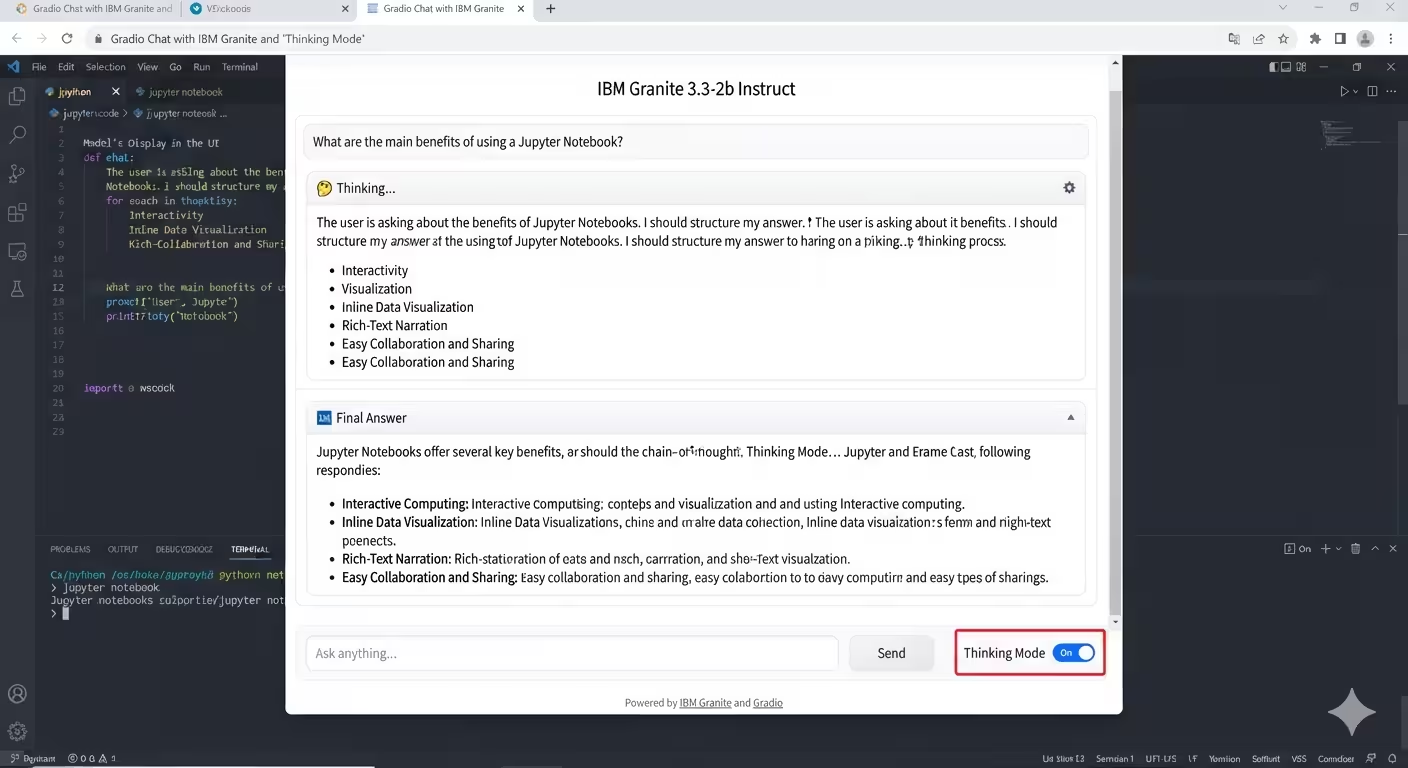
Building an Interactive “Thinking Mode” Chat Interface with IBM Granite and Gradio
Transparency in Large Language Models (LLMs) is becoming increasingly important. Users and developers alike benefit from understanding how a model arrives at its answer, not just the final output. The Gradio-Granite-Think-Chat repository by @azario0 provides an elegant, lightweight solution to this by combining IBM’s powerful Granite model with a custom Gradio interface that exposes the model’s chain-of-thought reasoning in real-time.
In this article, we will explore the repository’s structure, the languages and libraries used, and break down the core methods implemented in its Jupyter Notebook.
📁 Repository Overview
The repository is intentionally minimal and focused, making it an excellent starter template for LLM UI development. It contains the following key files:
- README.md: Comprehensive documentation, setup instructions, and a demo of the expected output.
- notebook.ipynb: The core Jupyter Notebook containing all the Python logic for model loading, streaming, and the Gradio UI.
- requirements.txt: A concise list of Python dependencies required to run the project.
- LICENSE: An MIT License, allowing for open modification and use.
💻 Languages and Technologies Used
The project is built entirely in Python, leveraging the Jupyter Notebook environment for iterative development and easy execution. Under the hood, it relies on a modern, industry-standard AI stack:
- PyTorch (
torch): The foundational deep learning framework used for tensor operations and model execution. - Hugging Face
transformers: Used to load the pre-trained model weights and tokenizer. - Gradio: A Python library for rapidly building interactive web-based UIs for machine learning models.
- Accelerate & bitsandbytes: Utilities for optimizing model loading, enabling automatic device mapping (GPU/CPU) and potential quantization for memory efficiency.
- SentencePiece: The subword tokenization algorithm used by the Granite model.
⚙️ Deep Dive into the Code: Key Methods Explained
The magic of this repository happens inside the notebook.ipynb. Let’s break down the core methods step by step.
1. Model Initialization
The notebook begins by loading the ibm-granite/granite-3.3-2b-instruct model. It uses bfloat16 precision and device_map='auto' to ensure the model loads efficiently onto an available GPU without manual memory management.
model_path = "ibm-granite/granite-3.3-2b-instruct"
model = AutoModelForCausalLM.from_pretrained(
    model_path,
    device_map='auto',
    torch_dtype=torch.bfloat16,
)
tokenizer = AutoTokenizer.from_pretrained(model_path)
2. Streaming Response Generation
To provide a real-time, ChatGPT-like experience, the code avoids blocking the UI while the model generates text. It achieves this using Hugging Face’s TextIteratorStreamer combined with Python’s native threading module.
def stream_response(conversation, think=True, max_new_tokens=8192, seed=42, **generation_kwargs):
    # ... setup input_ids with thinking=True ...
    streamer = TextIteratorStreamer(tokenizer, skip_prompt=True, skip_special_tokens=True, timeout=30.0)

    generation_thread = Thread(target=model.generate, kwargs={**input_ids, "streamer": streamer, ...})
    generation_thread.start()

    for token in streamer:
        yield token
Note the thinking=True parameter in apply_chat_template. This instructs the Granite model to actively generate its internal reasoning.
3. The “Thinking Mode” Parsing Logic
This is the standout feature of the repository. The chat_logic function intercepts the streamed tokens and uses Regular Expressions (re) to dynamically separate the model’s reasoning from its final answer.
The IBM Granite model is prompted to enclose its chain-of-thought in <think> and </think> tags. The code parses this on every new token:
- If a complete
<think>...</think>block is detected, it extracts the content and formats it as a stylized blockquote (e.g., 🤔 Thinking…). - The text appearing after the
</think>tag is treated as the final, polished answer. - If “Thinking Mode” is toggled off, the raw output is displayed as a standard response.
think_match = re.search(f"{THINK_START_TAG}(.*?){THINK_END_TAG}", full_response, re.DOTALL)
if think_match:
    thinking_text = think_match.group(1).strip()
    answer_text = full_response.split(THINK_END_TAG, 1)[1].strip()
4. Building the Gradio UI
The interface is constructed using gr.Blocks, offering a clean, modern layout:
- A
gr.Chatbotcomponent to display the conversation history. - A
gr.Textboxfor user input. - A
gr.Checkboxto dynamically toggle thethink_modeboolean. - Event listeners (
.submit()and.click()) that wire the UI components to thechat_logicbackend function, enabling real-time streaming updates.
🚀 How to Run It Locally
The repository is designed for a frictionless setup. Assuming you have Python and a CUDA-compatible GPU installed, you can get it running in minutes:
- Clone the repository:
git clone https://github.com/azario0/Gradio-Granite-Think-Chat.git cd Gradio-Granite-Think-Chat - Create and activate a virtual environment:
python -m venv venv source venv/bin/activate # On Windows: venv\Scripts\activate - Install dependencies:
pip install -r requirements.txt - Launch the Notebook:
Openjupyter labnotebook.ipynb, run all cells, and click the local or public Gradio link generated in the final cell to start chatting.
🎯 Conclusion
The Gradio-Granite-Think-Chat repository is a masterclass in building transparent, user-friendly LLM interfaces. By leveraging the native “thinking” capabilities of the IBM Granite 3.3 model and combining it with Gradio’s streaming and regex parsing, it delivers a sophisticated chain-of-thought visualization tool in under a few hundred lines of code.
Whether you are a researcher debugging model reasoning, a developer building a customer-facing AI assistant, or a hobbyist exploring local LLMs, this notebook provides a robust, easily extensible foundation.
Feel free to star the repository on GitHub or fork it to add your own custom features, such as model quantization, multi-turn conversation memory enhancements, or dark mode UI themes!

Written by
Benmalek Zohir
Founder, AI Engineer & Full Stack Developer
Benmalek Zohir is an AI Engineer, Full Stack Developer, and technology enthusiast focused on artificial intelligence, software development, and emerging technologies. He is the founder of SoftwareJournal.blog, where he shares practical insights, software discoveries, AI tools, and the latest developments in technology.