Inside Complexity_Quiz: How Flask + Google Gemini AI Generate Dynamic Python Iteration Quizzes
Deep dive into Complexity_Quiz, an open-source Flask app that uses Google Gemini to dynamically generate Python code complexity challenges. Learn its tech stack, prompt engineering, Flask routes, and how frontend and AI work together.complexity-quiz-flask-gemini-ai-dynamic-python-quiz-explained
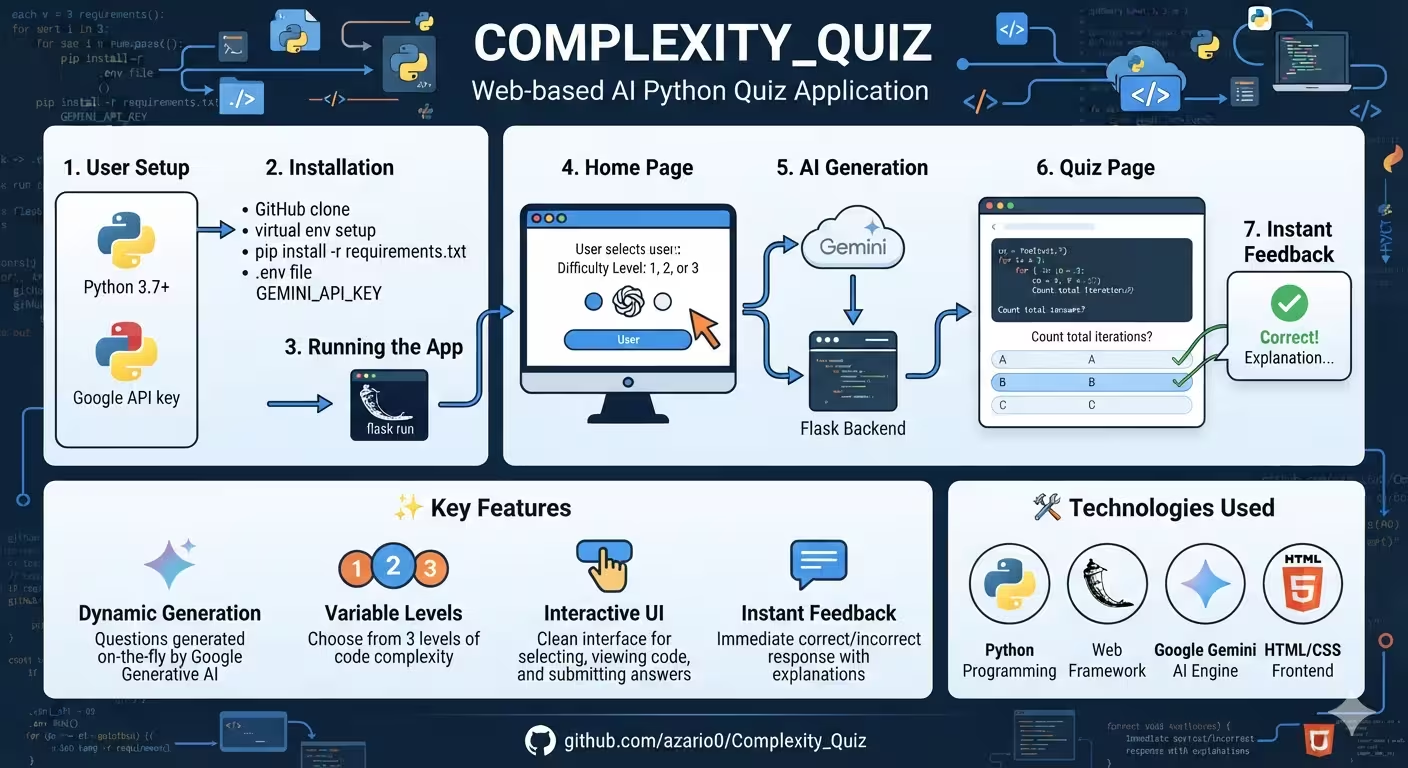
Inside Complexity_Quiz: How Flask + Google Gemini AI Generate Dynamic Python Iteration Quizzes
Source Code: azario0/Complexity_Quiz on GitHub
What if your quiz questions were never the same twice? That’s the core idea behind Complexity_Quiz — a web-based Python quiz application that doesn’t use a static database of questions. Instead, it leverages Google’s Generative AI (Gemini) to generate a fresh Python code snippet on every request and challenges you to count its total iterations.
In this article, we’ll break down the entire project file-by-file: the languages used, the methods that power it, and how everything works together from browser to AI and back.
1. Project Overview
Complexity_Quiz is an educational tool built to test understanding of loops, recursion, and iteration counting. The workflow is simple:
- User selects a complexity level
1to3on the home page. - The app asks Gemini to generate a Python function for that level.
- The user analyzes the code and picks the correct total iteration count from 3 multiple-choice options.
- Instant feedback is shown via Flask’s flash messaging system.
No hard-coded questions. Every quiz is AI-generated.
Key Features:
- Dynamic Quiz Generation via Gemini API
- 3 Variable Complexity Levels
- Clean Interactive UI
- Instant Feedback & Validation
- Lightweight Flask Backend
2. Tech Stack & Languages Used
The project intentionally stays minimal and lightweight:
| Layer | Technology | Purpose |
|---|---|---|
| Backend | Python 3.7+ | Core logic |
| Web Framework | Flask | Routing, templating, server |
| AI Engine | Google Generative AI SDK (google-generativeai) + Gemini 1.5 Flash | Code & quiz generation |
| Frontend | HTML5, CSS3 | Structure & styling |
| Templating | Jinja2 (via Flask) | Dynamic HTML rendering ({{ quiz.code }}) |
| Prototyping | Jupyter Notebook (notebook.ipynb) | Prompt engineering & testing |
| Env Management | python-dotenv (recommended) | Secure API key storage |
Project Structure
Complexity_Quiz/
├── quiz_app/
│   ├── app.py                  # <-- Flask app & all backend logic
│   ├── templates/
│   │   ├── index.html          # <-- Home / complexity selector
│   │   └── quiz.html           # <-- Quiz question page
│   └── static/css/style.css    # <-- Styling
├── notebook.ipynb              # <-- Prompt prototyping playground
├── README.md
└── LICENSE (MIT)
Explore it live: quiz_app/app.py, notebook.ipynb
3. Methods Explained - A Deep Dive Into app.py
The entire backend lives in quiz_app/app.py (~100 lines). Let’s break down each method.
3.1. Configuration & Setup — quiz_app/app.py:1-11
from flask import Flask, render_template, request, flash, redirect, url_for
import google.generativeai as genai
import json
import os

genai.configure(api_key="YOUR_KEY") # Replace with your API key
app = Flask(__name__)
app.secret_key = os.urandom(24)- Flask is initialized and a random
secret_keyis generated for session & flash messaging. - google.generativeai is configured with a Gemini API key. The README correctly recommends moving this to a
.envfile using[python-dotenv](https://pypi.org/project/python-dotenv/)andos.getenv("GEMINI_API_KEY")for security.
3.2. The Brain: prompt_engineering(complexity: int) — quiz_app/app.py:13-41
This is the most critical function. It’s a prompt engineering technique that forces the LLM to behave deterministically.
It returns an f-string prompt that instructs Gemini:
- Act as an expert Python teacher.
- Generate code exactly matching the
complexitylevel passed in. - Calculate the total number of iterations when executed.
- Create 3 multiple-choice integers (1 correct, 2 plausible distractors).
- Return ONLY strict JSON with this schema:
{
  "code": "Python code as a string",
  "choices": [int, int, int],
  "correct_choice": int
}
Why this works: By explicitly defining the JSON schema, forbidding extra text, and repeating the constraint Focus only on the requested complexity level: {complexity}, the prompt minimizes hallucinations and makes the response parsable with json.loads().
The prototype version in notebook.ipynb:105-152 is even more detailed, including few-shot examples:
Complexity 1: Single
for i in range(num):-> 3 iterations
Complexity 2: Loop + recursionloop_function(num-1)-> 6 iterations
Complexity 3: Mutual recursionloop_function<->loop_function_2-> 5 iterations
These examples teach Gemini what “complexity” means without fine-tuning.
3.3. Route 1: index() — quiz_app/app.py:43-57
@app.route('/', methods=['GET', 'POST'])
def index():- Handles
GET: Renderstemplates/index.htmlwith a simple number input (min="1" max="3"). - Handles
POST: Validates input, usesflash()for errors, andredirect(url_for('quiz', complexity=...))to navigate. This is the classic Post/Redirect/Get (PRG) pattern to prevent form resubmission.
3.4. Route 2: quiz(complexity) — quiz_app/app.py:59-76
This is where the AI magic happens:
@app.route('/quiz/<int:complexity>')
def quiz(complexity):
    model_name = "gemini-1.5-flash"
    prompt = prompt_engineering(complexity)
    response = genai.GenerativeModel(model_name).generate_content(prompt)
    cleaned_response = response.text.strip().replace("```json", "").replace("```", "").strip()
    quiz_data = json.loads(cleaned_response)
    return render_template('quiz.html', quiz=quiz_data, complexity=complexity)
Step-by-step:
- Selects the model:
gemini-1.5-flash(fast, cheap, ideal for low-latency quizzes). The notebook testsgemini-2.5-flash. - Calls
generate_content(prompt)via the Gemini API. - Cleans the response: Gemini often wraps JSON in
```json ... ```markdown. The code strips this to get valid JSON — a crucial real-world LLM handling trick. - Parses with
json.loads()and passesquiz_datatotemplates/quiz.htmlvia Jinja2. - Wrapped in
try/except— on failure, flashes the error and redirects home.
3.5. Route 3: submit() — quiz_app/app.py:78-96
@app.route('/submit', methods=['POST'])
def submit():
    user_answer = int(request.form['choice'])
    correct_answer = int(request.form['correct_choice'])
    if user_answer == correct_answer:
        flash('Correct! Well done.', 'success')
    else:
        flash(f'Incorrect. The correct answer was {correct_answer}.', 'danger')
return redirect(url_for('quiz', complexity=complexity))- The quiz page hides
correct_choiceandcomplexityin<input type="hidden">fields. This is simple but not tamper-proof (a user could inspect HTML). A more secure approach would use Flask session. - It compares integers and uses categorized flashes (
'success','danger','warning') which the CSS styles differently. Then it redirects to generate a new question at the same complexity level.
4. Frontend: How the UI Works
templates/index.html:1-31 & templates/quiz.html:1-38
Both templates are pure HTML5 + Jinja2 templating.
- index.html: A centered form with
action="/" method="post"and<input type="number" min="1" max="3">. Displays flash errors with{% with messages = get_flashed_messages() %}. - quiz.html: Displays the code inside
<pre><code>{{ quiz.code }}</code></pre>(preserves formatting). Loops over choices with{% for choice in quiz.choices %}to generate 3 buttons. Each button submitsname="choice" value="{{ choice }}"to/submit. Hidden fields preserve state.
static/css/style.css:1-102
Minimal, modern CSS3:
- Flexbox centering:
display: flex; justify-content: center; align-items: center; min-height: 100vh; - Card UI:
.containerwithbox-shadowandborder-radius: 8px - Code block:
pre { background-color: #f5f5f5; white-space: pre-wrap; }for readability - Flash styling:
.flash-success(green),.flash-danger(red),.flash-warning(yellow) mapped directly to Flask categories.
No JavaScript needed — full functionality via HTML forms + Flask.
5. How It All Works Together (The Full Lifecycle)
Here’s the request journey:
[Browser: index.html] --POST complexity=2--> [Flask: index() validates] --redirect--> [Flask: quiz(2)]
      |
      |---> [prompt_engineering(2) builds prompt] ---> [Google Gemini API: gemini-1.5-flash]
      |                                                        |
      |<--- JSON {code, choices, correct_choice} <-------------|
      |
      |---> [json.loads + render_template('quiz.html')] ---> [Browser: shows code + 3 buttons]
      |
[Browser: clicks choice=8] --POST to /submit--> [Flask: submit() compares] --flash message--> [redirect to /quiz/2 for new question]
The beauty is stateless AI generation: The app holds no question bank. The notebook (notebook.ipynb:83-161) was the lab where this prompt was iterated before being copied (almost identically) into app.py. The only difference is the notebook includes explicit examples in the prompt for better grounding — a good upgrade to port to app.py.
6. Strengths, Limits & How to Improve It
Strengths:
- Excellent example of LLM integration into a web framework
- Clear separation: Prompt logic vs. Routing vs. Presentation
- Instant, infinite, personalized questions
Current Limitations & Easy Fixes:
- Hardcoded API Key (
app.py:8): Fix viaload_dotenv()as the README suggests. See Google AI Studio to get your key. - Client-side answer storage: Move
correct_choicetosessioninstead of hidden input. - No
requirements.txt: You’ll needFlask,google-generativeai,python-dotenv. - No iteration verification: The app trusts Gemini’s
correct_choice. A robust version would execute the generated code in a sandboxedexec()and count iterations programmatically to verify.
Ideas to Extend:
- Add Complexity 4-5 (nested loops, Big-O explanations)
- Add a timer & scoring system
- Use Streaming for faster perceived generation
- Deploy to Render or Railway with environment variables
7. Conclusion
Complexity_Quiz proves you don’t need a massive codebase to build an intelligent educational app. With just ~100 lines of Python, a bit of HTML/CSS, and clever prompt engineering, it turns a static Flask app into a dynamic, AI-powered tutor.
It’s a perfect starter project for anyone learning Flask, experimenting with the Gemini API, or teaching code complexity. Fork it, add dotenv security, deploy it, and you have a portfolio-ready AI web app.
Ready to try it? Clone it:
git clone https://github.com/azario0/Complexity_Quiz.git
cd Complexity_Quiz
pip install Flask google-generativeai python-dotenv
# Add GEMINI_API_KEY to .env, then
flask --app quiz_app/app run --debug
And visit http://127.0.0.1:5000.
Licensed under MIT License by Zohir Benmalek.

Written by
Benmalek Zohir
Founder, AI Engineer & Full Stack Developer
Benmalek Zohir is an AI Engineer, Full Stack Developer, and technology enthusiast focused on artificial intelligence, software development, and emerging technologies. He is the founder of SoftwareJournal.blog, where he shares practical insights, software discoveries, AI tools, and the latest developments in technology.