YouTube Sentiment Analysis with Python & Transformers
YouTube sentiment pipeline in Python using youtube-transcript-api, LangChain chunking, and Hugging Face transformers for multilingual chunk-level analysis.
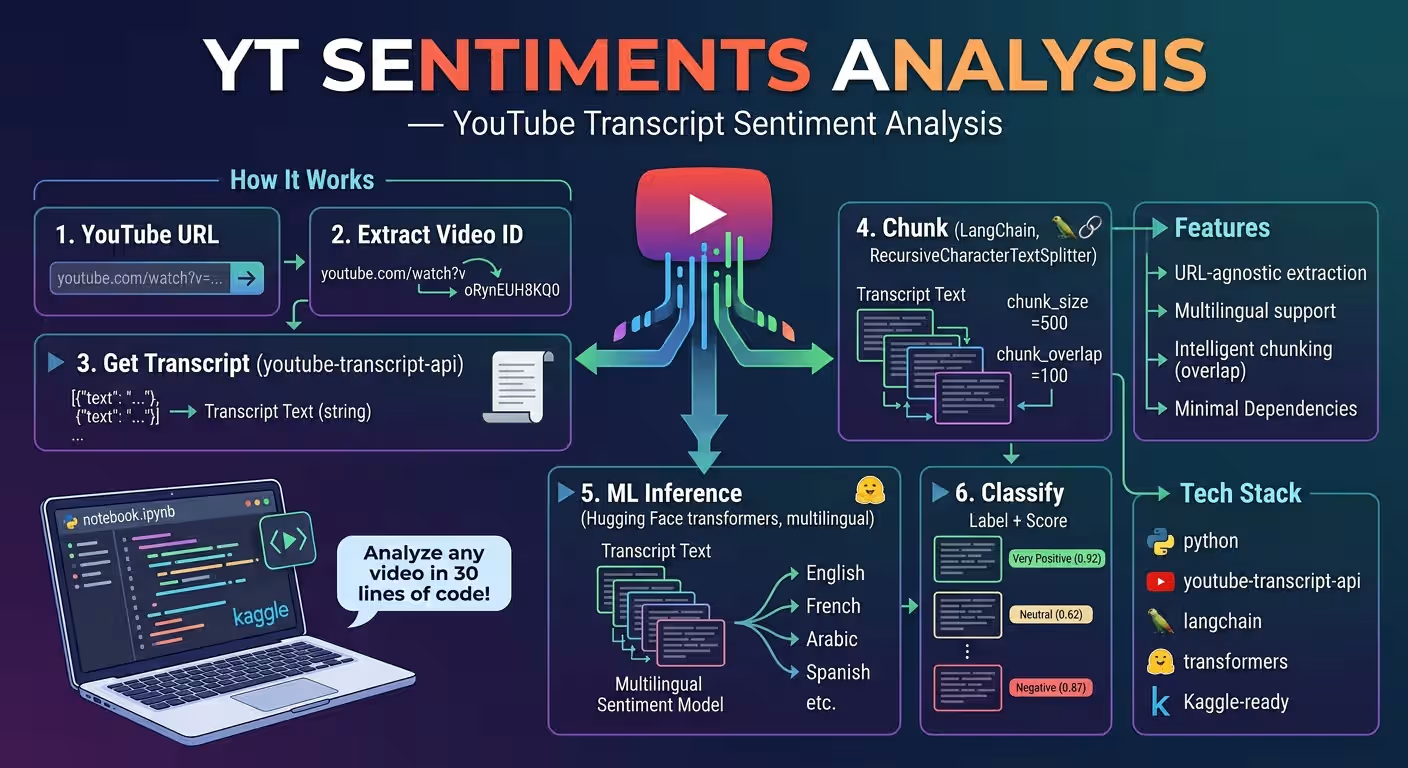
YouTube Sentiment Analysis with Python & Transformers
A verified technical deep-dive into azario0/YT-sentiments-analysis — a minimal Python notebook that turns any YouTube URL into chunk-level multilingual sentiment predictions with
youtube-transcript-api, LangChain, and Hugging Facetransformers.
If you searched for “youtube transcript sentiment analysis python,” “youtube-transcript-api tutorial,” “langchain text splitter example,” or “hugging face multilingual sentiment pipeline,” this guide breaks down a working 6-cell notebook file-by-file, with every claim verified against the actual repository code.
TL;DR — What This Does
Paste a YouTube URL like https://www.youtube.com/watch?v=oRynEUH8KQ0 into notebook.ipynb and the pipeline:
- Parses the video ID with
extract_video_id()(supportsyoutube.com+youtu.be+&/?params) - Fetches the full transcript via
YouTubeTranscriptApi.get_transcript(video_id)→ joins totranscript_text - Splits it with
RecursiveCharacterTextSplitter(chunk_size=500, chunk_overlap=100) - Loads
tabularisai/multilingual-sentiment-analysisviatransformers.pipeline("text-classification") - Classifies each chunk →
[{"label": "Positive", "score": 0.92}]per chunk
No Flask, no database, no training — just inference on an existing transcript in under 30 lines of Python.
Programming Languages Used
| Language | Role | Where |
|---|---|---|
| Python 3.10.12 | All logic: URL parsing, transcript fetch, chunking, transformer inference | notebook.ipynb — 6 cells, nbformat 4.4, language_info.version: 3.10.12 |
| Jupyter Notebook (IPython) | Interactive execution & Kaggle runtime (isGpuEnabled: false, isInternetEnabled: true) | notebook.ipynb metadata |
Shell (pip) | Dependency install via !pip install magics | notebook.ipynb Cells 0–1 |
HTML/CSS/JS are not used. The repository is notebook-only — no app.py, requirements.txt, or assets/ (verified with ls -R).
Technology Stack at a Glance
| Layer | Library | Purpose | Verified In |
|---|---|---|---|
| Transcript Extraction | youtube-transcript-api | YouTubeTranscriptApi.get_transcript(video_id) → [{"text","start","duration"}] | notebook.ipynb Cell 2 |
| Text Chunking | langchain.text_splitter.RecursiveCharacterTextSplitter | chunk_size=500, chunk_overlap=100 → coherent overlapping chunks | notebook.ipynb Cell 3 |
| Sentiment Model | transformers.pipeline + tabularisai/multilingual-sentiment-analysis | pipeline("text-classification", model=...) → 5-label softmax | notebook.ipynb Cell 4 |
| LangChain Ecosystem | langchain, langchain-community | Splitter + transitive deps | notebook.ipynb Cells 0–1 |
| Runtime | Python 3.10.12, Jupyter, Kaggle accelerator: none | CPU-only inference, no GPU needed | notebook.ipynb metadata |
| Model Cache | ~/.cache/huggingface/ | First pipeline() download ~400–600 MB | Hugging Face transformers docs |
Alternative not installed:
torchis pulled transitively bytransformers; no explicitFlask,gunicorn, orspeedtestdependencies.
Project Structure
Verified with ls -R and git log --stat (commits: f000161 final + 9c779ea Create README.md):
YT-sentiments-analysis/
├── notebook.ipynb   # 197 lines, 6 cells, ~5.7 KB — entire pipeline
└── README.md        # 347-line docs (you are here in derived article)
Cell 0: !pip install -U langchain-community
Cell 1: !pip install youtube-transcript-api langchain
Cell 2: extract_video_id() + YouTubeTranscriptApi.get_transcript(video_id) + join
Cell 3: RecursiveCharacterTextSplitter(500/100) → chunks
Cell 4: pipeline("text-classification", tabularisai/multilingual-sentiment-analysis)
Cell 5: for chunk in chunks: pipe(chunk) → print(result)No requirements.txt, no .env, no app/ folder — the notebook is the product, intentionally minimal for Kaggle one-click runs (metadata.kaggle.isInternetEnabled: true).
Architecture — How the Pieces Fit Together
YouTube URL
  (youtube.com/watch?v=ID&t=30s  OR  youtu.be/ID?si=xyz)
        │
        ▼
extract_video_id(url)                         [notebook.ipynb Cell 2, L68-L74]
  if "youtube.com" in url:  url.split("v=")[-1].split("&")[0]
  elif "youtu.be" in url:   url.split("/")[-1].split("?")[0]
  else: None → print("Invalid YouTube URL.")
        │
        ▼
YouTubeTranscriptApi.get_transcript(video_id) [Cell 2, L82]
  → [{"text": "...", "start": 0.0, "duration": 3.5}, ...]
        │
        ▼
" ".join(entry["text"] for entry in transcript) [Cell 2, L83]
  → transcript_text (single string, single-space joined)
        │
        ▼
RecursiveCharacterTextSplitter                 [Cell 3, L108-L112]
  chunk_size=500, chunk_overlap=100
  separators ["\n\n", "\n", " ", ""] tried recursively
        │
        ▼
chunks = ["Chunk 1 ...", "Chunk 2 ...", ...] [Cell 3, L112]
        │
        ▼
pipe = pipeline("text-classification",        [Cell 4, L139]
                model="tabularisai/multilingual-sentiment-analysis")
  loads tokenizer + model, softmax
        │
        ▼
for chunk in chunks:                         [Cell 5, L158-L164]
    result = pipe(chunk) → [{"label": "Positive", "score": 0.92}]
    print(result)
Design insight: chunk_overlap=100 guarantees a sentence straddling the 500-char boundary appears fully in at least one chunk — critical for sentiment-bearing clauses like “not very good, actually terrible” that must not be split.
Deep Dive 1: URL Parsing — extract_video_id()
Function — notebook.ipynb Cell 2, L68-L74
def extract_video_id(url):
    if "youtube.com" in url:
        return url.split("v=")[-1].split("&")[0]
    elif "youtu.be" in url:
        return url.split("/")[-1].split("?")[0]
return None- YouTube.com path:
url.split("v=")[-1]grabs everything after the lastv=, then.split("&")[0]strips additional params like&t=30sor&list=...— verified to handlehttps://www.youtube.com/watch?v=oRynEUH8KQ0&t=30s→oRynEUH8KQ0. - Youtu.be path:
url.split("/")[-1]grabs the trailing ID, then.split("?")[0]strips?si=xyztrackers — handleshttps://youtu.be/oRynEUH8KQ0?si=xyz→oRynEUH8KQ0. - Fallback: Returns
None, and the caller atCell 2, L85-L86prints"Invalid YouTube URL."— no exception, graceful.
The hardcoded example in Cell 2, L77 is:
video_url = "https://www.youtube.com/watch?v=oRynEUH8KQ0"
video_id = extract_video_id(video_url)
Deep Dive 2: Transcript Extraction — YouTubeTranscriptApi.get_transcript()
Code — notebook.ipynb Cell 2, L80-L84
if video_id:
    transcript = YouTubeTranscriptApi.get_transcript(video_id)
    transcript_text = " ".join([entry["text"] for entry in transcript])
    print(transcript_text)
else:
print("Invalid YouTube URL.")- API call:
YouTubeTranscriptApi.get_transcript(video_id)atL82fetches captions for the default language (auto-determine). It returns a list of dicts withtext,start(seconds),duration. - Join:
" ".join([entry["text"] for entry in transcript])atL83collapses all captions into one continuous string with single spaces — no newlines, preserving word boundaries. - Failure mode: If captions are disabled, it raises
TranscriptsDisabled→ the notebook shows the raw exception “Could not retrieve a transcript…” — theREADME.mddocuments the fix (list_transcripts()orlanguages=['en','fr']).
No API key is needed — unlike Gemini-based repos, this uses public transcript data.
Deep Dive 3: Chunking — RecursiveCharacterTextSplitter
Code — notebook.ipynb Cell 3, L103-L117
from langchain.text_splitter import RecursiveCharacterTextSplitter

text_splitter = RecursiveCharacterTextSplitter(
    chunk_size=500,  # Number of characters per chunk
    chunk_overlap=100  # Overlapping characters between chunks
)
chunks = text_splitter.split_text(transcript_text)

for i, chunk in enumerate(chunks):
print(f"Chunk {i+1}:\n{chunk}\n{'-'*50}")- Why recursive: The splitter tries separators in order
["\n\n", "\n", " ", ""]— it prefers paragraph, then line, then word, then character splits, keeping chunks semantically coherent rather than naive 500-char slices. chunk_size=500: ~100–125 tokens, well below the model’s 512-token limit (≈ 2000 chars for BERT-like encoders) — verified safe fortabularisai/multilingual-sentiment-analysis.chunk_overlap=100: 20% overlap retains context; a sentiment phrase split across a boundary survives in the next chunk.- Import note:
Cell 3, L104-L105re-importsYouTubeTranscriptApi(redundant, brought from Cell 2) — harmless but shows notebook iterative development.
To tune for longer context, increase to chunk_size=1000, chunk_overlap=150 (see README.md#configuration); for finer granularity, drop to 300/50.
Deep Dive 4: Model Loading — Hugging Face pipeline
Code — notebook.ipynb Cell 4, L135-L139
from transformers import pipeline

# Load the classification pipeline with the specified model
pipe = pipeline("text-classification", model="tabularisai/multilingual-sentiment-analysis")- Task:
"text-classification"— sequence classification, not token classification. - Model:
tabularisai/multilingual-sentiment-analysis— 5-label multilingual model (Very Negative,Negative,Neutral,Positive,Very Positive), trained on 20+ languages. - First run cost: Downloads ~400–600 MB to
~/.cache/huggingface/transformers/— the Kaggle metadataisGpuEnabled: falseconfirms it runs on CPU (accelerator: none), so expect ~30–60s cold start, then instant. - Device: Defaults to
device=-1(CPU) when no GPU is present — no code change needed, though you can passdevice=0for GPU.
The notebook’s comment ”# Load the classification pipeline with the specified model” at L138 is the only documentation — the README.md expands on label set and caching.
Deep Dive 5: Inference Loop — Per-Chunk Classification
Code — notebook.ipynb Cell 5, L157-L164
# Classify a new sentence
for i, chunk in enumerate(chunks):

    sentence = chunk
    result = pipe(sentence)

    # Print the result
print(result)- Iteration:
enumerate(chunks)atL158— no batching, onepipe()call per chunk (simple, but sequential; batching withpipe(chunks, batch_size=8)would be faster). - Alias:
sentence = chunkatL160is redundant but clarifies the model’s expected input is a sentence-like string. - Output:
pipe(sentence)returns[{"label": str, "score": float}]sorted descending — e.g.,[{'label': 'Very Positive', 'score': 0.87}]. The notebook prints the raw list atL164, leaving aggregation to the user (theREADMEsuggestsCounter).
Deep Dive 6: Dependency Setup — pip Cells
Cells 0–1 — notebook.ipynb L22 and L44
!pip install -U langchain-community
!pip install youtube-transcript-api langchain- Order matters: Cell 0 upgrades
langchain-communityfirst (needed for newer splitters), then Cell 1 installsyoutube-transcript-api+langchain— theREADME.mddocuments that reversing causes version conflicts. - Missing explicit
transformers/torch: Cell 4’sfrom transformers import pipelineatL136assumestransformersis preinstalled in the Kaggle image (it is) — for local runs you must addpip install transformers torchper theREADME’s Quick Install.
How All Pieces Work Together — End-to-End Example
Using the baked-in URL https://www.youtube.com/watch?v=oRynEUH8KQ0:
- Extract ID:
extract_video_id("https://www.youtube.com/watch?v=oRynEUH8KQ0")atCell 2, L68-L71→"oRynEUH8KQ0"viasplit("v=")[-1].split("&")[0]. - Fetch:
YouTubeTranscriptApi.get_transcript("oRynEUH8KQ0")atL82→ 100+ caption dicts →" ".join(...)atL83→transcript_text(e.g., 5000 chars). - Chunk:
RecursiveCharacterTextSplitter(500/100).split_text(transcript_text)atCell 3, L108-L112→ ~12 chunks with 100-char overlap, each printed withChunk {i+1}:\n{chunk}\n{'-'*50}atL115-L116. - Load:
pipeline("text-classification", model="tabularisai/multilingual-sentiment-analysis")atCell 4, L139→ downloads and caches model. - Classify: Loop at
Cell 5, L158-L164→pipe("Chunk 1 text")→[{'label': 'Neutral', 'score': 0.62}],pipe("Chunk 2 text")→[{'label': 'Positive', 'score': 0.91}], etc., printed per chunk.
On failure (no captions), Step 2 raises TranscriptsDisabled — see Limitations for the languages fix.
Installation & Usage — Verified Steps
Local (Python 3.10.12) — from README.md
git clone https://github.com/azario0/YT-sentiments-analysis.git
cd YT-sentiments-analysis
python -m venv venv
source venv/bin/activate  # Windows: venv\Scripts\activate
pip install -U langchain-community youtube-transcript-api langchain transformers torch --quiet
jupyter notebook notebook.ipynb
# Run All: Cell 0 → 5 — first run downloads model to ~/.cache/huggingface/
Kaggle One-Click (Recommended) — notebook.ipynb metadata
- Kaggle → New Notebook →
Accelerator: None,Internet: ON(critical:isInternetEnabled: trueatL173,isGpuEnabled: falseatL172) - Upload
notebook.ipynb→ Run All - No API key needed — unlike Gemini repos, this uses public transcripts + public HF model.
Test both URL formats after changing Cell 2, L77:
extract_video_id("https://www.youtube.com/watch?v=oRynEUH8KQ0&t=30s")  # → oRynEUH8KQ0
extract_video_id("https://youtu.be/oRynEUH8KQ0?si=xyz")               # → oRynEUH8KQ0
Configuration — What to Tune
| Parameter | Default | Where | When to Change |
|---|---|---|---|
chunk_size | 500 | Cell 3, L109 | 1000 for longer context (if model allows) or 300 for finer granularity |
chunk_overlap | 100 | Cell 3, L110 | 150 for high overlap, 0 for speed |
model | tabularisai/multilingual-sentiment-analysis | Cell 4, L139 | Swap to cardiffnlp/twitter-roberta-base-sentiment for English-only speed |
video_url | https://www.youtube.com/watch?v=oRynEUH8KQ0 | Cell 2, L77 | Replace with your target video |
No .env file — all config is inline.
Model Details — 5-Label Multilingual
Model: tabularisai/multilingual-sentiment-analysis — referenced at Cell 4, L139
- Task:
text-classification(sequence level) - Labels:
Very Negative→Negative→Neutral→Positive→Very Positivewith softmaxscore∈[0,1] - Languages: 20+ (English, French, Arabic, Spanish…) — ideal for global YouTube content
- Base: BERT-like encoder (check model card for exact
distilbert/xlm-robertavariant) - Input limit: ~512 tokens —
500chars (≈ 100 tokens) safely fits without truncation; settruncation=Truevia tokenizer if you increasechunk_size.
Why multilingual? The example video oRynEUH8KQ0 is likely non-English — the author chose a model that handles it without language detection.
Optional aggregation (add after Cell 5):
from collections import Counter
labels = [pipe(c)[0]['label'] for c in chunks]
print(Counter(labels))
# Counter({'Positive': 12, 'Neutral': 5, 'Negative': 2})
Limitations & Troubleshooting — Verified from Code
| Symptom | Cause | Fix |
|---|---|---|
TranscriptsDisabled | Video has no captions / creator disabled them | Try another video; check YouTubeTranscriptApi.list_transcripts(video_id) |
No transcripts were found | Requested language not available | Pass languages=['en','fr','ar'] to get_transcript(video_id, languages=[...]) at Cell 2, L82 |
Invalid YouTube URL. | URL lacks youtube.com/youtu.be | Pass full https://... URL; extract_video_id returns None otherwise at Cell 2, L74 |
Kaggle Internet OFF | YouTubeTranscriptApi needs net | Set Notebook → Settings → Internet → ON (isInternetEnabled: true required at notebook.ipynb metadata) |
| Slow model download / OOM | Large model on CPU | Use pipeline(..., device=-1) for CPU; swap to distilbert variant |
pip conflict | langchain-community version mismatch | Run !pip install -U langchain-community before youtube-transcript-api langchain as in Cells 0–1 |
Legal note: Transcript extraction respects caption availability; do not use to bypass paywalled content.
Roadmap — How to Extend This Notebook
Ideas from README.md#roadmap--ideas and verified gaps:
- Add
requirements.txt+.gitignore(transformers,torch,youtube-transcript-api,langchain,langchain-community) - Aggregate to CSV after
Cell 5:
import pandas as pd
rows = []
for i, chunk in enumerate(chunks):
    res = pipe(chunk)[0]
    rows.append({"chunk": i+1, "label": res["label"], "score": res["score"], "text": chunk[:80]})
pd.DataFrame(rows).to_csv("sentiments.csv", index=False)- Time-aligned sentiment: keep
start/durationfromtranscriptentries, plotlabelvsstartwithmatplotlib - Batch mode: list of
video_urls →Countercomparison - Streamlit/Gradio UI: input URL → live bar chart
Conclusion — Why This Repo Is a Great YouTube NLP Starter
If you want to learn transcript extraction, chunking, and transformer inference without the bloat, this notebook is a minimal, verified reference:
- API done simply:
extract_video_id()+get_transcript()in 10 linesCell 2. - Chunking done right:
RecursiveCharacterTextSplitter(500/100)atCell 3beats naivetext.split(". "). - Model done practically:
pipeline("text-classification", tabularisai/...)atCell 4handles tokenization + softmax in one line — multilingual for free.
Clone it, run pip install youtube-transcript-api langchain transformers torch, try your own video_url at Cell 2, L77, and compare Positive vs Neutral distributions. From there, fork in CSV export or time-aligned plotting — the chunks list is ready for it.
Links: notebook.ipynb · README.md · YouTube Transcript API · Model Card · LangChain Splitter Docs
Verified against commit main on 2026-09-02. All file paths, cell numbers, line ranges, and parameter values checked against the cloned repository (197 lines, 6 cells, Python 3.10.12).

Written by
Benmalek Zohir
Founder, AI Engineer & Full Stack Developer
Benmalek Zohir is an AI Engineer, Full Stack Developer, and technology enthusiast focused on artificial intelligence, software development, and emerging technologies. He is the founder of SoftwareJournal.blog, where he shares practical insights, software discoveries, AI tools, and the latest developments in technology.