Running Liquid AI's LFM2-350M Locally: A Streaming Flask API with Transformers
A deep technical walkthrough of azario0's LFM2-350M repo — a minimal local inference stack built with Hugging Face Transformers and Flask, covering the download script, the token-streaming generator, the two-stage "thinking + final answer" prompting pattern, and the accompanying notebook.
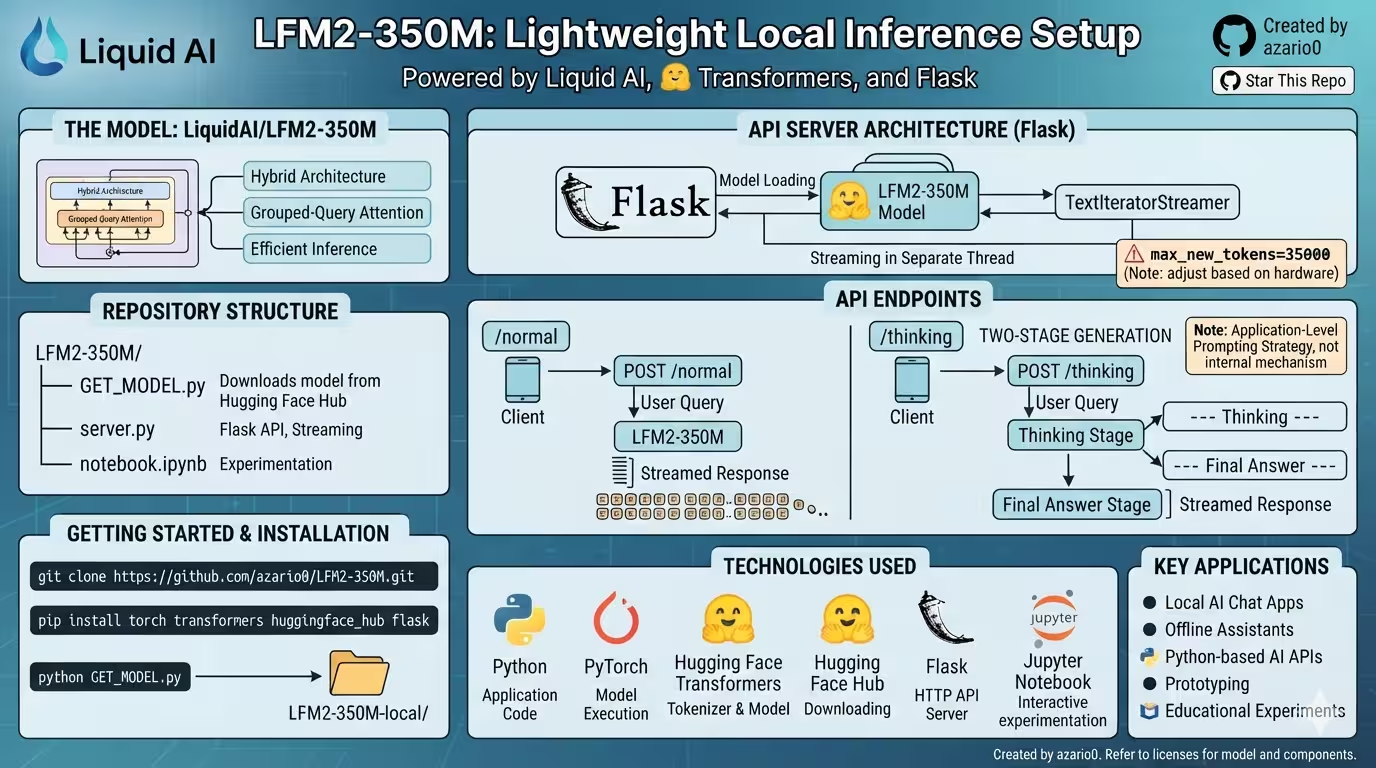
Running Liquid AI’s LFM2-350M Locally: A Streaming Flask API with Transformers
Small language models are having a moment. Not every project needs a 70B-parameter frontier model behind an API key — sometimes you just want something that runs on a laptop, responds fast, and doesn’t leave your machine. azario0/LFM2-350M is a small, well-scoped example of exactly that: a local inference and serving harness built around Liquid AI’s LFM2-350M model, using nothing more exotic than 🤗 Transformers, huggingface_hub, and Flask.
This article walks through the repository file by file, explains the mechanics of each piece, and shows how they compose into a working local LLM API with real-time token streaming and a simple two-stage reasoning trick.
What’s in the repo
The project is intentionally small — four files:
LFM2-350M/
├── GET_MODEL.py     # downloads the model snapshot locally
├── server.py         # Flask API with streaming generation
└── notebook.ipynb     # interactive experimentation notebook
There’s no training code here — this is purely an inference and serving example, as the README itself is careful to point out.
The model: LFM2-350M
The repo targets LiquidAI/LFM2-350M, part of Liquid AI’s LFM2 hybrid model family. According to the Transformers LFM2 docs, the architecture combines short convolution blocks with grouped-query attention — a design aimed at efficient inference across CPU, GPU, and edge deployments rather than raw benchmark-chasing. At 350M parameters, it’s small enough to load and run comfortably on modest hardware, which is exactly the use case this repo is built around.
Step 1: GET_MODEL.py — pulling the model down
from huggingface_hub import snapshot_download
from transformers import AutoTokenizer, AutoModelForCausalLM
import os

model_id = "LiquidAI/LFM2-350M"
save_directory = "./LFM2-350M-local"

print(f"📥 Downloading model '{model_id}' with progress...")
local_model_path = snapshot_download(repo_id=model_id, local_dir=save_directory)
print(f"✅ Model snapshot saved to: {local_model_path}")

print("🔄 Loading model and tokenizer from local folder...")
tokenizer = AutoTokenizer.from_pretrained(local_model_path, trust_remote_code=True)
model = AutoModelForCausalLM.from_pretrained(local_model_path, trust_remote_code=True)
print("🎉 Model and tokenizer loaded successfully!")
This script does two distinct things, and it’s worth separating them mentally:
-
snapshot_download(repo_id=model_id, local_dir=save_directory)— fromhuggingface_hub, this pulls the entire repository snapshot (weights, tokenizer files, config, etc.) from the Hugging Face Hub down into./LFM2-350M-local, rather than relying on the implicit cache directory (~/.cache/huggingface) thatfrom_pretrainedwould use on its own. Materializing the files into an explicit local folder makes the downstream loading step inserver.pysimpler and more portable — you can zip upLFM2-350M-local/and move it anywhere without worrying about the Hub cache layout. -
Loading with
AutoTokenizer.from_pretrained/AutoModelForCausalLM.from_pretrained— these are the standard Transformers “Auto” classes, which inspect the model’sconfig.jsonto resolve the correct tokenizer and model classes at runtime. Passingtrust_remote_code=Truehere matters for newer/less-common architectures: LFM2’s modeling code may not (yet) be fully merged into every Transformers release, so this flag permits execution of custom modeling code shipped in the model repo itself. This is a standard pattern for cutting-edge Hub models, but it’s also a flag worth being deliberate about, since it means running Python code from the model repo, not just weights.
This script is really just a one-time setup step — run it once, and you have a self-contained local directory that server.py and the notebook both read from.
Step 2: server.py — the streaming Flask API
This is the heart of the repo. Let’s take it apart piece by piece.
Loading the model
local_model_path = "./LFM2-350M-local"
tokenizer = AutoTokenizer.from_pretrained(local_model_path)
model = AutoModelForCausalLM.from_pretrained(local_model_path)
Straightforward — load the tokenizer and model at process startup, once, so every request reuses the same in-memory model rather than reloading weights per request (which would be prohibitively slow).
The streaming generator: stream_chat
def stream_chat(messages, tokenizer, model, max_new_tokens=35000):
    inputs = tokenizer.apply_chat_template(
        messages,
        add_generation_prompt=True,
        tokenize=True,
        return_dict=True,
        return_tensors="pt",
    ).to(model.device)

    streamer = TextIteratorStreamer(tokenizer, skip_prompt=True, skip_special_tokens=True)

    generation_kwargs = dict(
        **inputs,
        max_new_tokens=max_new_tokens,
        streamer=streamer,
    )

    thread = Thread(target=model.generate, kwargs=generation_kwargs)
    thread.start()

    for token in streamer:
        yield token
This is a clean, canonical implementation of streamed generation in Transformers, and it’s worth understanding each moving part:
-
tokenizer.apply_chat_template(...)— converts a list of{"role": ..., "content": ...}dicts into the exact prompt format the model was instruction-tuned on (system/user/assistant turn markers, special tokens, etc.), then tokenizes it directly into tensors viareturn_tensors="pt".add_generation_prompt=Trueappends the special tokens that signal “now it’s the assistant’s turn to speak,” which is what actually triggers the model to generate a response rather than continue the user’s turn. -
TextIteratorStreamer— a Transformers utility that turnsmodel.generate()’s internal token-by-token loop into a Python iterator.skip_prompt=Truemeans the streamer only yields newly generated tokens (not an echo of the input prompt), andskip_special_tokens=Truefilters out things like end-of-turn markers before they reach the client. -
The threading trick —
model.generate()is a blocking call that only returns once generation is fully complete. That’s incompatible with streaming. The workaround here is to runmodel.generate()in a backgroundThread, passing it thestreameras a generation kwarg. Internally,generate()pushes each new token into the streamer’s queue as it’s produced; meanwhile, the main thread’sfor token in streamer:loop pulls tokens off that queue as they arrive. This producer/consumer pattern (generation thread produces, main thread consumes) is exactly what letsstream_chatbe a proper Python generator that yields text incrementally instead of blocking until the whole response is done. -
max_new_tokens=35000— this is a notably high ceiling. The README explicitly flags this as something to be aware of: depending on hardware and prompt length, this can translate into very long-running or memory-heavy generations if the model doesn’t naturally stop early (e.g., via an EOS token).
The two-stage “thinking” pipeline
def stream_thinking_and_answer(user_input, tokenizer, model):
    yield "--- Thinking ---\n"

    stage1_prompt = [
        {"role": "user", "content": f"""
Think deeply about the following question. Write out your step-by-step reasoning.
Do NOT give the final answer yet, only your detailed thoughts.

Question: {user_input}
"""}
    ]

    thinking_result = ""
    for token in stream_chat(stage1_prompt, tokenizer, model):
        thinking_result += token
        yield token

    yield "\n\n--- Final Answer ---\n"

    stage2_prompt = [
        {"role": "user", "content": f"""
Based on the following reasoning, provide the final clear answer.

Reasoning:
{thinking_result}

Final Answer:
"""}
    ]

    for token in stream_chat(stage2_prompt, tokenizer, model):
        yield token
This is the repo’s most interesting piece of application logic, and it’s important to be precise about what it is and isn’t. It is not exposing some hidden internal “reasoning mode” of LFM2-350M. It’s a plain prompting strategy implemented entirely at the application layer:
- Stage 1 sends a prompt that explicitly instructs the model to reason step-by-step without committing to a final answer, and streams that reasoning back to the client while simultaneously accumulating it into
thinking_result. - Stage 2 takes the full text of that reasoning and feeds it back into the model as context in a second, separate prompt, asking it to now produce a final answer based on what it just “thought.”
This is a form of self-generated chain-of-thought scaffolding — the model’s own intermediate output becomes input to a second call. It’s a technique that can improve answer quality on reasoning-heavy questions, precisely because it forces the model to externalize intermediate steps before committing to a conclusion, and because that externalized reasoning then becomes available as grounding context for the second pass. It costs roughly double the generation time and token budget of a single-pass answer, which is a real trade-off worth flagging for latency-sensitive use cases.
The two API routes
@app.route('/normal', methods=['POST'])
def normal_response():
    data = request.get_json()
    if not data or 'message' not in data:
        return jsonify({"error": "Request must be JSON and contain a 'message' key."}), 400

    user_message = data['message']
    messages = [{"role": "user", "content": user_message}]
    return Response(stream_chat(messages, tokenizer, model), mimetype='text/plain')


@app.route('/thinking', methods=['POST'])
def thinking_response():
    data = request.get_json()
    if not data or 'message' not in data:
        return jsonify({"error": "Request must be JSON and contain a 'message' key."}), 400

    user_input = data['message']
    return Response(stream_thinking_and_answer(user_input, tokenizer, model), mimetype='text/plain')
Both endpoints follow the same shape: validate the incoming JSON body, wrap the message in the chat-message format Transformers expects, and hand a generator function directly to Flask’s Response object with mimetype='text/plain'. This is the key integration point between Transformers’ streaming primitives and Flask’s HTTP layer — Flask will iterate the generator and flush each yielded chunk to the client as it’s produced, rather than buffering the entire response in memory first. That’s what makes curl -N ... (README’s example) show tokens appearing live in the terminal rather than all at once at the end.
curl -N \
  -X POST http://127.0.0.1:5000/normal \
  -H "Content-Type: application/json" \
  -d '{"message":"Explain what a neural network is."}'
And on the Python client side, consuming the stream is just:
import requests

response = requests.post(
    "http://127.0.0.1:5000/normal",
    json={"message": "Write a short introduction to artificial intelligence."},
    stream=True,
)

for chunk in response.iter_content(chunk_size=None, decode_unicode=True):
    if chunk:
        print(chunk, end="", flush=True)
The stream=True flag on the requests call and the chunked iteration on the client mirror the server-side generator pattern — streaming has to be honored end-to-end, not just on the server.
notebook.ipynb — the same ideas, interactively
The notebook essentially recreates server.py’s logic outside of Flask, for experimentation, and adds a couple of extra ideas worth calling out:
-
Non-streaming generation first, as a baseline:
outputs = model.generate(**inputs, max_new_tokens=40)
print(tokenizer.decode(outputs[0][inputs["input_ids"].shape[-1]:]))
This slices off the prompt tokens (
inputs["input_ids"].shape[-1]:) before decoding, sincegenerate()returns the full sequence (prompt + completion) by default. -
A basic RAG-style prompt — not an actual retrieval pipeline, but a manual demonstration of grounding the model’s answer in a chunk of pasted context (a Wikipedia excerpt about Linux) followed by a question, sent as a single user turn. It’s a useful minimal illustration of how in-context grounding works before reaching for an actual vector-store-backed RAG setup.
-
“Thinking V2” — parameterized reasoning modes, which generalizes the two-stage pattern from
server.pyinto five distinct reasoning styles:templates = { "Mathematical Thinking": ..., "Philosophical Thinking": ..., "Strategic Thinking": ..., "Creative Thinking": ..., "Scientific Thinking": ..., }Each mode is just a different Stage-1 instruction template (e.g., “break it into equations and formulas” vs. “explore assumptions and contradictions”), while the Stage-2 final-answer step stays structurally the same. It’s a lightweight demonstration of prompt templating as a way to steer how a small model reasons, without touching weights or fine-tuning.
-
A self-classifying router, which is the most novel addition:
classify_thinking_mode()uses the model itself, given a system prompt listing the five valid modes, to pick which reasoning style best fits an incoming question:messages = [ {"role": "system", "content": system_prompt}, {"role": "user", "content": question}, ] outputs = model.generate(**inputs, max_new_tokens=20) result = tokenizer.decode(outputs[0][inputs["input_ids"].shape[1]:], skip_special_tokens=True).strip() for mode in thinking_modes: if mode.lower() in result.lower(): return mode return "Unknown"This is a small but complete example of using an LLM as its own classifier/router: constrain the output space via a system prompt, cap
max_new_tokenslow since only a short label is expected, and post-process the raw text output with a substring match against the known valid labels (falling back to"Unknown"if the model doesn’t produce a recognizable one — a necessary guard, since nothing here actually constrains the model’s output to the label set at generation time).
How the pieces fit together
Putting it all together, the data flow for a /thinking request looks like this:
Client POST /thinking {"message": "..."}
        ↓
apply_chat_template → tokenize → move to model.device
        ↓
Stage 1: model.generate() runs on a background Thread,
         TextIteratorStreamer yields reasoning tokens live
        ↓
Reasoning text accumulated + re-embedded into a Stage 2 prompt
        ↓
Stage 2: model.generate() runs again, streaming the final answer
        ↓
Flask Response streams both stages back to the client as plain text
The elegance of this repo is that it doesn’t need any exotic infrastructure — no vLLM, no dedicated serving framework, no GPU cluster — to demonstrate a legitimate pattern (streaming generation via a background thread + iterator) alongside a legitimate prompting technique (externalized, application-level chain-of-thought). Everything is stock Transformers and stock Flask.
Technologies used
| Technology | Role |
|---|---|
| Python | Glue language for the whole project |
| PyTorch | Underlying tensor/model execution engine |
| Hugging Face Transformers | Tokenizer, model loading (AutoTokenizer, AutoModelForCausalLM), chat templating, TextIteratorStreamer |
| Hugging Face Hub | snapshot_download for pulling model weights locally |
| Flask | Minimal HTTP server exposing /normal and /thinking |
| Jupyter Notebook | Interactive exploration and prototyping |
Where this fits, and what it’s not
Per the repository’s own notes, this is a serving example, not a training pipeline — there’s no fine-tuning code here, and the “thinking” behavior is explicitly an application-level prompting pattern, not a special capability baked into LFM2-350M itself. Read that way, the project is a genuinely useful reference for a few things at once: how to wire TextIteratorStreamer into a Flask endpoint correctly, how to structure a two-stage reasoning prompt, and how to use a small local model as its own lightweight classifier. It’s a solid starting point for local chat tools, offline assistants, or small-model prototyping — with the caveat that the max_new_tokens=35000 default and the doubled cost of the /thinking endpoint are both things you’d want to tune before shipping anything beyond a prototype.
References
- LFM2-350M GitHub Repository — the project covered in this article
- LiquidAI/LFM2-350M on Hugging Face — the model itself
- LFM2 documentation in Transformers
- Hugging Face Transformers
- Hugging Face Hub library (
huggingface_hub) - Flask documentation
TextIteratorStreamerAPI reference
Repository created by azario0.

Written by
Benmalek Zohir
Founder, AI Engineer & Full Stack Developer
Benmalek Zohir is an AI Engineer, Full Stack Developer, and technology enthusiast focused on artificial intelligence, software development, and emerging technologies. He is the founder of SoftwareJournal.blog, where he shares practical insights, software discoveries, AI tools, and the latest developments in technology.