Gesture-Controlled Rock Paper Scissors with Python: How OpenCV + MediaPipe Turn Your Hand Into a Controller
A deep-dive into Gesture-RPS-Game — an open-source Python game that uses OpenCV and Google MediaPipe to play Rock Paper Scissors with hand gestures. We break down the tech stack, every method, and how computer vision logic works end-to-end.
Gesture-Controlled Rock Paper Scissors with Python: How OpenCV + MediaPipe Turn Your Hand Into a Controller
Project Source: azario0/Gesture-RPS-Game on GitHub Main File Analyzed: app.py (220 lines) | README.md | MIT License
What if you could play Rock Paper Scissors without touching your keyboard — just by showing your hand to your webcam? That’s exactly what Gesture-RPS-Game does. This small but powerful open-source project combines computer vision, hand tracking, and game logic in under 220 lines of Python.
In this article, we explore the language used, the libraries, every key method, and how it all works together as a real-time system.
1. Project Overview
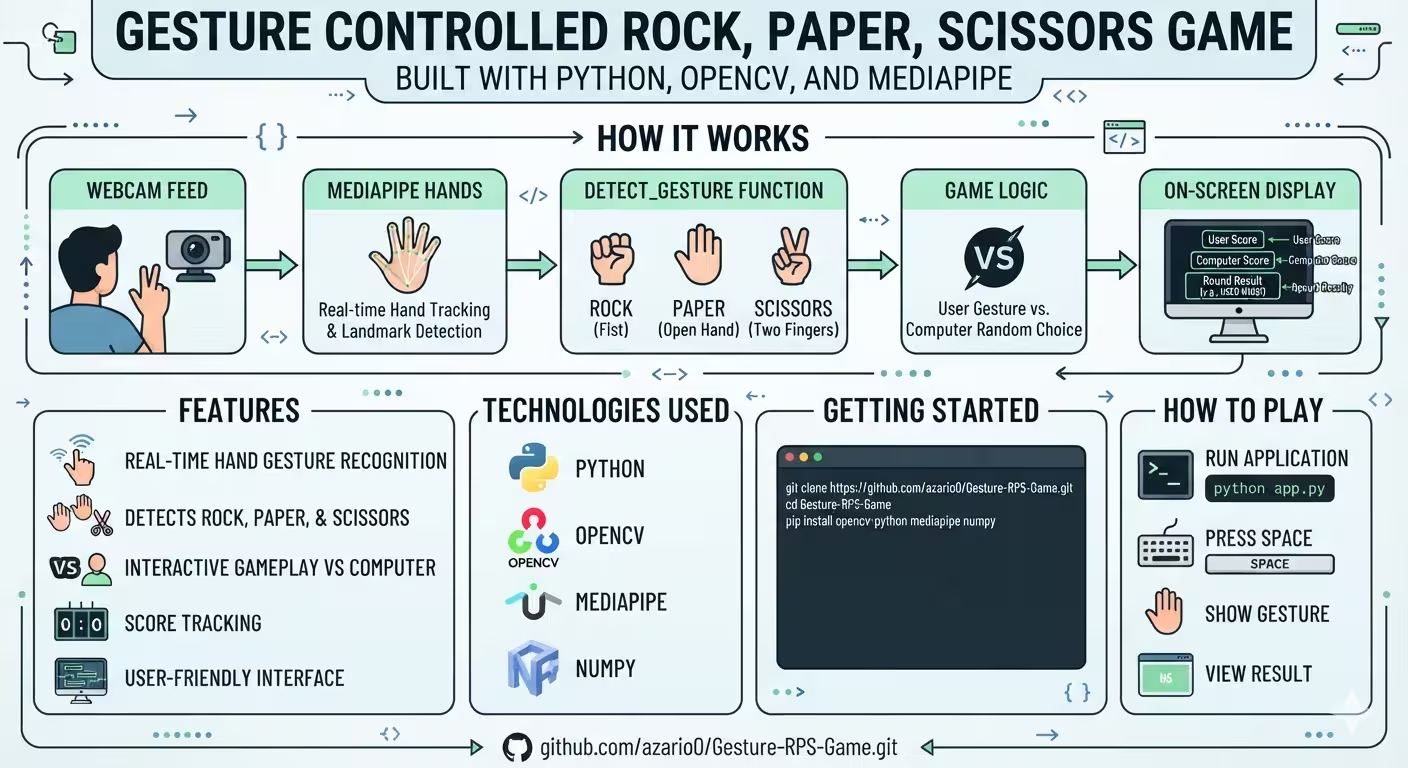
Gesture-RPS-Game is a Python-based Rock, Paper, Scissors game that uses your webcam as the controller. You press SPACE to start a round, show Rock (fist), Paper (open palm), or Scissors (peace sign) after a countdown, and the app detects your gesture in real-time, compares it to a random computer choice, and updates the score — all overlaid on the live video feed.
Key Features:
- Real-time hand gesture recognition via webcam
- Accurate Rock / Paper / Scissors classification
- Computer opponent with randomized choices
- Live score tracking and on-screen UI
- Mirror-view video + hand skeleton visualization
It’s a perfect beginner-to-intermediate Computer Vision project that demonstrates applied AI without needing to train a custom model.
2. Technology Stack - Language & Libraries Used
The entire project is built in Python — the go-to language for AI and rapid prototyping.
| Technology | Role in the Project | Official Link |
|---|---|---|
| Python 3 | Core language, game logic, orchestration | python.org |
| OpenCV (cv2) | Webcam capture (VideoCapture), image processing, UI drawing and window display | opencv.org & docs.opencv.org |
| MediaPipe | Google’s framework for hand tracking & 21-point landmark detection | MediaPipe Hands Docs |
| NumPy | Scientific computing, image array handling (implicitly used by OpenCV/MediaPipe) | numpy.org |
| random & time (std lib) | Random computer choice & countdown/state timing | Python random / Python time |
Why this stack? OpenCV handles efficient video I/O, MediaPipe gives you production-ready hand tracking without training, and Python glues it together in a highly readable way.
Installation is just one line:
pip install opencv-python mediapipe numpy3. File Structure
The repository is intentionally minimal:
Gesture-RPS-Game/
├── app.py      # The entire game — class, vision, and loop (180 LOC)
├── README.md   # Setup & how to play
└── LICENSE     # MIT License
All the magic lives in app.py inside a single class: RockPaperScissorsGame.
4. Deep Dive: The Code Explained Method by Method
4.1 __init__(self) - Initializing MediaPipe and Game State
Located at the top of app.py, this constructor sets up two things:
a) MediaPipe Hands setup:
self.mp_hands = mp.solutions.hands
self.hands = self.mp_hands.Hands(
    static_image_mode=False,      # Optimized for video stream
    max_num_hands=1,              # Track only 1 hand for performance
    min_detection_confidence=0.7, # Higher = fewer false positives
    min_tracking_confidence=0.5
)
self.mp_draw = mp.solutions.drawing_utils
static_image_mode=False tells MediaPipe to track across frames instead of redetecting every frame, which is much faster for video.
b) Game State Variables:
self.player_score = 0; self.computer_score = 0
self.game_state = "waiting" # waiting -> countdown -> playing -> result
self.choices = ["Rock", "Paper", "Scissors"]
The game uses a finite state machine to control flow — more on this in section 5.
4.2 count_extended_fingers(self, landmarks) - Low-Level Finger Counting
This helper counts how many fingers are up by analyzing MediaPipe’s 21 hand landmarks.
- Landmark Indices:
finger_tips = [4, 8, 12, 16, 20](Thumb, Index, Middle, Ring, Pinky) andfinger_pips = [3, 6, 10, 14, 18](the joint below the tip). - Thumb Logic: Compares
xcoordinates (landmarks[4].x > landmarks[3].x) because the thumb moves sideways. It handles both right and left hands. - Other Fingers Logic: Compares
ycoordinates (tip.y < pip.y). If the tip is above the joint (remember y=0 is top of image), the finger is extended.
Returns an integer 0-5. This method is a pure geometric check — no machine learning needed beyond landmark detection.
4.3 detect_gesture(self, landmarks) - The Core Classification
This is the brain of the game. It uses the same landmark logic but maps the pattern to a game gesture:
extended_fingers = [] # stores indices of extended fingers [0=thumb ... 4=pinky]

if num_extended == 0 or (num_extended == 1 and 0 in extended_fingers):
    return "Rock"      # Fist or fist with thumb

elif num_extended >= 4:
    return "Paper"     # All fingers open (flexible >=4 for robustness)

elif num_extended == 2 and 1 in extended_fingers and 2 in extended_fingers:
    return "Scissors"  # Only Index + Middle

return "None"
Why >=4 for Paper? To make detection more forgiving — if one finger is slightly bent and missed, it still counts as Paper, improving user experience.
4.4 determine_winner(self, player, computer) - Pure Game Logic
Classic Rock-Paper-Scissors rules, no vision involved:
if player == computer: return "Tie"
elif (player == "Rock" and computer == "Scissors") or \
     (player == "Paper" and computer == "Rock") or \
     (player == "Scissors" and computer == "Paper"):
    return "Player"
else: return "Computer"
Simple, deterministic, and testable.
4.5 draw_text(self, img, text, position, ...) - UI Helper
A wrapper around OpenCV’s putText and rectangle functions. It first draws a black background rectangle sized via cv2.getTextSize(), then draws white/colored text on top. This ensures text is readable over any video background — a common trick in OpenCV UI.
4.6 run_game(self) - The Main Loop (Where Everything Connects)
This is the 100+ line heart that ties webcam, AI, and game together. It runs at ~30 FPS in an infinite while True: loop:
Step 1 - Capture & Preprocess:
ret, frame = cap.read() # from cv2.VideoCapture(0)
frame = cv2.flip(frame, 1) # Mirror effect
rgb_frame = cv2.cvtColor(frame, cv2.COLOR_BGR2RGB) # MediaPipe needs RGB
Step 2 - AI Inference:
results = self.hands.process(rgb_frame)
if results.multi_hand_landmarks:
    self.mp_draw.draw_landmarks(frame, hand_landmarks, self.mp_hands.HAND_CONNECTIONS)
    self.current_gesture = self.detect_gesture(hand_landmarks.landmark)
The HAND_CONNECTIONS draws the skeleton on screen for visual feedback.
Step 3 - State Machine Execution:
waiting: Shows “Press SPACE to play!”countdown: 3-second timer (time.time()based). When done,computer_choice = random.choice(self.choices)playing: 2-second window — “Show your gesture”. Capturesself.current_gesture.result: Compares gestures viadetermine_winner(), updates scores, shows “You Win!” / “Computer Wins!” for 3 seconds, then resets towaiting.
Step 4 - Always-On Overlay & Controls:
cv2.imshow('Rock Paper Scissors', frame)
key = cv2.waitKey(1) & 0xFF
if key == ord('q'): break
elif key == ord(' ') and self.game_state == "waiting":
    self.game_state = "countdown"
Finally, cap.release() and cv2.destroyAllWindows() clean up properly.
5. How It All Works Together - End-to-End Flow
Here’s the full pipeline from hand to score:
- Input: OpenCV grabs a BGR frame from webcam
0at 30 FPS. - Transform: Frame is flipped (mirror) and converted BGR → RGB for MediaPipe.
- Detection: MediaPipe Hands returns 21 (x,y,z) landmarks per hand if a hand is found.
- Classification:
detect_gesture()applies geometric rules (tip vs. pip) to classify as Rock/Paper/Scissors. - Game Logic: The state machine waits for user input (
SPACE), runs a timed countdown, locks in a randomcomputer_choice, then callsdetermine_winner(). - Feedback: Scores, current gesture, countdown, and result are rendered with
draw_text()+ skeleton overlay via OpenCV. - Loop:
cv2.imshow()refreshes the window andwaitKey(1)keeps it real-time untilqis pressed.
This is a classic Sense → Think → Act loop used in robotics and interactive AI.
6. Strengths and Limitations
Strengths:
- No dataset or training required — leverages Google’s pre-trained model.
- Very readable, beginner-friendly Python.
- Real-time performance on CPU.
Limitations to Improve:
- Thumb detection can flip with hand rotation. A more robust solution would check handedness (
results.multi_handedness) from MediaPipe. count_extended_fingers()anddetect_gesture()duplicate logic — could be refactored.- Lighting and background affect detection confidence (0.7 threshold).
- Only one hand, fixed 2-second capture window.
Ideas for v2: Add a CNN classifier instead of rule-based logic, add sound effects, add best-of-5 match logic, or deploy as a web app with Streamlit or Gradio.
7. How to Run It Yourself
git clone https://github.com/azario0/Gesture-RPS-Game.git
cd Gesture-RPS-Game
pip install opencv-python mediapipe numpy
python app.py
# Press SPACE to start, show gesture, press q to quit
Make sure you have a webcam and good front lighting.
Conclusion
Gesture-RPS-Game is a brilliant example of how a few lines of Python, combined with the power of OpenCV and MediaPipe, can turn a simple childhood game into an interactive computer vision experience. It elegantly shows that you don’t need to build a deep learning model from scratch — you can stand on the shoulders of giants and focus on creative interaction design.
If you’re learning Computer Vision or looking for a fun portfolio project, fork the repository, experiment with the gesture thresholds, and make it your own.
Found this breakdown useful? Star the original repo here and try extending it!

Written by
Benmalek Zohir
Founder, AI Engineer & Full Stack Developer
Benmalek Zohir is an AI Engineer, Full Stack Developer, and technology enthusiast focused on artificial intelligence, software development, and emerging technologies. He is the founder of SoftwareJournal.blog, where he shares practical insights, software discoveries, AI tools, and the latest developments in technology.