Gemini Code Reviewer Explained: How Flask and Gemini 1.5 Flash Create an AI-Powered Python Code Reviewer
A complete deep-dive into azario0/gemini-code-reviewer — an open-source Flask app that uses Google's Gemini 1.5 Flash to review Python code for correctness, performance, and best practices. We break down the tech stack, project structure, key methods, prompt engineering, and how frontend and backend work together.
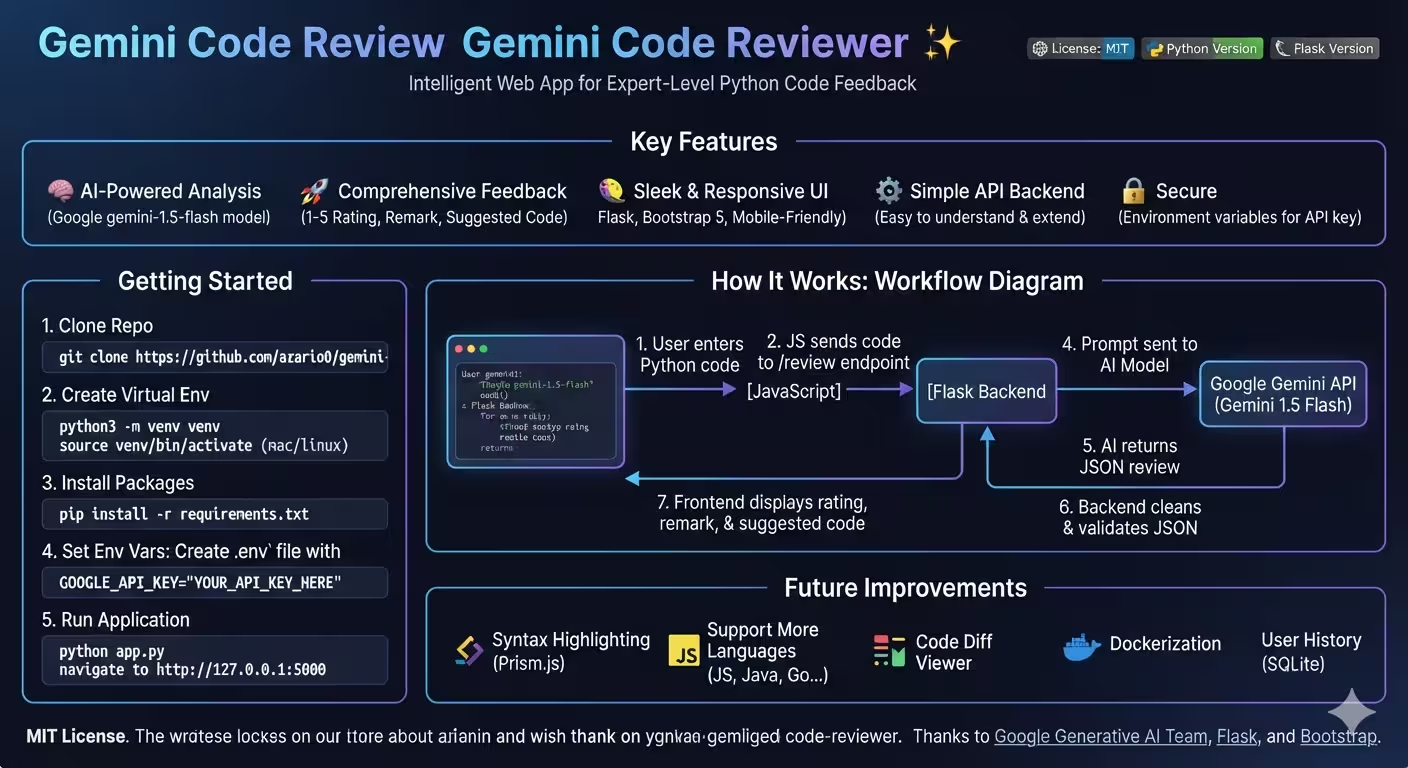
Gemini Code Reviewer Explained: How Flask and Gemini 1.5 Flash Create an AI-Powered Python Code Reviewer
Repository: azario0/gemini-code-reviewer — A sleek, minimal web app that gives your Python code instant, expert-level feedback using Google’s Gemini API.
Ever wanted a senior developer to review your code in under 2 seconds? That’s exactly what Gemini Code Reviewer does. It combines a lightweight Flask backend, a clean Bootstrap 5 frontend, and the power of gemini-1.5-flash to analyze Python code for correctness, performance, and readability — then returns a 1-5 rating, a detailed remark, and a rewritten, optimized version of your code.
This article breaks down every piece of the project: languages used, libraries, methods, and how everything connects end-to-end.
Table of Contents
- Quick Overview
- Tech Stack & Languages Used
- Project Structure
- How It Works Together: The 7-Step Flow
- Backend Deep Dive:
app.py - Frontend Deep Dive: HTML, CSS & JavaScript
- Prompt Engineering: The Secret Sauce
- The Prototype Lab:
notebook.ipynb - Security & Configuration
- How to Run It Locally
- Strengths, Limitations & Future Improvements
- Final Verdict
- Useful Links
Quick Overview
Gemini Code Reviewer is an intelligent web application by azario0 that solves a simple but powerful problem: instant code feedback without waiting for a human reviewer.
You paste Python code into a textarea, click “Review My Code”, and the app:
- Sends code to a Flask API endpoint (
/review) - Wraps it in a carefully crafted prompt
- Calls Google’s
gemini-1.5-flashmodel - Cleans and validates the JSON response
- Displays a Rating (1-5), Remark, and SuggestedVersion back to you
It’s MIT licensed, requires only 3 Python dependencies, and runs locally on http://127.0.0.1:5000.
Tech Stack & Languages Used
| Layer | Technology | Purpose | Link |
|---|---|---|---|
| Backend | Python 3.9+ | Core language | python.org |
| Web Framework | Flask 3.0 | Routing, templating, JSON API | Flask Docs |
| AI Engine | Google Gemini API via google-generativeai | Code analysis & generation | Gemini API Docs |
| Model | gemini-1.5-flash | Fast, cost-effective LLM with deep code understanding | Model Overview |
| Frontend Structure | HTML5 | Page layout (templates/index.html) | MDN HTML |
| Styling | CSS3 + Bootstrap 5.3.3 | Responsive dark-themed UI | Bootstrap Docs |
| Typography | Inter + Fira Code | Clean UI + monospace code editor | Google Fonts |
| Interactivity | Vanilla JavaScript (Fetch API) | Async POST to /review, dynamic DOM updates | Fetch API |
| Config | python-dotenv | Load GOOGLE_API_KEY from .env securely | python-dotenv |
| Prototyping | Jupyter Notebook (notebook.ipynb) | Testing prompts & cleaning logic before Flask integration | Jupyter |
Language Breakdown: ~60% Python (backend + AI), ~25% HTML/JS (frontend logic), ~15% CSS (Bootstrap + custom dark theme). No database, no heavy framework — pure simplicity.
Project Structure
Fetched directly from the repository tree:
gemini-code-reviewer/
├── code-reviewer-app/
│   ├── app.py                # <-- Flask app + Gemini logic (main file)
│   ├── requirements.txt      # <-- 3 dependencies: Flask, google-generativeai, python-dotenv
│   ├── static/
│   │   └── style.css         # <-- Dark theme, Fira Code editor, card hover effects
│   └── templates/
│       └── index.html        # <-- Bootstrap UI + inline JavaScript
├── notebook.ipynb            # <-- Prototype: prompt testing + clean_llm_json() development
├── README.md                 # <-- Docs, setup & architecture overview
└── LICENSE                   # <-- MIT
Key Files Explored:
code-reviewer-app/app.py— The heart of the appcode-reviewer-app/requirements.txtcode-reviewer-app/templates/index.htmlcode-reviewer-app/static/style.cssnotebook.ipynb— Where the idea was born
How It Works Together: The 7-Step Flow
This is the exact flow described in the README How It Works section, with technical detail added:
User pastes Python code → [1] JavaScript fetch() → [2] Flask POST /review → [3] Prompt Construction → [4] Gemini 1.5 Flash API → [5] clean_llm_json() → [6] jsonify() → [7] Frontend Render| Step | Actor | What Happens | File |
|---|---|---|---|
| 1 | Frontend | User types code in <textarea id="codeInput"> and clicks #submitBtn. JS validates non-empty input. | templates/index.html:54-72 |
| 2 | JS → Flask | fetch('/review', {method: 'POST', body: JSON.stringify({code})}) sends JSON. Button shows spinner, disables itself. | templates/index.html:84-102 |
| 3 | Flask | review_code() extracts request.json.get('code'), validates, builds a prompt with f-string embedding. | app.py:54-85 |
| 4 | Gemini | model.generate_content(prompt) calls Google Generative AI. Model returns response.text (hopefully JSON). | app.py:87 |
| 5 | Cleaning | clean_llm_json() strips ```json fences, parses JSON, normalizes whitespace. | app.py:22-48 |
| 6 | Response | Flask does json.loads(cleaned_json_str) then jsonify(json_data) to send proper JSON (not string). | app.py:88-90 |
| 7 | Frontend | JS receives {Rating, Remark, SuggestedVersion}, injects into #rating, #remark, #suggestedCode, unhides #resultsContainer. | templates/index.html:104-115 |
If anything fails, the catch block shows #errorContainer with the error message.
Backend Deep Dive: app.py
The entire backend is ~90 lines — a masterclass in minimalism. Located at code-reviewer-app/app.py:
1. Initialization & AI Configuration (app.py:1-22)
import os, json, re
import google.generativeai as genai
from flask import Flask, render_template, request, jsonify
from dotenv import load_dotenv

load_dotenv()
app = Flask(__name__)

api_key = os.getenv("GOOGLE_API_KEY")
genai.configure(api_key=api_key)
model = genai.GenerativeModel("gemini-1.5-flash")load_dotenv()loads.env→ keepsGOOGLE_API_KEYout of code. If missing, it raisesValueErrorand setsmodel = None(graceful failure).genai.GenerativeModel("gemini-1.5-flash")is chosen for speed + low cost. Alternativegemini-1.5-prois more powerful but slower — the comment innotebook.ipynbeven mentions this trade-off.
2. The Critical Utility: clean_llm_json(raw_json: str) -> str (app.py:24-48)
LLMs are notoriously messy — they wrap JSON in Markdown fences like json { ... } and add inconsistent whitespace. This function fixes that:
def clean_llm_json(raw_json: str) -> str:
    raw_json = re.sub(r"^```json\s*|\s*```$", "", raw_json.strip(), flags=re.DOTALL)
    data = json.loads(raw_json)
    if "Remark" in data:
        data["Remark"] = re.sub(r'\s+', ' ', data["Remark"]).strip()
    if "SuggestedVersion" in data:
        data["SuggestedVersion"] = data["SuggestedVersion"].strip()
    return json.dumps(data, indent=2, ensure_ascii=False)
Method Breakdown:
re.sub(r"^```json\s*|\s*```$", ...)— Regex strips leadingjson and trailing(withDOTALLto handle multiline).json.loads()— Safely parses; if fails, returns{"error": "Failed to parse..."}structure instead of crashing.- Whitespace normalization —
re.sub(r'\s+', ' ', remark)collapses newlines/tabs into single spaces for clean display. json.dumps(indent=2, ensure_ascii=False)— Returns pretty, human-readable JSON.
This exact function was first prototyped in
notebook.ipynbcell 3, tested with a sample response showingRating: 3for inefficientfor i in range(1): counter +=5.
3. Routes
index() — GET / (app.py:51-53)
@app.route('/')
def index():
    return render_template('index.html')
Simply serves the frontend. Flask auto-looks in templates/ folder.
review_code() — POST /review (app.py:55-92)
This is the core API:
- Validation: Checks
if not model→ 500 error;if not code_to_review→ 400 error. - Prompt Building: Uses Python f-string to embed user code inside a detailed instruction block (see next section).
- Generation:
response = model.generate_content(prompt)— synchronous call to Gemini. - Double-Parsing:
clean_llm_json(response.text)→ string →json.loads()→jsonify()— ensures client gets valid JSON, not a JSON string. - Error Handling: Broad
try/exceptcatches API failures, JSON errors, network issues → returns 500 with message.
4. Entry Point (app.py:94-95)
if __name__ == '__main__':
    app.run(debug=True)
Runs Flask dev server on http://127.0.0.1:5000 with auto-reload. Not for production — would need gunicorn + proper hosting.
Frontend Deep Dive: HTML, CSS & JavaScript
templates/index.html (View on GitHub)
A single-file frontend that does everything — no React, no bundler:
-
Structure:
- Dark theme via
data-bs-theme="dark"(Bootstrap 5.3 feature) - Header + Card with
<textarea class="code-editor">+ full-width primary button - Hidden
#resultsContainer(withd-none) for Rating badge, Remark paragraph, and<pre><code id="suggestedCode"> - Hidden
#errorContaineralert for failures
- Dark theme via
-
Styling Dependencies:
- Bootstrap 5.3.3 CDN
- Inter & Fira Code via Google Fonts — Inter for UI, Fira Code for code editor
- Custom
static/style.csslinking viaurl_for('static', filename='style.css')
-
JavaScript Logic (inline
<script>):document.getElementById('submitBtn').addEventListener('click', async () => { // 1. Validate input // 2. Show spinner + disable button + hide old results // 3. fetch('/review', {method:'POST', headers:{'Content-Type':'application/json'}, body:JSON.stringify({code})}) // 4. If !response.ok → throw Error // 5. Else inject data.Rating, data.Remark, data.SuggestedVersion // 6. Finally hide spinner + enable button });- UX Details: Spinner is
spinner-border spinner-border-sm d-nonetoggled viaclassList. Results use template literals${data.Rating || 'N/A'} / 5. No external JS file — keeps it simple (thescript.jspath 404s, because logic is inline).
- UX Details: Spinner is
static/style.css (View on GitHub)
Only 30 lines but effective:
body { font-family: 'Inter', sans-serif; background-color: #212529; }
.code-editor { font-family: 'Fira Code', monospace; background-color: #1a1a1a !important; color: #f8f9fa !important; border: 1px solid #444; }
.card:hover { box-shadow: 0 0 15px rgba(0, 123, 255, 0.2); }
pre { background-color: #1a1a1a; padding: 1rem; border-radius: 0.25rem; white-space: pre-wrap; word-break: break-all; }- Dark editor background (
#1a1a1a) for eye comfort white-space: pre-wrapensures long code lines wrap instead of overflowing- Subtle hover glow on cards for modern feel
Prompt Engineering: The Secret Sauce
Located at app.py:62-83 and originally tested in notebook.ipynb cell 2:
You are a code reviewer and performance optimizer.
Your task is to analyze the given code and provide constructive feedback.
Focus on:
- Correctness (does the code work as intended?)
- Performance (can it run faster or use fewer resources?)
- Readability and best practices (is it easy to understand and maintain?)

Here is the code to review:
```python
{user_code}
Respond ONLY in JSON format with the following fields: { “Rating”: “An integer from 1 (poor) to 5 (excellent)”, “Remark”: “A constructive explanation…”, “SuggestedVersion”: “An improved version…” }
**Why This Works:**

1.  **Role Assignment:** "You are a code reviewer" primes Gemini to be critical yet constructive.
2.  **Three Pillars:** Explicitly lists Correctness, Performance, Readability — guides the model to cover all angles, not just syntax.
3.  **JSON Enforcement:** "Respond ONLY in JSON" + strict field names prevents verbose prose and makes `clean_llm_json()` parsing reliable.
4.  **Fenced Code Block:** Wrapping user code in ```python helps Gemini recognize language context.

> Tested example in notebook: `counter=0; for i in range(1): counter+=5` → Gemini correctly rated 3/5 and suggested `counter = 5; print(counter)` — proving it catches unnecessary loops.

---

## The Prototype Lab: `notebook.ipynb`

Before Flask, there was the [Jupyter Notebook](https://github.com/azario0/gemini-code-reviewer/blob/main/notebook.ipynb) — 5 cells showing iterative development:

| Cell | Purpose | Key Code |
|---|---|---|
| 1 | Configure Gemini | `genai.configure(api_key="YOUR_API_KEY"); model = genai.GenerativeModel("gemini-1.5-flash")` |
| 2 | Build prompt + call API | `code = """counter=0..."""; prompt = f"""..."""; response = model.generate_content(prompt)` |
| 3 | Develop `clean_llm_json()` | Regex + json.loads + whitespace cleaning (same as `app.py`) |
| 4 | Test cleaning | `print(clean_llm_json(response.text))` → shows `Rating: 3` example |
| 5 | Extra playground | Bubble-sort-like `tab = [2,5,1,2,3,5,3]` sorting loop — likely testing if Gemini catches inefficient sorting |

This notebook-first workflow is **best practice**: prototype prompts and parsing logic interactively, then copy-paste stable code into `app.py`.

---

## Security & Configuration

*   **Environment Variables:** [`python-dotenv`](https://pypi.org/project/python-dotenv/) + `.env` file with `GOOGLE_API_KEY="YOUR_KEY"` avoids hardcoding secrets. The [README Installation](https://github.com/azario0/gemini-code-reviewer#installation) explicitly warns to create `.env` and get a key from [Google AI Studio](https://aistudio.google.com/app/apikey).
*   **No Auth Layer:** Currently anyone with the URL can use it — fine for local dev, but production would need rate limiting (Flask-Limiter) or authentication.
*   **Input Validation:** Only checks `if not code_to_review` — no sanitization needed since code is never `eval()`'d, just sent to Gemini. However, large payloads could exceed Gemini token limits (no current limit check).
*   **Error Leakage:** `clean_llm_json` returns `raw_response` on failure — helpful for debugging but could leak prompt details in production.

---

## How to Run It Locally

From the [README Getting Started](https://github.com/azario0/gemini-code-reviewer#-getting-started):

```bash
# 1. Clone
git clone https://github.com/azario0/gemini-code-reviewer.git
cd gemini-code-reviewer

# 2. Virtual environment
python3 -m venv venv
source venv/bin/activate  # Windows: venv\Scripts\activate

# 3. Install deps
pip install -r code-reviewer-app/requirements.txt
# Requires: Flask, google-generativeai, python-dotenv

# 4. Env file
echo 'GOOGLE_API_KEY="YOUR_API_KEY_HERE"' > .env
# Get key at https://aistudio.google.com/app/apikey

# 5. Run
python code-reviewer-app/app.py
# Open http://127.0.0.1:5000
Note: The README says
pip install -r requirements.txtandpython app.py, but actual paths are insidecode-reviewer-app/— a small docs inconsistency to watch for.
Strengths, Limitations & Future Improvements
Strengths
- Minimal & Readable: Under 100 lines of Python, no ORM, no complexity — perfect for beginners learning Flask + LLM integration.
- Fast Feedback Loop:
gemini-1.5-flashis optimized for low latency. - Structured Output: JSON with Rating/Remark/SuggestedVersion makes frontend rendering trivial.
Current Limitations
- Python-Only: Prompt is hardcoded to ```python — no language detection.
- No Syntax Highlighting: Suggested code is plain text; README suggests adding Prism.js or Highlight.js.
- No History: No database (like SQLite) to store past reviews.
- No Diff View: User can’t visually compare original vs. suggested code side-by-side.
- Not Dockerized: README lists Docker as future work.
Roadmap (from README Future Improvements)
- Syntax Highlighting with Prism.js / Highlight.js
- Multi-language support (JavaScript, Java, Go)
- Code Diff Viewer
- Dockerfile for easy deployment
- SQLite history storage
Final Verdict
Gemini Code Reviewer is a brilliant example of “simple done right.” It demonstrates three modern web development essentials in one repo:
- LLM Integration — How to wrap a powerful model (Gemini 1.5 Flash) with careful prompt engineering and robust JSON cleaning.
- Flask Microservice Pattern — A clean REST endpoint (
/review) that does one job well, with proper error codes (400/500) andjsonify()responses. - UX Simplicity — Bootstrap + vanilla JS provides a responsive, dark-themed UI without framework bloat.
For students, it’s an ideal template to learn Python, Flask, and Generative AI together. For developers, it’s a launchpad — add authentication, Docker, and multi-language support, and you have a production-ready SaaS tool.
The magic isn’t in complexity, but in connection: Frontend → Flask → Prompt → Gemini → Clean → Frontend — a seamless loop that turns raw code into expert advice in seconds.
Useful Links
- Repository: https://github.com/azario0/gemini-code-reviewer
- Main Backend File: https://github.com/azario0/gemini-code-reviewer/blob/main/code-reviewer-app/app.py
- Frontend Template: https://github.com/azario0/gemini-code-reviewer/blob/main/code-reviewer-app/templates/index.html
- Custom Styles: https://github.com/azario0/gemini-code-reviewer/blob/main/code-reviewer-app/static/style.css
- Requirements: https://github.com/azario0/gemini-code-reviewer/blob/main/code-reviewer-app/requirements.txt
- Prototype Notebook: https://github.com/azario0/gemini-code-reviewer/blob/main/notebook.ipynb
- README: https://github.com/azario0/gemini-code-reviewer/blob/main/README.md
- Flask Docs: https://flask.palletsprojects.com/
- Bootstrap 5 Docs: https://getbootstrap.com/docs/5.3/getting-started/introduction/
- Gemini API Docs: https://ai.google.dev/gemini-api/docs
- Gemini Models: https://ai.google.dev/gemini-api/docs/models/gemini
- Google AI Studio (Get API Key): https://aistudio.google.com/app/apikey
- google-generativeai PyPI: https://pypi.org/project/google-generativeai/
- python-dotenv PyPI: https://pypi.org/project/python-dotenv/
- Jupyter: https://jupyter.org/
- License (MIT): https://github.com/azario0/gemini-code-reviewer/blob/main/LICENSE
Article generated from direct exploration of azario0/gemini-code-reviewer on 2026-09-01. All code references point to main branch.

Written by
Benmalek Zohir
Founder, AI Engineer & Full Stack Developer
Benmalek Zohir is an AI Engineer, Full Stack Developer, and technology enthusiast focused on artificial intelligence, software development, and emerging technologies. He is the founder of SoftwareJournal.blog, where he shares practical insights, software discoveries, AI tools, and the latest developments in technology.