Build a PDF Flashcard App with Flask and Gemini AI
Learn how this Flask PDF flashcard app uses PyMuPDF and Google Gemini AI to extract text, generate Q&A flashcards as JSON, and run an interactive quiz workflow.
Build a PDF Flashcard App with Flask and Gemini AI
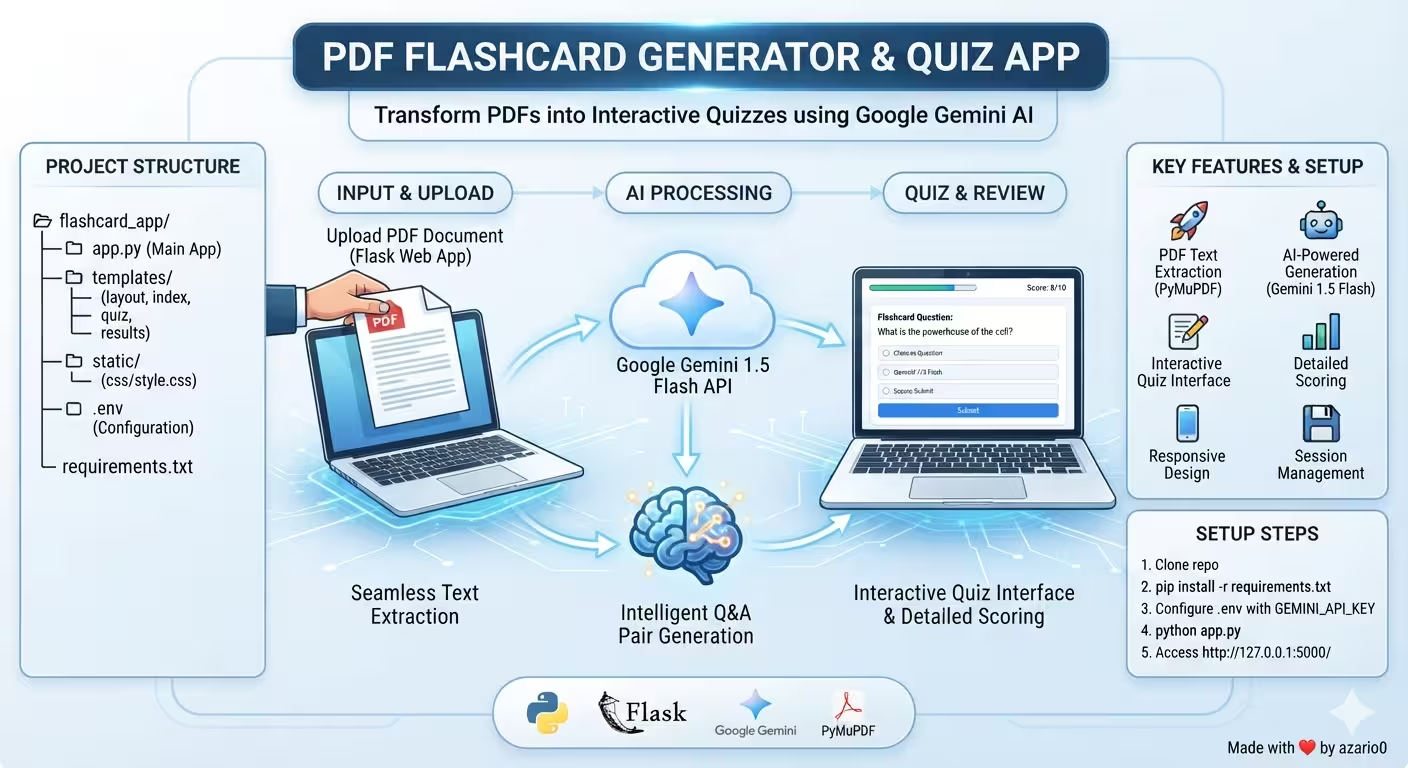
A verified developer deep-dive into azario0/flashcard_app — a Flask web app that turns any PDF into AI-generated flashcards and an interactive quiz using PyMuPDF and Google Gemini 1.5 Flash. Every detail below is checked against the actual code.
If you searched for “Flask PDF to flashcards,” “Gemini flashcard generator,” “PyMuPDF quiz app,” or “how to build a quiz app with Flask and Gemini AI,” this guide dissects a minimal, working implementation with no LangChain, no database, and no frontend framework — just Python, Jinja2, and a clever prompt.
What This Project Does
The PDF Flashcard Generator & Quiz App lets you upload a PDF, extracts its text, calls Google Gemini to create up to 4 question-answer pairs as strict JSON, and walks you through a one-question-at-a-time quiz stored entirely in the Flask session. At the end, it scores answers with a simple case-insensitive comparison and shows a color-coded breakdown.
The flow described in the README.md is exactly what the code does: Upload PDF → Generate Flashcards → Take Quiz → View Results → Start New Quiz.
Programming Languages Used
This repository is a polyglot web app with two primary languages:
- Python (3.8+) — All backend logic: PDF parsing, AI generation, routing, session handling, and scoring. See the imports at the top of
flashcard_app/app.py#L1-L7:fitz,google.generativeai,json,re, andflask. - HTML with Jinja2 + CSS — No React, Vue, or JavaScript. The UI is four server-rendered templates that extend a base layout:
templates/layout.html,templates/index.html,templates/quiz.html,templates/results.html, plus a flash-messages partialtemplates/_flash_messages.html. Styling is vanilla CSS instatic/css/style.css. - Jupyter Notebook (IPython) — Prototyping lives in
notebook.ipynbwith 5 cells that isolate extraction and generation before they were ported to Flask.
There is no custom JavaScript, no TypeScript, no database, and no API layer beyond Flask’s built-in routing.
Technology Stack at a Glance
| Layer | Technology | Purpose | Where |
|---|---|---|---|
| Web Framework | Flask 2.0+ | Routing, templating, sessions, flash messages | app.py#L6 |
| PDF Parsing | PyMuPDF (fitz) | Extracts text from PDF streams/pages | app.py#L2, notebook.ipynb Cell 0 |
| LLM API | google-generativeai (gemini-1.5-flash-latest) | Generates Q&A flashcards as JSON | app.py#L3, app.py#L48-L51 |
| Templating | Jinja2 (via Flask) | Layout inheritance, dynamic quiz rendering | templates/layout.html |
| Styling | Vanilla CSS | Responsive centered card UI, alerts | static/css/style.css |
| Config | python-dotenv | Loads GEMINI_API_KEY + FLASK_SECRET_KEY from .env | app.py#L7-L13 |
| Session | Flask signed cookies | Stores flashcards, current_q_index, user_answers | app.py#L195-L198 |
The README.md documents pip install Flask python-dotenv google-generativeai PyMuPDF — the exact four dependencies imported in app.py. Note: despite being mentioned, a requirements.txt file is not actually present in the repo at time of writing.
Project Structure Explained
flashcard_app/               # repo root https://github.com/azario0/flashcard_app
├── README.md                # Features, setup, project structure docs
├── LICENSE                  # MIT
├── notebook.ipynb           # 5-cell prototype (extraction + generation)
└── flashcard_app/           # ← runnable Flask app
    ├── app.py               # 285-line main application
    ├── .env                 # Contains GEMINI_API_KEY="YOUR_API_KEY"
    ├── static/
    │   └── css/style.css    # 211-line stylesheet
    └── templates/
        ├── layout.html      # 21-line base template
        ├── index.html       # PDF upload form
        ├── quiz.html        # Single-question view
        ├── results.html     # Score + detailed breakdown
        └── _flash_messages.html # Flash alert partial
This is the exhaustive file tree — find confirms no hidden requirements.txt, .env.example, or JS assets exist despite the README’s project-structure diagram suggesting they should.
Architecture: The End-to-End Flow
[ User Uploads PDF ]
      ↓
[ Flask index() POST ] → extract_text_from_pdf_stream() via PyMuPDF fitz
      ↓
[ Text + Prompt ] → model.count_tokens() → limit 10,000 check
      ↓
[ Gemini 1.5 Flash ] → raw text → regex clean → json.loads() → list[{question, answer}]
      ↓
[ session['flashcards'] ] ← stored in signed cookie
      ↓
[ /quiz GET/POST loop ] → session['current_q_index']++, session['user_answers'].append()
      ↓
[ /results GET ] → case-insensitive string match → score + detailed_results[] → results.html
      ↓
[ /restart ] → session.pop() → back to index.html
No database roundtrip, no background job queue. The entire quiz state lives in the browser cookie managed by Flask.
Deep Dive 1: PDF Text Extraction with PyMuPDF
Key Functions:
- Notebook:
extract_text_from_pdf(pdf_path)innotebook.ipynbCell 0 - Production:
extract_text_from_pdf_stream(pdf_stream)inflashcard_app/app.py#L17-L29
How it works in app.py:
def extract_text_from_pdf_stream(pdf_stream):
    text = ""
    pdf_bytes = pdf_stream.read()
    doc = fitz.open(stream=pdf_bytes, filetype="pdf")
    for page in doc:
        text += page.get_text()
    doc.close()
    return text, None
Compared to the notebook version which takes a file path (fitz.open(pdf_path)), the Flask version reads the Werkzeug FileStorage.stream as bytes and opens it with stream= + filetype="pdf" — required because uploads never hit disk. It concatenates page.get_text() for every page, so scanned-image PDFs (no embedded text) return empty and later trigger Could not extract any text in app.py#L180.
Error handling returns a tuple (text, error_msg) rather than raising, allowing the index() route to flash(err, 'danger') in app.py#L176-L178.
Deep Dive 2: AI Flashcard Generation with Gemini 1.5 Flash
This is the core of the app — turning raw text into structured data via prompt engineering.
Key Function: generate_flashcards_gemini_flash() in flashcard_app/app.py#L31-L150 (notebook version in notebook.ipynb Cell 1 is similar but returns list[dict] only and defaults to max_flashcards=10).
Signature in app.py:
def generate_flashcards_gemini_flash(
    api_key: str,
    text_input: str,
    max_flashcards: int = 15,
    temperature: float = 0.3,
    count_tokens_before_sending: bool = True
) -> tuple[list[dict], str | None]:
Important nuance: Although the default is 15, the actual call in the Flask route at app.py#L185 is generate_flashcards_gemini_flash(GEMINI_API_KEY, pdf_text, max_flashcards=4) — so users get 4 flashcards per PDF by default, not 15.
Prompt Engineering (Lines 53-75)
prompt = f"""
You are an expert flashcard creator. Your task is to analyze the following text and generate concise question-answer pairs suitable for flashcards.
The questions should test understanding of key concepts, facts, definitions, or important relationships mentioned in the text.
The answers should be directly derivable from the text and be as brief as possible while still being accurate and complete.
Aim to generate up to {max_flashcards} flashcard pairs.

Format your output STRICTLY as a JSON list of objects. Each object must have a "question" key and an "answer" key.
Do NOT include any introductory text, explanations, or markdown formatting like ```json ... ``` outside of the JSON structure itself.
Just return the raw JSON list.

Example of expected JSON output format:
[
    {{"question": "What is the primary function of mitochondria?", "answer": "To generate..."}},
    {{"question": "Who developed the theory of relativity?", "answer": "Albert Einstein."}}
]

Here is the text to process:
---
{text_input}
---

Generate the flashcards now:
"""
The prompt forces strict JSON mode with escaped braces {{ }} for the few-shot example and explicit Do NOT include markdown instructions.
Token Guard (Lines 77-89)
token_count_response = model.count_tokens(prompt)
if token_count_response.total_tokens >= 10000:
    return [], f"Error: The document is too long. Prompt tokens: {token_count_response.total_tokens}. Processing limit: 10,000 tokens."
Gemini 1.5 Flash supports 1M tokens, but the app caps at 10,000 (documented in README.md API Limits). If count_tokens_before_sending=False, it skips the check.
Robust JSON Cleaning (Lines 102-138)
Gemini often wraps JSON in json blocks even when told not to. The code handles it in three layers:
- Regex extract from markdown fence:
re.search(r"```(json)?\s*([\s\S]*?)\s*```", raw_json_text) - Strip and check
startswith('[') and endswith(']')— if not a list, tryre.search(r"(\[[^\]]*\])", cleaned_json_text)fallback json.loads()+ validation that each item isdictwith"question"and"answer"keys; invalid items are skipped with a warning, and an emptyvalid_flashcardsreturns a warning string.
The notebook example in notebook.ipynb Cell 3 shows a successful 15-card output for the paper 1409.3215v3.pdf (Sequence-to-Sequence Learning), proving the pipeline works end-to-end.
Deep Dive 3: Flask Backend — Routes, Session, and Scoring
All HTTP logic is in flashcard_app/app.py#L152-L285 with four routes.
index() — GET / and POST / (app.py#L154-L204)
- On
GET: flashes a warning ifGEMINI_API_KEYmissing, then renderstemplates/index.html. - On
POST:- Validates
pdf_fileexists andfile.filename.endswith('.pdf')— otherwiseflash('Invalid file type...', 'warning')atapp.py#L201. - Calls
extract_text_from_pdf_stream(file.stream)atapp.py#L175. - Calls
generate_flashcards_gemini_flash(..., max_flashcards=4)atapp.py#L185. - On success, stores
session['flashcards'], resetssession['current_q_index']=0andsession['user_answers']=[]atapp.py#L195-L198, thenredirect(url_for('quiz')).
- Validates
Session keys are the only persistence — no database.
quiz() — GET/POST /quiz (app.py#L206-L231)
- Guards that
session['flashcards']exists, else redirects toindexwithflash('No flashcards available...', 'info')atapp.py#L209. - On
POST: appendsrequest.form.get('answer', '')tosession['user_answers'], incrementssession['current_q_index']atapp.py#L216-L221. - If
current_q_index >= len(flashcards)→redirect(url_for('results'))atapp.py#L224. - Otherwise renders
templates/quiz.htmlwithquestion,q_num=current_q_index+1,total_qs=len(flashcards)atapp.py#L228-L231.
This creates the sequential one-question-per-request flow without JavaScript.
results() — GET /results (app.py#L233-L272)
- Validates both
flashcardsanduser_answersexist; check mismatch atapp.py#L242redirects to/restart. - Scoring logic at
app.py#L250-L261:
correct_answer_norm = card['answer'].strip().lower()
user_answer_norm = user_answers[i].strip().lower()
is_correct = (correct_answer_norm == user_answer_norm)
Exact, lowercased, trimmed string equality — not semantic similarity or fuzzy match. A correct answer with extra punctuation or paraphrase is marked incorrect.
- Builds
detailed_resultslist withquestion,correct_answer,user_answer,is_correctand renderstemplates/results.html. Session data is kept after results to allow refresh; only/restartclears it.
restart() — GET /restart (app.py#L274-L280)
Pops all three session keys and redirects to index. The if __name__ == '__main__' block at app.py#L282-L285 warns if the API key is missing and runs app.run(debug=True).
Configuration (app.py#L9-L13)
load_dotenv()
app.secret_key = os.environ.get('FLASK_SECRET_KEY', 'default_secret_key_for_dev')
GEMINI_API_KEY = os.environ.get('GEMINI_API_KEY')
The checked-in flashcard_app/.env contains GEMINI_API_KEY="YOUR_API_KEY" as a placeholder — you must replace it as described in the README.md installation.
Deep Dive 4: Templates — Server-Rendered UI with Jinja2
No frontend build step. All pages extend templates/layout.html which provides the shell:
<head>links to{{ url_for('static', filename='css/style.css') }}atlayout.html#L7<header>with link tourl_for('index')atL11<main class="container">includes{% include '_flash_messages.html' %}atL14and{% block content %}
templates/index.html: Simple method="POST" enctype="multipart/form-data" form with accept=".pdf" and required at L8. Button posts back to the same index() route. A note links to aistudio.google.com/app/apikey at L13.
templates/quiz.html: Shows Question {{ q_num }} of {{ total_qs }} at L4, the flashcard-question paragraph at L6, and a textarea name="answer" form at L11 that POSTs to the same /quiz endpoint.
templates/results.html: Displays {{ score }} / {{ total_qs }} and percentage {{ "%.2f"|format((score/total_qs)*100) }} at L7. Loops results and adds class="correct" or "incorrect" at L13 with status-badge spans at L18-L20. Final CTA links to url_for('restart') at L27.
templates/_flash_messages.html: Uses get_flashed_messages(with_categories=true) at L1 to render alert-{{ category }} divs (success, danger, warning, info).
Deep Dive 5: Styling — Clean, Responsive CSS
Single stylesheet static/css/style.css (211 lines):
- System font stack, flex column layout with
min-height: 100vhandmargin-top: autofooter atL11andL210. - Blue hero header
#007bffatL15, centered card.containermax-width800pxwithbox-shadowatL28-L37. - Alert variants at
L49-L52map to Flask flash categories. - Quiz
.flashcardwith blue left border5px solid #007bffatL131-L137. - Results
.result-item.correctgreen and.incorrectred left borders atL177-L182plus badge colors atL191-L198.
Notebook vs. App: What Changed?
The notebook.ipynb prototype differs in verified ways:
extract_text_from_pdf(pdf_path)takes a path string for local testing ('1409.3215v3.pdf') vs stream-based in Flask.generate_flashcards_gemini_flashdefaultmax_flashcards=10in the notebook vs15inapp.py— and the Flask call overrides to4.- Return type: Notebook returns
list[dict]and prints warnings;app.pyreturnstuple[list[dict], str|None]for flash-friendly error handling. - Token logic: Notebook checks
if token_count_response.total_tokens<10000:as an outerif/elseprinting'too much tokens limit reached !';app.pydoes an earlyif >=10000: return [], errorinside the sametry. - Error strings:
app.pyprefixes errors with"Error: "/"Warning: "for flash categories.
The cell execution result in notebook.ipynb Cell 3 demonstrates correct JSON output for the sequence-to-sequence paper — the same JSON shape the Flask app expects to parse.
How All Pieces Work Together — A Real Request
- User
GET /→index()rendersindex.html. - Select PDF →
POST /withmultipart/form-data→extract_text_from_pdf_stream()inapp.py#L175extracts text viafitz. generate_flashcards_gemini_flash()inapp.py#L185counts tokens, sends prompt togemini-1.5-flash-latest, cleans markdown, validates JSON, stores 4 cards insession['flashcards']atapp.py#L195.- Redirect to
GET /quiz→ showsquestion1 of 4 fromquiz.html. - Submit answer →
POST /quizappends tosession['user_answers'], incrementssession['current_q_index'], redirects to nextGET /quizorGET /resultswhen>= len(flashcards)atapp.py#L224. GET /results→ normalizes and compares strings atapp.py#L251-L253, buildsresultslist, rendersresults.htmlwith green/red styling fromstyle.css.GET /restart→ clears session atapp.py#L276-L278.
Running Locally and Customization Tips
As documented in README.md (verified against actual code):
git clone https://github.com/azario0/flashcard_app.git
cd flashcard_app/flashcard_app
pip install Flask python-dotenv google-generativeai PyMuPDF
# Create .env next to app.py
echo 'GEMINI_API_KEY="your_key"' > .env
echo 'FLASK_SECRET_KEY="random_string"' >> .env
python app.py
# open http://127.0.0.1:5000
To customize: change max_flashcards=4 at app.py#L185 to generate more cards, adjust temperature=0.3 at app.py#L35 for creativity, raise the 10000 token limit at app.py#L84 for large PDFs, or edit CSS variables in static/css/style.css for branding.
Verified Limitations and Improvement Ideas
Honest notes from reading the code:
- Exact-match scoring at
app.py#L253is brittle — consider LLM-based grading or fuzzySequenceMatcher. - Only 4 flashcards hard-coded at
app.py#L185despite the function defaulting to15— make it user-configurable. - No persistent storage — everything in signed cookie sessions; large flashcards could exceed cookie limits.
- 10k token cap may truncate long PDFs; implement chunking or sliding window.
- No
requirements.txtcommitted — add one to avoid manual installs. - Default secret key fallback
'default_secret_key_for_dev'atapp.py#L12is insecure for production. - Image-only PDFs fail silently — add OCR fallback via Tesseract.
These are normal for a teaching demo and great first contributions.
Conclusion: Why This Flask + Gemini App Is a Great Reference
This repo shows PDF AI processing without complexity. In 285 lines of Python and four templates, it demonstrates how to extract text with PyMuPDF, engineer a strict-JSON prompt for Gemini 1.5 Flash, harden JSON parsing against markdown wrappers, and manage state with Flask sessions — all without a database or JavaScript framework. If you are learning how to build a flashcard quiz app with Flask, how to use PyMuPDF fitz for PDF extraction, or how to generate structured Q&A with Gemini AI, this verified codebase is an ideal starter template.
MIT licensed — see LICENSE.
Verified against main on 2026-09-02. All file paths, line numbers, defaults, and limits checked by reading the repository directly.

Written by
Benmalek Zohir
Founder, AI Engineer & Full Stack Developer
Benmalek Zohir is an AI Engineer, Full Stack Developer, and technology enthusiast focused on artificial intelligence, software development, and emerging technologies. He is the founder of SoftwareJournal.blog, where he shares practical insights, software discoveries, AI tools, and the latest developments in technology.