Flask Quiz Master Explained: Building a Dynamic Quiz App with Flask and QuizAPI.io
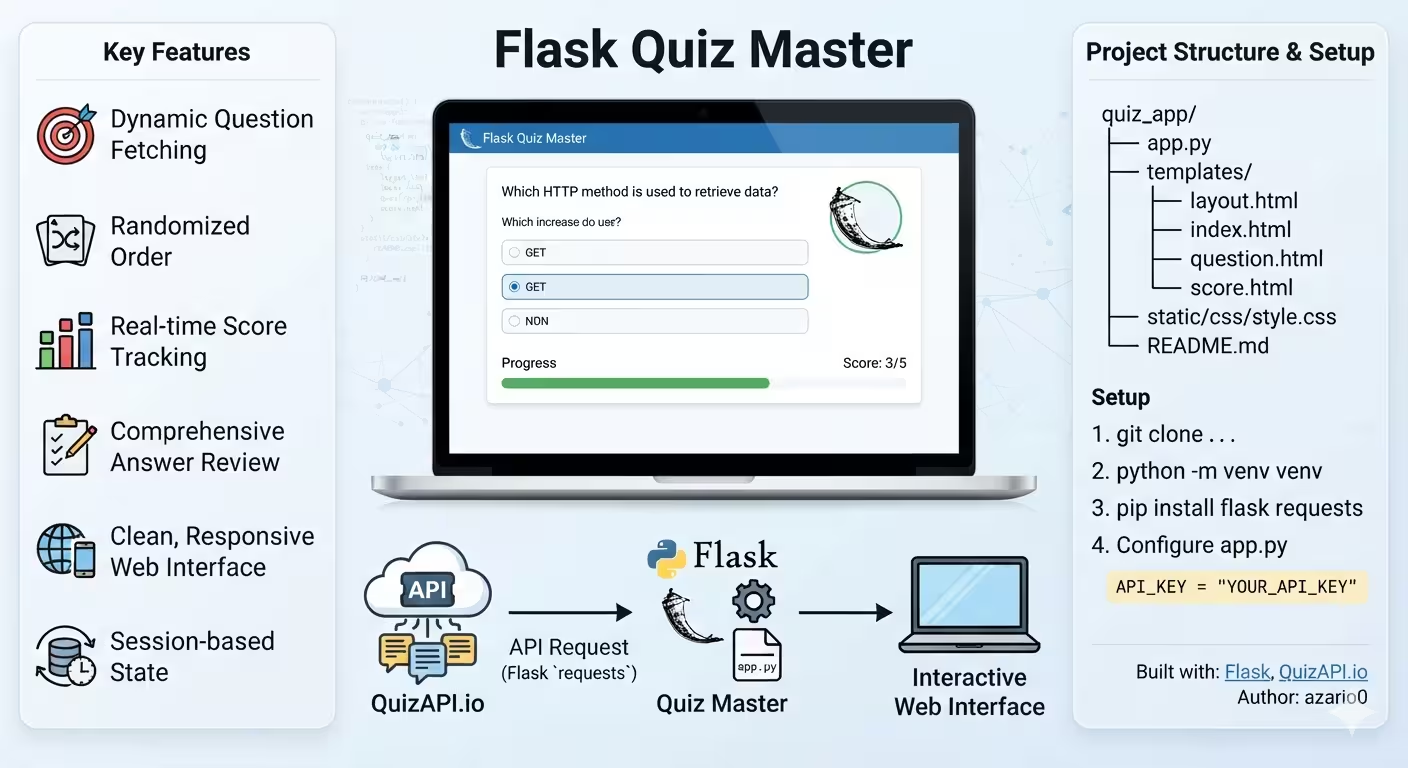
A complete deep-dive into Flask Quiz Master — a dynamic Python Flask quiz app that fetches live questions from QuizAPI.io, manages sessions, randomizes questions, and renders a responsive Bootstrap UI with score tracking and review.
Flask Quiz Master Explained: Building a Dynamic Quiz App with Flask and QuizAPI.io
Repository: azario0/flask-quiz-master | API: QuizAPI.io | Framework: Flask
A dynamic web-based quiz application that pulls real questions from an external API, randomizes them, tracks your score in a server-side session, and gives you a full answer review at the end. Simple idea, but it stitches together almost every core concept of modern Python web development.
This article breaks down every file, every method, and how they work together.
1. At a Glance: What Does It Do?
- User lands on a welcome page and clicks Start Quiz
- App calls QuizAPI.io for
Nquestions (default5) - Questions are shuffled, stored in Flask Session, and the user is redirected to
/quiz - One question is shown at a time. User selects an answer -> POST to same route -> scored -> next question
- After the last question ->
/scoreshowsscore / total, a progress bar, and a detailed review with explanations
Features that come out-of-the-box from the README.md:
- 🎯 Dynamic fetching from QuizAPI.io
- 🔀
random.shuffle()for randomized order - 📊 Real-time score tracking via
session['score'] - 📝 Answer review with correct/incorrect highlighting
- 🎨 Responsive UI with Bootstrap 4.5 + custom CSS
- 🔄 Restart functionality (
session.clear()) - ⚡ Server-side session state
2. Tech Stack & Languages Used
| Layer | Technology | Purpose | Link |
|---|---|---|---|
| Backend Language | Python 3.7+ | All logic, routing, API calls | python.org |
| Web Framework | Flask | Lightweight WSGI framework, routing, templating, sessions | flask.palletsprojects.com |
| Templating | Jinja2 (bundled with Flask) | {% extends %}, {% block %}, {{ variable }} logic in HTML | jinja.palletsprojects.com |
| HTTP Client | Requests | requests.get() to call QuizAPI | requests.readthedocs.io |
| Frontend | HTML5 + Jinja2 | layout.html, index.html, question.html, score.html | developer.mozilla.org/en-US/docs/Web/HTML |
| Styling | CSS3 + Bootstrap 4.5 | Responsive grid, cards, badges, progress bars | getbootstrap.com |
| Additional | Google Fonts (Poppins) | Typography | fonts.google.com |
| Frontend JS | jQuery 3.5.1 + Popper.js + Bootstrap JS | Only for Bootstrap components (no custom JS) | jquery.com |
| API | QuizAPI.io | Source of 1000+ trivia/dev questions with answers + correct_answers | quizapi.io/docs |
| Data Exploration | Jupyter Notebook (notebook.ipynb) | Prototype/test API call before integrating into Flask | jupyter.org |
No database. Everything lives in the signed cookie session (
app.secret_key = os.urandom(24)). Great for demo/portability, not for persistence.
3. Project Structure
From quiz_app/README structure:
flask-quiz-master/
├── quiz_app/
│   ├── app.py              # Main Flask application (170 lines)
│   ├── templates/
│   │   ├── layout.html     # Base template - navbar, footer, Bootstrap imports
│   │   ├── index.html      # Homepage: Welcome + Start button + error display
│   │   ├── question.html   # Single question view: radio buttons + metadata
│   │   └── score.html      # Results: score, progress bar, review loop
│   └── static/
│       └── css/
│           └── style.css   # Custom styles (130 lines) - gradients, cards, hover
├── notebook.ipynb          # API prototyping - shows raw JSON response
├── README.md
└── LICENSE (MIT)
4. Core File Deep Dive
4.1 quiz_app/app.py — The Brain (170 lines)
This is the entire backend. Source: quiz_app/app.py
A. Initialization quiz_app/app.py:1-13
from flask import Flask, render_template, request, redirect, url_for, session
import requests, os, random
app = Flask(__name__)
app.secret_key = os.urandom(24) # Generates a random secret key each restart
API_KEY = "YOUR_API_KEY"
QUIZ_API_URL = "https://quizapi.io/api/v1/questions"
NUMBER_OF_QUESTIONS = 5Flask(__name__)creates the WSGI app.secret_keyis required for Flask sessions — they are cryptographically signed cookies. Usingos.urandom(24)means sessions invalidate on restart (in production use a fixed env var).NUMBER_OF_QUESTIONSis the single config knob to change quiz length.
B. Helper: fetch_questions() quiz_app/app.py:16-47
The most important function. Handles all external communication.
def fetch_questions(limit=NUMBER_OF_QUESTIONS, category=None, difficulty=None, tags=None):
    params = {"apiKey": API_KEY, "limit": limit}
    if category: params["category"] = category
    if difficulty: params["difficulty"] = difficulty # Easy/Medium/Hard
    if tags: params["tags"] = tags # e.g. "JavaScript,PHP"
    try:
        response = requests.get(QUIZ_API_URL, params=params)
        response.raise_for_status()
        questions_data = response.json()
        valid_questions = []
        for q in questions_data:
            if q.get("question") and isinstance(q.get("answers"), dict) ...
                if any(val is not None for val in q["answers"].values()):
                    valid_questions.append(q)
        return valid_questions
    except requests.exceptions.RequestException as e: ...
except ValueError as e: ...- What it does: Builds query params, does
GET https://quizapi.io/api/v1/questions?apiKey=xxx&limit=5, validates JSON. - Validation is critical: QuizAPI sometimes returns malformed entries. It checks
questionexists,answers/correct_answersare dicts, and at least one answer is notnull. - Error handling:
raise_for_status()catches 401 (bad key), 429 (rate limit). ReturnsNoneon failure so the route can show an error. - Extensibility:
category,difficulty,tagsare already wired — you just need a form to expose them (see Potential Enhancements in README).
C. Helper: get_correct_answer_key() quiz_app/app.py:49-58
Quirk of QuizAPI’s schema:
"correct_answers": {
  "answer_a_correct": "true",
  "answer_b_correct": "false",
  ...
}
def get_correct_answer_key(question_data):
for key, is_correct in question_data.get("correct_answers", {}).items():
if is_correct == "true":
return key.replace("_correct", "") # 'answer_a_correct' -> 'answer_a'
return None- Converts
answer_a_correct→answer_ato compare directly withrequest.form.get('answer')(which isanswer_a,answer_b, etc.).
D. Route: index() — GET / quiz_app/app.py:61-65
@app.route('/')
def index():
    session.clear() # Wipes previous quiz
return render_template('index.html', num_questions=NUMBER_OF_QUESTIONS)- Resets state every time you visit home. Prevents stale
scorefrom leaking into a new game.
E. Route: start_quiz() — POST /start_quiz quiz_app/app.py:67-95
Triggered by the Start Quiz button in index.html.
@app.route('/start_quiz', methods=['POST'])
def start_quiz():
    questions = fetch_questions(limit=NUMBER_OF_QUESTIONS)
    if not questions:
        return render_template('index.html', error="Could not fetch...", num_questions=...)
    random.shuffle(questions)
    session['questions'] = questions
    session['current_question_index'] = 0
    session['score'] = 0
    session['user_answers'] = []
return redirect(url_for('show_question'))- Fetches → validates length → shuffles (so order is different each playthrough) → seeds
session→ redirects to/quiz. - Note duplicate check
if not questions(lines 79 and 83) — minor redundancy but harmless.
F. Route: show_question() — GET & POST /quiz quiz_app/app.py:97-146
This route does double duty — display + evaluate.
GET path (display):
current_question_data = questions[current_index]
answers_for_template = {k:v for k,v in current_question_data['answers'].items() if v is not None}
return render_template('question.html', question_data=..., question_number=current_index+1, ...)- Filters out
nullanswers (QuizAPI sendsanswer_e: nulletc. when only 4 options exist) so UI doesn’t show empty radio buttons.
POST path (evaluate):
if request.method == 'POST':
    user_answer_key = request.form.get('answer') # e.g. 'answer_a'
    correct_answer_key = get_correct_answer_key(current_question_data)
    is_correct = (user_answer_key == correct_answer_key)
    if is_correct: session['score'] += 1
    session['user_answers'].append({
        "question_text": ...,
        "user_answer": current_question_data["answers"].get(user_answer_key, "Not answered"),
        "correct_answer_text": current_question_data["answers"].get(correct_answer_key, "N/A"),
        "is_correct": is_correct,
        "explanation": current_question_data.get("explanation")
    })
    session.modified = True # MUST for mutable list
    session['current_question_index'] += 1
    return redirect(url_for('show_question'))
session.modified = Trueis essential — Flask doesn’t detect in-place mutation of lists/dicts. Without it,user_answerswouldn’t persist.- Stores both texts (
user_answerandcorrect_answer_text) for the review page, not just keys — soscore.htmlcan render without re-accessing API. - Uses
Post/Redirect/Getpattern (redirectafter POST) to prevent double-submit on refresh.
Guard clauses:
if 'questions' not in session: return redirect(url_for('index'))
if current_index >= len(questions): return redirect(url_for('show_score'))
G. Route: show_score() — GET /score quiz_app/app.py:148-167
@app.route('/score')
def show_score():
    if 'score' not in session: return redirect(url_for('index'))
    score = session.get('score', 0)
    total_questions = len(session.get('questions', []))
    user_answers_review = session.get('user_answers', [])
return render_template('score.html', score=..., total_questions=..., user_answers_review=...)- Calculates percentage in template:
{% set percentage = (score / total_questions * 100) %}. - Session is not cleared here (code commented out) — allows hitting back. Could clear to force fresh start.
H. Runner quiz_app/app.py:169-170
if __name__ == '__main__':
app.run(debug=True)debug=Trueenables auto-reload + debugger. Never use in production.
4.2 Templates — Jinja2 Inheritance
All templates extend layout.html — classic DRY.
layout.html quiz_app/templates/layout.html:1-42 — The Master Shell
- Imports Bootstrap 4.5 CSS, style.css via
url_for('static', filename='css/style.css'), and Poppins font. - Defines
{% block title %}and{% block content %}. - Navbar with SVG graduation cap icon linking to
url_for('index'). - Footer:
Powered by QuizAPI.iowithtarget="_blank". - Loads jQuery + Popper.js + Bootstrap JS at bottom.
index.html quiz_app/templates/index.html:1-25 — Landing
- Shows
{{ num_questions }}dynamically (so changing config auto-updates UI). {% if error %}alert block displays API failures fromstart_quiz().- Form
POSTtourl_for('start_quiz')with big yellow.btn-start-quiz.
question.html quiz_app/templates/question.html:1-47 — Quiz Engine UI
- Header:
Question {{ question_number }} of {{ total_questions }}+{{ question_data.category }}badge. - Body:
{{ question_data.question }}+ optional{{ question_data.description }}. - Loop:
{% for key, text in answers.items() %}→<input type="radio" name="answer" value="{{ key }}" required>→ ensures one choice, HTML5 validation. - Footer:
Difficulty: {{ question_data.difficulty | capitalize }}+{% for tag in question_data.tags %}badges.
score.html quiz_app/templates/score.html:1-54 — Results & Review
{{ score }} / {{ total_questions }}with largedisplay-3.- Progress bar color logic:
{% if percentage >= 75 %}bg-success{% elif percentage >= 50 %}bg-warning{% else %}bg-danger{% endif %} Play Again→url_for('index')(which clears session).- Review loop:
{% for item in user_answers_review %}→ card borderborder-successvsborder-danger, badge colors, showsCorrect answeronly ifnot item.is_correct, andExplanation:if present.
4.3 static/css/style.css quiz_app/static/css/style.css:1-130 — Custom Polish
Not just Bootstrap defaults:
body { font-family: 'Poppins'; background: #f0f2f5; display:flex; flex-direction:column; min-height:100vh }→ sticky footer layout +.content-area { flex:1 }..welcome-container { background: linear-gradient(135deg, #667eea 0%, #764ba2 100%) }→ gradient hero..btn-start-quiz:hover { transform: translateY(-2px); box-shadow: ... }→ subtle lift..answer-options .list-group-item:hover { background:#e9ecef; border-color:#007bff }→ hover feedback..progress, .progress-bar { border-radius:20px }→ rounded bar..review-section { max-width:700px; margin:2rem auto }→ centered, readable review.
4.4 notebook.ipynb — API Playground
Source: notebook.ipynb
A single cell that does what fetch_questions() does but standalone:
import requests, json
api_key = "Your_API_KEY"
url = "https://quizapi.io/api/v1/questions"
params = {"apiKey": api_key}
response = requests.get(url, params=params)
data = response.json()
print(json.dumps(data, indent=2))
print(f"Question: {data[0].get('question')}")- Output in the notebook shows 20-question payload with fields:
id,question,answers: {answer_a..f},correct_answers: {answer_a_correct: "true"/"false"},explanation,tags,category,difficulty. - Purpose: Test your key and inspect shape before wiring into Flask. Also reveals the exposed key
0Bh4rrJ...in output — rotate it if yours.
5. How It All Works Together — Request Lifecycle
Browser                     Flask (app.py)                  QuizAPI.io
  |                             |                               |
  | GET /                       |                               |
  |---------------------------->| session.clear()                |
  |<-- index.html (Start btn) --|                               |
  |                             |                               |
  | POST /start_quiz            |                               |
  |---------------------------->| fetch_questions()             |
  |                             |-------- GET /questions?apiKey &limit=5 --->|
  |                             |<------- JSON[5 questions] -----------------|
  |                             | random.shuffle()              |
  |                             | session['questions']=...      |
  |<-- 302 Redirect /quiz ------|                               |
  |                             |                               |
  | GET /quiz                   |                               |
  |---------------------------->| answers_for_template filter    |
  |<-- question.html Q1 --------|                               |
  | POST /quiz (answer_a)       |                               |
  |---------------------------->| get_correct_answer_key()      |
  |                             | score +=1 if correct          |
  |                             | user_answers.append(...)      |
  |                             | current_index +=1             |
  |<-- 302 Redirect /quiz ------|                               |
  | ... repeat Q2..Q5 ...       |                               |
  | GET /quiz (index==len)      |                               |
  |---------------------------->| redirect /score                |
  | GET /score                  |                               |
  |---------------------------->| render score.html              |
  |<-- score.html + review -----|                               |
Key design choices:
- Stateless server, stateful client cookie: No DB, no server memory bloat. But cookie size limit (~4KB) means you can’t scale to 50 questions with full JSON. For larger quizzes, store in server-side cache (Redis) or DB.
- Synchronous fetch: App blocks on QuizAPI at start. If API is slow, user waits. Could add loading spinner or async fetch.
- Shuffle on server: Ensures every user gets different order even with same API response.
6. Installation & Configuration (from README)
git clone https://github.com/azario0/flask-quiz-master.git
cd flask-quiz-master
python -m venv venv
source venv/bin/activate # Windows: venv\Scripts\activate
pip install flask requests
Get key from QuizAPI.io (free tier) and edit quiz_app/app.py:11:
API_KEY = "your_actual_api_key_here"Optional tweak quiz_app/app.py:13:
NUMBER_OF_QUESTIONS = 5 # try 10
# and in fetch_questions(): category="Linux", difficulty="Easy", tags="Python"
Run:
python quiz_app/app.py
# → http://localhost:5000
7. Strengths & Limitations
Strengths
- Minimal dependencies (
flask,requests) — easy to run anywhere. - Clean separation:
fetch_questions()is pure, routes are thin, templates handle presentation. - Good validation + error UX (shows
erroron index if API fails). - Nice UI polish beyond default Bootstrap.
Limitations / Gotchas
os.urandom(24)on each start invalidates all sessions — useos.environ.get('SECRET_KEY')in prod.- No handling for
multiple_correct_answers == "true"— currently only checks first"true", would mis-score multi-select questions. QuizAPI sends that flag; you could filtermultiple_correct_answers == "false"or implement checkbox logic. - Stores full question JSON in cookie — could hit
CookieTooLarge. Safer to store IDs or server-side. - Exposed API key in notebook output — should be gitignored / env var.
8. Potential Enhancements (from README)
- User auth + persistent scoring (Flask-Login + SQLite/Postgres)
- Category/Difficulty selectors on
index.html→ pass tofetch_questions(category=...) - Timer per question (JS
setInterval+session['start_time']) - Leaderboard (
/leaderboardroute) - Question bookmarking
- Social sharing (
score.htmlmeta tags)
9. Conclusion
Flask Quiz Master is a textbook example of glue code done right: ~170 lines of Python stitching Flask, Requests, Jinja2, Bootstrap, and QuizAPI.io into a complete, shippable product. You learn:
- How to consume a third-party JSON API and sanitize it
- How Flask sessions + Post/Redirect/Get make a multi-step flow feel seamless
- How template inheritance keeps HTML DRY
- How a tiny CSS file transforms a generic Bootstrap app into something delightful
Clone it, swap the API key, change NUMBER_OF_QUESTIONS, and you have a quiz for any topic in under 5 minutes.
Links to explore further:
- Repo: https://github.com/azario0/flask-quiz-master
- Live API Docs: https://quizapi.io/docs/1.0/overview
- Flask Quickstart: https://flask.palletsprojects.com/en/latest/quickstart/
- Bootstrap Cards: https://getbootstrap.com/docs/4.5/components/card/
- Notebook File: https://github.com/azario0/flask-quiz-master/blob/main/notebook.ipynb
⭐ If you found this breakdown helpful, star the original repo and try building your own category filter!
Generated from source review of azario0/flask-quiz-master on 2026-09-02. All file references verified locally.

Written by
Benmalek Zohir
Founder, AI Engineer & Full Stack Developer
Benmalek Zohir is an AI Engineer, Full Stack Developer, and technology enthusiast focused on artificial intelligence, software development, and emerging technologies. He is the founder of SoftwareJournal.blog, where he shares practical insights, software discoveries, AI tools, and the latest developments in technology.