MealDB Explorer: Flask Recipe App with TheMealDB API
Explore how MealDB Explorer builds a Flask recipe app with TheMealDB API — search, filter by ingredient, category, area, and random meals with Python requests.
MealDB Explorer: Flask Recipe App with TheMealDB API
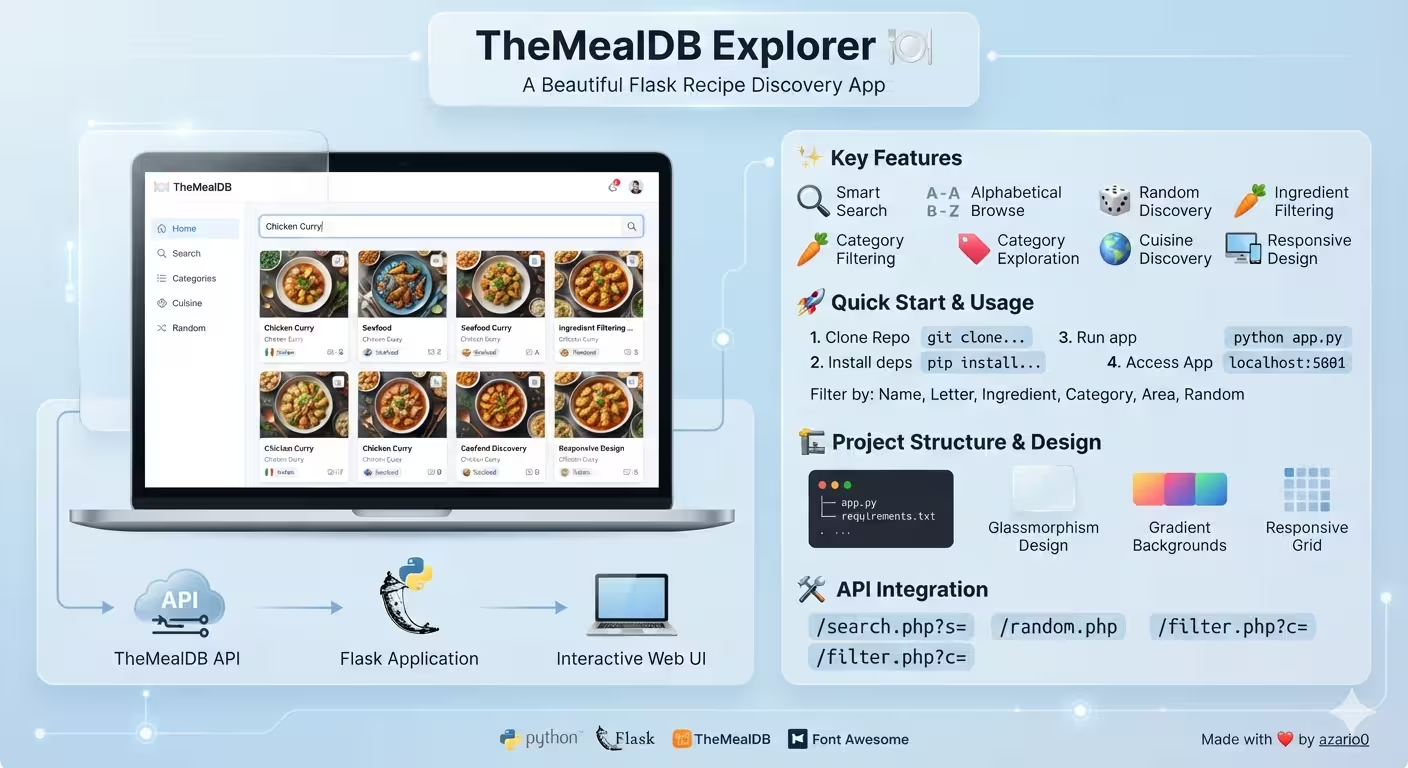
A verified deep-dive into azario0/mealdb-explorer — a beautiful Flask application that integrates with the TheMealDB API to search meals by name, browse alphabetically, filter by ingredient, category or area, and discover random recipes, all from a single Python file.
If you searched for “Flask TheMealDB API tutorial,” “Python recipe app with TheMealDB,” “Flask render_template_string example,” or “how to build a meal search app with Flask and requests,” this guide breaks down a working implementation file-by-file — every claim verified against the cloned repository.
What Is MealDB Explorer?
MealDB Explorer is a responsive, glassmorphism-styled web app defined almost entirely in app.py (686 lines). It wraps TheMealDB’s free JSON API (https://www.themealdb.com/api/json/v1/1/) behind a clean Flask navigation bar:
- Home — welcome overview
- Search Meal — free-text name search
- List by Letter — alphabetical browsing A-Z
- Random Meal — surprise discovery
- Filter by Ingredient / Category / Area — targeted exploration
All rendering is server-side with no separate frontend build step and no database — perfect for beginners learning Flask API integration and for developers wanting a minimal example of consuming a third-party REST API with Python.
Programming Languages Used
This is a polyglot but Python-centric project:
| Language | Role | Where |
|---|---|---|
| Python | Flask server, TheMealDB API fetching, routing, Jinja2 context preparation | app.py, notebook.ipynb |
| HTML (Jinja2) | Single massive HTML_TEMPLATE string (560 lines) rendered via render_template_string — includes conditional blocks for forms and meal layouts | app.py#L9-L568 |
| CSS (embedded) | Gradient background, glassmorphism cards, responsive grid, animations — inside the same <style> block | app.py#L18-L354 |
| JavaScript (embedded) | Two progressive-enhancement handlers: form submit loading state and meal-card hover lift | app.py#L539-L565 |
| Jupyter Notebook (IPython) | Prototyping TheMealDB calls and HTML display helpers before Flask integration | notebook.ipynb |
No TypeScript, no frontend bundler, no ORM. Python drives everything; HTML/CSS/JS are inlined for zero-config deployment.
Technology Stack at a Glance
| Layer | Technology | Purpose | Verified In |
|---|---|---|---|
| Web Framework | Flask (Flask, render_template_string, request, jsonify unused but imported) | HTTP routing + server-side rendering | app.py#L1, app.py#L587 |
| HTTP Client | requests | GET https://www.themealdb.com/api/json/v1/1/{endpoint} with raise_for_status() + JSON decoding | app.py#L2, app.py#L572-L574 |
| External API | TheMealDB (free, no auth) | 6 endpoints: search.php?s=, search.php?f=, random.php, filter.php?i=, c=, a= | app.py#L6, README.md#api-integration |
| Templating | Jinja2 via Flask | {% if data.meals[0].strInstructions %} branching for detailed vs grid cards | app.py#L460-L518 |
| Styling | Embedded CSS + Google Fonts (Roboto) + Font Awesome 6 | Glassmorphism, gradients, responsive grid, animations | app.py#L16-L17, app.py#L18-L354 |
| Prototyping | Jupyter + IPython.display HTML/Image | Interactive fetch_api_data + display_meal_* helpers | notebook.ipynb |
Installation:
README.mdinstructspip install flask requests— both imports are at the top ofapp.py#L1-L2. Norequirements.txtis committed (the structure doc mentions it as optional).
Project Structure
Verified with ls -R (2 commits, main branch):
mealdb-explorer/
├── app.py              # 686-line monolith: Flask app + HTML_TEMPLATE + routes
├── notebook.ipynb      # 457-line prototype: 4 code cells + 3 demo execution cells
├── README.md           # 172-line docs: features, quick start, API endpoints, roadmap
└── LICENSE             # MIT
Note the intentional simplicity: one Python file is the entire application. app.py holds both backend logic and frontend template — no templates/ or static/ directories. This makes deployment trivial (python app.py) but trades off maintainability.
Architecture Overview — How the Pieces Fit Together
Browser
  │
  ├─► GET /                              ──► home() @ app.py#L587 renders HTML_TEMPLATE with welcome message
  ├─► GET /search_meal_by_name_form     ──► shows form (show_search_meal_by_name_form=True) @L593
  │       └─► GET /search_meal_by_name?name=Arrabiata ──► fetch_data("search.php", {"s": name}) @L631 ──► TheMealDB ──► render grid or detail
  ├─► GET /list_meals_by_first_letter_form              ──► form @L599
  │       └─► GET /list_meals_by_first_letter?letter=a ──► fetch_data("search.php", {"f": letter}) @L641
  ├─► GET /random_meal                   ──► fetch_data("random.php") @L646 → always detailed view
  ├─► GET /filter_by_main_ingredient_form               ──► form @L605
  │       └─► GET /filter_by_main_ingredient?ingredient=chicken_breast ──► fetch_data("filter.php", {"i": ...}) @L656
  ├─► GET /filter_by_category_form                      ──► form @L611
  │       └─► GET /filter_by_category?category=Seafood ──► fetch_data("filter.php", {"c": ...}) @L668
  └─► GET /filter_by_area_form                          ──► form @L618
          └─► GET /filter_by_area?area=Italian         ──► fetch_data("filter.php", {"a": ...}) @L680

fetch_data() @L570: requests.get(BASE_URL + endpoint, params) → raise_for_status() → response.json()
                  → on RequestException → {"error": str(e), "status_code": ...}
                  → on ValueError → {"error": "Failed to decode JSON..."}
Two route families:
- Form routes (
*_form, no external call) — renderHTML_TEMPLATEwith a boolean likeshow_search_meal_by_name_form=Trueto display the correct<form>and instructionalmessage(see Form Routes Deep Dive). - API routes (
/search_meal_by_name, etc.) — callfetch_data(), then render the same template withdata=dataand a dynamictitle(see API Routes Deep Dive).
The template decides what to show via cascading Jinja conditionals at app.py#L376-L535.
Deep Dive 1: The Flask App & Inline Template — A Single-File Monolith
Imports & App Setup — app.py#L1-L6
from flask import Flask, jsonify, render_template_string, request
import requests
app = Flask(__name__)
BASE_URL = "https://www.themealdb.com/api/json/v1/1/"render_template_string(notrender_template) is used because the template is a Python string constant, not a file intemplates/— a deliberate single-file design.jsonifyis imported atL1but never used — likely leftover from prototyping.BASE_URLatL6is the free TheMealDB tier1(no API key). The port is5001atL686to avoid colliding with common Flask defaults on5000.
HTML_TEMPLATE — app.py#L9-L568 (560 lines)
This is not a typical Flask pattern but an effective teaching choice:
- Head: Google Fonts Roboto + Font Awesome 6.0 at
L16-L17, responsive viewport meta. - Embedded CSS — Glassmorphism & Gradients:
- Body:
linear-gradient(135deg, #667eea → #764ba2)atL27 - Top bar / nav / content-box:
rgba(255,255,255,0.95)+backdrop-filter: blur(10px)atL34-L42,L55-L61,L96-L103— the frosted-glass effect highlighted inREADME.md#design-features. - Meal cards:
meals-gridusesgrid-template-columns: repeat(auto-fill, minmax(350px, 1fr))atL117for adaptive columns;.meal-card:hoverliftstranslateY(-5px)+ shadow atL131-L134and imagescale(1.05)atL143. - Detail view:
meal-detailis agrid-template-columns: 1fr 1fratL182-L186collapsing to1fron mobile via@media (max-width: 768px)atL326-L343. - Animation:
fadeInkeyframes (opacity+translateY) atL346-L353applied to.meal-card.
- Body:
- Top Bar & Nav:
TheMealDB Explorertitle with gradient text +background-clip: textatL48-L52; seven nav links atL360-L369(/,/search_meal_by_name_form,/list_meals_by_first_letter_form,/random_meal,/filter_by_main_ingredient_form,/filter_by_category_form,/filter_by_area_form) styled as pill buttons with hover gradient atL82-L87. - Embedded JS — Progressive Enhancement at
L539-L565:
The first handler gives instant loading feedback (no spinner, just button text swap); the second enhances the CSS hover with a JS scale for smoother interaction. Both are wrapped inform.addEventListener('submit', () => submitBtn.value='🔍 Searching...' ; submitBtn.disabled=true) mealCards.forEach(card => card.addEventListener('mouseenter', () => transform='translateY(-8px) scale(1.02)'))DOMContentLoaded.
Trade-off: Embedding everything in HTML_TEMPLATE makes the app copy-paste runnable (no templates/ dir needed) but at 560 lines the string dominates app.py and hampers syntax highlighting — a refactor would split it into templates/base.html.
Deep Dive 2: Core Data Fetcher — The Single API Gateway
fetch_data(endpoint, params=None) — app.py#L570-L585
def fetch_data(endpoint, params=None):
    try:
        response = requests.get(f"{BASE_URL}{endpoint}", params=params)
        response.raise_for_status()
        return response.json()
    except requests.exceptions.RequestException as e:
        status_code = 'N/A'
        if hasattr(e, 'response') and e.response is not None:
            status_code = e.response.status_code
        return {"error": str(e), "status_code": status_code}
    except ValueError:
        content = 'No content returned'
        if hasattr(response, 'text'):
            content = response.text
return {"error": "Failed to decode JSON from response.", "content": content}- URL construction:
f"{BASE_URL}{endpoint}"withparamsdict —requestshandles URL-encoding (crucial forchicken_breast→ stays underscored, butChicken Curry→Chicken%20Curryautomatically). - HTTP errors:
raise_for_status()raisesHTTPError(subclass ofRequestException) — caught in the firstexceptatL575. It tries to extracte.response.status_code(if the server responded, e.g.,404for unknown endpoint vsN/Afor DNS failure). - JSON errors:
ValueErroratL581coversresponse.json()failures — returnscontentfor debugging (mirrorsshow_search_meal_by_name_formerror display in the template atL452-L455which showsStatus:when present). - Normalized error shape: Always returns
{"error": ..., "status_code": ...}or{"error": ...}— the template’s{% if data.error %}atL451relies on this contract. On success, it returns the raw TheMealDB JSON (e.g.,{"meals": [{...}, ...]}or{"meals": null}for no results).
Compare to the notebook’s fetch_api_data() at notebook.ipynb#L20-L52 — the Flask version is a streamlined copy: notebook handles HTTPError separately with pretty json.dumps logging, while the Flask version collapses all RequestException subtypes for brevity.
Deep Dive 3: Form Routes — Instructional Pages
These six routes render forms without calling the API. Each passes a unique boolean flag that the template checks:
| Route | Handler | Flag | Message Example |
|---|---|---|---|
GET / | home() | none | "Discover amazing recipes..." |
GET /search_meal_by_name_form | search_meal_by_name_form() | show_search_meal_by_name_form=True | "Enter a meal name..." |
GET /list_meals_by_first_letter_form | list_meals_by_first_letter_form() | show_list_meals_by_first_letter_form=True | "Browse meals alphabetically..." |
GET /filter_by_main_ingredient_form | filter_by_main_ingredient_form() | show_filter_by_main_ingredient_form=True | "Find meals that use your favorite ingredient!" |
GET /filter_by_category_form | filter_by_category_form() | show_filter_by_category_form=True | "Explore meals by category..." |
GET /filter_by_area_form | filter_by_area_form() | show_filter_by_area_form=True | "Discover authentic cuisine..." |
Example — app.py#L593-L597:
@app.route('/search_meal_by_name_form')
def search_meal_by_name_form():
    return render_template_string(HTML_TEMPLATE, title="🔍 Search Meal by Name",
                                show_search_meal_by_name_form=True,
                                message="Enter a meal name to find delicious recipes!")
The template renders the correct form via conditionals like {% if show_search_meal_by_name_form %} at L380-L392 (Search), L394-L406 (Letter), etc. Each form uses method="GET" + action="/search_meal_by_name" with a required text input and maxlength="1" for the letter form at L399.
Deep Dive 4: API Routes — TheMealDB Integration
All six data routes follow the same validate-then-fetch-then-render pattern:
1. search_meal_by_name — L624-L632
@app.route('/search_meal_by_name')
def search_meal_by_name():
    meal_name = request.args.get('name')
    if not meal_name:
        return render_template_string(HTML_TEMPLATE, title="🔍 Search Meal by Name",
                                    message="Error: Meal name is required.",
                                    show_search_meal_by_name_form=True)
    data = fetch_data("search.php", params={"s": meal_name})
return render_template_string(HTML_TEMPLATE, title=f"🔍 Search Results for: {meal_name}", data=data)- Query param
name→ TheMealDB params. Missing → re-render form with errormessage(notdata.error). - On success, title is dynamic (
Search Results for: Arrabiata) anddatais passed to the template’s meal renderer.
2. list_meals_by_first_letter — L634-L642
if not first_letter or len(first_letter) != 1:
    return render_template_string(..., message="Error: A single first letter is required.", show_list_meals_by_first_letter_form=True)
data = fetch_data("search.php", params={"f": first_letter})- Validates
len == 1atL637— prevents?letter=abfrom hitting the API (TheMealDB would ignore extra chars anyway).
3. random_meal — L644-L647
@app.route('/random_meal')
def random_meal():
    data = fetch_data("random.php")
return render_template_string(HTML_TEMPLATE, title="🎲 Random Meal Discovery", data=data)- No params, always returns
{"meals": [{fullDetail}]}with one element — used as the demo for the detailed card path (see Rendering Branching).
4. filter_by_main_ingredient — L649-L659
data = fetch_data("filter.php", params={"i": ingredient})
return render_template_string(..., title=f"🥕 Meals with {ingredient.replace('_', ' ').title()}", data=data)
.replace('_', ' ').title()atL658turnschicken_breast→Chicken Breastfor the title — a small UX polish. The API expects underscores.
5. filter_by_category — L661-L671 and 6. filter_by_area — L673-L683
Both mirror the ingredient pattern with params={"c": category} and params={"a": area} per TheMealDB API docs listed in README.md.
Common error handling: All API routes defer HTTP/JSON errors to fetch_data()’s {"error": ...} shape — the template at L451-L456 displays <div class="message error-message"> with status_code if present, so 500 or 403 from TheMealDB surfaces to the user without crashing Flask.
Deep Dive 5: Rendering Logic — Template Branching
The template’s core at app.py#L450-L535 decides among three states via nested Jinja:
1. Error State — L451-L456
{% if data.error %}
    <div class="message error-message">
        <i class="fas fa-exclamation-triangle"></i> {{ data.error }}
        {% if data.status_code %}(Status: {{ data.status_code }}){% endif %}
    </div>
2. Meals Found — L458-L518
The critical fork at L460:
{% if data.meals[0] and data.meals[0].strInstructions %}
    <!-- Full meal details -->
    {% for meal in data.meals %}
    <div class="meal-detail">
        <img src="{{ meal.strMealThumb }}" class="meal-detail-image">
        <div class="meal-detail-info">
            <h3>{{ meal.strMeal }}</h3>
            <span class="meal-category">{{ meal.strCategory }}</span>
            <div class="ingredients-list">
                {% for i in range(1, 21) %}
                    {% set ingredient = meal['strIngredient' + i|string] %}
                    {% set measure = meal['strMeasure' + i|string] %}
                    {% if ingredient and ingredient.strip() %}
                    <div class="ingredient-item">
                        <span>{{ ingredient }}</span><span>{{ measure }}</span>
                    </div>
                    {% endif %}
                {% endfor %}
            </div>
            <div class="instructions">{{ meal.strInstructions }}</div>
<a href="{{ meal.strYoutube }}" class="video-link">Watch Video</a>-
Why the check? TheMealDB’s
filter.php(ingredient/category/area) returns lightweight meals (idMeal,strMeal,strMealThumbonly) withoutstrInstructions— whilesearch.phpandrandom.phpreturn full details. ThestrInstructionspresence atL460is the discriminator. -
Detailed path: Two-column grid at
L463with large image (meal-detail-image), category/area pills atL469-L470,strInstructionsverbatim atL474, ingredient loop1..20atL479-L488(TheMealDB stores 20strIngredientN/strMeasureNpairs, many empty — theif ingredient.strip()guards), andstrSource+strYoutubelinks atL491-L501. -
Grid path: At
L505-L518:{% else %} <div class="meals-grid"> {% for meal in data.meals %} <div class="meal-card"> <img src="{{ meal.strMealThumb }}" class="meal-image"> <h3 class="meal-title">{{ meal.strMeal }}</h3>Shows lightweight cards (image + title + optional pills) — ideal for browsing dozens of results without overwhelming instructions.
3. No Results — L520-L525
{% elif data.meals is defined and data.meals == null %}
    <div class="no-results">
        <i class="fas fa-search"></i>
        <h3>No meals found</h3>
        <p>Try searching with different keywords...</p>
</div>- TheMealDB returns
{"meals": null}(JSONnull, Jinjanull) for zero matches — distinct from{"error": ...}. The template explicitly checks== nullatL520, not justnot data.meals, ensuring errors don’t masquerade as “no results.”
Additionally, top-level message handling at L376-L378 and L533-L534 shows instructional or validation errors (e.g., "Error: Meal name is required." from L629) with .error-message styling when the message contains Error:.
Deep Dive 6: Notebook Prototype — Interactive Discovery Lab
notebook.ipynb (457 lines, 4 code cells + 3 demo outputs) is the Flask app’s ancestor:
- Configuration — Cell 0:
BASE_URL = "https://www.themealdb.com/api/json/v1/1/"atnotebook.ipynb#L17— identical toapp.py#L6. - Base Fetcher —
fetch_api_data()atL20-L52: More verbose than Flask’sfetch_data()— separatesHTTPError(with prettyjson.dumpsofdetails/raw_content) fromRequestExceptionandValueError, withprint()debugging. Flask collapses this for brevity. - Six Wrappers at
L54-L93:search_meal_by_name(meal_name)(s),list_meals_by_first_letter(letter)(fwithlen==1check),get_random_meal()(random.php),filter_by_main_ingredient(ingredient_name)(i),filter_by_category(category_name)(c),filter_by_area(area_name)(a) — exact parity with the six Flask API routes. - Display Helpers at
L96-L204:display_meal_summary_card(meal)atL98-L116— 300px inlinedivwith image + title (used for filter results).display_detailed_meal_card(meal)atL118-L171— 700px card with category/area badges,1..20ingredient loop (same logic as Flask’sL479),strInstructionswith\n→<br>, YouTube/Source buttons, and Font Awesome CDN injection.display_meal_list(data, title)atL173-L204— flex-wrap wrapper, error/null/empty branching mirroring the Flask template.
- Live Demos — Cells 2 & 3:
search_meal_by_name("Arrabiata")→Spicy Arrabiata Pennecard +XyzNonExistentMeal→"No meals found..."atL290-L297get_random_meal()→Cabbage Soup (Shchi)detailed card atL352-L360(Russian, Vegetarian)filter_by_area("Uruguayan")→Chivito uruguayoatL422-L425
The notebook’s HTML output is what’s ported into Flask’s HTML_TEMPLATE — but Flask’s version is more polished, adding grid, glassmorphism, and responsive breakpoints.
Complete Request Lifecycle — Search Example
User searches “Arrabiata”:
GET /search_meal_by_name_form→search_meal_by_name_form()rendersHTML_TEMPLATEwithshow_search_meal_by_name_form=Trueand the form atL381-L391.- User enters
Arrabiata→ submitsGET /search_meal_by_name?name=Arrabiata(formmethod="GET"atL382). search_meal_by_name()validatesmeal_nameviarequest.args.get('name')atL626, then callsfetch_data("search.php", {"s": "Arrabiata"})atL631.fetch_dataatL572-L574→requests.get("https://www.themealdb.com/api/json/v1/1/search.php?s=Arrabiata")→raise_for_status()→return {"meals": [{"strMeal":"Spicy Arrabiata Penne", "strMealThumb":"...", "strCategory":"Vegetarian", "strArea":"Italian", "strInstructions":"Bring a large pot...", "strIngredient1":"penne rigate", "strMeasure1":"1 pound", ...}]}- Route renders
render_template_string(HTML_TEMPLATE, title="🔍 Search Results for: Arrabiata", data=data)atL632. - Template at
L460findsdata.meals[0].strInstructionsexists → enters detailed branch atL462-L504, loops1..20ingredients atL479, shows instructions + YouTube link. - If user searched
XyzNonExistentMeal, TheMealDB returns{"meals": null}→ template matchesL520→No meals foundmessage. - If offline,
fetch_datareturns{"error": ..., "status_code": ...}→ template showserror-messagediv atL452.
Installation, Running & Configuration
Verified against README.md:
git clone https://github.com/azario0/mealdb-explorer.git
cd mealdb-explorer
python -m venv venv
source venv/bin/activate  # Windows: venv\Scripts\activate
pip install flask requests
python app.py
# → Running on http://127.0.0.1:5001 (debug=True @ L686)
# Open http://localhost:5001- Port:
5001atapp.py#L686— change viaapp.run(debug=True, port=YOUR_PORT)if needed. - No env vars: Unlike sister projects (e.g., Gemini-based apps), this app needs no API key — TheMealDB free tier
1is open. No.envrequired. - Notebook: Run
jupyter notebook notebook.ipynbto testfetch_api_data()anddisplay_meal_*helpers interactively before deploying Flask.
Customization & Extension Ideas
All from README.md#contributing + code inspection:
- Add Favorites: Store
session['favorites'] = [idMeal, ...]in Flasksession(importsession, addapp.secret_key— not currently set). Render a/favoritespage reusing the grid. - Split Template: Extract
HTML_TEMPLATEatL9intotemplates/base.html+templates/search.htmland switch torender_template— restores editor highlighting and enables{% extends %}. - Lookup by ID: Add
lookup.php?i={id}endpoint (TheMealDB supports it, not yet implemented) to allow clicking a grid card to see full details — the comment atL128notesonclickwas removed. - Debounce Search: Add client-side
fetch()+inputevent to replace the full-page GET with an AJAX JSON endpoint (add@app.route('/api/search')returningjsonify(data)). - Theming: Expose
BG_COLORequivalents as CSS variables — the glassmorphism values atL34-L103are hard-coded. - Error Pages: Add
@app.errorhandler(404)with the sameHTML_TEMPLATEwrapper — currently unhandled routes return Flask’s default 404.
Limitations & Trade-offs
Verified by reading code, not just docs:
- Monolith: 560 lines of template inside a Python string at
L9-L568hampers maintainability and linting — but makes the repo beginner-friendly (clone → run). - GET for Mutations: All forms use
method="GET"atL382etc., leaking queries into URL history —POSTwould hide them but require CSRF handling. - No Caching or Rate-Limit Display: TheMealDB has no rate limit documented, but the app has no
Cache-Controlor retry — a 429 would surface only asStatus: 429in the error div. jsonifyUnused: Imported atL1but never called — a JSON API variant (/api/*.json) would be trivial to add with it.- Ingredient Display Divergence: Notebook’s
display_meal_summary_cardatnotebook.ipynb#L98omits category/area for grid cards (commented out), while Flask’s grid atapp.py#L513-L514shows them — a subtle parity gap.
Conclusion — Why This Repo Is a Great Flask API Starter
If you want to learn Flask integration with a real REST API without the bloat, this project is a minimal, verified template:
- Flask done simply: One file, two route families (form vs API), one
fetch_datagateway — yet it handles six TheMealDB endpoints, validation, and graceful errors. - API done practically:
requests.get+raise_for_status()+{"error": ...}normalization shows the healthy pattern for consuming any JSON API. - Rendering done pragmatically: The
strInstructionsfork atL460hides TheMealDB’s two response shapes (full vs lightweight) behind a single UX.
Clone it, run pip install flask requests && python app.py, try Search Meal → Arrabiata, then Filter by Area → Italian, and finally Random Meal. From there, extract HTML_TEMPLATE into real templates, add session-based favorites, or wrap fetch_data with functools.lru_cache for instant repeat queries — the 12 routes are ready for it.
Links: app.py · notebook.ipynb · README.md · LICENSE · TheMealDB API Docs
Verified against commit main on 2026-09-02. All file paths, line numbers, parameter names (s/f/i/c/a), and rendering branches checked against the cloned repository.

Written by
Benmalek Zohir
Founder, AI Engineer & Full Stack Developer
Benmalek Zohir is an AI Engineer, Full Stack Developer, and technology enthusiast focused on artificial intelligence, software development, and emerging technologies. He is the founder of SoftwareJournal.blog, where he shares practical insights, software discoveries, AI tools, and the latest developments in technology.