AI Recipe Generator: Flask, LangChain & Gemini Guide
Flask AI recipe generator built with Python, LangChain and Gemini 1.5 Flash — how ingredient parsing, prompt engineering, and LCEL chains work end to end.
AI Recipe Generator: Flask, LangChain & Gemini Guide
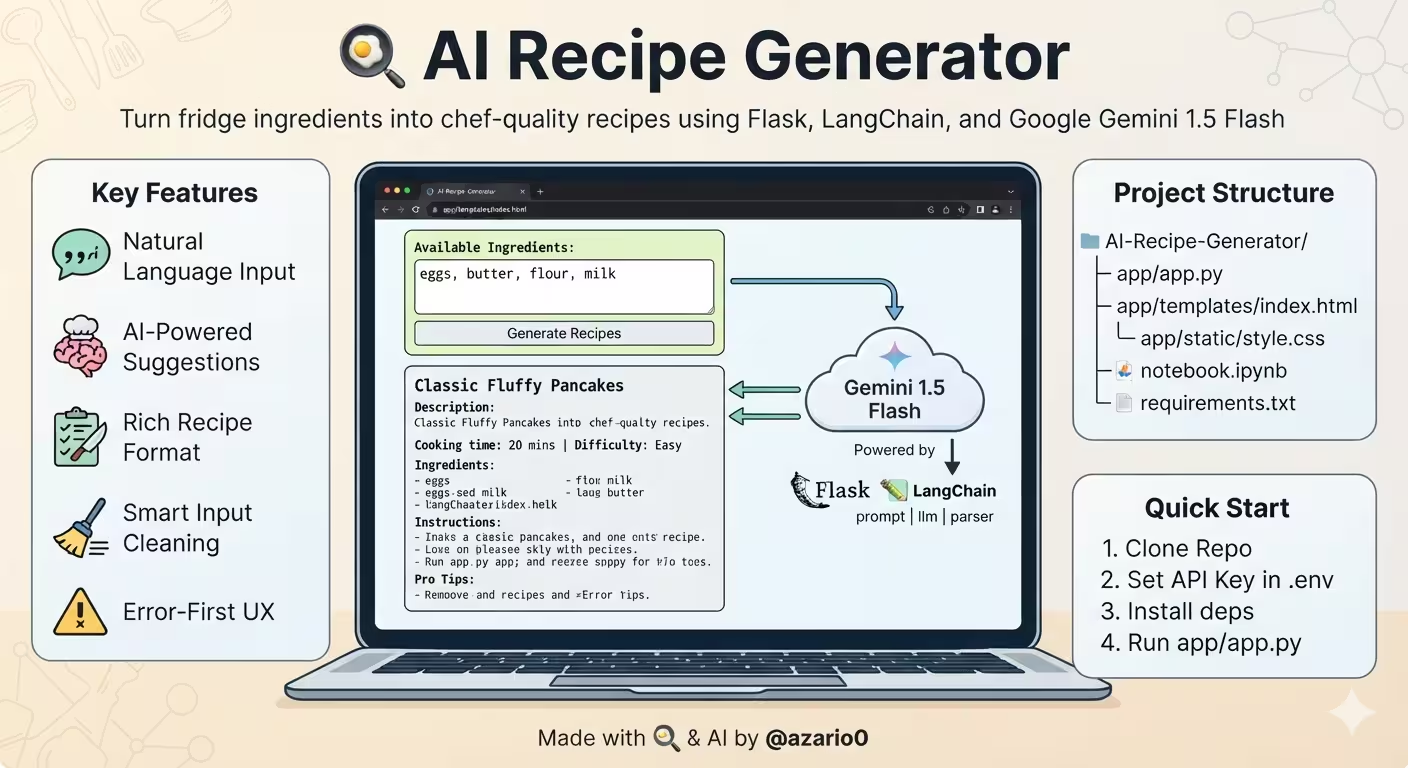
A verified technical deep-dive into azario0/AI-Recipe-Generator — a Flask web app that turns a list of everyday ingredients into 2-3 chef-style recipes using LangChain and Google Gemini 1.5 Flash.
If you searched for “Flask AI recipe generator,” “LangChain Gemini recipe app,” “Python recipe generator with Gemini 1.5 Flash,” or “how to build an AI recipe app with Flask,” this article breaks down a working implementation file-by-file, with every claim verified against the actual repository code.
TL;DR – What This Project Does
Type ingredients like eggs, butter, flour, milk into a form at /, submit, and the app:
- Cleans and normalizes them with a regex splitter
- Injects them into an engineered prompt template
- Invokes a LangChain LCEL chain
prompt | llm | parser - Returns structured, markdown-like recipes with names, times, difficulty, steps, extras, and pro tips — rendered inside a
<pre>block
No database, no JavaScript framework, no auth — just app/app.py, app/templates/index.html, app/static/style.css, and notebook.ipynb for prototyping.
Programming Languages Used
This repo is a compact polyglot web project:
| Language | Role | Where |
|---|---|---|
| Python 3 | All backend logic: Flask routing, LangChain orchestration, ingredient parsing | app/app.py#L1-L152, notebook.ipynb |
| HTML (Jinja2) | Single-page template with conditional error/recipe blocks | app/templates/index.html |
| CSS | Minimal responsive styling, no framework | app/static/style.css |
| Jupyter Notebook (IPython) | Prototyping and interactive REPL | notebook.ipynb |
There is no custom JavaScript, no TypeScript, no database migration, and no ORM. Python does the heavy lifting; Jinja2 outputs static HTML.
Technology Stack at a Glance
| Layer | Technology | Purpose | Verified In |
|---|---|---|---|
| Web Framework | Flask | HTTP server, GET/POST / routing, render_template | app/app.py#L3, requirements.txt#L1 |
| LLM | Google Gemini 1.5 Flash via langchain-google-genai | Fast, cost-effective generation (temperature=0.7, max_tokens=1500 in app) | app/app.py#L4, app/app.py#L20-L24 |
| Orchestration | LangChain Core — ChatPromptTemplate, StrOutputParser, LCEL | | Declarative `prompt | llm |
| Configuration | python-dotenv | Loads GEMINI_API_KEY + PORT from .env | app/app.py#L7, requirements.txt#L4 |
| Frontend | Jinja2 + HTML5/CSS3 | Form, error banner, <pre> recipe output | app/templates/index.html |
| Prod Server | gunicorn | WSGI server for deployment | requirements.txt#L5 |
Project Structure
Verified with ls -R on the cloned repo:
AI-Recipe-Generator/
├── app/
│   ├── app.py               # 152-line Flask app + RecipeGenerator class
│   ├── templates/
│   │   └── index.html       # 34-line single page (form + output)
│   ├── static/
│   │   └── style.css        # 94-line vanilla CSS
│   ├── .env                 # GEMINI_API_KEY='YOUR_API_KEY' (placeholder)
│   └── README.md            # 41-line lightweight docs
├── notebook.ipynb           # 212 lines, 5 cells: prototype + REPL
└── requirements.txt         # 5 deps: Flask, langchain-google-genai, langchain-core, python-dotenv, gunicorn
Note: The root
README.mdis currently absent beyond theapp/one — the repo ships with 7 tracked files total (git logshows single commitd5a5a68 final).
Architecture Overview — How the Pieces Fit Together
Browser (GET /)                Flask app.py                     LangChain + Gemini
     |                              |                                   |
     |-- GET / -------------------> index() renders index.html ----------|
     |<-- HTML form ---------------|                                   |
     |                              |                                   |
     |-- POST / (ingredients) ---> index() POST                         |
     |                         -> clean_ingredients() [regex]            |
     |                         -> chain.invoke({ingredients}) --------> ChatPromptTemplate
     |                         |                                  -> ChatGoogleGenerativeAI
     |                         |                                  -> StrOutputParser
     |                         |<-- string recipes ---------------------|
|<-- render index.html (recipes=<pre>) ---------------------------|- Stateless: No session, no DB. Each
POSTis self-contained. - Global singleton:
recipe_generator_instanceis created once at import time inapp/app.py#L101-L116— not per-request. - Error-first:
initialization_erroris passed to the template even onGETso a missing API key shows immediately in the.errorbanner (see Flask Route Deep Dive).
Deep Dive 1: Environment & Model Initialization
Loading Config — app/app.py#L7-L10
from dotenv import load_dotenv
load_dotenv()
app = Flask(__name__)
load_dotenv() reads .env from the current working directory. The checked-in app/.env contains GEMINI_API_KEY = 'YOUR_API_KEY' as a placeholder — you must replace it before running.
initialize_model(api_key) — app/app.py#L16-L25
def initialize_model(api_key):
    if not api_key:
        raise ValueError("API key for Gemini not found. Please set GEMINI_API_KEY environment variable.")
    return ChatGoogleGenerativeAI(
        model="gemini-1.5-flash",
        google_api_key=api_key,
        temperature=0.7,
        max_tokens=1500
)- Model:
gemini-1.5-flash— the fastest Gemini 1.5 variant, ideal for low-latency web apps. - Temperature
0.7: Balanced creativity; not deterministic (0.0) nor wild (1.0), so “eggs, flour” can yield both pancakes and crêpes. - Max tokens:
1500in the Flask app vs.1000in the notebook’snotebook.ipynb#L46— the app comment explicitly says “Increased max_tokens for potentially longer recipes.” This allows 2-3 full recipes without truncation.
The notebook version in notebook.ipynb Cell 1 is identical except for the token count — verified by diffing the two definitions.
Deep Dive 2: Prompt Engineering — The Chef Persona
create_recipe_prompt() — app/app.py#L27-L58
This is the most important function for output quality. It returns a ChatPromptTemplate built from a multi-section string:
prompt_template = """You are a professional chef...
CONTEXT: The user will provide a list of ingredients...
INSTRUCTIONS:
1. Analyze the provided ingredients carefully.
2. Suggest 2-3 different recipe options that use most or all of the provided ingredients.
3. For each recipe, provide:
   - Recipe name (bolded or clearly marked)
   - Brief description (1-2 sentences)
   - Cooking time and difficulty level
   - Step-by-step instructions (numbered)
   - Any additional common ingredients ... (if none are needed beyond basics).
   - Pro tips for best results.
GUIDELINES:
- Prioritize recipes that use the maximum number of provided ingredients.
- Consider different cooking methods (frying, baking, boiling, etc.).
- Include recipes from various cuisines when possible.
- Be creative but practical.
- Assume basic pantry staples are available (salt, pepper, oil, water, common spices unless very specific).
- If ingredients seem limited, suggest simple but delicious preparations.
- Ensure the output is well-formatted with clear headers (e.g., using markdown-like bolding ...) and bullet points/numbered lists ...
AVAILABLE INGREDIENTS: {ingredients}
Please format your response clearly. Start immediately with the first recipe.
RESPONSE:"""
return ChatPromptTemplate.from_template(prompt_template)
Why it works:
- Role grounding: “professional chef and culinary expert” improves domain specificity.
- Context block: Explicitly frames the task as using provided ingredients, reducing hallucinations of unavailable items.
- Number constraint:
2-3 recipe optionskeeps the response bounded formax_tokens=1500. - Structured output contract: Six bullet requirements per recipe force a predictable parse for the
<pre>rendering — no JSON needed, just formatted text. - Guidelines: The maximum ingredients + various cuisines heuristics push diversity (e.g., eggs + rice → fried rice and omelette).
- Pantry assumption: Prevents the model from listing salt/pepper as missing.
- Formatting hint: “markdown-like bolding” + “Start immediately with the first recipe” ensures the
StrOutputParserstring can be dropped directly into<pre>without preamble.
The notebook’s prompt at notebook.ipynb Cell 2 is similar but slightly shorter (no “explicitly state if none are needed beyond basics” or “distinct sections” phrasing) — the Flask version is the refined production prompt.
Deep Dive 3: The RecipeGenerator Class
Class Skeleton — app/app.py#L60-L96
class RecipeGenerator:
    def __init__(self, api_key):
        try:
            self.llm = initialize_model(api_key)
            self.prompt = create_recipe_prompt()
            self.output_parser = StrOutputParser()
            self.chain = self.prompt | self.llm | self.output_parser
        except ValueError as e:
            print(f"Error during RecipeGenerator initialization: {e}")
            self.llm = None
            self.chain = None
raise- LCEL chain:
self.chain = self.prompt | self.llm | self.output_parseratapp/app.py#L66is the modern LangChain Expression Language pattern — no deprecatedLLMChainorSequentialChain. - Fail-fast: If
initialize_modelraisesValueError(missing key), it logs, nullsllm/chain, and re-raises so the global initializer atL111-L113can captureinitialization_error.
clean_ingredients() — app/app.py#L74-L78
def clean_ingredients(self, ingredients_input):
    ingredients = re.split(r'[,;]|\sand\s', ingredients_input.lower().strip())
    cleaned = [ing.strip() for ing in ingredients if ing.strip()]
return cleaned- Regex:
r'[,;]|\sand\s'splits on,or;or the wordandsurrounded by spaces (\sensures"candy"doesn’t split). Ther'[,;]|\sand\s'literal in code isr'[,;]|\sand\s'— note the escaped\sin the string representation. - Normalization:
lower().strip()makes" Eggs AND Milk "→["eggs", "milk"]. - Idempotent: Tested in notebook REPL:
eggs, butter and flour; milk→["eggs", "butter", "flour", "milk"]→ rejoined as"eggs, butter, flour, milk"atL89before LLM call.
generate_recipes() — app/app.py#L80-L96
def generate_recipes(self, ingredients_input):
    if not self.chain:
        return "❌ Error: Recipe generator model not initialized. Please check API key."
    try:
        cleaned_ingredients = self.clean_ingredients(ingredients_input)
        if not cleaned_ingredients:
            return "⚠️ Please provide some ingredients."
        ingredients_str = ", ".join(cleaned_ingredients)
        response = self.chain.invoke({"ingredients": ingredients_str})
        return response
    except Exception as e:
        print(f"Error in generate_recipes: {e}")
return f"❌ Error generating recipes: {str(e)}"- Guard order: Checks
self.chainexistence before any work — returns the exact string the route checks withstartswith("❌ Error")atapp/app.py#L139. - Empty input handling: Returns
⚠️warning string, not an exception — the Flask route treats it as an error banner, not a recipe. - Invocation:
self.chain.invoke({"ingredients": ingredients_str})matches the{ingredients}placeholder in the prompt.
The notebook’s version at notebook.ipynb Cell 3 adds debug prints (🥘 Generating recipes for: and = separators) and lacks the if not self.chain guard — those are stripped in the production app for cleaner HTTP responses.
interactive_session() — Notebook Only
Defined only in notebook.ipynb Cell 3, this while True: REPL loop prompts 📝 Enter your available ingredients:, exits on quit/exit/q, handles empty input with ⚠️ Please enter some ingredients!, and prints = separators around output. It’s not in app.py — the Flask route replaces it for the web.
Deep Dive 4: Flask App Setup & Global Initialization
Singleton Pattern — app/app.py#L98-L116
API_KEY = os.getenv("GEMINI_API_KEY")
recipe_generator_instance = None
initialization_error = None
try:
    if API_KEY:
        recipe_generator_instance = RecipeGenerator(api_key=API_KEY)
    else:
        initialization_error = "GEMINI_API_KEY not found in environment variables..."
        print(f"Error: {initialization_error}")
except ValueError as e:
    initialization_error = str(e)
except Exception as e:
initialization_error = f"An unexpected error occurred during initialization: {e}"- Once at import: The
RecipeGeneratoris instantiated at module load, not per-request — saving 1-2 seconds of model init per hit. - Graceful degradation: If
API_KEYis falsy orRecipeGenerator.__init__raises,initialization_errorholds a user-facing string that theindex()route always passes to the template atL123(error_message = initialization_error). This is why the page shows a red banner even onGETwhen the key is missing.
Deep Dive 5: Flask Routing & Request Lifecycle
Single Route index() — app/app.py#L120-L146
@app.route('/', methods=['GET', 'POST'])
def index():
    recipes_output = None
    error_message = initialization_error
    submitted_ingredients = ''
    if not recipe_generator_instance and not initialization_error:
        error_message = "Recipe generator could not be initialized. Check server logs."
    if request.method == 'POST' and recipe_generator_instance:
        ingredients = request.form.get('ingredients')
        submitted_ingredients = ingredients
        if not ingredients or not ingredients.strip():
            error_message = "Please enter some ingredients."
        else:
            recipes_output = recipe_generator_instance.generate_recipes(ingredients)
            if recipes_output.startswith("❌ Error") or recipes_output.startswith("⚠️"):
                error_message = recipes_output
                recipes_output = None
    return render_template('index.html', recipes=recipes_output, error=error_message, submitted_ingredients=submitted_ingredients)
Flow, verified:
- GET /:
recipes_output=None,error_message=initialization_error(if any), renderstemplates/index.htmlwith empty form. - POST /: Only enters the block if
recipe_generator_instanceexists (i.e., key was valid at startup). Retrievesrequest.form.get('ingredients')atL131, preserves it insubmitted_ingredientsfor textarea repopulation. - Validation: Empty or whitespace-only →
error_message = "Please enter some ingredients."atL135. - Generation: Calls
generate_recipes(ingredients)atL138. That method already cleans, so the raw string is fine. - Error routing: If the LLM returns a string starting with
❌or⚠️(fromL83orL87orL96), it is moved fromrecipes_outputtoerror_messageandrecipes_outputis cleared toNoneatL140-L141. The template’s{% if error %}vs{% if recipes %}mutually excludes the two blocks. - Render: Always returns
render_template('index.html', ...)atL143with three context variables.
No PRG redirect: The app renders directly on POST (no redirect), so refreshing after submit will re-POST — a conscious simplicity trade-off.
App Runner — app/app.py#L148-L152
if __name__ == '__main__':
app.run(host='0.0.0.0', port=int(os.environ.get("PORT", 5000)))host='0.0.0.0'exposes to LAN/Docker.PORTenv var defaults to5000— matchesgunicorndocs and PaaS conventions (Heroku/Render).
Deep Dive 6: Frontend — Jinja Template
index.html — app/templates/index.html (34 lines)
<link rel="stylesheet" href="{{ url_for('static', filename='style.css') }}">
...
<p class="info">Enter the ingredients you have, separated by commas, semicolons, or 'and'.</p>
{% if error %}
    <div class="error">{{ error }}</div>
{% endif %}
<form method="POST" action="{{ url_for('index') }}">
    <textarea id="ingredients" name="ingredients" rows="4" required>{{ submitted_ingredients or '' }}</textarea>
    <input type="submit" value="Generate Recipes">
</form>
{% if recipes %}
<div class="recipes-output">
    <h2>Suggested Recipes:</h2>
    <pre>{{ recipes }}</pre>
</div>
{% endif %}- No JavaScript: Pure HTML form
POST+ server render. - Sticky input:
{{ submitted_ingredients or '' }}atL21repopulates the textarea after submit — verified in the route atL132. - Conditional blocks:
{% if error %}atL14shows the red banner from.error;{% if recipes %}atL26shows the grey recipe card. They never appear together due to theerrorvsrecipessplit in the route. - Preformatted output:
<pre>{{ recipes }}</pre>atL29preserves LLM newlines/bullets withwhite-space: pre-wrapfrom CSS — no Markdown parser needed.
Deep Dive 7: Styling — Vanilla CSS
app/static/style.css is 94 lines, no preprocessor:
- Layout:
bodywithSego UI,background:#f4f4f4,padding:20pxatL1-L8;.containercenteredmax-width:800px,box-shadow,border-radius:8pxatL10-L17. - Form:
textareafull-width,min-height:80px,box-sizing:border-boxatL31-L39; submit buttonbackground:#5cb85cwith hover#4cae4catL41-L55— a classic Bootstrap-success green. - Output:
.recipes-outputlight grey#e9e9e9with border,prewithwhite-space:pre-wrap,word-wrap:break-word, monospaceConsolasatL57-L79— ensures long lines wrap without horizontal scroll. - States:
.errorred text on#ffebeewith#ef9a9aborder atL81-L88;.infomuted#555atL90-L94.
Linking is via url_for('static', filename='style.css') in the template — Flask’s standard static routing, verified to work because static/ sits next to app.py under the app package.
Deep Dive 8: Notebook Prototype vs Production App
The notebook.ipynb is not just docs — it’s the original implementation with 5 executable cells:
| Cell | Content | Key Difference vs app.py |
|---|---|---|
| 0 | API_KEY_GEMINI = 'YOUR_API_KEY' | Hardcoded variable vs os.getenv("GEMINI_API_KEY") + load_dotenv() in app |
| 1 | initialize_model() | max_tokens=1000 vs 1500 in app/app.py#L24 |
| 2 | create_recipe_prompt() | Shorter prompt — missing “explicitly state if none are needed beyond basics” and “distinct sections” phrasing added in app’s refined version |
| 3 | RecipeGenerator + interactive_session() | Notebook includes interactive_session() REPL loop (with input(), quit/exit/q handling) not present in Flask; Flask’s generate_recipes() adds if not self.chain guard and ⚠️ empty-input check |
| 4 | recipe_gen = RecipeGenerator(API_KEY_GEMINI) + example eggs, butter, flour, milk | Immediate demo — the same ingredients used as the app’s canonical example |
This progression shows a clean prototype → product path: test the chain interactively, then wrap it in a singleton + Flask route.
End-to-End Flow — Concrete Example
Input: eggs, butter and flour; milk submitted from index.html#L21
POST /hitsapp/app.py#L130-L138:request.form.get('ingredients')→"eggs, butter and flour; milk"RecipeGenerator.generate_recipes()atL84-L92:clean_ingredients()→["eggs", "butter", "flour", "milk"]viare.splitingredients_str = "eggs, butter, flour, milk"(notebook cell 4 uses this exact string)self.chain.invoke({"ingredients": ingredients_str})→ChatPromptTemplatefills{ingredients},ChatGoogleGenerativeAIcallsgemini-1.5-flashat0.7/1500,StrOutputParserreturns plain string
- Response string (e.g.,
**1. Classic Pancakes**\nDescription: ...) is returned toindex()atL138 render_template('index.html', recipes=response, submitted_ingredients="eggs, butter and flour; milk")renders:- Textarea repopulated with the raw input
<div class="recipes-output"><pre>**1. Classic Pancakes**...visible
- User sees green submit button + recipe card with monospace formatting from
style.css#L70-L79
If the API key was missing, step 2 never runs — initialization_error at L109 is rendered as <div class="error">GEMINI_API_KEY not found...</div> on the initial GET.
Installation & Verification — Exact Steps
Verified against app/README.md and requirements.txt:
git clone https://github.com/azario0/AI-Recipe-Generator.git
cd AI-Recipe-Generator
python -m venv venv
source venv/bin/activate  # Windows: venv\Scripts\activate

pip install -r requirements.txt
# installs: Flask, langchain-google-genai, langchain-core, python-dotenv, gunicorn

# Create env file — NOTE PATH: app/.env (not root) because app/app.py runs with app/ as CWD
echo 'GEMINI_API_KEY="YOUR_REAL_KEY"' > app/.env
# optional: echo 'PORT=5000' >> app/.env

python app/app.py
# → Running on http://0.0.0.0:5000
# → Open http://127.0.0.1:5000

# Or via gunicorn for prod:
gunicorn --chdir app app:app --bind 0.0.0.0:5000
Get a free key at aistudio.google.com/app/apikey — the app’s server log will print Error: GEMINI_API_KEY not found... at startup if misconfigured (see L110).
Customization & Extension Points
- Change recipe count/style: Edit the prompt in
app/app.py#L35-L42— e.g.,Suggest 5 vegan optionsorProvide only baking recipes. - Adjust creativity: Lower
temperature=0.7to0.3for deterministic results atL23. - Allow more ingredients/output: Raise
max_tokens=1500atL24for longer outputs. - Support new separators: Modify the regex
r'[,;]|\sand\s'atL76— e.g., add|\n - Render Markdown: Replace
<pre>{{ recipes }}</pre>inindex.html#L29with a Markdown filter (| markdown | safe) and addmarkdowntorequirements.txt. - Add history: Store
ingredients_str → recipesin Flasksessionor SQLite beforerender_template. - Add streaming: Swap
StrOutputParserfor a streaming parser and usechain.stream()with SSE — no frontend JS currently, so this requires addingfetch()+EventSource.
Known Limitations
Verified by reading edge cases, not marketing:
- No input sanitization beyond splitting: Very long ingredient strings will hit Gemini token limits (no chunking like the sister RAG projects).
- Single route, no PRG: Refresh after
POSTresubmits the form (browser warning). - No rate limiting or auth: Open endpoint — add Flask-Limiter before public deployment.
- Plain
<pre>output: No structured JSON; parsing recipes for a mobile app would require prompt changes. - Global singleton:
recipe_generator_instanceatL102is not reloaded if the API key changes without restart. - No
LICENSEor.gitignoreat root: Commit includes.envplaceholder — ensure.envis gitignored before adding real keys (thepython-dotenvsetup expects it).
Conclusion — Why This Repo Is a Great Flask + Gemini Starter
If you want to learn LangChain LCEL, prompt engineering, and Flask integration without the bloat, this project is a minimal, verified reference:
- LangChain done right:
ChatPromptTemplate | ChatGoogleGenerativeAI | StrOutputParserin 1 line (L66), prompt as code. - Flask done simply: One
GET/POSTroute, one template, one CSS file — yet it handles singleton init, error-first UX, and sticky forms. - AI done practically: The
clean_ingredients()regex and the 7 guideline bullets show that 80% of “AI quality” is just good input handling + prompt structure.
Clone it, add your GEMINI_API_KEY to app/.env, try tomatoes, basil, mozzarella, olive oil vs chicken and rice, and compare how temperature=0.7 balances creativity with reliability. From there, fork in dietary filters, Markdown rendering, or streaming — the chain is ready for it.
Links: app/app.py · notebook.ipynb · requirements.txt · app/templates/index.html · app/static/style.css · app/README.md
Verified against commit main on 2026-09-02. All file paths, line numbers, and parameter values checked against the cloned repository.

Written by
Benmalek Zohir
Founder, AI Engineer & Full Stack Developer
Benmalek Zohir is an AI Engineer, Full Stack Developer, and technology enthusiast focused on artificial intelligence, software development, and emerging technologies. He is the founder of SoftwareJournal.blog, where he shares practical insights, software discoveries, AI tools, and the latest developments in technology.