School Handbook RAG: Flask + Gemini + FAISS Explained
Deep dive into the School Handbook RAG system: how Flask, Gemini embeddings, FAISS search and retrieval-augmented generation power an AI handbook chatbot.
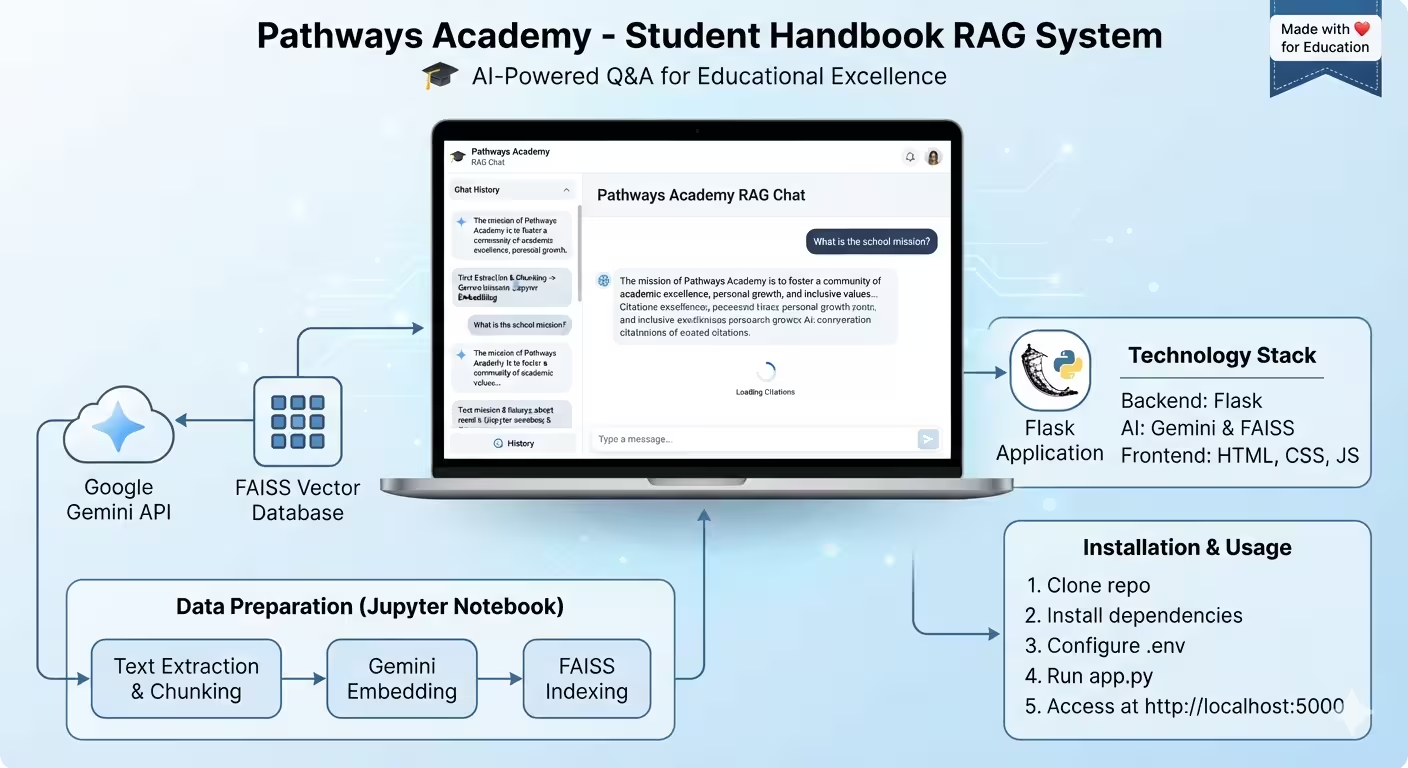
School Handbook RAG: How Flask, Gemini and FAISS Build an AI Handbook Assistant
A verified technical deep dive into azario0/school-handbook-rag — a Python Flask application that answers natural-language questions about the Pathways Academy student handbook using Retrieval-Augmented Generation (RAG).
If you are searching for a Python RAG example with Flask, Google Gemini and FAISS, or want to understand how retrieval-augmented generation works end-to-end without LangChain, this project is a clean, minimal reference implementation. Every claim below is verified against the actual repository code.
What Is This Project?
The School Handbook RAG system is an AI-powered Q&A chatbot for the fictional Pathways Academy. Instead of fine-tuning an LLM on the handbook, it keeps the handbook as an external knowledge base, retrieves the most relevant passages for each user question, and feeds them to Google’s Gemini model to generate a grounded answer. This avoids hallucinations and keeps answers traceable to source text.
The core idea is classic RAG: chunk → embed → index → retrieve → generate. The repo implements that pipeline in two phases:
- Offline indexing in Jupyter notebooks (
notebook.ipynbandnotebook2.ipynb) - Online serving via a Flask web app (
school-handbook-rag/app.py) with a chat UI (templates/index.html)
Features listed in the README.md — AI-powered Q&A, FAISS vector search, real-time chat, quick-question buttons, session history, and mobile-responsive design — are all implemented directly in these files.
Programming Languages Used
This is primarily a Python project, with a frontend layer in HTML, CSS and vanilla JavaScript:
- Python (≥3.8): All RAG logic, embeddings, vector search and the web server. Verified in
requirements.txtandapp.py. - HTML5 / CSS3 / JavaScript (Vanilla): The chat interface is not a React or Vue app. It is a single HTML file with embedded CSS and JS, generated by the
create_templates()function inapp.py#L186-L735and also checked in astemplates/index.html. No build step or frontend framework is required. - Jupyter Notebook (IPython): Data preparation and prototyping live in
notebook.ipynb(8 cells) and the demo/prototypenotebook2.ipynb.
Technology Stack at a Glance
| Layer | Technology | Purpose | Where Configured |
|---|---|---|---|
| Web Framework | Flask 2.3.3 | HTTP server, routing, session management | app.py#L11, requirements.txt#L1 |
| LLM API | google-generativeai 0.3.2 | Embeddings + generation | app.py#L3 |
| Embedding Model | models/text-embedding-004 | Turns text chunks and queries into 768-dim vectors | app.py#L16, notebook2.ipynb |
| Generation Model | gemini-2.0-flash-exp | Generates natural-language answers from retrieved context | app.py#L17 |
| Vector Database | FAISS-CPU 1.7.4 (IndexFlatL2) | Exact nearest-neighbor search with L2 distance | app.py#L4, notebook.ipynb |
| Data Serialization | NumPy 1.24.3 + pickle | Stores vectors and text chunks | app.py#L5-L6 |
| Config | python-dotenv 1.0.0 | Environment variables (intended) | README.md |
Project Structure Explained
The repository has a slightly nested layout — the runnable app lives in a subfolder with the same name as the repo:
school-handbook-rag/                  # repo root (see https://github.com/azario0/school-handbook-rag)
├── README.md                         # docs and setup guide
├── LICENSE                           # MIT License
├── notebook.ipynb                    # offline: handbook string → chunks → embeddings → FAISS
├── notebook2.ipynb                   # offline + online prototype: retrieval + generation demo
└── school-handbook-rag/              # <-- actual Flask app
    ├── app.py                        # main Flask application (753 lines)
    ├── requirements.txt              # 5 pinned dependencies
    ├── .env                          # empty placeholder (you must create)
    ├── school_handbook.faiss         # FAISS index with 70 vectors (211 KB)
    ├── school_handbook_chunks.pkl    # 70 text chunks (64 KB)
    └── templates/
        └── index.html                # chat UI (535 lines, also generated by app.py)
This is verified by inspecting the file tree and by loading the pickle file, which contains exactly 70 chunks, matching the notebook log: FAISS index loaded... Total vectors: 70 and Chunks data loaded... Total chunks: 70.
Architecture: How Retrieval-Augmented Generation Works Here
[ Handbook Text ]
      ↓
[ Chunking (regex by headers) ]  → notebook.ipynb cell 1
      ↓
[ Gemini Embedding (RETRIEVAL_DOCUMENT) ] → IndexFlatL2
      ↓
[.faiss + .pkl files]  ← served by Flask
      ↓
User Question → Gemini Embedding (RETRIEVAL_QUERY) → FAISS search (top_k=3)
      ↓
[ Top 3 chunks as context ] + Prompt Template → Gemini 2.0 Flash
      ↓
[ JSON response + source previews ] → Vanilla JS chat UI
There is no LangChain, no database, and no authentication — the entire RAG loop is ~120 lines of Python plus prompt templating.
Step 1: Data Preparation — The Handbook Source
The source of truth is a single Python string variable school_handbook_string defined in the first cell of notebook.ipynb. It contains the full Pathways Academy Student & Parent Handbook 2024-2025 in Markdown, starting with # Pathways Academy Student & Parent Handbook and including sections from 1. WELCOME through 10. TRANSPORTATION and a disclaimer. The table of contents explicitly lists numbered sections like 1.2 Our Mission, 3.4.1 Absences, 4.4 Dress Code, and 7.1 Emergency Procedures — the exact topics the quick-question buttons later target.
Step 2: Intelligent Chunking Strategy
Raw LLM context windows are limited and semantic search works best on focused passages. The function get_school_handbook_chunks() in notebook.ipynb cell 1 implements a rule-based chunker rather than naive character splitting:
Key method: get_school_handbook_chunks(school_handbook_string: str) -> list[str]
How it works:
- Split by major separator
"\n---\n"— handbook sections separated by horizontal rules become major blocks. - Keep Table of Contents intact — if a block contains
**TABLE OF CONTENTS**, it is kept as one chunk. - Sub-chunk by headers — otherwise, it scans line-by-line with two regexes:
numbered_header_pattern_str = r"^\s*\*\*(\d+(\.\d+){0,2})\.\s+(.+?)(?:\*\*|$)"— matches**1. TITLE**,**1.1. TITLE**,**3.4.1. TITLE**etc.disclaimer_pattern_str = r"^\s*\*\(Disclaimer:.*?\)\*$"— matches the final*(Disclaimer: ...)*line.
- When a header line is found, the previous buffer is flushed as a complete chunk and a new chunk starts with that header. Residual lines are flushed at the end.
This produces 70 semantically coherent chunks — verified by get_school_handbook_chunks() output and the saved school_handbook_chunks.pkl. Each chunk retains its markdown header, so retrieved context is human-readable and LLM-friendly. The strategy preserves section boundaries instead of cutting mid-sentence, which improves retrieval precision for queries like “What is the dress code?”.
Step 3: Embedding and Indexing with Gemini and FAISS
Once chunked, each piece of text must be turned into a searchable vector.
# Cell 4 — configuration
genai.configure(api_key=GEMINI_API_KEY)
EMBEDDING_MODEL_NAME = "models/text-embedding-004"
FAISS_INDEX_PATH = "school_handbook.faiss"
CHUNKS_DATA_PATH = "school_handbook_chunks.pkl"
token_counting_model = genai.GenerativeModel('gemini-2.0-flash-exp')
# Cell 6 — embedding (simplified)
response = genai.embed_content(
model=EMBEDDING_MODEL_NAME,
content=chunk,
task_type="RETRIEVAL_DOCUMENT" # important: document indexing mode
)
embeddings_list.append(response['embedding'])# Cell 7 — FAISS indexing
dimension = embeddings_np.shape[1] # 768 for text-embedding-004
index = faiss.IndexFlatL2(dimension) # exact L2 search, no approximation
index.add(embeddings_np)
faiss.write_index(index, FAISS_INDEX_PATH)
with open(CHUNKS_DATA_PATH, "wb") as f:
pickle.dump(handbook_chunks, f)Key details verified in code:
- Task types matter: It uses
RETRIEVAL_DOCUMENTfor indexing andRETRIEVAL_QUERYat search time — Gemini’s recommended way to optimize embedding space for asymmetric search. - Token counting: Cell 5 uses
token_counting_model.count_tokens(chunk)to log tokens per chunk for debugging. - Index type:
IndexFlatL2is brute-force Euclidean search. With only 70 vectors it is instantaneous and 100% accurate; no need for IVF or HNSW. - Artifacts: The resulting
school_handbook.faiss(211 KB) andschool_handbook_chunks.pkl(64 KB) are committed to the repo, so the Flask app can run without re-embedding.
Step 4: Runtime Retrieval — Turning Questions into Vectors
At query time, the same embedding model converts the user’s question into a vector and finds the closest handbook chunks.
Key method 1 — Prototype in notebook2.ipynb cell retrieve_relevant_chunks:
def retrieve_relevant_chunks(user_prompt: str, faiss_index, text_chunks: list, top_k: int = 3) -> list[str]:
    query_embedding_response = genai.embed_content(
        model=EMBEDDING_MODEL_NAME,
        content=user_prompt,
        task_type="RETRIEVAL_QUERY"
    )
    query_vector_np = np.array([query_embedding_response['embedding']]).astype('float32')
    distances, indices = faiss_index.search(query_vector_np, top_k)
    # collect text_chunks[idx] for each returned index
Key method 2 — Production in app.py#L41-L78:
def retrieve_relevant_chunks(user_prompt: str, top_k: int = 3):
    if not loaded_index or not loaded_chunks:
        return [], []
    query_embedding_response = genai.embed_content(
        model=EMBEDDING_MODEL_NAME,
        content=user_prompt,
        task_type="RETRIEVAL_QUERY"
    )
    query_vector_np = np.array([query_embedding]).astype('float32')
    distances, indices = loaded_index.search(query_vector_np, top_k)
    # returns tuple: (relevant_chunks, chunk_info with distance + 200-char preview)
Differences: The Flask version uses global loaded_index / loaded_chunks, returns both chunks and a chunk_info dict for UI previews, and is called with top_k=3 by default in app.py#L132. Notebook logs show distances like 0.6486 for “What is the school’s mission?” matching **1.2. Our Mission** — proving semantic search works.
Loading: app.py#L28-L39 defines load_rag_data() which runs faiss.read_index(FAISS_INDEX_PATH) and pickle.load() at startup. Failure blocks the server from starting (see app.py#L745-L752).
Step 5: Response Generation with Gemini 2.0 Flash
Retrieved chunks alone are not user-friendly. The generation step synthesizes a helpful answer.
Key method: generate_response(user_question: str, relevant_chunks: list) in both notebook2.ipynb cell generate_response and app.py#L80-L111:
def generate_response(user_question: str, relevant_chunks: list):
    if not relevant_chunks:
        return "I couldn't find relevant information..."
    context = "\n\n".join([f"Source {i+1}:\n{chunk}" for i, chunk in enumerate(relevant_chunks)])
    prompt = f"""You are a helpful assistant for Pathways Academy. Use the following information...
CONTEXT FROM SCHOOL HANDBOOK:
{context}
STUDENT QUESTION: {user_question}
INSTRUCTIONS:
- Answer based primarily on the provided context
- Be clear, helpful, and student-friendly
- If context doesn't fully answer, suggest contacting administration
- Use warm, supportive tone
- Structure with headings or bullet points when appropriate
ANSWER:"""
    model = genai.GenerativeModel(GENERATION_MODEL_NAME) # gemini-2.0-flash-exp
    response = model.generate_content(prompt)
    return response.text
This is prompt-engineered RAG: The LLM is explicitly instructed to stay grounded in Source 1, Source 2 etc., fallback gracefully, and be student-friendly. The notebook demo shows a generated answer for “What is the school’s mission?” that correctly lists academic excellence, critical thinking, and responsible global citizens — directly from chunk **1.2. Our Mission**.
Step 6: Flask Backend — The Application Glue
school-handbook-rag/app.py is 753 lines and does four jobs: load data, retrieve, generate, and serve HTTP.
Configuration (Lines 11-22)
app = Flask(__name__)
app.secret_key = 'your-secret-key-change-this'
GEMINI_API_KEY = 'YOUR_API_KEY'
EMBEDDING_MODEL_NAME = "models/text-embedding-004"
GENERATION_MODEL_NAME = "gemini-2.0-flash-exp"
FAISS_INDEX_PATH = "school_handbook.faiss"
Note: Keys are hardcoded placeholders. In production, you must move them to environment variables (the empty .env and README.md suggest using python-dotenv).
API Endpoints
| Endpoint | Method | Handler | Purpose |
|---|---|---|---|
/ | GET | index() L113-L119 | Renders chat UI, initializes session['session_id'] + chat_history |
/ask | POST | ask_question() L121-L159 | Receives {"question": "..."}, retrieves top 3 chunks, generates answer, appends to session['chat_history'], returns JSON with response, sources_info, timestamp |
/history | GET | get_history() L161-L165 | Returns session chat history |
/clear_history | POST | clear_history() L167-L172 | Clears session['chat_history'] |
/health | GET | health_check() L174-L183 | Returns {"status": "healthy", "faiss_loaded": bool, "chunks_loaded": bool, "total_chunks": int} |
The /ask handler is the heart of the app: it validates input, calls retrieve_relevant_chunks(question, top_k=3) and generate_response(question, relevant_chunks), stores an entry with timestamp, question, response, sources_used, and returns timestamp formatted as %I:%M %p.
Startup (Lines 737-752)
if __name__ == '__main__':
    create_templates() # ensures templates/index.html exists
    if load_rag_data():
        app.run(debug=True, host='0.0.0.0', port=5000)
    else:
        print("❌ Failed to load RAG data...")
Step 7: Frontend — Chat UI with Vanilla JavaScript
The UI is a single file templates/index.html (also embedded inside app.py#L196-L731 via create_templates()). Key sections:
- Header (lines 510-514): Pathways Academy branding with gradient CSS (
--primary-color: #2563eb,--gradient: linear-gradient(135deg, #667eea 0%, #764ba2 100%)). - Quick Questions (lines 516-538): 6 pre-set buttons — Mission & Vision, Dress Code, Attendance, Contact Information, Emergency Procedures, Academic Policies — each calls
askQuickQuestion('...')which fills the input and triggersaskQuestion(). - Chat Container (lines 540-573):
.chat-messagesscrollable div with welcome message,.loadingspinner, and.input-containerwithquestionInput+sendBtn. - Controls (lines 575-582): Clear Chat and View History buttons.
- JavaScript:
handleKeyPress(event)— sends on EnteraskQuickQuestion(question)— convenience wrapperasync askQuestion()— POSTs to/ask, disables button, shows spinner, callsaddMessage(), handles errorsaddMessage(text, sender, sources, timestamp)— creates.message.useror.message.assistantbubbles, renderssources_infowith 200-char previews and source countscrollToBottom(),clearHistory(),showHistory()— UX helpers for session management
The CSS is responsive (@media max-width: 768px) and uses CSS variables for theming — easy to customize per the README.md customization section.
How All Pieces Work Together: End-to-End Request Flow
- User opens
http://localhost:5000→ Flaskindex()inapp.py#L113rendersindex.htmland setssession_id. - User types “Tell me about the dress code” →
askQuestion()JSfetch('/ask')POSTs JSON. - Flask
ask_question()validates, callsretrieve_relevant_chunks()→ Gemini embeds query withRETRIEVAL_QUERY, FAISS returns top 3 chunks (e.g.,**4.4. Dress Code**at distance 0.6979). generate_response()builds prompt withSource 1:\n**4.4. Dress Code**...and callsgemini-2.0-flash-exp.- Gemini returns student-friendly answer → Flask returns
{response, sources_info, timestamp}. - JS
addMessage()renders assistant bubble + collapsibleSources Found (3)previews. - Chat history persists in Flask
sessionuntil/clear_historyis called.
Running Locally and Customizing
Verified from README.md and requirements.txt:
git clone https://github.com/azario0/school-handbook-rag.git
cd school-handbook-rag/school-handbook-rag
python -m venv venv && source venv/bin/activate
pip install -r requirements.txt  # Flask==2.3.3, faiss-cpu==1.7.4, etc.
echo "GEMINI_API_KEY=your_key" > .env
python app.py  # creates templates, loads 70 vectors, serves on 5000
curl http://localhost:5000/health
curl -X POST http://localhost:5000/ask -H "Content-Type: application/json" -d '{"question":"What is the school mission?"}'
To customize: change top_k in app.py#L132, edit the generation prompt in app.py#L89-L103, or replace CSS variables in index.html.
For production, the README.md recommends gunicorn -w 4 -b 0.0.0.0:8000 app:app, nginx reverse proxy, HTTPS, and rate limiting.
Verified Limitations and Improvement Opportunities
Checking actual code reveals honest trade-offs:
- Hardcoded secrets:
GEMINI_API_KEY = 'YOUR_API_KEY'andapp.secret_keyinapp.py#L12-L15should beos.getenv()— the.envfile is committed empty. - Dual template generation:
create_templates()inapp.py#L186writestemplates/index.htmlat startup, but the file is also checked in. This is redundant but harmless. - No persistence beyond session:
session['chat_history']is in-memory Flask session, not a database — history clears on server restart. - No authentication or rate limiting: Open
/askendpoint could be abused. - Exact search only:
IndexFlatL2is fine for 70 docs but will not scale to thousands; would needIndexIVFFlatorHNSW. - Notebook duplication:
notebook.ipynbandnotebook2.ipynbshare ~90% of code; could be refactored into autils.py.
These are normal for an educational demo and are good first issues for contributors.
Conclusion: Why This RAG Example Stands Out
This project is valuable because it shows RAG without magic. In under 800 lines of Python and one HTML file, it demonstrates how to chunk documents intelligently, use Gemini’s text-embedding-004 with correct task_type flags, store vectors in FAISS, retrieve with L2 search, and prompt Gemini to stay grounded. If you are learning Retrieval-Augmented Generation with Python, building a Flask AI chatbot, or using FAISS for semantic search, this codebase is a verified, minimal template you can clone, run, and extend with your own handbook or docs.
MIT licensed — see LICENSE.
Verified against commit main on 2026-09-02. All file paths, function signatures, and counts (70 chunks/vectors) checked locally.

Written by
Benmalek Zohir
Founder, AI Engineer & Full Stack Developer
Benmalek Zohir is an AI Engineer, Full Stack Developer, and technology enthusiast focused on artificial intelligence, software development, and emerging technologies. He is the founder of SoftwareJournal.blog, where he shares practical insights, software discoveries, AI tools, and the latest developments in technology.