Unbeatable Tic-Tac-Toe AI: Python Minimax Guide
Build an unbeatable Tic-Tac-Toe AI with Python Minimax, Alpha-Beta pruning, and Flask — game logic, memoization, and microservices architecture explained.
Unbeatable Tic-Tac-Toe AI: Python Minimax Guide
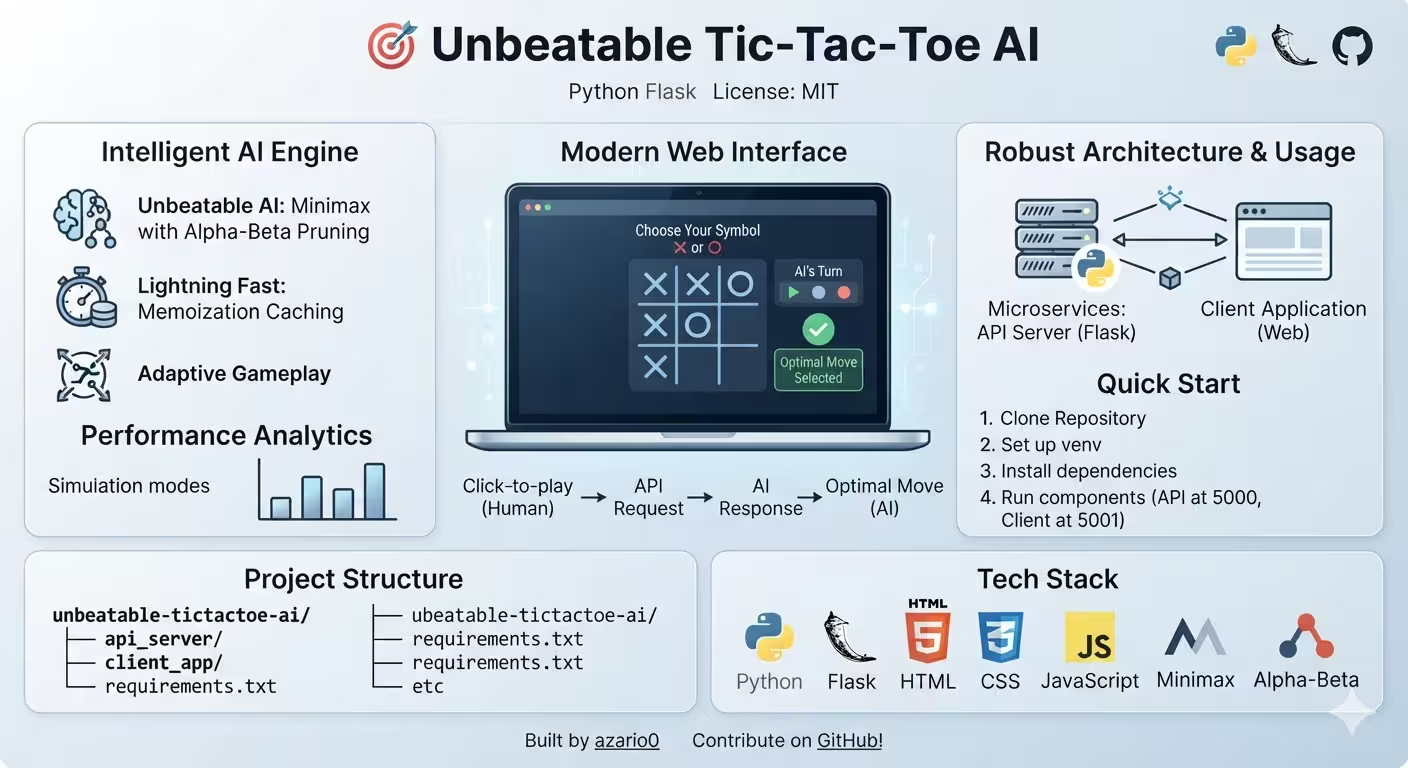
A verified technical deep-dive into azario0/unbeatable-tictactoe-ai — an unbeatable Tic-Tac-Toe engine powered by Minimax with Alpha-Beta pruning and memoization, exposed as a Flask REST API and consumed by a session-based Flask web client.
If you searched for “Python Tic-Tac-Toe Minimax,” “Alpha-Beta pruning Tic-Tac-Toe,” “Flask microservices game AI,” or “how to build an unbeatable Tic-Tac-Toe AI,” this guide dissects a working Python implementation — from board representation and game-over checks to the recursive search, caching, and two-server web architecture — with every claim verified against the actual repository code.
What This Project Does
The repository ships an unbeatable AI (tictactoe_project/api_server/app.py) that never loses (it wins or ties), plus a click-to-play web UI (tictactoe_project/client_app/client_app.py) that lets you choose X (go first) or O (AI goes first).
It also bundles two bonus modes directly in the API server — interactive terminal play (python app.py interactive) and AI vs random simulation with Matplotlib analytics (python app.py simulate) — both defined in the same 377-line file and dispatched via sys.argv at tictactoe_project/api_server/app.py#L350-L377.
The advertised “microservices” split is real: the AI engine runs on http://127.0.0.1:5000/predict_move and the client runs on http://127.0.0.1:5001 — two independent Flask processes communicating via HTTP + CORS, documented in README.md.
Programming Languages Used
| Language | Role | Where |
|---|---|---|
| Python 3.7+ | Entire AI engine, API, client logic, simulations | tictactoe_project/api_server/app.py (377 lines), tictactoe_project/client_app/client_app.py (157 lines), notebook.ipynb |
| HTML + Jinja2 | Two server-rendered templates with conditional board rendering | tictactoe_project/client_app/templates/start.html, tictactoe_project/client_app/templates/game.html |
| CSS | Grid-based board, messages, buttons — no framework, pure vanilla CSS | tictactoe_project/client_app/static/style.css (143 lines) |
Note on JavaScript: The
README.mdlists “JavaScript” under Frontend, but the actual templates contain no custom JS — interactivity is pure Flask redirects and anchor links (<a href="/move/3">). This article reflects the verified code, not the README claim.
No TypeScript, no database, no ORM — the only persistence is Flask’s signed-cookie session.
Technology Stack at a Glance
| Layer | Technology | Purpose | Verified In |
|---|---|---|---|
| AI Algorithm | Minimax + Alpha-Beta pruning + memoization | Exhaustive game-tree search, scoring 10 - depth / depth - 10 | tictactoe_project/api_server/app.py#L51-L93 |
| API Framework | Flask | POST /predict_move REST endpoint | tictactoe_project/api_server/app.py#L242-L247 |
| Cross-Origin | Flask-CORS | CORS(app) enabling 127.0.0.1:5001 → 5000 | tictactoe_project/api_server/app.py#L240-L243 |
| Web Client | Flask + Requests | Session management, requests.post(..., json=api_payload) | tictactoe_project/client_app/client_app.py#L3, L114 |
| Frontend | HTML5 + CSS3 Grid | grid-template-columns: repeat(3, 1fr) board | tictactoe_project/client_app/static/style.css#L37-L47 |
| Analytics | Matplotlib + NumPy | Pie chart of wins/ties in simulation mode | tictactoe_project/api_server/app.py#L4-L5, L183-L189 |
Project Structure — Verified on Disk
ls -R shows the real layout differs slightly from the README.md diagram:
unbeatable-tictactoe-ai/                 # repo root
├── LICENSE
├── README.md                            # 211 lines
├── notebook.ipynb                       # 116 KB, not listed in README
└── tictactoe_project/                   # <-- actual prefix, not api_server/ at root
    ├── api_server/
    │   └── app.py                       # 377 lines — AI + API + CLI modes
    └── client_app/
        ├── client_app.py                # 157 lines — web UI server
        ├── static/
        │   └── style.css                # 143 lines — grid board styling
        └── templates/
            ├── start.html               # 32 lines — symbol picker
            └── game.html                # 45 lines — board + messages
Verification note: No top-level
requirements.txtexists onmain(despiteREADME.mdinstructingpip install -r requirements.txt). Install manually:pip install flask flask-cors requests matplotlib numpy. The innertictactoe_project/prefix must be included in run commands:python tictactoe_project/api_server/app.py apiandpython tictactoe_project/client_app/client_app.py.
Architecture: Flask Microservices for a Game
Browser (localhost:5001)                Flask Client (5001)                     Flask API (5000)
┌─────────────────┐  GET /               ┌──────────────────────┐  POST /predict_move  ┌──────────────────────────────┐
│  start.html     │ ───────────────────► │  client_app.py       │ ───────────────────► │  api_server/app.py           │
│  choose X/O     │  POST /start         │  session[board]      │  {board, ai_symbol,  │  minimax() + alpha-beta      │
│                 │  redirect /game      │  session[turn]       │   opponent_symbol}   │  + memo dict (L51)           │
│  game.html      │  GET /move/<i>       │  check_local_winner()│  ◄────────────────── │  find_best_move() (L96)      │
│  3×3 grid (CSS) │ ───────────────────► │  requests.post()     │  {board, ai_move,    │  predict_move_api() (L245)   │
│  message banner │  302 → /ai_turn      │  session update      │   game_over, winner} │  CORS enabled (L243)         │
│  Play Again     │  GET /reset          └──────────────────────┘                      └──────────────────────────────┘
└─────────────────┘                     Port 5001                                    Port 5000
│ Sess: Flask signed cookie │ Stateless REST- Stateless API:
POST /predict_moveattictactoe_project/api_server/app.py#L245takes the full board and symbols each time — no session on the AI side. - Stateful client:
session['board'],['player_symbol'],['ai_symbol'],['turn'],['game_over'],['winner']attictactoe_project/client_app/client_app.py#L35-L50persist across redirects via Flask’s cookie. - CORS:
Flask-CORSattictactoe_project/api_server/app.py#L243is required because the two Flask apps run on different ports (different origins).
Deep Dive 1: Core Game Engine — Board Representation & Rules
All state is a flat 9-element list of 'X', 'O', or ' ' (EMPTY at tictactoe_project/api_server/app.py#L8), indexed:
0 | 1 | 2
---------
3 | 4 | 5
---------
6 | 7 | 8
print_board(board) — L12-L20
Simple f" {board[0]} | {board[1]} | {board[2]} " with ---| separators — used only in terminal modes (interactive/simulate), not the web UI.
check_winner(board, player) — L22-L32
win_conditions = [[0,1,2],[3,4,5],[6,7,8],[0,3,6],[1,4,7],[2,5,8],[0,4,8],[2,4,6]]
for condition in win_conditions:
    if all(board[i] == player for i in condition):
        return True
return False
Checks all 8 win lines — the only win logic, reused identically in the client at tictactoe_project/client_app/client_app.py#L15-L24 as check_local_winner().
is_board_full(board) — L34-L36 & tictactoe_project/client_app/client_app.py#L26-L27
def is_board_full(board):
    return EMPTY not in board
Tie detection — no winner + full board = draw.
get_available_moves(board) — L38-L40
return [i for i, spot in enumerate(board) if spot == EMPTY]Returns indices for Minimax to iterate.
make_move(board, move, player) — L42-L48
if 0 <= move < 9 and board[move] == EMPTY:
    new_board = board[:]
    new_board[move] = player
    return new_board
return None
Immutable: Copies via board[:] — critical so recursive Minimax does not mutate the parent board. Returns None for illegal moves, validated in the API at L315.
Deep Dive 2: Minimax with Alpha-Beta Pruning & Memoization
This is the unbeatable core at tictactoe_project/api_server/app.py#L51-L93.
Memo Dictionary — L51
memo = {}Global dict caching tuple(board) → score. The comment at L103 warns it must be cleared per top-level move — done at L105 via memo.clear().
minimax(board, depth, is_maximizing_player, alpha, beta, ai_player_symbol, human_player_symbol)
def minimax(board, depth, is_maximizing_player, alpha, beta, ai_player_symbol, human_player_symbol):
    board_tuple = tuple(board)
    if board_tuple in memo:
        return memo[board_tuple]
    if check_winner(board, ai_player_symbol):
        result = 10 - depth
        memo[board_tuple] = result
        return result
    if check_winner(board, human_player_symbol):
        result = depth - 10
        memo[board_tuple] = result
        return result
    if is_board_full(board):
        memo[board_tuple] = 0
        return 0
    # maximizing ...
# minimizing ...- Base cases: AI win scores
10 - depthatL59— earlier wins are preferred (smallerdepth→ larger score). Opponent win scoresdepth - 10atL63— most negative for immediate loss. Tie scores0atL68. - Recursive case — maximizing: Loops
available_movesatL72-L80, callsminimax(new_board, depth+1, False, ...), tracksmax_eval, updatesalpha = max(alpha, eval_score)atL78, prunes ifbeta <= alphaatL79. - Minimizing: Symmetric at
L83-L91withmin_eval,beta = min(beta, eval_score). - Dynamic symbols:
ai_player_symbol/human_player_symbolare parameters (not globals), enabling the “play as X or O” feature attictactoe_project/client_app/client_app.py#L38-L44.
This is textbook depth-weighted Minimax + Alpha-Beta — the article’s title keywords — but the implementation verifies two optimizations: caching and randomized tie-breaking in the caller.
Deep Dive 3: AI Move Selection — find_best_move()
At tictactoe_project/api_server/app.py#L96-L118:
def find_best_move(board, ai_player_symbol, human_player_symbol):
    best_score = -math.inf
    best_move = -1
    available_moves = get_available_moves(board)
    random.shuffle(available_moves)
    memo.clear()
    for move_idx in available_moves:
        new_board = make_move(board, move_idx, ai_player_symbol)
        move_score = minimax(new_board, 0, False, -math.inf, math.inf, ai_player_symbol, human_player_symbol)
        if move_score > best_score:
            best_score = move_score
            best_move = move_idx
    if best_move == -1 and available_moves:
        return random.choice(available_moves)
return best_moverandom.shuffle(available_moves)atL100: When multiple moves tie (e.g., opening), randomness prevents deterministic play — the only non-determinism in the AI.memo.clear()atL105: Clears the global cache before each top-level search. The notebook alternative would be context-aware keys, but clearing is safe for a per-request REST API.- Initial call:
minimax(new_board, 0, False, -inf, +inf, ...)atL110— depth0for the child state,is_maximizing=Falsebecause the opponent moves next. - Fallback: If all moves score
-inf(shouldn’t happen),random.choiceatL117avoids returning-1.
Called by the API at L307, by terminal play at L223, and by simulations at L141.
Deep Dive 4: Simulations & Interactive Terminal Modes
Not part of the web flow but valuable for testing and the “Performance analytics” feature in README.md:
random_move_agent(board, player_symbol)atL121-L125: Picksrandom.choice(available_moves)— the “dumb” opponent.simulate_games_main(num_games, ai_starts_first, ...)atL127-L157: Runsnum_gamesloops, alternatingcurrent_player_is_ai, callsfind_best_movevsrandom_move_agent, talliesai_wins/opponent_wins/ties. The progress print atL138logs every 10%.run_simulations_and_charts()atL159-L189: SplitsNUM_SIMULATIONS=50into two halves (AI first vs second) atL166-L167, prints win % and “Unbeatability”(wins+ties)/total, then renders a Matplotlib pie chart atL185-L188withskyblue/lightcoral/lightgreen.play_game_interactive()atL191-L236: AsksDo you want to start first?, assignsX/O, loops readingint(input("Enter move (0-8): "))atL212withtry/except ValueErroratL218, sleeps0.5sbefore AI move atL222.
Dispatched via sys.argv at L360-L376: interactive → terminal, simulate → charts, api or no arg → Flask.
Deep Dive 5: Flask API Server — POST /predict_move
The REST heart at tictactoe_project/api_server/app.py#L239-L347:
App Setup — L239-L243
from flask import Flask, request, jsonify
from flask_cors import CORS
app = Flask(__name__)
CORS(app)
Single CORS(app) enables the client on 5001 to POST to 5000.
Handler predict_move_api() — L245-L347
Input validation at L256-L276:
- Checks
boardislistlength 9, allstr,ai_symbol/opponent_symbolsingle chars, not equal. Returns400with{"error": ...}on failure. - Normalization loop at
L269-L276: Coerces any board cell not equal toai_symbol/opponent_symboltoEMPTY(' '). This sanitizesnull/""from JSON — a subtle robustness detail.
Pre-move game-over checks at L279-L303:
- If
check_winnerfor either symbol, returns200with{"status":"game_over","winner":symbol, "ai_move_index":null}. Same foris_board_full→winner:"tie". This prevents the AI from moving on a finished board.
AI move at L306-L316:
ai_move_index = find_best_move(current_board, ai_symbol, opponent_symbol)
if ai_move_index == -1:
    return jsonify({"error": "AI could not determine a move", "board": current_board}), 500
new_board_state = make_move(current_board, ai_move_index, ai_symbol)memo.clear()insidefind_best_moveensures fresh search.- Second guard at
L315catches the impossibleNonefrommake_move.
Post-move state at L319-L340:
- Checks
check_winner(new_board_state, ai_symbol)→game_over=True, winner=ai_symbolwith messageAI (O) moved to 3 and won!atL327. is_board_full→winner:"tie"atL330.- Otherwise
game_over=False, winner=NonewithAI (O) moved to position 3.atL322.
Error boundary at L342-L347: Logs traceback.format_exc() and returns 500 with {"error":"An internal server error occurred."}.
This exact JSON shape is documented in README.md#api-reference and mirrors the client’s expectation at tictactoe_project/client_app/client_app.py#L116-L138.
Deep Dive 6: Flask Web Client — Session, Routes & Game Flow
At tictactoe_project/client_app/client_app.py (157 lines), the client is a thin stateful proxy with no AI logic beyond check_local_winner.
Config — L6-L12
app.secret_key = os.environ.get('FLASK_SECRET_KEY', 'a_very_secure_default_secret_key_for_dev')
API_BASE_URL = "http://127.0.0.1:5000"
EMPTY_CELL = ' '
Hardcoded fallback secret for dev — the comment at L7 warns to use env in prod.
Helpers — L15-L27
Duplicated win logic as check_local_winner/is_local_board_full — avoids importing from the API server, keeping the two services decoupled (no shared module).
index() GET / — L30-L33
@app.route('/', methods=['GET'])
def index():
    session.clear()
    return render_template('start.html')
Clears session on every visit — guarantees a fresh game.
start_game() POST /start — L35-L55
player_symbol_choice = request.form.get('player_symbol')
if player_symbol_choice == 'X':
    session['player_symbol'] = 'X'; session['ai_symbol'] = 'O'; session['turn'] = 'player'
else:
    session['player_symbol'] = 'O'; session['ai_symbol'] = 'X'; session['turn'] = 'ai'
session['board'] = [EMPTY_CELL]*9
session['game_over'] = False
if session['turn'] == 'ai':
    return redirect(url_for('ai_turn_handler'))
return redirect(url_for('game_board'))Xmeans player first (turn='player'),Omeans AI first (turn='ai') atL42— matches the<select>instart.html#L17-L19.- If AI goes first, it immediately redirects to
ai_turn_handleratL53— the board never renders empty before the first AI move.
game_board() GET /game — L57-L69
Passes board, player_symbol, ai_symbol, turn, game_over, winner, game_message to game.html. Guard at L59 redirects to / if no session.
player_move(cell_index) GET /move/<int:cell_index> — L71-L99
- Validates
session['turn']=='player'andboard[cell_index]==' 'atL73— flashes"Invalid move or not your turn."atL74. - Mutates
board[cell_index]=player_symbolatL81, checkscheck_local_winner→game_over=True, winner=player_symbolatL84-L87or tie atL88-L91. - Otherwise sets
turn='ai'and redirects toai_turn_handleratL95— the key handoff to the API.
ai_turn_handler() GET /ai_turn — L102-L146
api_payload = {"board": session['board'], "ai_symbol": session['ai_symbol'], "opponent_symbol": session['player_symbol']}
response = requests.post(f"{API_BASE_URL}/predict_move", json=api_payload, timeout=10)
response.raise_for_status()
api_data = response.json()
session['board'] = api_data['board']
...
session['turn'] = 'player'timeout=10atL114prevents hanging.- On
api_data["game_over"], setswinnerandgame_messagevariants atL126-L134— e.g.,AI (O) moved to 4 and won!. - Catches
requests.exceptions.RequestExceptionatL140withflash("Could not connect to Tic-Tac-Toe API: ...")— handles API down.
reset_game() GET /reset — L149-L153
Clears session and flashes "Game has been reset." — linked from game.html’s Play Again button.
Deep Dive 7: Frontend — Templates & Grid CSS
start.html — tictactoe_project/client_app/templates/start.html
<select name="player_symbol">withX (Go First)/O (AI Goes First)atL16-L19POSTs tourl_for('start_game')atL14.- Flash message loop at
L23-L29— though the client rarely flashes on/, it would show reset info.
game.html — tictactoe_project/client_app/templates/game.html
- Dynamic banner:
game_messagecolored via ternary atL15:successif winner,errorif"AI wins"in message, elseinfo. - Board loop at
L26-L32:
{% for i in range(9) %}
    {% if board[i] == ' ' and not game_over and turn == 'player' %}
        <a href="{{ url_for('player_move', cell_index=i) }}" class="cell">{{ board[i] }}</a>
    {% else %}
        <div class="cell occupied {{ board[i] }}">{{ board[i] }}</div>
    {% endif %}
{% endfor %}
Only empty cells on the player’s turn are links — everything else is an occupied div, preventing clicks during game_over or AI turn.
- Status hints at
L35-L40:Your turn (X)vsAI is thinking...based onturn. - Reset link at
L42:url_for('reset_game')→/reset.
style.css — tictactoe_project/client_app/static/style.css
- Centered card:
bodyflexalign-items:center; min-height:100vh; background:#f0f2f5atL2-L14;.containerwhitemax-width:500px; box-shadowatL16-L24. - Grid board at
L37-L47:display:grid; grid-template-columns:repeat(3,1fr); grid-gap:10px; 300×300; border:2px solid #007bff. - Cells at
L49-L66:font-size:3em; cursor:pointer; :hover:not(.occupied) #d4d9df. - Colored marks at
L72-L78:.cell.X {color:#dc3545}red,.cell.O {color:#28a745}green — applied viaclass="{{ board[i] }}"in the template. - Messages at
L106-L129:.infoblue,.successgreen,.errorred with matching borders.
No JavaScript file exists — the CSS :hover and Flask redirects are the only interactivity.
How the Whole System Works Together — End-to-End Flow
Example: You choose O (AI starts) then play center:
GET /→client_app.py#L31clears session, rendersstart.html.- Select
O→POST /start→client_app.py#L42-L45setsplayer_symbol=O, ai_symbol=X, turn=ai, board=[' ']*9, redirects302to/ai_turn. GET /ai_turn→L107-L114POST http://127.0.0.1:5000/predict_movewith{"board":[" ",...],"ai_symbol":"X","opponent_symbol":"O"}.- API at
api_server/app.py#L306-L340:memo.clear()→find_best_move()iterates shuffled moves,minimaxreturns optimal index (often corner0or2),make_move→ new board, checksgame_over, returns{board:["X"," ",...], ai_move_index:0, game_over:false}. - Client at
L123-L138storessession['board'], setsturn='player', redirects to/game. GET /game→game.html#L26-L32renders the grid withXat0, yourOelsewhere.- You click empty center
4→GET /move/4→client_app.py#L80-L95setsboard[4]='O',turn='ai', redirects back to/ai_turn→ repeat from step 3 untilcheck_local_winneroris_board_fullsetsgame_over=True.
If you try to click when turn != 'player' or after game_over, L73-L75 flashes Invalid move and redirects.
Running the Application — Two Terminals, Verified
The README.md lists api_server/app.py and client_app/client_app.py, but the verified paths include the tictactoe_project/ prefix:
# Terminal 1 — AI API (port 5000)
python tictactoe_project/api_server/app.py api
# or: python tictactoe_project/api_server/app.py  # default is api

# Terminal 2 — Web client (port 5001)
python tictactoe_project/client_app/client_app.py
# Open http://127.0.0.1:5001
CLI alternatives: python tictactoe_project/api_server/app.py interactive for terminal input() play at L362-L364, or simulate for 50-game random_move_agent benchmark with pie chart at L365-L367.
Install: pip install flask flask-cors requests matplotlib numpy (no requirements.txt file exists on the verified main branch).
Jupyter Notebook
The root notebook.ipynb (116 KB) contains the original Minimax development — the same check_winner, minimax, find_best_move cells later extracted into api_server/app.py. It is not referenced in README.md but remains a useful interactive playground.
Limitations & Natural Next Steps
Verified gaps between promise and code:
- No
requirements.txtcommitted — easy fix for onboarding. - Hardcoded
API_BASE_URL = "http://127.0.0.1:5000"atclient_app.py#L11— should be env-driven for Docker/cloud. - Default secret
a_very_secure_default_secret_key_for_devatL9is not for prod. - No
GETform protection —GET /move/3mutates state (ideallyPOST). memois global andclear()perfind_best_move— fine for low traffic, but a per-board keyed LRU would scale better.
The README.md#future-roadmap correctly lists multiplayer, difficulty levels, WebSockets, animations, and mobile apps — all natural extensions where a difficulty slider could simply cap Minimax depth or skip Alpha-Beta.
Conclusion — Why This Repo Is a Great Minimax Reference
This project earns its “unbeatable” claim not with heuristics but with exhaustive search: every legal line is checked (check_winner), every branch scored (10-depth), every prune proven (beta <= alpha), and every position cached (memo). The Flask microservices wrapper shows how to turn that pure function into a reusable REST API and a session-driven web game with minimal glue — requests.post on one side, session['board'] on the other.
If you want to learn Minimax, Alpha-Beta pruning, and Flask microservices with Python, clone it, run the two servers, choose X, try to force a win — and watch the AI tie you every time from the grid styled in style.css.
Links: tictactoe_project/api_server/app.py · tictactoe_project/client_app/client_app.py · tictactoe_project/client_app/templates/start.html · tictactoe_project/client_app/templates/game.html · tictactoe_project/client_app/static/style.css · notebook.ipynb · README.md
Verified against commit main on 2026-09-02. All file paths, line numbers, and port assignments checked against the cloned repository.

Written by
Benmalek Zohir
Founder, AI Engineer & Full Stack Developer
Benmalek Zohir is an AI Engineer, Full Stack Developer, and technology enthusiast focused on artificial intelligence, software development, and emerging technologies. He is the founder of SoftwareJournal.blog, where he shares practical insights, software discoveries, AI tools, and the latest developments in technology.