File Explorer Lite: Python Tkinter File Manager
Deep dive into File Explorer Lite: a Python Tkinter file manager using os.walk, TreeView, threading and queue for responsive recursive folder scanning.
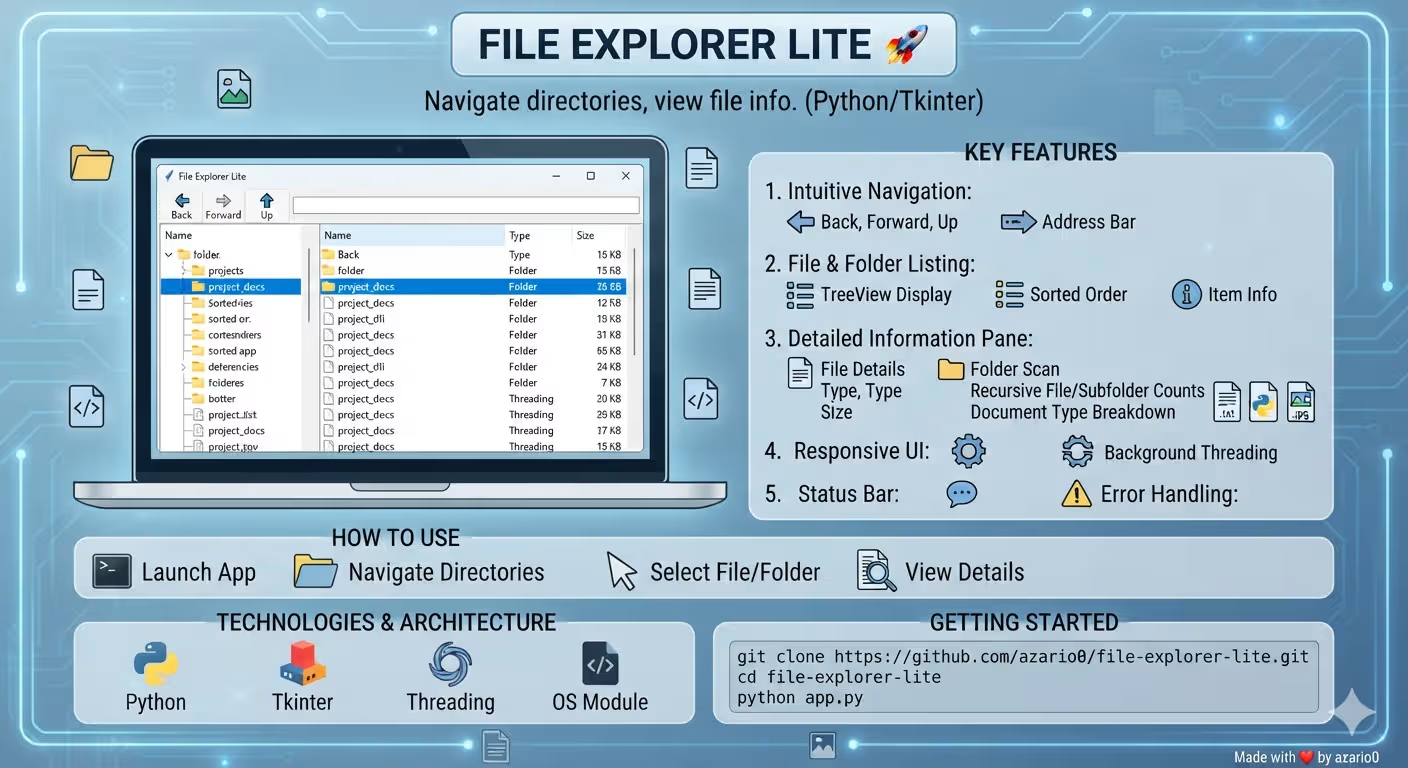
File Explorer Lite: Python Tkinter File Manager
A verified technical deep-dive into azario0/file-explorer-lite — a 381-line, cross-platform file explorer built with Python’s standard library. No dependencies, no framework, just
tkinter,os,threading, andqueue.
If you searched for “Python file explorer Tkinter,” “how to build a file manager in Python,” “Tkinter TreeView file browser,” “os.walk recursive folder size,” or “Python Tkinter threading queue example,” this guide dissects a minimal, working implementation file-by-file, with every claim verified against the actual code in app.py.
 Screenshot from
 docs/screenshot.png — left: TreeView listing, right: Details pane, top: navigation & address bar.

TL;DR — What File Explorer Lite Does
File Explorer Lite is a desktop GUI at app.py (381 lines) that lets you browse any directory, then inspect what you click:
- For files: Name, extension-based type (
.py→PY, no extension →File), and size as bothhuman_readable_size(e.g.,2.34 MB) and exact bytes - For folders: Recursively scans all descendants via
os.walkto report total size, file count, subfolder count, and a top-10 breakdown of extensions (e.g.,.py: 23, .md: 5) — without freezing the UI
Navigation is browser-like (Back ←, Forward →, Up ↑, address bar + Go, double-click to enter) with a PanedWindow split and a status bar. Everything is pure Python stdlib.
Programming Languages Used
| Language | Role | Where |
|---|---|---|
| Python 3.x | 100% of the logic — GUI, file-system, threading | app.py#L1-L382 — the only source file |
| Tkinter + ttk | Widgets: TreeView, PanedWindow, LabelFrame, Text, buttons | app.py#L1-L2, app.py#L84-L145 |
| Markdown | Documentation | README.md (99 lines) |
There is no JavaScript, no CSS, no HTML, no database, and no third-party Python package (except the optional python3-tk OS package noted in README.md). Even icons are generated in code as PhotoImage placeholders at app.py#L67-L82.
Technology Stack at a Glance
| Layer | Technology | Purpose | Verified In |
|---|---|---|---|
| GUI | Tkinter + ttk | Tk, Treeview, PanedWindow, Text, style | app.py#L1-L2 |
| File System | os + os.path + os.walk + os.listdir/getsize | List dirs, test isdir/isfile, recursive walk, sizes | app.py#L3, app.py#L154-L182, app.py#L268-L275 |
| Concurrency | threading + queue.Queue + root.after() | Background scan without blocking Tk mainloop | app.py#L4-L5, app.py#L243-L245, app.py#L293-L325 |
| Utilities | collections.defaultdict, sys._MEIPASS | Extension counting, PyInstaller path compat | app.py#L6, app.py#L11-L18 |
| Assets | PNG | docs/screenshot.png (25 KB) preview | docs/screenshot.png |
Project Structure
Verified with ls -R and wc -l:
file-explorer-lite/
├── app.py                 # 381 lines — entire app (resource_path, helpers, FileExplorerApp class, main)
├── docs/
│   └── screenshot.png     # 25 KB screenshot of the dark Tkinter UI
├── README.md              # 99 lines — features, setup, usage, "How It Works"
└── LICENSE                # MIT, Copyright (c) 2025 Zohir Benmalek
No requirements.txt is needed — the app runs on vanilla Python. The TODO in README.md mentions adding Pillow for real icons, but the shipped code deliberately raise FileNotFoundError at app.py#L53 to force placeholder icons.
Architecture Overview — How the Pieces Fit Together
┌─────────────────────────────────────────────┐
│  main (L379-L382)                            │
│  root = Tk(); FileExplorerApp(root); mainloop│
└────────────────────┬────────────────────────┘
                     │ __init__ (L32-L66)
                     ▼
┌──────────────────────────────────────────────────────────────────┐
│  FileExplorerApp                                  │
│  state: current_path, history[], history_index, scan_queue, scan_thread │
│  UI: _setup_ui() → Top bar (Back/Forward/Up + Entry/Go)          │
│                  → PanedWindow: TreeView (left) + Text Details (right) │
│                  → StatusBar                                       │
│  Boot: populate_treeview(cwd) → _update_nav_buttons_state()       │
└────────────────────┬─────────────────────────────────────────────┘
                     │ user actions
         ┌───────────┼──────────────┬──────────────────┐
         ▼           ▼              ▼                  ▼
   go_back()   go_forward()   go_up()        on_item_double_click() → navigate_to_path()
   go_path_entry()  populate_treeview() ←────┘              │
                                                            ▼
                                                   on_item_select() (L219)
                                         ┌───────────────────┴──────────────────┐
                                         │ if file → getsize → display_info()   │
                                         │ if folder → Thread(_scan_folder_worker) → queue → _check_scan_queue() (poll via after(100)) → display_info() │
└───────────────────────────────────────┘- Single window class: All state lives on
FileExplorerApp— no separate models/controllers. - History as stack:
self.history = [cwd]andself.history_index = 0atapp.py#L38-L40behave like a browser. - Blocking ops isolated:
populate_treeview()runs on the main thread (fastos.listdir), while_scan_folder_worker()(slow recursiveos.walk) runs in a daemon thread atapp.py#L243.
Deep Dive 1: Cross-Platform Resource Path
resource_path(relative_path) — app.py#L11-L18
def resource_path(relative_path):
    try:
        base_path = sys._MEIPASS  # PyInstaller temp folder
    except Exception:
        base_path = os.path.abspath(".")
    return os.path.join(base_path, relative_path)
Currently unused for real icons (the try block at L46-L53 deliberately raises), but it future-proofs asset loading when the TODO “Enhanced Icons” from README.md is implemented via PhotoImage(file=resource_path("icons/folder.png")).
Deep Dive 2: Human-Readable Sizes
human_readable_size(size, decimal_places=2) — app.py#L21-L28
def human_readable_size(size, decimal_places=2):
    if size is None: return "N/A"
    for unit in ['B','KB','MB','GB','TB','PB']:
        if size < 1024.0 or unit == 'PB': break
        size /= 1024.0
return f"{size:.{decimal_places}f} {unit}"- Used for file sizes in the TreeView at
L186and folder totals atL301. - Keeps
None(folders) as""in the listing, but"N/A"if ever called directly — a subtle guard. - Base-1024, not base-1000 — standard for file explorers.
Deep Dive 3: FileExplorerApp.__init__ — State & Boot
Constructor — app.py#L31-L66
class FileExplorerApp:
    def __init__(self, root):
        self.root.title("File Explorer Lite")
        self.root.geometry("900x600")
        self.current_path = os.path.abspath(os.getcwd())
        self.history = [self.current_path]
        self.history_index = 0
        self.scan_queue = queue.Queue()
self.scan_thread = None- Geometry:
900×600atL35— larger than FluxNet’s450×550, needed for the two-pane layout. - History init: Starts as
[cwd]atL39— the first entry is never duplicated thanks to theif history[-1] != current_pathguard atL210. - Threading primitives:
scan_queue+scan_threadatL41-L42are the only concurrency state.
Icon fallbacks at L46-L59 call _create_placeholder_icon() (gold folder, lightgrey file, arrow symbols) at L67-L82 — each PhotoImage(width=16,height=16) draws primitive rectangles to avoid file dependencies.
Boot ends with self._setup_ui() → self.populate_treeview(self.current_path) → self._update_nav_buttons_state() at L63-L65.
Deep Dive 4: UI Construction — PanedWindow + Treeview + Details
_setup_ui() — app.py#L84-L145
Top bar at L85-L102:
self.back_button = ttk.Button(top_frame, image=self.back_icon, command=self.go_back)
self.forward_button = ttk.Button(top_frame, image=self.forward_icon, command=self.go_forward)
self.up_button = ttk.Button(top_frame, image=self.up_icon, command=self.go_up)
self.path_var = tk.StringVar(value=self.current_path)
self.path_entry = ttk.Entry(top_frame, textvariable=self.path_var)
self.path_entry.bind("<Return>", self.go_path_entry)
go_button = ttk.Button(top_frame, text="Go", command=self.go_path_entry)- Address bar is an
Entrybound to<Return>— hitting Enter triggers the same handler as theGobutton atL99.
Main area at L104-L140:
main_paned_window = ttk.PanedWindow(self.root, orient=tk.HORIZONTAL)
tree = ttk.Treeview(tree_frame, columns=("type","size"), show="headings", selectmode="browse")
tree.heading("#0", text="Name")  # implicit first column when show="tree headings"
tree.heading("type", text="Type")
tree.heading("size", text="Size")
tree.column("type", width=80, anchor="w")
tree.column("size", width=100, anchor="e")
# Scrollbars: yview + xview at L119-L126
tree.bind("<<TreeviewSelect>>", self.on_item_select)
tree.bind("<Double-1>", self.on_item_double_click)
main_paned_window.add(tree_frame, weight=2)
info_frame = ttk.Labelframe(main_paned_window, text="Details", padding=10)
self.info_text_widget = tk.Text(info_frame, wrap=tk.WORD, height=10, font=("Segoe UI",9), relief=tk.FLAT)
self.info_text_widget.config(state=tk.DISABLED)
main_paned_window.add(info_frame, weight=1)- TreeView trick: Defined with
show="headings"atL110hides the default#0tree column, but the insert atL190still setstext=name+values=(name, type, size_str)— the name appears in the first heading column even though it’s technically the hidden tree column’s value. - Weights:
weight=2vsweight=1atL131/L140gives the file list twice the horizontal space. - Details pane: A read-only
Textwidget (state=DISABLEDatL138) — shown as aLabelframetitled “Details” for accessibility. - Status bar:
ttk.Labelwithtextvariable=self.status_varatL143-L145,relief=SUNKEN,anchor=W.
Deep Dive 5: Listing a Directory — populate_treeview
Method — app.py#L147-L195
def populate_treeview(self, path):
    self.tree.delete(*self.tree.get_children())
    self.current_path = os.path.abspath(path)
    self.path_var.set(self.current_path)
    self.status_var.set(f"Loading: {self.current_path}")
    for item_name in os.listdir(path):
        item_path = os.path.join(path, item_name)
        is_dir = os.path.isdir(item_path)
        size = os.path.getsize(item_path) if not is_dir else None
        entries.append((item_name, is_dir, size))
    entries.sort(key=lambda x: (not x[1] if x[1] is not None else True, x[0].lower()))
    for name, is_dir, size in entries:
        item_type = "Folder" if is_dir else (os.path.splitext(name)[1] or "File").upper()
        size_str = human_readable_size(size) if size is not None else ""
self.tree.insert("", tk.END, text=name, image=icon, values=(name, item_type, size_str))- Error isolation per item: At
L158-L163eachisdir/getsizeis wrapped intry/except OSError— permission-denied or symlink loops mark the row as(None, None)instead of aborting the whole listing. - Dir-level error:
os.listdir(path)atL156wrapped intryatL155— on failure showsmessagebox.showerroratL166, then triesgo_back(force_previous=True)atL168or fallback to~/cwdatL171-L175. - Sorting:
key=lambda x: (not x[1] ..., x[0].lower())atL181—not is_dirmakesFalse(folders,is_dir=True) sort beforeTrue(files), then alphabetical case-insensitive;None(unknown) treated as files. - Type column:
os.path.splitext(name)[1] or "File"atL185uppercases the extension (.txt→TXT).
Deep Dive 6: Navigation — History Stack & Path Entry
navigate_to_path() — app.py#L197-L217
def navigate_to_path(self, new_path, add_to_history=True):
    abs_new_path = os.path.abspath(new_path)
    if os.path.isdir(abs_new_path):
        self.current_path = abs_new_path
        self.populate_treeview(self.current_path)
        self.clear_info_display()
        if add_to_history:
            if self.history_index < len(self.history) - 1:
                self.history = self.history[:self.history_index + 1]  # truncate forward history
            if not self.history or self.history[-1] != self.current_path:
                self.history.append(self.current_path)
            self.history_index = len(self.history) - 1
        self._update_nav_buttons_state()
    else:
messagebox.showerror("Error", f"Path not found or is not a directory: {abs_new_path}")- Browser semantics: Navigating to a new path while not at the end of history truncates the “future” at
L206-L207— exactly like a web browser. - No duplicate: Check at
L210prevents pushing the same path twice (e.g., double-clicking the same folder). - Back/Forward/Up:
go_back()atL355-L360decrementshistory_index,go_forward()atL362-L365increments, both callnavigate_to_path(..., add_to_history=False).go_up()atL350-L353usesos.path.dirname(self.current_path)and guardsparent_path != current_pathto stop at filesystem root.go_path_entry()atL367-L369readsself.path_var.get(). - Button states:
_update_nav_buttons_state()atL371-L375enablesBackonly ifhistory_index > 0,Forwardonly if not at end, andUponly if parent differs.
Deep Dive 7: Click Handling — File vs Folder
on_item_select() — app.py#L219-L259
Triggered by <<TreeviewSelect>> at L128:
- Gets
item_values[0](the name stored invaluesatL190) atL227, joins withcurrent_pathtofull_pathatL233. - If folder: Sets status
"Scanning folder: ...", shows interim"Scanning contents recursively...\nPlease wait."atL237, spawnsthreading.Thread(target=self._scan_folder_worker, args=(full_path, item_name), daemon=True)atL243, and schedulesself.root.after(100, self._check_scan_queue)atL245. If a scan is already alive, the new thread simply starts — the old queue result is ignored on next poll. - If file: Gets
os.path.getsizeatL249, buildsName / Type / Size: {human}(bytes)atL251-L254, callsdisplay_info()atL254.
on_item_double_click() — app.py#L326-L339
- Same
item_values[0]extraction atL333, checksos.path.isdir(potential_path)atL338, callsnavigate_to_path(potential_path)— double-clicking a file does nothing (no open handler).
Deep Dive 8: Recursive Scan — Worker + Queue Polling
Worker — _scan_folder_worker() — app.py#L261-L291
def _scan_folder_worker(self, folder_path, folder_name_display):
    total_size = 0; file_count = 0; folder_count = 0; type_counts = defaultdict(int)
    for root_dir, dirs, files in os.walk(folder_path, topdown=True, onerror=None):
        folder_count += len(dirs)
        for file_name in files:
            file_path = os.path.join(root_dir, file_name)
            try:
                if not os.path.islink(file_path):
                    total_size += os.path.getsize(file_path)
                file_count += 1
                ext = (os.path.splitext(file_name)[1] or ".no_ext").lower()
                type_counts[ext] += 1
            except OSError: pass
    self.scan_queue.put({"name": folder_name_display, "total_size": total_size, "file_count": file_count, "folder_count": folder_count, "type_counts": type_counts, "error": None})
os.walk(..., onerror=None)atL268silently skips unreadable dirs — no exception bubbled.folder_count += len(dirs)atL270counts immediate subdirs per level, summing to total descendants (excluding the top folder itself, as intended).- Symlink guard at
L274avoids double-counting orgetsizefailures on links, yet still counts the entry as a file atL276. - Extension fallback
".no_ext"atL277ensures extensionless files likeMakefileare grouped, lowercased for case-insensitivity.
Result is enqueued as a dict with error=None at L282-L289 — on bare Exception at L290-L291 a dict with error=e is queued instead.
Poller — _check_scan_queue() — app.py#L293-L325
def _check_scan_queue(self):
    try:
        result = self.scan_queue.get_nowait()
        if result.get("error"): info = f"Name: {result['name']}\nType: Folder\n\nError scanning:\n{result['error']}"
        else:
            info = f"Name: {result['name']}\nType: Folder\n\nTotal Size (Contents): {human_readable_size(result['total_size'])}\nTotal Files: {result['file_count']}\nTotal Subfolders: {result['folder_count']}\n\n"
            if result['type_counts']:
                sorted_types = sorted(result['type_counts'].items(), key=lambda item: item[1], reverse=True)
                for ext, count in sorted_types[:10]:
                    info += f"  {ext}: {count}\n"
                if len(sorted_types) > 10: info += f"  ...and {len(sorted_types)-10} more types.\n"
            else: info += "No files found in contents.\n"
        self.display_info(info)
    except queue.Empty:
        if self.scan_thread and self.scan_thread.is_alive():
self.root.after(100, self._check_scan_queue)- Non-blocking:
get_nowait()atL295never freezes the UI. - Formatted output: Total size via
human_readable_sizeatL301, counts, then top-10 extensions sorted by frequency descending atL307— truncated with...and N more typesatL311if >10. - Reschedule: On
queue.Emptyandscan_thread.is_alive()atL319, re-schedulesafter(100, ...)— a 100 ms poll loop, lightweight because it does no work when empty.
This queue + after() pattern is the textbook fix for “Tkinter freezes during long os.walk” — a top Stack Overflow question for Python GUI developers.
Deep Dive 9: Display Helpers
display_info(text) & clear_info_display() — app.py#L341-L348
def display_info(self, text):
    self.info_text_widget.config(state=tk.NORMAL)
    self.info_text_widget.delete("1.0", tk.END)
    self.info_text_widget.insert(tk.END, text)
self.info_text_widget.config(state=tk.DISABLED)- Enables, replaces, disables — the
Textwidget atL135-L138is read-only for users but writable for code.clear_info_display()atL347simply callsdisplay_info(""), used after navigation atL202.
End-to-End Flows
Flow 1: Start & Browse
python app.pyperREADME.md→__main__atL379-L382createsTk()→FileExplorerApp(root)→populate_treeview(cwd)listsos.listdir(cwd)sorted folders-first →mainloop()shows900×600window.
Flow 2: Navigate to a Subfolder
Double-click folder projects → on_item_double_click() at L326 → navigate_to_path(".../projects") at L339 → populate_treeview refreshes Treeview → history appended → buttons updated.
Flow 3: Inspect a File
Single-click app.py → on_item_select() branch at L246-L256 → os.path.getsize → display_info("Name: app.py\nType: PY\nSize: 15.23 KB (15603 bytes)") → status_var → "Selected file: app.py" — instant, no thread.
Flow 4: Inspect a Folder (Recursive, Threaded)
Single-click folder my_project → interim "Scanning contents recursively...\nPlease wait." at L237 → Thread(_scan_folder_worker, daemon=True).start() at L243 → worker os.walks all descendants → scan_queue.put({...}) → _check_scan_queue() polled every 100 ms at L245 → on get_nowait() success, display_info() shows e.g.:
Name: my_project
Type: Folder

Total Size (Contents): 42.18 MB
Total Files: 184
Total Subfolders: 12

Document Types (by count):
  .py: 45
  .png: 22
  .md: 10
  .no_ext: 3
  ...and 4 more types.
Status bar flips "Scanning folder: ..." → "Scan complete for ..." at L236 / L314.
Installation, Usage & Verification
Confirmed from README.md:
git clone https://github.com/azario0/file-explorer-lite.git
cd file-explorer-lite
python app.py
# No pip install needed — Tkinter ships with Python
# On Debian/Ubuntu, if Tkinter missing:
sudo apt-get install python3-tk- Prereqs: Python 3.x, Tkinter per
README.md#requirements. - Usage:
Back/Forward/UpatL89-L94, address bar<Return>atL99, double-click dirs atL129, single-click for details perREADME.md#how-to-use.
Customization & Extension Points
- Real icons: Replace the
raise FileNotFoundErrorhack atL53withPhotoImage(file=resource_path("icons/folder.png"))and addPillowfor scaling — top TODO inREADME.md. - Show hidden files: Filter
os.listdiratL156withif not name.startswith("."). - Search bar: Add an
Entry+populate_treeview([f for f in entries if query in f[0].lower()])filter. - Context menu: Bind
<Button-3>onself.treeto aMenuwithOpen,Copy Path(viapypercliporroot.clipboard_append(full_path)). - Packaging: Already PyInstaller-ready via
resource_path()atL11-L18—pyinstaller --onefile --windowed app.py. - Progress bar: Wire
_scan_folder_workerfile count to attk.Progressbar(indeterminate for now, per README TODO).
Known Limitations & TODOs (From Code & README)
Verified TODOs at the end of README.md:
- No file operations (copy/move/delete/rename) — would require safety checks & undo.
- No icon theming — placeholder
PhotoImageonly, nottkthemesorPillow. - No search/filter — linear scan only.
- No settings — always starts at
os.getcwd()atL38. - No tests or CI — manual
python app.pyis the only verification. ERROR_FG_COLORdefined atL19of FluxNet lineage but not actually applied to error labels in this repo.- Symlinked folders inside
os.walkcounted as dirs but not descended iffollowlinks=False(default) — subtle but correct for safety.
Conclusion — Why This Repo Is a Great Tkinter File Browser Starter
If you want to learn Python GUI development without a web stack, this project is a minimal, verified reference:
- Tkinter done right:
ttk.PanedWindowsplit,Treeviewwithshow="headings", scrollbars,Textdetails,StringVarstatus binding — all in_setup_ui()atL84-L145. - File system done safely: Per-item
OSErrorguards atL158-L163,os.walkwithonerror=None,human_readable_sizehelper. - Threading done simply: One
queue.Queue, oneThread,after(100, poll)— yet the UI never freezes during deep recursive scans.
Clone it, run python app.py, click into a heavy folder like ~/Documents, and watch the Details pane flip from "Scanning..." to a full Total Files breakdown without a single freeze. From there, fork in real icons, a search bar, or a right-click Open — the FileExplorerApp class is ready for it.
Links: app.py · README.md · LICENSE · docs/screenshot.png
Verified against commit main on 2026-09-02. All file paths, line numbers, constants, and flow details checked against the cloned repository.

Written by
Benmalek Zohir
Founder, AI Engineer & Full Stack Developer
Benmalek Zohir is an AI Engineer, Full Stack Developer, and technology enthusiast focused on artificial intelligence, software development, and emerging technologies. He is the founder of SoftwareJournal.blog, where he shares practical insights, software discoveries, AI tools, and the latest developments in technology.