Building a Cross-Platform Zip & Unzip GUI Tool with Python and Tkinter
A deep dive into the zip_unzip_tk open-source project, exploring how Python, Tkinter, and threading come together to create a responsive, user-friendly file compression and extraction application without any external dependencies.
Building a Cross-Platform Zip & Unzip GUI Tool with Python and Tkinter
Managing compressed files is a daily task for many computer users. While there are countless proprietary tools available, building your own lightweight, cross-platform solution is surprisingly straightforward.
In this article, we’ll explore the zip_unzip_tk open-source repository. We’ll break down the programming language used, the core methods, and how all the pieces work together to create a seamless graphical user interface (GUI) for zipping and unzipping files.
🐍 Language and Dependencies
The entire application is written in Python 3.x. What makes this project particularly elegant is its reliance 100% on Python’s standard library. There are no third-party packages (like PyQt or customtkinter) required to run it.
The key modules used are:
tkinterandttk: For building the graphical user interface and themed widgets.zipfile: For reading, writing, and extracting ZIP archive files.os: For interacting with the operating system, handling file paths, and directory traversal.threading: For running compression/extraction tasks in the background to prevent the GUI from freezing.shutil: For high-level file operations, specifically copying file objects during extraction.
🏗️ Core Architecture and UI Design
The application is encapsulated within a single class: ZipperApp. This object-oriented approach keeps the state (like selected files and status messages) neatly organized.
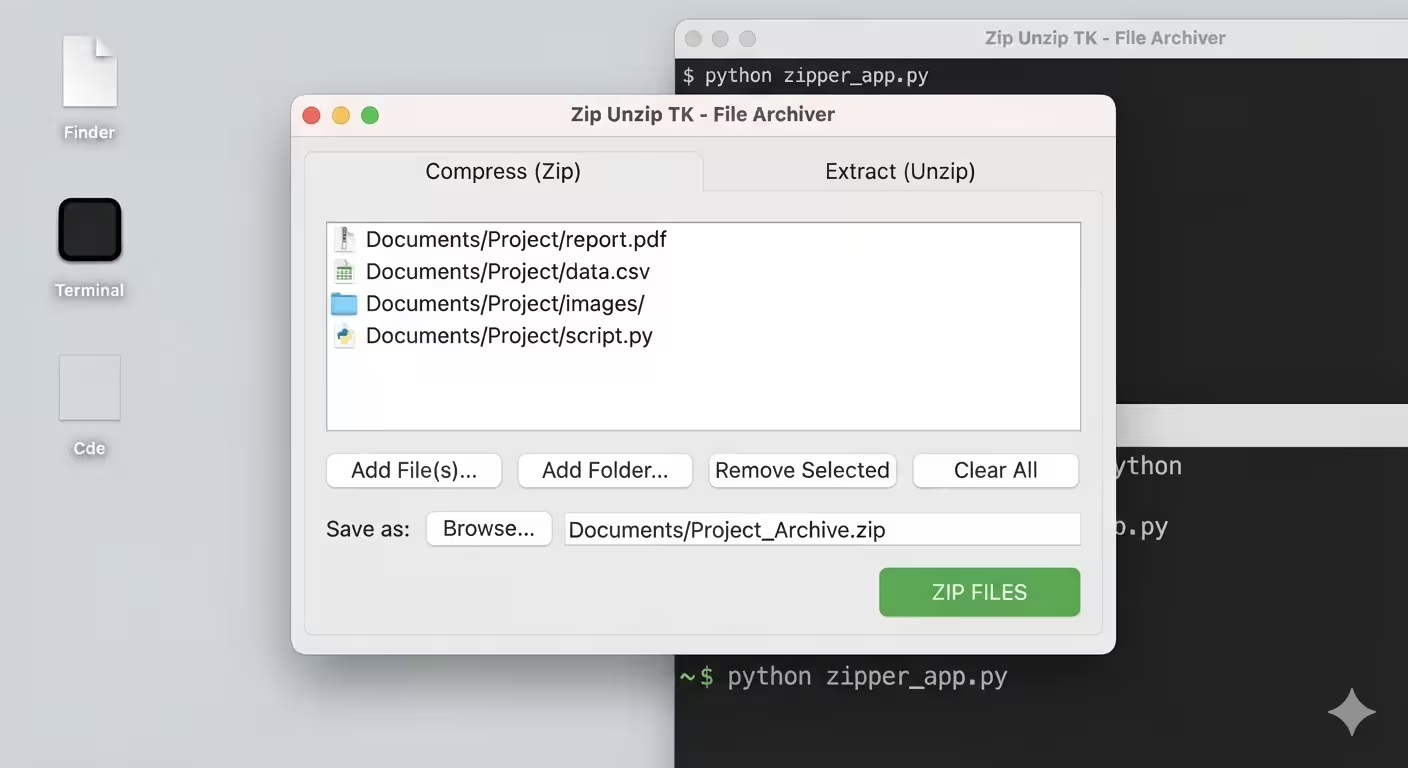
Upon initialization, the app sets up a main window (root) and applies the "clam" theme via ttk.Style for a cleaner, more modern aesthetic. The core of the UI is a ttk.Notebook, which provides a tabbed interface with two distinct sections:
- Compress (Zip): For selecting multiple files/folders and bundling them.
- Extract (Unzip): For choosing an existing
.zipfile and a target destination.
⚙️ Key Methods and How They Work
1. File Management (The Zip Tab)
The app provides intuitive controls for building a list of items to compress:
add_files(): Opens a native file dialog (filedialog.askopenfilenames) allowing multi-selection of files, which are then appended to atk.Listbox.add_folder(): Opens a directory dialog (filedialog.askdirectory) to add an entire folder.remove_selected()&clear_list(): Manage theListboxcontents by deleting selected indices or wiping the list entirely.
2. The Compression Logic (_perform_zip)
When the user clicks “ZIP FILES”, the app gathers all paths from the Listbox. Instead of running the compression on the main thread (which would freeze the UI), it spawns a new background thread:
thread = threading.Thread(target=self._perform_zip, args=(items_to_zip, zip_save_path))
thread.start()
Inside _perform_zip, the zipfile.ZipFile context manager is used with zipfile.ZIP_DEFLATED (standard compression).
- If the item is a file, it’s added directly using
os.path.basenameto avoid saving the entire absolute path inside the archive. - If the item is a folder, it uses
os.walk()to recursively traverse the directory, calculating the relative path (os.path.relpath) so the folder structure is preserved cleanly inside the ZIP.
3. The Extraction Logic (_perform_unzip)
The extraction process contains a brilliant “smart unzip” feature. Standard extraction tools often crash or silently overwrite files if a file with the same name already exists in the destination. This app prevents that:
if os.path.exists(target_path):
    base, ext = os.path.splitext(target_path)
    counter = 1
    while True:
        new_path = f"{base} ({counter}){ext}"
        if not os.path.exists(new_path):
            target_path = new_path
            break
        counter += 1
If a conflict is detected, it automatically renames the incoming file (e.g., document.txt becomes document (1).txt). Furthermore, instead of using the default zipf.extract(), it manually opens the source file from the archive and writes it to disk using shutil.copyfileobj. This provides granular control over the renaming process and ensures robust I/O handling.
4. GUI Responsiveness via Threading
A common pitfall in GUI development is blocking the main event loop (root.mainloop()). If you zip a 2GB file on the main thread, the window will show “(Not Responding)”. By delegating _perform_zip and _perform_unzip to separate threading.Thread instances, the UI remains fully interactive, and the zip_status / unzip_status labels can be updated in real-time.
🔄 How It All Works Together: A User Flow
- Launch: The user runs
python app.py. TheZipperAppclass initializes, rendering the themed tabbed window. - Selection: The user navigates to the “Compress” tab, clicks “Add Folder”, and selects a directory. The path appears in the
Listbox. - Execution: The user clicks “ZIP FILES”. A save dialog appears. Once confirmed, a background thread starts.
- Feedback: The status label immediately changes to “Zipping… Please wait.” The main thread remains free to handle window resizing or tab switching.
- Completion: Upon success, the thread updates the status label and triggers a
messagebox.showinfopopup to notify the user.
🚀 How to Run the Project
Getting this tool running on your machine takes just a few seconds:
- Clone the repository:
git clone https://github.com/azario0/zip_unzip_tk.git - Navigate to the project directory:
cd zip_unzip_tk - Run the application:
python app.py
💡 Conclusion
The zip_unzip_tk project is a prime example of how powerful Python’s standard library can be. By combining tkinter for the UI, zipfile for archive management, and threading for performance, it delivers a robust, cross-platform desktop application with zero external dependencies.
Whether you are a beginner looking to understand GUI event loops and file I/O, or a seasoned developer needing a quick, scriptable compression tool, this repository offers clean, well-commented, and highly practical code.
Feel free to explore the code, fork the repository, and contribute your own features!

Written by
Benmalek Zohir
Founder, AI Engineer & Full Stack Developer
Benmalek Zohir is an AI Engineer, Full Stack Developer, and technology enthusiast focused on artificial intelligence, software development, and emerging technologies. He is the founder of SoftwareJournal.blog, where he shares practical insights, software discoveries, AI tools, and the latest developments in technology.