Building an Infinite 3D Maze: A Deep Dive into the endless3Dgame Raycasting Engine
A comprehensive, architectural breakdown of the endless3Dgame GitHub repository. Discover how Python, Pygame, and Numba JIT compilation unite to create a highly performant, procedurally generated 3D raycasting engine that achieves infinite exploration with zero memory growth.
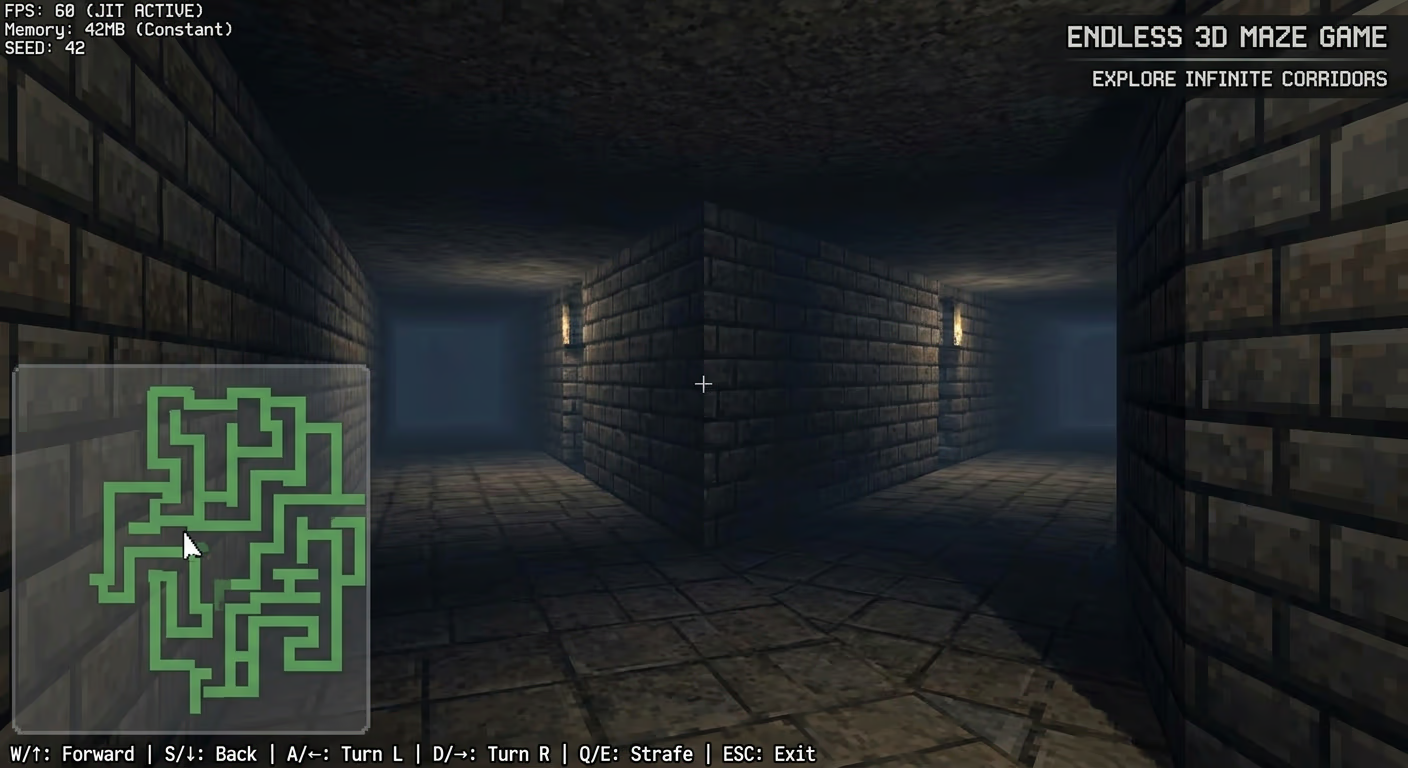
Building an Infinite 3D Maze: A Deep Dive into the endless3Dgame Raycasting Engine
Have you ever wondered how classic games like Wolfenstein 3D rendered 3D worlds on hardware with kilobytes of memory? The answer lies in raycasting. In this article, we will perform a deep, line-by-line architectural analysis of the endless3Dgame repository by azario0.
This project is a masterclass in efficient, procedural game development. It generates an infinite 3D maze in real-time using Python, Pygame, and Numba JIT compilation, all while maintaining a footprint of virtually zero megabytes of memory.
🛠️ The Tech Stack
Before diving into the code, let’s understand the tools that make this project possible:
- Python 3.7+: The core programming language, chosen for its readability and robust ecosystem.
- Pygame: A set of Python modules designed for writing video games, handling the window creation, input polling, and 2D drawing primitives (which we use to draw our “3D” slices).
- NumPy: Used for efficient numerical operations and buffer management.
- Numba: A Just-In-Time (JIT) compiler that translates a subset of Python and NumPy code into fast machine code. This is the secret sauce that makes real-time raycasting viable in pure Python.
🧠 Core Concept: Procedural Generation vs. Stored Data
Traditional games load level data from files into memory. If you want an infinite world, you can’t store infinite data.
endless3Dgame solves this using deterministic procedural generation. Instead of saving a map, it uses a mathematical hash function. When the game needs to know if there is a wall at coordinate (X, Y), it passes those coordinates into a hash function. The function will always return the same result for the same coordinates. This guarantees:
- Zero memory growth: No matter how far you walk, the memory usage stays flat.
- Consistent layout: If you walk away and come back, the maze looks exactly the same.
🔍 Detailed Code Breakdown
Let’s explore the main file, app.py, and break down its methods and how they interconnect.
1. Configuration & Constants
At the top of the file, global constants define the game’s physics and visual fidelity:
SCREEN_WIDTH = 1200
SCREEN_HEIGHT = 800
PLAYER_SPEED = 0.05
PLAYER_ROT_SPEED = 0.03
FOV = math.pi / 3  # 60-degree field of view
NUM_RAYS = SCREEN_WIDTH // 3  # Renders 1 ray per 3 pixels for performance
MAX_DEPTH = 25.0  # Maximum render distance
MAZE_SEED = 42  # The deterministic seed for the hash function
Note: NUM_RAYS is set to SCREEN_WIDTH // 3 as a clever optimization. Instead of casting 1200 rays per frame, it casts 400 and stretches the resulting wall slice to 3 pixels wide, drastically reducing CPU load with minimal visual degradation.
2. The Procedural Maze Algorithm
The heart of the infinite world lies in two Numba-optimized functions:
fast_hash(x, y, seed)
@numba.jit(nopython=True, cache=True)
def fast_hash(x, y, seed):
    x, y = int(x), int(y)
    h = seed + x * 374761393 + y * 668265263
    h = (h ^ (h >> 13)) * 1274126177
    h = h ^ (h >> 16)
    return h & 0x7fffffff
This is a custom, lightweight pseudo-random number generator. It uses bitwise XOR (^) and bit-shifting (>>) combined with large prime-like multipliers to scramble the coordinates into a seemingly random, yet perfectly deterministic, integer. The @numba.jit decorator compiles this to C-like machine code, making it execute in nanoseconds.
is_wall(x, y, seed)
@numba.jit(nopython=True, cache=True)
def is_wall(x, y, seed):
    x, y = int(x), int(y)
    if (x % 2 != 0) and (y % 2 != 0):
        return False  # Always open room centers
    if (x % 2 == 0) and (y % 2 == 0):
        return fast_hash(x // 2, y // 2, seed) % 100 < 80  # Pillars

    room_x, room_y = x // 2, y // 2
    hash_val = fast_hash(room_x, room_y, seed) % 100

    if x % 2 == 0:  # Vertical wall
        return hash_val < 40
    else:  # Horizontal wall
        return hash_val < 35
This function defines the rules of the maze:
- Odd/Odd coordinates: Always open (the center of a “room”).
- Even/Even coordinates: 80% chance of being a pillar, adding visual variety.
- Mixed coordinates: Potential walls connecting the rooms. The hash value determines if a passage exists (60% chance of being open vertically, 65% horizontally). This ensures the maze is navigable and doesn’t trap the player in isolated boxes.
3. The Raycasting Pipeline
Raycasting simulates 3D by casting 2D lines (rays) from the player’s viewpoint and measuring how far they travel before hitting a wall.
cast_ray(start_x, start_y, angle, seed, max_depth)
@numba.jit(nopython=True, cache=True)
def cast_ray(start_x, start_y, angle, seed, max_depth):
    dx = math.cos(angle)
    dy = math.sin(angle)
    step = 0.02
    distance = 0.0
    x, y = start_x, start_y

    while distance < max_depth:
        x += dx * step
        y += dy * step
        distance += step
        if is_wall(x, y, seed):
            return distance, x, y
    return max_depth, x, y
This uses a fixed-step ray marching algorithm. It moves the ray forward by 0.02 units per iteration, checking is_wall() at each step. While a true DDA (Digital Differential Analyzer) algorithm is mathematically more efficient, this fixed-step approach is much simpler to implement and, thanks to Numba, runs fast enough for real-time 60 FPS gameplay.
OptimizedRenderer.render_3d()
This class handles the visual magic:
- Clears the screen with a ceiling and floor color.
- Loops through all
NUM_RAYS, calculating the angle for each. - Calls
cast_rayto get the distance to the wall. - Fisheye Correction:
distance *= math.cos(player_angle - current_angle). Without this, walls would appear unnaturally curved because rays at the edge of the FOV travel a longer physical distance than the center ray. - Perspective Projection:
wall_height = min(self.height, self.height / (distance + 0.001)). Closer walls are drawn taller; farther walls are shorter. - Dynamic Shading:
- Distance fog:
shading = max(0.1, 1.0 - (distance / MAX_DEPTH))darkens walls further away. - Face orientation: By checking if the hit was closer to a vertical or horizontal grid line (
dx_to_grid > dy_to_grid), it applies different base colors (COLOR_WALL_LIGHTvsCOLOR_WALL_DARK). This gives the flat walls a faux-3D cornered appearance.
- Distance fog:
4. Player Controller & Collision Detection
The Game class manages the player’s state and input.
def handle_input(self):
    # ... rotation logic ...
    dx = dy = 0
    if keys[pygame.K_UP] or keys[pygame.K_w]:
        dx += math.cos(self.player_angle) * PLAYER_SPEED
        dy += math.sin(self.player_angle) * PLAYER_SPEED

    # Collision detection
    if not is_wall(self.player_x + dx, self.player_y, MAZE_SEED):
        self.player_x += dx
    if not is_wall(self.player_x, self.player_y + dy, MAZE_SEED):
        self.player_y += dy
Movement is calculated using basic trigonometry (cos for X, sin for Y). Crucially, collision detection is handled by simply asking the is_wall() function if the future position is a wall. If it is, the movement is canceled. This is incredibly efficient because it reuses the exact same procedural function used for rendering.
5. The Minimap System
The MiniMap class provides a top-down tactical view. It iterates over a small grid around the player’s current coordinates, calling is_wall() for each cell and drawing a small rectangle if a wall exists. Because it uses the same deterministic hash, the minimap perfectly matches the 3D view without needing a separate map data structure.
⚙️ How It All Works Together: The Game Loop
The Game.run() method ties every component together in a classic game loop:
- Delta Time Calculation: Ensures the game logic updates at a consistent rate, independent of frame rate fluctuations.
- Event Polling: Checks for
pygame.QUITor theESCkey to gracefully exit. - State Update: Calls
handle_input()to process movement and collisions. - Rendering:
- Calls
renderer.render_3d()to draw the first-person view. - Calls
minimap.render()to overlay the top-down map. - Calls
render_ui()to draw the FPS counter and controls.
- Calls
- Display Flip:
pygame.display.flip()pushes the rendered buffer to the screen. - Fallback Mechanism: At the bottom of the script, a
try...except ImportErrorblock ensures that if the user doesn’t have Numba installed, the script will dynamically rewrite its own code (removing the@numba.jitdecorators) and run in pure Python, albeit at a lower frame rate.
🚀 How to Run It Yourself
Ready to explore the infinite maze? You can clone and run the project in just a few steps:
- Ensure you have Python 3.7+ installed.
- Clone the repository:
git clone https://github.com/azario0/endless3Dgame.git cd endless3Dgame - Install the required dependencies (highly recommended for performance):
pip install pygame numpy numba - Run the game:
python app.py
🎯 Conclusion
The endless3Dgame repository is a brilliant demonstration of how algorithmic thinking can overcome hardware limitations. By combining deterministic hashing, ray marching, and Numba JIT compilation, the developer created a seamless, infinite 3D world in under 350 lines of readable Python code.
Whether you are a beginner looking to understand game loops and trigonometry, or an experienced developer interested in procedural generation and performance optimization, this codebase is a fantastic learning resource.
Happy coding, and enjoy getting lost in the infinite maze!

Written by
Benmalek Zohir
Founder, AI Engineer & Full Stack Developer
Benmalek Zohir is an AI Engineer, Full Stack Developer, and technology enthusiast focused on artificial intelligence, software development, and emerging technologies. He is the founder of SoftwareJournal.blog, where he shares practical insights, software discoveries, AI tools, and the latest developments in technology.