Demystifying the Cosmic Word Search Game: A Deep Dive into Python and Pygame
A comprehensive, detailed breakdown of the "Cosmic Word Search Game" built with Python and Pygame. Learn how grid generation, mouse interaction algorithms, and the game loop work together to create an engaging, space-themed puzzle experience.
Introduction
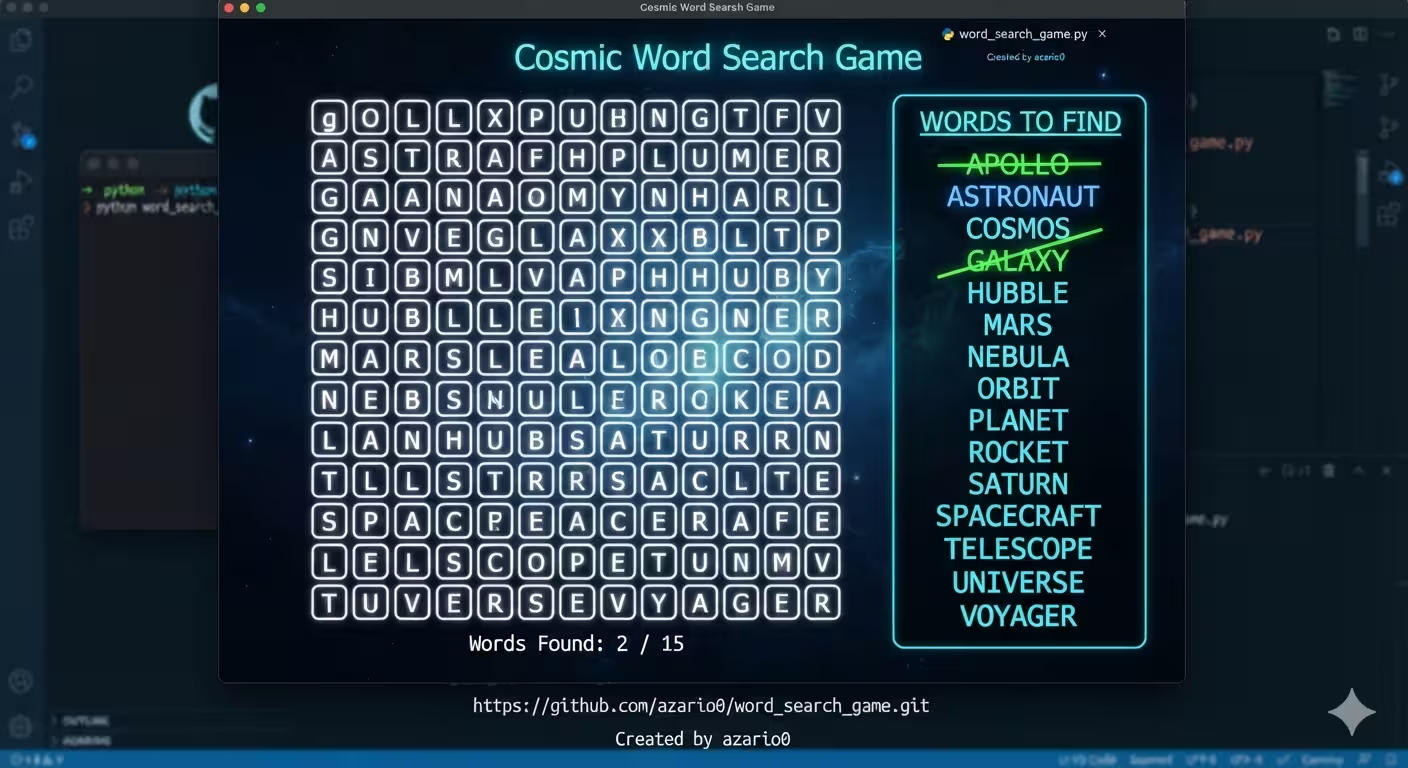
Welcome to a deep dive into the Cosmic Word Search Game, an open-source, space-themed puzzle game. Whether you are a beginner looking to understand game development or an experienced developer interested in grid-based algorithms, this article breaks down the repository’s codebase line by line. We will explore the programming language, core methods, rendering pipeline, and how all the pieces seamlessly work together.
You can find the full source code in the official repository: github.com/azario0/word_search_game.
🛠️ The Tech Stack
The game is built entirely using Python (100% of the codebase), leveraging the Pygame library.
- Python: Chosen for its readability and robust standard library (e.g.,
random,string,math), making it perfect for rapid game prototyping and logic implementation. - Pygame: A cross-platform set of Python modules designed for writing video games. It handles graphics rendering, event listening (mouse/keyboard), and frame-rate control out of the box.
⚙️ Architecture & Configuration
Before any logic runs, the script defines a solid foundation of constants. This is a best practice in game development, making the code highly customizable.
SCREEN_WIDTH = 1000
SCREEN_HEIGHT = 750
GRID_SIZE = 15  # 15x15 grid
CELL_SIZE = 40- Screen & Grid Metrics: The game reserves a 250px wide UI panel on the right (
UI_WIDTH = 250), leaving the rest for the 15x15 grid. Each cell is 40x40 pixels. - Cosmic Neon Theme: Colors are defined as RGB tuples. Notably,
COLOR_HIGHLIGHTandCOLOR_FOUNDuse a 4th value (alpha), enabling semi-transparent overlays via Pygame’sSRCALPHAflag. - Word List: A hardcoded list of space-themed words (
"PLANET","GALAXY","NEBULA", etc.) that the algorithm will attempt to place.
🧠 Core Methods Explained
1. generate_word_search(words, size)
This is the brain of the game. It dynamically generates a unique puzzle every time the game launches.
- Sorting: It sorts the target words by length (longest first). Placing longer words first drastically reduces the chance of placement failure.
- Directional Logic: It defines 8 possible directions (N, NE, E, SE, S, SW, W, NW) as
(row_change, col_change)tuples. - Placement Attempts: For each word, it makes up to 100 random attempts to find a valid starting position and direction.
- Collision Detection: Before placing, it checks if the target cells are either empty (
'') or already contain the same letter (allowing words to cross, a classic word search feature). - Fallback Filling: After all words are placed, any remaining empty cells are filled with random uppercase letters using
random.choice(string.ascii_uppercase).
2. get_cell_from_mouse(pos)
This helper bridges the gap between pixel coordinates and grid logic.
- It takes the
(x, y)mouse position. - It checks if the click is within the grid boundaries (
GRID_X_OFFSETtoGRID_X_OFFSET + GRID_WIDTH). - If valid, it uses integer division (
//) to convert the pixel coordinate into a(row, col)grid index.
3. get_cells_in_line(start_cell, end_cell)
This method determines which cells are selected when the player drags their mouse.
- It calculates the difference in rows (
dr) and columns (dc). - It enforces a strict rule: a valid selection must be perfectly horizontal (
dr == 0), vertical (dc == 0), or diagonal (abs(dr) == abs(dc)). - If valid, it calculates the step direction (
r_step,c_step) and iterates from the start to the end cell, collecting all intermediate coordinates. This is a simplified, grid-friendly version of the Bresenham’s Line Algorithm.
🎨 The Rendering Pipeline
Pygame requires redrawing the screen every frame. The code modularizes this into distinct drawing functions:
draw_grid(screen, grid): Iterates through the 2D list, drawing faint nebula-colored rectangles for cell borders and rendering the letters in “bright star white” at the center of each cell.draw_ui(screen, word_data): Draws the right-side panel. It renders the “WORDS TO FIND” list and dynamically applies a red strikethrough line (pygame.draw.line) over words that have been found.draw_selection(screen, selected_cells): Creates a semi-transparent blue surface (pygame.SRCALPHA) and blits it over the cells the player is currently dragging across.draw_found_words(screen, word_data): Draws a thick, semi-transparent green line from the center of the start cell to the center of the end cell for permanently found words.draw_win_screen(screen): Overlays a dark, semi-transparent black rectangle over the entire screen and renders a bold “YOU WIN!” message in the center.
🔄 The Main Game Loop
The main() function is the heartbeat of the application. It initializes Pygame, sets up the display, and enters a while running: loop that executes up to 60 times per second (clock.tick(60)).
Event Handling
The loop listens for specific user inputs:
MOUSEBUTTONDOWN: When the left mouse button is pressed, it callsget_cell_from_mouse. If valid, it setsselecting = Trueand records thestart_cell.MOUSEMOTION: Whileselectingis true, it continuously updates theend_cellbased on the current mouse position, creating a real-time visual drag effect.MOUSEBUTTONUP: When the player releases the mouse, it finalizes the selection:- It calls
get_cells_in_lineto get the exact path. - It joins the letters from the grid along that path to form a
selected_word. - Smart Validation: It checks if
selected_wordOR its reverse (selected_word[::-1]) exists in theword_datadictionary. This brilliant UX detail means players can drag from the first letter to the last, or from the last to the first, and both will be accepted. - If valid, it marks the word as
found: True.
- It calls
Win Condition
After processing events, the loop checks:
if not game_over and all(data['found'] for data in word_data.values()):
    game_over = True
If every word in the dictionary is marked as found, the game_over flag is triggered, and the draw_win_screen function is called on the next render.
🧩 How It All Works Together: A Player’s Journey
- Startup: The player runs
python word_search_game.py. Pygame initializes, andgenerate_word_searchbuilds a unique 15x15 grid, returning it alongside a dictionary tracking the placement coordinates of each target word. - Scanning: The player looks at the UI panel on the right and spots “ROCKET”.
- Interaction: The player clicks on the ‘R’ in the grid.
MOUSEBUTTONDOWNfires, locking in thestart_cell. - Dragging: As the player drags to the ‘T’,
MOUSEMOTIONcontinuously updates theend_cell.get_cells_in_linevalidates the drag is a straight diagonal line, anddraw_selectionpaints those cells blue. - Validation: The player releases the mouse.
MOUSEBUTTONUPtriggers. The code extracts “ROCKET”, checks it against the dictionary, and flips itsfoundstatus toTrue. - Feedback: The grid immediately renders a thick green line over the word, and the UI panel draws a red strikethrough over “ROCKET”.
- Victory: Once the final word is found, the
all()condition is met, and the celebratory win screen overlays the game.
🔧 Customization & Extensibility
One of the strongest aspects of this repository is its modularity. As noted in the README.md, developers can easily:
- Change the
WORDS_TO_FINDlist to create themed puzzles (e.g., animals, programming terms, or historical figures). - Tweak the
COLOR_*constants at the top of the file to completely rebrand the UI (e.g., a “Forest” theme with greens and browns). - Adjust
GRID_SIZEandCELL_SIZEto make the puzzle larger or smaller, though the UI layout may require minor offset tweaks for extreme sizes.
Conclusion
The Cosmic Word Search Game is a masterclass in clean, readable, and well-structured Python game development. By separating configuration, logic, and rendering into distinct functions, the code remains highly maintainable. It elegantly handles edge cases like reverse-word selection and intersecting word placements, making it an excellent learning resource for anyone stepping into the world of Pygame.
Ready to build your own? Clone the repository, install Pygame (pip install pygame), and start experimenting with the code today!

Written by
Benmalek Zohir
Founder, AI Engineer & Full Stack Developer
Benmalek Zohir is an AI Engineer, Full Stack Developer, and technology enthusiast focused on artificial intelligence, software development, and emerging technologies. He is the founder of SoftwareJournal.blog, where he shares practical insights, software discoveries, AI tools, and the latest developments in technology.