Building a Local Gemma-3 270M Chat Server with Flask, Tkinter, and Streaming Generation
A code walkthrough of azario0's local-llm-server-ui project — a desktop app that downloads Google's Gemma-3 270M-IT model, serves it through a Flask API in a separate process, and streams tokens back to a Tkinter GUI (and any external client) in real time.
Building a Local Gemma-3 270M Chat Server with Flask, Tkinter, and Streaming Generation
azario0/gemma-3-270m-it-local is a small but well-structured
project that turns Google’s Gemma-3 270M-IT model into a
self-contained local chat server with a desktop control panel. No cloud calls, no API keys — just a Tkinter
GUI, a Flask server, and Hugging Face’s transformers library doing the heavy lifting.
The project has two files worth understanding: GET_MODEL.py (a one-time downloader) and app_gui.py
(the actual application, which is really two programs glued together — a Flask server and a Tkinter UI).
Language & Core Libraries
Everything is plain Python 3. The stack breaks down like this:
transformers—AutoTokenizer/AutoModelForCausalLMto load Gemma, plusTextIteratorStreamerfor token-by-token output.torch— the tensor backend the model runs on (CPU by default).flask— a minimal HTTP server exposing generation endpoints.tkinter/ttk/scrolledtext— Python’s built-in GUI toolkit for the control panel.multiprocessing— runs the Flask server in a fully separate OS process from the GUI.threading— runs model generation in a background thread inside that server process, so the Flask server itself stays responsive.
Step 1: Downloading the Model (GET_MODEL.py)
This script is meant to be run once. It authenticates with Hugging Face (via huggingface-cli login,
run beforehand), then does the simplest possible thing:
model_id = "google/gemma-3-270m-it"
save_directory = "./gemma-3-270m-it-local"

tokenizer = AutoTokenizer.from_pretrained(model_id)
tokenizer.save_pretrained(save_directory)

model = AutoModelForCausalLM.from_pretrained(model_id)
model.save_pretrained(save_directory)
from_pretrained(model_id) pulls the weights and tokenizer config from the Hugging Face Hub;
save_pretrained(save_directory) writes them to disk locally. After this runs once, the app never
needs internet access again — everything loads from ./gemma-3-270m-it-local.
Step 2: The Architecture of app_gui.py
The file is split into two clearly commented parts, and understanding why they’re separated is the key to understanding the whole project.
Part 1 — The Flask server (run_flask_app)
This function is the target of a multiprocessing.Process, meaning it runs in its own OS-level process,
with its own memory space — separate from the GUI. That matters because:
- Loading a language model and running inference is CPU/GPU-heavy and can block. If it ran on the same thread as the Tkinter event loop, the GUI would freeze.
- If the server crashes, the GUI process survives.
Inside run_flask_app, the model and tokenizer are loaded once at process startup:
tokenizer = AutoTokenizer.from_pretrained(local_model_path)
model = AutoModelForCausalLM.from_pretrained(local_model_path)
model.to(device)
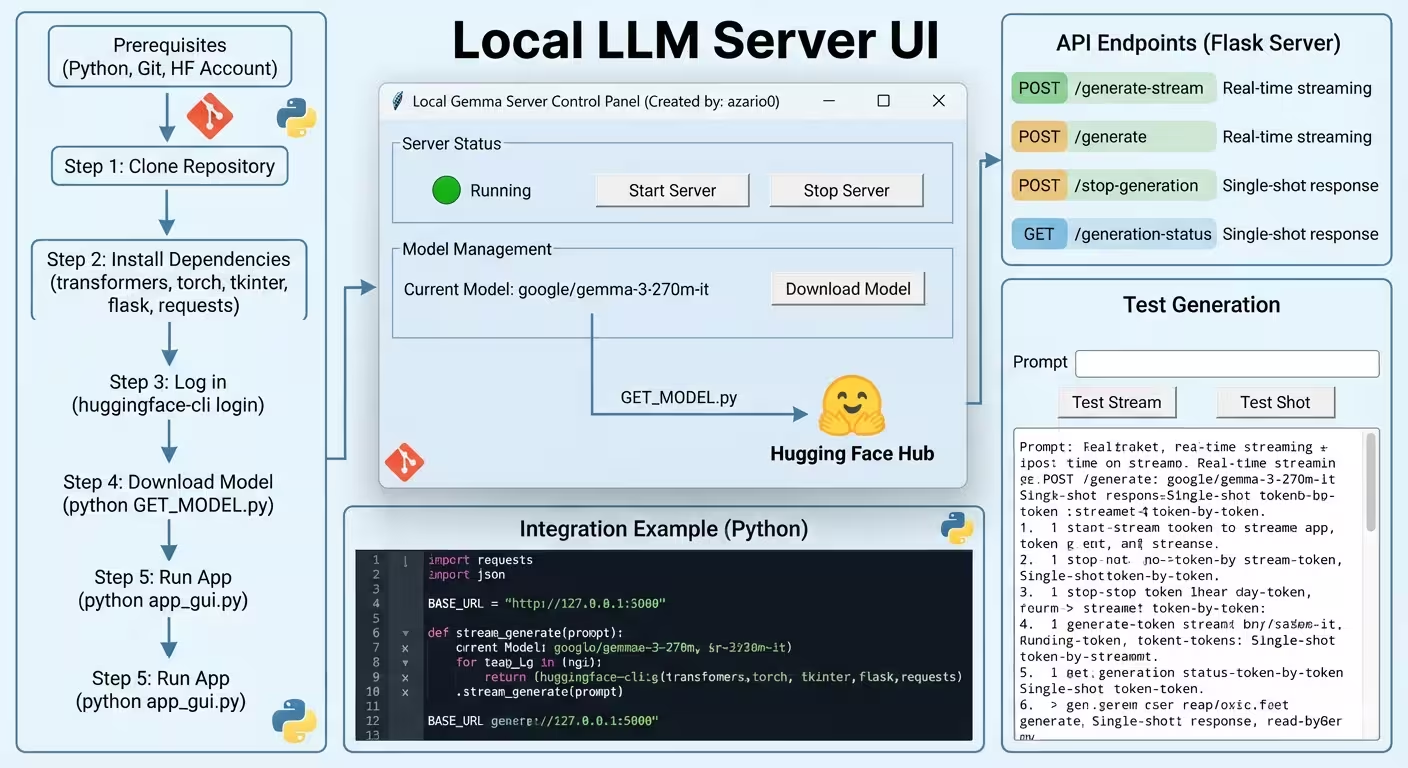
Then it defines four Flask routes:
| Endpoint | Method | Purpose |
|---|---|---|
/generate-stream | POST | Token-by-token streaming response |
/generate | POST | Full response, returned all at once |
/stop-generation | POST | Interrupts an in-progress stream |
/generation-status | GET | Reports whether generation is currently running |
How streaming actually works is the most interesting part of the code. /generate-stream:
messages = [{"role": "user", "content": prompt}]
inputs = tokenizer.apply_chat_template(
    messages, add_generation_prompt=True, tokenize=True,
    return_dict=True, return_tensors="pt"
).to(model.device)

streamer = TextIteratorStreamer(tokenizer, skip_special_tokens=True)

def generation_with_stop():
    model.generate(**inputs, streamer=streamer, max_new_tokens=4000, do_sample=True)

current_generation_thread = threading.Thread(target=generation_with_stop)
current_generation_thread.start()

for new_text in streamer:
    if stop_generation_flag.is_set():
        break
    yield new_text
apply_chat_template formats the raw prompt into Gemma’s expected chat format (system/user/assistant
turns) before tokenizing — this is what makes the model respond conversationally rather than just
autocompleting text.
model.generate() is normally a blocking call that returns only after the entire response is
generated. TextIteratorStreamer gets around this: it’s handed to generate() as a callback target, and
generate() is run on a separate thread. As new tokens are produced, they’re pushed into the
streamer’s internal queue, and the main Flask route iterates over the streamer as an ordinary Python
generator (for new_text in streamer), yield-ing each chunk straight into the HTTP response body. Flask
turns that generator into a chunked, real-time HTTP stream via Response(generate_tokens(), mimetype='text/plain').
A threading.Event (stop_generation_flag) is checked on every loop iteration, which is how
/stop-generation can interrupt a stream mid-generation — it doesn’t kill the underlying model.generate()
call (there’s no clean way to do that), but it stops the server from continuing to forward tokens to the
client once the flag is set.
Part 2 — The Tkinter control panel (ModelHostApp)
This is a fairly standard ttk-styled desktop app. The important interaction pattern:
- Start Server spawns the Flask process with
multiprocessing.Process(target=run_flask_app)and callsself.server_process.start(). The GUI doesn’t talk to the model directly at any point — it only ever talks to it over HTTP, using therequestslibrary, exactly like an external client would. - Test Stream / Test Complete buttons send requests to
/generate-streamor/generateand render the response into ascrolledtext.ScrolledTextwidget, callingself.root.update()to force a redraw as each chunk arrives. - Auto-refresh polls
/generation-statusevery 2 seconds viaroot.after(2000, ...)(Tkinter’s non-blocking timer callback) to keep the “Generating / Idle / Stopping” indicator in sync. - Stop Server calls
self.server_process.terminate()— a hard OS-level kill of the whole Flask process, which is much simpler than trying to gracefully shut down Flask’s dev server from the outside.
Because the GUI treats the model server purely as an HTTP API, the same endpoints are trivially usable from any other script — which is exactly what the README’s example snippet demonstrates:
import requests

def stream_generate(prompt):
    response = requests.post(
        "http://127.0.0.1:5000/generate-stream",
        json={"prompt": prompt}, stream=True
    )
    for chunk in response.iter_content(chunk_size=1, decode_unicode=True):
        if chunk:
            print(chunk, end='', flush=True)
Why This Design?
Putting the model in its own process rather than a thread is the key architectural decision here. Python’s
GIL means CPU-bound work in a thread still blocks other Python code from running concurrently; a separate
process sidesteps that entirely and gives a genuinely responsive GUI even while the model is loaded and
generating. Layering threading inside that server process for generation is what then makes streaming
possible without needing async frameworks — TextIteratorStreamer bridges a blocking generate() call and
an iterable Python generator.
Setup Summary
git clone https://github.com/azario0/local-llm-server-ui.git
cd local-llm-server-ui
pip install transformers torch flask requests
huggingface-cli login
python GET_MODEL.py
python app_gui.py
Takeaways for Your Own Projects
multiprocessing.Process+ Flask is a lightweight way to keep a GPU/CPU-heavy model out of your GUI’s critical path, without needing a full client-server deployment.TextIteratorStreamer+ a background thread is the standardtransformerspattern for streaming generation over HTTP — reusable for any chat-style API you build with Hugging Face models.- Wrapping local inference behind plain HTTP endpoints (rather than importing the model directly wherever it’s needed) means the same server can back a GUI, a notebook, a CLI, or a web frontend with zero code duplication.
Repo: github.com/azario0/gemma-3-270m-it-local
Model: huggingface.co/google/gemma-3-270m-it
transformers docs: huggingface.co/docs/transformers

Written by
Benmalek Zohir
Founder, AI Engineer & Full Stack Developer
Benmalek Zohir is an AI Engineer, Full Stack Developer, and technology enthusiast focused on artificial intelligence, software development, and emerging technologies. He is the founder of SoftwareJournal.blog, where he shares practical insights, software discoveries, AI tools, and the latest developments in technology.