Building a Streaming Chat Interface for Qwen3-0.6B with Hugging Face Transformers
A code walkthrough of azario0's Qwen3-0.6B notebook — how AutoModelForCausalLM, chat templates, and TextIteratorStreamer combine to run a compact 0.6B-parameter language model with real-time, token-by-token output.
Building a Streaming Chat Interface for Qwen3-0.6B with Hugging Face Transformers
Small language models are having a moment. You don’t always need a 70B-parameter giant to get useful reasoning and conversation out of a model — sometimes a 0.6B-parameter model running comfortably on a single GPU (or even a CPU) is enough to prototype, learn, or build lightweight tools.
azario0/Qwen3-0.6B is a small, focused repository that does exactly that: it loads Qwen3-0.6B from Hugging Face and wraps it in a streaming chat function, so tokens appear one at a time instead of waiting for the whole response to generate. It’s a great, compact example of how the modern Transformers inference stack fits together. Let’s go through it piece by piece.
What’s in the repository
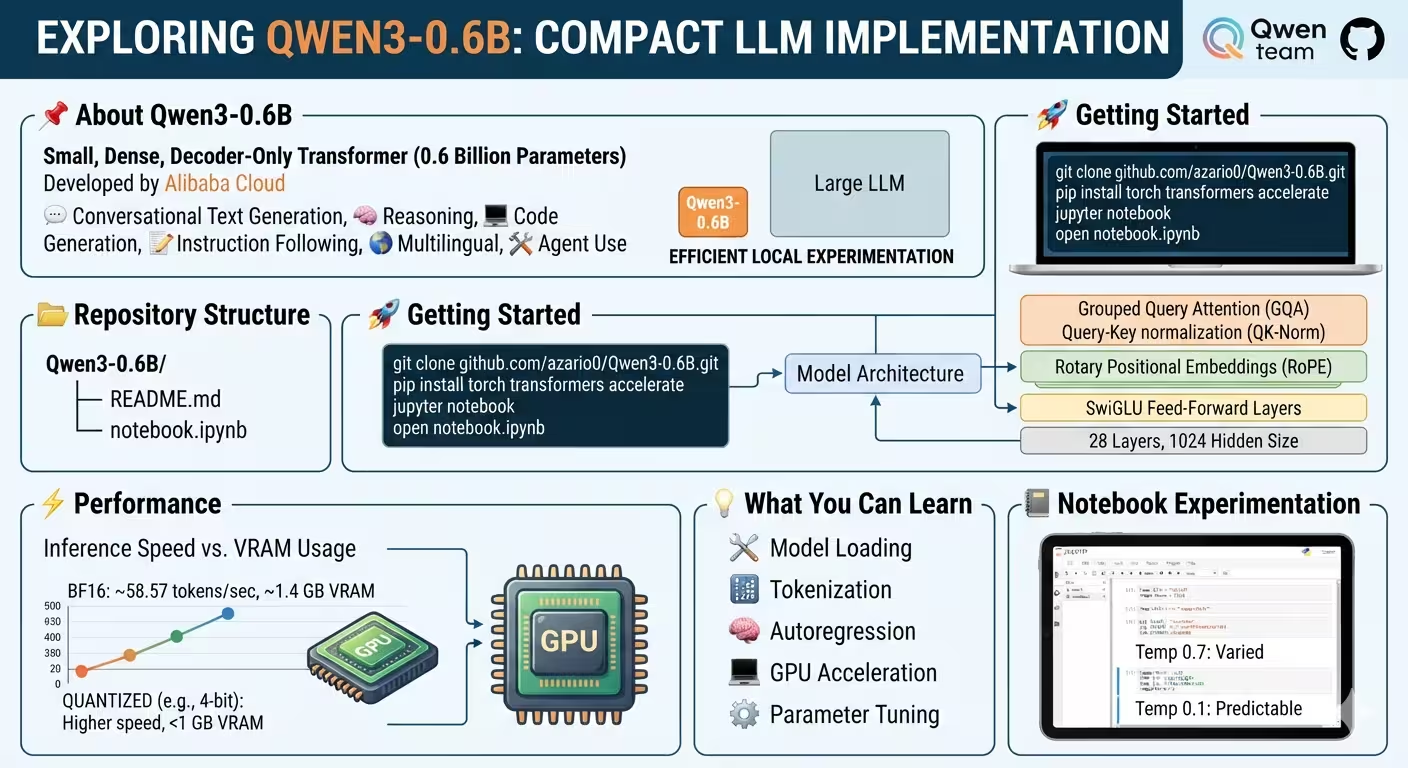
The repo is intentionally minimal:
Qwen3-0.6B/
│
├── README.md
└── notebook.ipynb
Everything happens in notebook.ipynb — a Jupyter/Kaggle notebook with four code cells: load the model, define a streaming helper, then two usage examples.
The model: Qwen3-0.6B
Qwen3 is Alibaba Cloud’s third-generation model family, released in both dense and Mixture-of-Experts variants. Qwen3-0.6B is the smallest dense, decoder-only Transformer in the family. According to the repo’s README, its architecture includes several techniques that are now standard in efficient LLM design:
- Grouped Query Attention (GQA) — shares key/value projections across groups of query heads to cut memory and compute during attention, instead of giving every query head its own K/V pair.
- QK-Norm (Query-Key normalization) — normalizes queries and keys before the attention dot product, which stabilizes training at scale.
- Rotary Positional Embeddings (RoPE) — encodes token position by rotating query/key vectors in a way that generalizes well to longer sequences.
- SwiGLU feed-forward layers — a gated activation variant used in place of a plain ReLU/GELU MLP block, generally improving quality per parameter.
- RMSNorm — a simplified, cheaper alternative to LayerNorm used for normalization throughout the network.
- Tied input/output embeddings — the token embedding matrix is reused as the output projection (logits) layer, saving parameters — important at this small a scale.
Concretely, the model has 28 Transformer layers, a hidden size of 1024, 16 query attention heads, 8 key/value heads (the GQA split), and a vocabulary of roughly 152K tokens. It also supports a “thinking” mode and a “non-thinking” mode — the model can either expose intermediate reasoning before answering, or skip straight to a fast final answer, and the notebook toggles this directly.
Step 1 — Loading the model and tokenizer
from transformers import AutoModelForCausalLM, AutoTokenizer
import torch
from transformers import TextIteratorStreamer
from threading import Thread
import threading

model_name = "Qwen/Qwen3-0.6B"

# load the tokenizer and the model
tokenizer = AutoTokenizer.from_pretrained(model_name)
model = AutoModelForCausalLM.from_pretrained(
    model_name,
    torch_dtype="auto",
    device_map="auto"
)
This is standard Hugging Face Transformers boilerplate, but each argument is doing real work:
AutoTokenizer.from_pretraineddownloads and builds the correct tokenizer class for Qwen3 automatically, based on the model’s config — you don’t need to know it’s a byte-pair-encoding tokenizer ahead of time.AutoModelForCausalLM.from_pretraineddoes the same for the model architecture: it inspects the model’s config on the Hugging Face Hub and instantiates the rightnn.Modulesubclass with pretrained weights loaded in.torch_dtype="auto"lets Transformers pick the weight precision (typicallybfloat16on modern GPUs) instead of defaulting to fullfloat32, which roughly halves memory usage with little quality loss.device_map="auto"hands placement off to Accelerate, which decides whether the model goes on GPU, CPU, or is split across devices, based on what hardware is available.
At this point model and tokenizer are both loaded once and reused for every subsequent generation call.
Step 2 — A generator function for streaming output
The core of the notebook is this function:
def stream_chat(messages, tokenizer, model, max_new_tokens=32768, enable_thinking=True):
    """
    Stream model responses token-by-token in real time.
    """
    # Prepare inputs
    text = tokenizer.apply_chat_template(
        messages,
        tokenize=False,
        add_generation_prompt=True,
        enable_thinking=enable_thinking
    )
    model_inputs = tokenizer([text], return_tensors="pt").to(model.device)

    # Streamer to capture tokens
    streamer = TextIteratorStreamer(tokenizer, skip_special_tokens=False)

    # Run generation in a background thread
    generation_kwargs = dict(
        **model_inputs,
        max_new_tokens=max_new_tokens,
        streamer=streamer
    )
    thread = threading.Thread(target=model.generate, kwargs=generation_kwargs)
    thread.start()

    # Yield tokens in real time
    for new_text in streamer:
        yield new_text
There are three distinct mechanisms working together here, and it’s worth separating them out.
1. Chat templating
messages is a plain list of dicts like {"role": "user", "content": "..."} — the same shape used by the OpenAI-style chat API. tokenizer.apply_chat_template() converts that structured conversation into the exact prompt string Qwen3 was trained on, inserting the model’s special role tokens and formatting. add_generation_prompt=True appends the tokens that tell the model “now it’s your turn to respond.” enable_thinking toggles whether the template asks the model to emit its reasoning trace before the final answer — this is the “thinking vs non-thinking mode” mentioned earlier, controlled purely through the prompt template rather than a different model.
2. TextIteratorStreamer: turning generation into an iterable
Normally, model.generate() is a blocking call — it runs until the full response (up to max_new_tokens) is generated, then returns the entire token sequence at once. That’s incompatible with “print tokens as they arrive.”
TextIteratorStreamer solves this by acting as a queue: as generate() produces each new token internally, the streamer decodes it and pushes the resulting text onto an internal queue. Iterating over the streamer object (for new_text in streamer:) pulls text off that queue as it becomes available, blocking only until the next piece of text is ready — not until generation finishes.
3. Threading: making the blocking call non-blocking
There’s a catch: something still has to actually call model.generate(), and that call is still blocking. If it ran on the main thread, the for new_text in streamer loop below it would never even start — the code would sit inside generate() until it fully finished, defeating the purpose of the streamer.
The fix is Python’s threading module: model.generate() is launched inside a background Thread, so the main thread is immediately free to start the for new_text in streamer: loop. The generation thread pushes tokens into the streamer’s queue as it works; the main thread reads them out and yields them one at a time. stream_chat itself is a generator function (it uses yield), so each caller gets a live, lazy stream of text chunks rather than one giant string.
Step 3 — Using it
prompt = "Is 9.10 bigger than 9.9 ?"
messages = [
    {"role": "user", "content": prompt}
]

print("Assistant: ", end="", flush=True)
response = ''
for token in stream_chat(messages, tokenizer, model, enable_thinking=False):
    print(token, end="", flush=True)  # real-time print
    response += token
print("\n\nFinal Response:", response)
This loop consumes the generator, printing each chunk immediately (flush=True forces the terminal/notebook to display it right away instead of buffering) while also accumulating everything into response for later use. The notebook runs this twice — once with enable_thinking=False for a fast, direct answer, and once with the default enable_thinking=True on a more open-ended question (“How many countries are there in Africa?”), showing the model’s reasoning trace before its final answer.
Why this pattern matters
This four-cell notebook is a compact demonstration of a pattern used far beyond toy notebooks — it’s essentially the same mechanism behind streaming responses in chat UIs like ChatGPT or Claude: template the conversation, run generation on a background thread, and stream decoded text back to the caller through a thread-safe iterator. Swap the print() loop for a websocket send, an HTTP Server-Sent-Events write, or a UI update callback, and you have the backbone of a real streaming chat backend.
Because Qwen3-0.6B is small, this whole setup runs fast enough to iterate on locally — the README cites roughly 58.57 tokens/second in BF16 with Transformers under one benchmarked configuration, at around 1.4 GB of memory, though actual numbers will vary with hardware, quantization, and context length.
Try it yourself
git clone https://github.com/azario0/Qwen3-0.6B.git
cd Qwen3-0.6B
pip install torch transformers accelerate
jupyter notebook
Then open notebook.ipynb and experiment with temperature, max_new_tokens, and different prompts to see how the streamed output changes.
Further reading
- azario0/Qwen3-0.6B on GitHub — the repository this article walks through
- Qwen/Qwen3-0.6B on Hugging Face — model card and weights
- QwenLM/Qwen3 on GitHub — official Qwen3 repository
- Qwen3 documentation — official docs covering inference, deployment, and quantization
- Hugging Face Transformers documentation —
AutoModelForCausalLM,AutoTokenizer, and generation utilities TextIteratorStreamerAPI reference- Python
threadingmodule docs
Note: I don’t have live access to search or a citation database — the benchmark numbers and architecture details above come directly from the repository’s README, but it’s worth double-checking anything critical against the official Qwen3 repository or Hugging Face model card.

Written by
Benmalek Zohir
Founder, AI Engineer & Full Stack Developer
Benmalek Zohir is an AI Engineer, Full Stack Developer, and technology enthusiast focused on artificial intelligence, software development, and emerging technologies. He is the founder of SoftwareJournal.blog, where he shares practical insights, software discoveries, AI tools, and the latest developments in technology.