Qwen2.5-7B-Instruct-1M Explained: Running a 1 Million Token LLM with Python
Learn how Qwen2.5-7B-Instruct-1M works and how to run it with Python and Hugging Face Transformers. This guide explains the repository, tokenizer, model loading, chat templates, GPU device mapping, text generation, and the architecture behind Qwen's 1-million-token context model.
Qwen2.5-7B-Instruct-1M Explained: Running a 1 Million Token LLM with Python
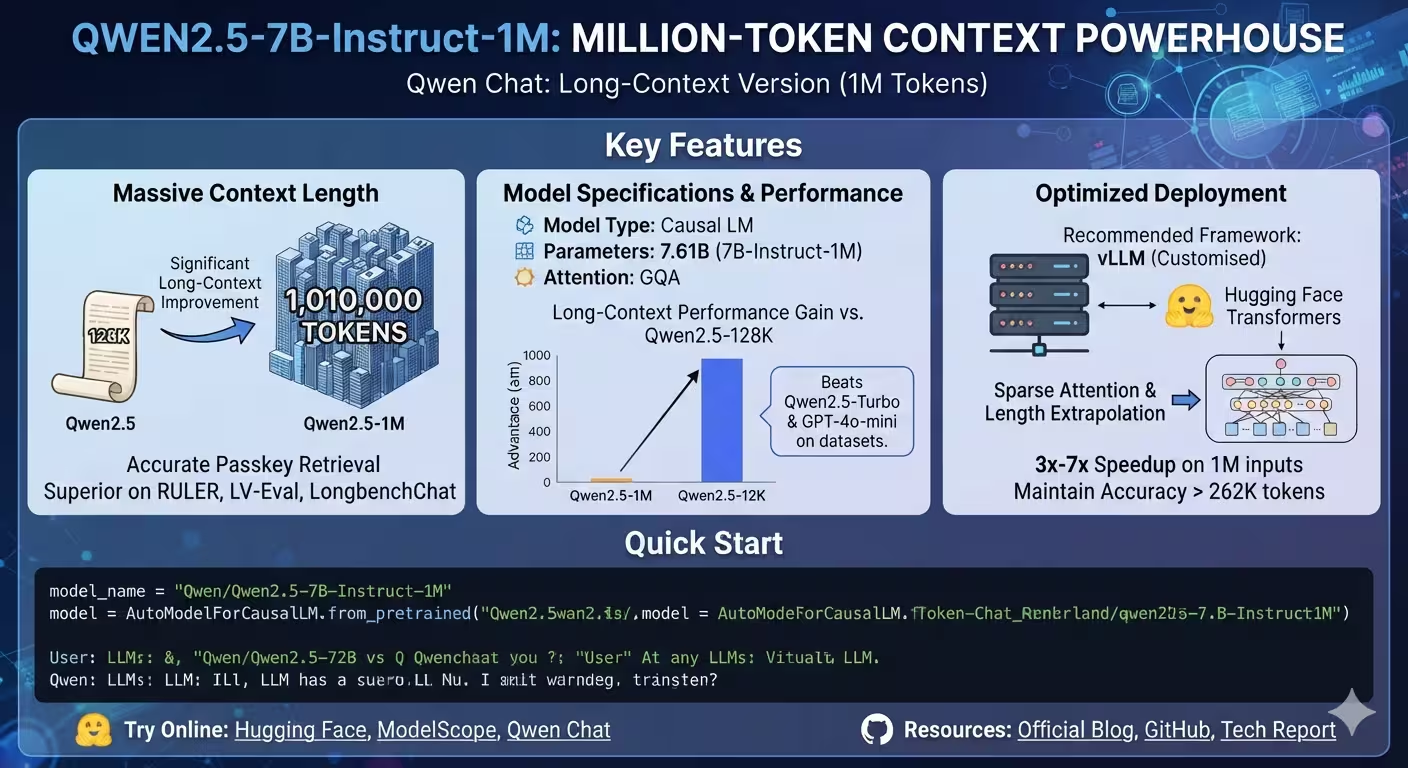
Large language models are becoming increasingly useful for working with large documents, source code, books, research papers, and other long-form information. One interesting example is Qwen2.5-7B-Instruct-1M, a long-context version of the Qwen2.5 family that can process up to approximately 1 million tokens.
In this article, we will explore the Qwen2.5-7B-Instruct-1M GitHub repository, understand the code used to load the model, and explain how the different components work together.
The repository contains a README.md and a Jupyter notebook, making it a relatively small but useful example of deploying the model with Python.
What Is Qwen2.5-7B-Instruct-1M?
Qwen2.5-7B-Instruct-1M is an instruction-tuned large language model from the Qwen family.
The important part of its name is:
- Qwen2.5 — the model generation.
- 7B — approximately 7 billion parameters.
- Instruct — optimized for following human instructions and conversations.
- 1M — designed for extremely long contexts of up to approximately one million tokens.
According to the repository, the model contains approximately 7.61 billion parameters, uses 28 transformer layers, and uses Grouped Query Attention with 28 query heads and 4 key/value heads.
The repository specifies a context length of approximately 1,010,000 tokens, with generation of up to 8,192 tokens.
This makes it particularly interesting for applications involving very large inputs.
Repository Structure
The repository is intentionally simple:
Qwen2.5-7B-Instruct-1M/
├── README.md
└── notebook.ipynb
The README.md provides documentation and a Python quick-start example, while notebook.ipynb provides an interactive Jupyter environment for experimenting with the model.
You can explore the complete project here:
Qwen2.5-7B-Instruct-1M on GitHub
What Programming Language Is Used?
The main programming language is Python.
Python is particularly common in artificial intelligence and machine learning because of its large ecosystem of libraries.
This project relies primarily on:
- PyTorch
- Hugging Face Transformers
- Python
- Jupyter Notebook
The repository’s example does not implement a transformer model from scratch. Instead, it uses the Transformers library to download, configure, tokenize, and execute the pretrained model.
That is an important distinction.
Instead of writing billions of parameters and transformer operations manually, the Python code acts as the interface between the developer and the pretrained model.
Loading the Model
The central part of the example is:
from transformers import AutoModelForCausalLM, AutoTokenizerTwo important classes are imported here.
AutoModelForCausalLM
AutoModelForCausalLM loads a model designed for causal language modeling.
A causal language model predicts the next token based on the tokens that came before it.
For example:
The sky isThe model might predict:
blueThe process is repeated token by token to generate a complete response.
AutoTokenizer
The tokenizer converts human-readable text into numerical token IDs that the neural network can process.
For example:
Hello, how are you?is transformed into something conceptually similar to:
[15496, 11, 703, 389, 345, 30]The exact numbers depend on the tokenizer.
The model does not directly process strings. It processes numerical representations of text.
Selecting the Model
The repository defines:
model_name = "Qwen/Qwen2.5-7B-Instruct-1M"This tells Hugging Face which model to download.
The model is hosted under the Qwen organization and is available through the Hugging Face ecosystem.
The important point is that the Python program does not contain the model’s billions of parameters directly.
Instead, Transformers uses the model identifier to locate the model files and configuration.
Loading the Neural Network
The next section is:
model = AutoModelForCausalLM.from_pretrained(
    model_name,
    torch_dtype="auto",
    device_map="auto"
)
This is one of the most important pieces of the entire example.
from_pretrained()
The method:
from_pretrained()loads an already-trained model.
This means we are performing inference, not training the model from scratch.
Training a 7-billion-parameter model requires enormous computational resources.
Inference is much simpler: the model’s learned parameters are loaded into memory and used to generate predictions.
torch_dtype="auto"
The parameter:
torch_dtype="auto"allows Transformers to automatically determine an appropriate PyTorch data type based on the model configuration and available weights.
Using an appropriate numerical precision can significantly affect memory usage and performance.
For large language models, this is particularly important because model weights can require many gigabytes of memory.
device_map="auto"
Another important parameter is:
device_map="auto"This tells Transformers to automatically determine where the model should be placed.
Depending on the hardware and available memory, components may be placed on available GPUs or CPU memory.
This is especially useful for large models because manually deciding where every layer should go can be complicated.
For example, a sufficiently large GPU might hold most or all of the model, while a system with limited GPU memory may require some components to be handled differently.
Loading the Tokenizer
The tokenizer is loaded separately:
tokenizer = AutoTokenizer.from_pretrained(model_name)The tokenizer must correspond to the model.
Its job is to convert text into tokens before inference and convert generated token IDs back into readable text afterward.
The overall pipeline looks like this:
Human text
    ↓
Tokenizer
    ↓
Token IDs
    ↓
Qwen2.5-7B-Instruct-1M
    ↓
Generated Token IDs
    ↓
Tokenizer
    ↓
Human-readable response
This tokenizer-model relationship is fundamental to virtually every modern language model application.
Creating the Prompt
The repository then creates a simple prompt:
prompt = "Give me a short introduction to large language model."This is the instruction we want the model to answer.
However, Qwen’s instruction-tuned model uses a conversational structure rather than simply passing the raw sentence directly.
The example creates:
messages = [
    {
        "role": "system",
        "content": "You are Qwen, created by Alibaba Cloud. You are a helpful assistant."
    },
    {
        "role": "user",
        "content": prompt
    }
]
There are two messages.
The first has the role:
systemand defines the assistant’s behavior.
The second has the role:
userand contains the actual request.
This structure is commonly used by modern instruction-following language models.
System and User Messages
The system message establishes the assistant’s role:
{
    "role": "system",
    "content": "You are Qwen, created by Alibaba Cloud. You are a helpful assistant."
}
The user message contains the actual question:
{
    "role": "user",
    "content": prompt
}
Conceptually, the conversation is:
SYSTEM:
You are Qwen, created by Alibaba Cloud.
You are a helpful assistant.

USER:
Give me a short introduction to large language model.
The model then generates the assistant’s response.
Applying the Chat Template
The next important method is:
text = tokenizer.apply_chat_template(
    messages,
    tokenize=False,
    add_generation_prompt=True
)
This method converts the structured conversation into the format expected by the model.
This is important because different language models can use different special tokens and conversation formats.
Instead of manually constructing those tokens, the tokenizer provides a chat template.
messages
The conversation created earlier is supplied here.
tokenize=False
This means the method returns formatted text instead of immediately converting it into token IDs.
add_generation_prompt=True
This tells the tokenizer that we are about to generate an assistant response.
Conceptually, the process becomes:
messages
   ↓
Chat template
   ↓
Model-compatible conversation text
Converting Text Into Model Inputs
Next:
model_inputs = tokenizer(
    [text],
    return_tensors="pt"
).to(model.device)
This performs several operations.
First, the formatted conversation is passed to the tokenizer.
Then:
return_tensors="pt"requests PyTorch tensors.
The resulting tensors contain the numerical representation of the input.
Finally:
.to(model.device)moves those tensors to the same device used by the model.
This is important because the input and model need to be located on compatible devices for inference.
Generating the Response
The actual generation happens here:
generated_ids = model.generate(
    **model_inputs,
    max_new_tokens=512
)
The generate() method is responsible for producing new tokens.
The parameter:
max_new_tokens=512limits the generated response to a maximum of 512 new tokens.
It does not mean that the input is limited to 512 tokens.
Instead:
Input tokens
+
Generated tokens
=
Complete sequence
The model reads the input and then repeatedly predicts what token should come next.
What Happens Inside generate()?
Conceptually, generation works like this:
Input:
"Give me a short introduction to large language model."

          ↓

Tokenization

          ↓

Transformer

          ↓

Predict next token

          ↓

Add token to sequence

          ↓

Transformer processes updated sequence

          ↓

Predict next token

          ↓

Repeat...
Eventually the model produces a complete answer.
The exact generation behavior depends on sampling and generation configuration.
Removing the Original Prompt
After generation, the repository uses:
generated_ids = [
    output_ids[len(input_ids):]
    for input_ids, output_ids in zip(
        model_inputs.input_ids,
        generated_ids
    )
]
This small piece of code is easy to overlook, but it serves an important purpose.
The output returned by generate() can contain both:
- The original input tokens
- The newly generated tokens
The code removes the original input.
This part:
output_ids[len(input_ids):]starts reading after the length of the original input.
The result is therefore only the newly generated response.
Decoding the Response
The generated token IDs are converted back into text with:
response = tokenizer.batch_decode(
    generated_ids,
    skip_special_tokens=True
)[0]
The process is the reverse of tokenization.
Earlier:
Text → TokensNow:
Tokens → Textskip_special_tokens=True prevents special tokens used internally by the model from appearing in the final response.
Finally:
print(response)prints the generated answer.
How Everything Works Together
The entire repository’s main workflow can be simplified to:
                Python Application
                       │
                       ▼
             Hugging Face Transformers
                       │
             ┌─────────┴─────────┐
             ▼                   ▼
        AutoTokenizer      AutoModelForCausalLM
             │                   │
             ▼                   ▼
       Format prompt        Load Qwen model
             │                   │
             └─────────┬─────────┘
                       ▼
                  Tokenization
                       │
                       ▼
                PyTorch tensors
                       │
                       ▼
                model.generate()
                       │
                       ▼
                Generated tokens
                       │
                       ▼
                   Decoding
                       │
                       ▼
                 Final response
This is the core architecture of the example.
Why Is the 1M Context Important?
The most interesting aspect of this model is its long-context capability.
Traditional language models have a finite context window.
If a model supports 8,000 tokens, for example, you cannot simply give it a document containing hundreds of thousands of tokens and expect it to process the entire document.
Qwen2.5-7B-Instruct-1M is specifically designed for much longer inputs.
The repository states support for approximately 1.01 million tokens.
This opens the door to applications such as:
- Large document analysis
- Long books
- Source-code repositories
- Research papers
- Large logs
- Legal documents
- Long conversations
- Large datasets
- Multi-document analysis
However, a large context window does not automatically mean that every application can efficiently process one million tokens on ordinary hardware.
Memory requirements and inference speed become major considerations.
The Model Architecture
The repository identifies the model as a causal language model based on a Transformer architecture.
It uses technologies including:
- Transformer layers
- RoPE
- SwiGLU
- RMSNorm
- Grouped Query Attention
- QKV attention bias
The model has 28 layers and approximately 7.61 billion parameters.
These components work together to transform the input token sequence into contextual representations and ultimately predict the next token.
Grouped Query Attention
One particularly interesting component is Grouped Query Attention (GQA).
The model uses:
28 query heads
4 key/value heads
Instead of having a separate key and value head for every query head, several query heads can share key/value representations.
This can reduce the memory requirements associated with the attention mechanism, particularly during autoregressive generation.
That becomes especially important when working with very long sequences.
RoPE
The architecture also uses Rotary Positional Embeddings (RoPE).
Transformers need some mechanism for representing the position of tokens.
For example:
The cat ate the fish.has a different meaning from:
The fish ate the cat.Even though the same words appear, their positions are different.
RoPE incorporates positional information into the attention mechanism.
For long-context models, positional encoding is particularly important because the model needs to distinguish relationships between tokens spread across a very large sequence.
RMSNorm
Another component is RMSNorm.
Normalization helps stabilize neural-network computations.
Rather than using the traditional LayerNorm formulation, RMSNorm normalizes activations using their root mean square.
This is one of the architectural components used throughout modern Transformer models.
SwiGLU
The model also uses SwiGLU, a gated activation mechanism.
It is used inside the Transformer feed-forward network.
Conceptually, a Transformer layer contains two major types of operations:
Attention
   ↓
Feed-forward network
SwiGLU is part of the feed-forward component and provides a gated way of transforming representations.
Why Python Is Enough
An interesting aspect of this project is how little application code is required.
You don’t need to implement:
- Transformer attention
- Tokenization
- Position embeddings
- Neural-network layers
- GPU kernels
- Weight loading
- Text decoding
Those capabilities are already implemented by libraries such as PyTorch and Transformers.
The developer therefore works at a much higher level:
model = AutoModelForCausalLM.from_pretrained(...)and:
response = model.generate(...)This is one of the biggest advantages of modern machine-learning frameworks.
Hardware Considerations
A 7-billion-parameter model is still relatively large.
The model weights themselves can require several gigabytes of memory depending on the numerical precision used.
The memory requirements become substantially more demanding when processing extremely long contexts.
A 1-million-token context is therefore not something that should be confused with simply downloading a 7B model.
There are two separate memory considerations:
Model weights
+
Context / KV cache
+
Runtime overhead
=
Total memory requirement
The longer the sequence, the more demanding inference can become.
For serious 1M-token workloads, specialized inference optimizations are important.
The repository recommends a customized vLLM setup incorporating sparse attention and length-extrapolation techniques for efficient long-context inference.
The official vLLM project also provides an example specifically for Qwen2.5-7B-Instruct-1M that configures a one-million-token model length and uses chunked prefill.
Transformers vs. vLLM
The repository demonstrates the model through Hugging Face Transformers, which is excellent for experimentation and straightforward Python applications.
For production inference, however, specialized inference engines such as vLLM can provide additional optimizations.
A simplified comparison is:
| Approach | Main purpose |
|---|---|
| Transformers | Easy model loading and experimentation |
| PyTorch | Deep-learning computation |
| vLLM | High-performance LLM inference |
| Jupyter Notebook | Interactive experimentation |
The official vLLM example for Qwen2.5-7B-Instruct-1M uses settings such as:
max_model_len=1048576which corresponds to 1,048,576 tokens.
What the Notebook Adds
The repository also includes:
notebook.ipynbJupyter notebooks are useful for machine-learning experimentation because code can be executed in individual cells.
Instead of running an entire Python program from beginning to end, you can interactively:
- Import libraries.
- Load the model.
- Create a prompt.
- Generate an answer.
- Inspect the result.
- Modify the prompt.
- Run the experiment again.
This makes the notebook useful for learning and experimentation.
Important Version Considerations
The repository recommends using a recent version of Hugging Face Transformers.
It specifically notes that versions older than 4.37.0 can result in:
KeyError: 'qwen2'when working with the model.
Therefore, when experimenting with Qwen models, it is a good idea to create a dedicated Python environment and install current compatible versions of the required libraries.
For example:
python -m venv qwen-env
source qwen-env/bin/activate

pip install -U transformers torch
On Windows, activation would instead use the appropriate Windows virtual-environment command.
A Minimal Version of the Program
The complete concept can be reduced to the following:
from transformers import AutoModelForCausalLM, AutoTokenizer

model_name = "Qwen/Qwen2.5-7B-Instruct-1M"

model = AutoModelForCausalLM.from_pretrained(
    model_name,
    torch_dtype="auto",
    device_map="auto"
)

tokenizer = AutoTokenizer.from_pretrained(model_name)

messages = [
    {
        "role": "system",
        "content": "You are Qwen, a helpful assistant."
    },
    {
        "role": "user",
        "content": "Explain artificial intelligence."
    }
]

text = tokenizer.apply_chat_template(
    messages,
    tokenize=False,
    add_generation_prompt=True
)

inputs = tokenizer(
    [text],
    return_tensors="pt"
).to(model.device)

outputs = model.generate(
    **inputs,
    max_new_tokens=512
)

generated = [
    output[len(input_ids):]
    for input_ids, output in zip(inputs.input_ids, outputs)
]

response = tokenizer.batch_decode(
    generated,
    skip_special_tokens=True
)[0]

print(response)
Although this program looks short, a tremendous amount of functionality is happening underneath it.
The Complete Data Flow
Let’s summarize the entire process.
Step 1 — Load the model
AutoModelForCausalLM.from_pretrained(...)Downloads and initializes the pretrained Qwen model.
Step 2 — Load the tokenizer
AutoTokenizer.from_pretrained(...)Loads the tokenizer associated with the model.
Step 3 — Create messages
messages = [...]Defines the system and user conversation.
Step 4 — Apply the chat template
tokenizer.apply_chat_template(...)Converts the conversation into the format expected by Qwen.
Step 5 — Tokenize
tokenizer(...)Converts text into numerical tensors.
Step 6 — Generate
model.generate(...)Predicts new tokens.
Step 7 — Remove the prompt
output_ids[len(input_ids):]Keeps only newly generated tokens.
Step 8 — Decode
tokenizer.batch_decode(...)Converts token IDs back into readable text.
Step 9 — Display
print(response)Shows the final answer.
Final Thoughts
The Qwen2.5-7B-Instruct-1M repository is a relatively small project, but it demonstrates an important concept in modern AI development: you can interact with a sophisticated large language model using a surprisingly small amount of Python code.
The real complexity is hidden inside the underlying libraries and model architecture.
The application developer primarily needs to understand four important concepts:
Tokenizer
    ↓
Model
    ↓
Generation
    ↓
Decoding
The tokenizer converts human language into numbers, the Transformer processes those numbers, the generation algorithm predicts new tokens, and the tokenizer converts those tokens back into human-readable language.
What makes this particular model especially interesting is its focus on extremely long contexts. Qwen2.5-7B-Instruct-1M extends the Qwen2.5 family toward approximately one million-token inputs while retaining the relatively manageable 7B model size.
For developers interested in local LLMs, long-document analysis, RAG systems, code analysis, and large-context AI applications, it is a particularly interesting model to experiment with.

Written by
Benmalek Zohir
Founder, AI Engineer & Full Stack Developer
Benmalek Zohir is an AI Engineer, Full Stack Developer, and technology enthusiast focused on artificial intelligence, software development, and emerging technologies. He is the founder of SoftwareJournal.blog, where he shares practical insights, software discoveries, AI tools, and the latest developments in technology.