Building a Retro AI Pseudocode Generator: Flask + Gemini 1.5 Flash Explained
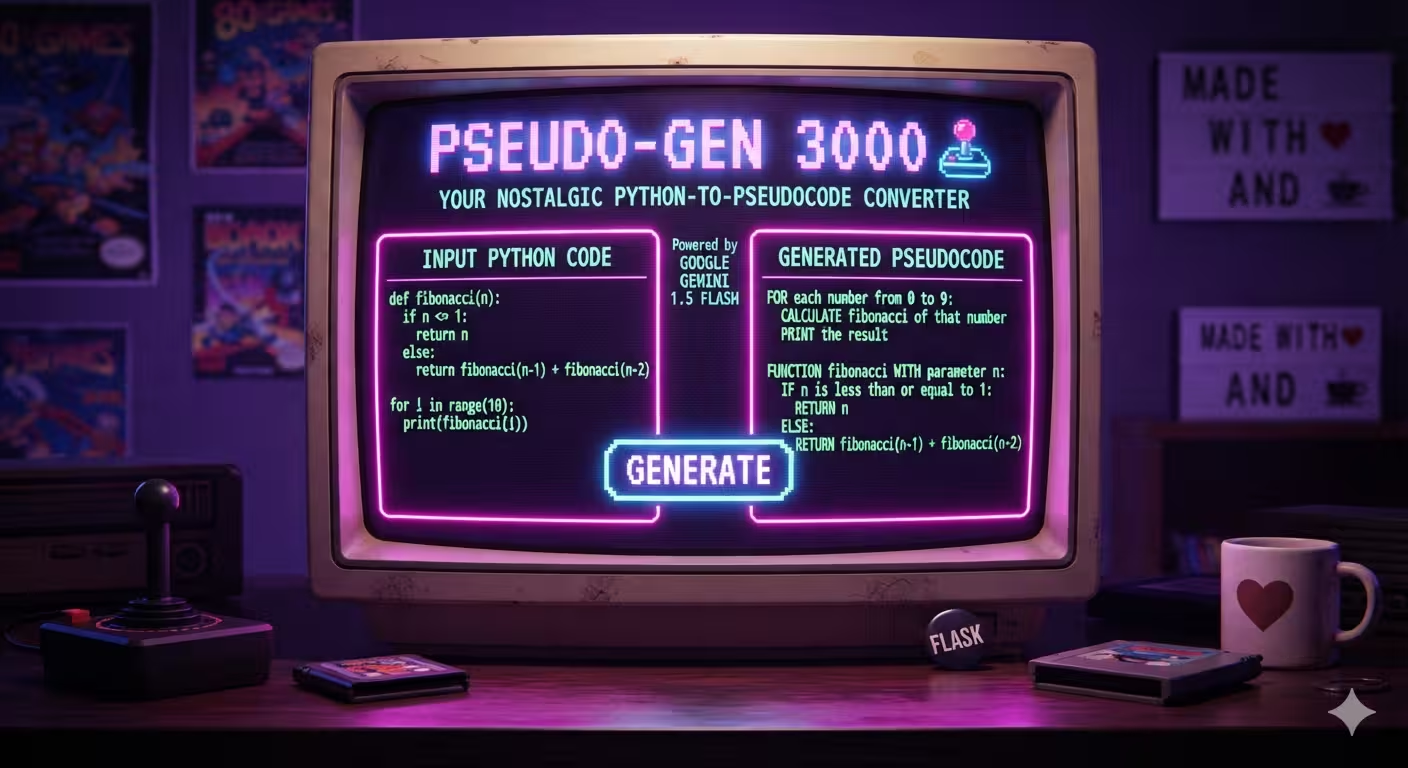
A code walkthrough of Pseudo-Gen 3000, an open-source Flask app that uses Google's Gemini 1.5 Flash API to convert Python code into plain-English pseudocode, wrapped in an 80s neon terminal UI.
Building a Retro AI Pseudocode Generator: Flask + Gemini 1.5 Flash Explained
Source repo: azario0/retro-pseudocode-app
Pseudo-Gen 3000 is a small, focused project: paste in Python code, click a button, get back clean, structured pseudocode — generated by an LLM rather than a hand-rolled parser. It’s a good reference project because it’s small enough to read end-to-end in a few minutes, but it touches on real patterns you’ll reuse in any LLM-backed web app: environment-based secrets, prompt design, graceful degradation, and a server-rendered UI with zero client-side JavaScript.
This walkthrough covers the stack, the code, the prompt design (including an early French-language variant found in the project notebook), and the overall architecture.
Stack at a glance
| Layer | Technology |
|---|---|
| Backend framework | Flask |
| LLM | Google Gemini 1.5 Flash via google-generativeai |
| Config | python-dotenv |
| Templating | Jinja2 (bundled with Flask) |
| Styling | Vanilla CSS, no framework |
| Fonts | VT323 and Press Start 2P via Google Fonts |
Dependencies, per requirements.txt:
Flask
google-generativeai
python-dotenv
Three packages, no ORM, no build step, no frontend framework. This is intentionally a minimal reference implementation — it’s meant to be read in full, not scaffolded from.
Project layout
retro-pseudocode-app/
├── app.py                 # Flask app + Gemini integration
├── requirements.txt
├── templates/
│   └── index.html         # Single Jinja2 template
└── static/
    └── style.css           # Retro terminal theme
There’s also a notebook.ipynb in the repo root — a Jupyter notebook that reads like the author’s scratch pad for prompt design before the logic was ported into app.py. More on that below.
The backend: app.py
Configuration and API setup
import os
import google.generativeai as genai
from flask import Flask, render_template, request
from dotenv import load_dotenv

load_dotenv()

app = Flask(__name__)

api_key = os.getenv("GOOGLE_API_KEY")

if not api_key:
    print("Error: GOOGLE_API_KEY not found in environment variables.")
    print("Please create a .env file and add your key: GOOGLE_API_KEY='Your-API-Key'")

try:
    genai.configure(api_key=api_key)
    model = genai.GenerativeModel('gemini-1.5-flash')
except Exception as e:
    print(f"Failed to configure GenerativeAI: {e}")
    model = None
Nothing exotic here, but the pattern is worth calling out because it’s the correct baseline for any script that talks to a paid API:
- Secrets never touch source control.
load_dotenv()pullsGOOGLE_API_KEYfrom a local.envfile (get one via Google AI Studio) rather than hardcoding it. - Fail soft, not hard. If configuration fails,
modelis set toNoneinstead of letting the exception propagate and crash the whole app at import time. This means the Flask server still boots and serves the UI even with a missing or invalid key — you just get a clear in-app error instead of a stack trace on startup. Every call site that usesmodelchecks forNonefirst.
gemini-1.5-flash is chosen deliberately: it’s Google’s low-latency, low-cost tier, appropriate for a single-shot text transformation task with no need for the larger context window or reasoning depth of Pro-tier models.
The core function: generate_pseudocode
def generate_pseudocode(python_code):
    if not model:
        return "Error: Generative model is not configured. Check API key."

    prompt = f"""
    You are a pseudocode generator.
    Your task is to read the given Python code and output clear, structured pseudocode.

    Guidelines:
    - Write in plain English, not Python syntax.
    - Use indentation for loops and blocks.
    - Be concise but cover all logic.
    - Do not add explanations, titles, or any text other than the pseudocode itself.

    Here is the Python code:
    ```python
    {python_code}
    ```

    Now generate the pseudocode:
    """

    try:
        response = model.generate_content(prompt)
        if response.text:
            return response.text.strip()
        else:
            return "Error: Received an empty response from the model."
    except Exception as e:
        print(f"An error occurred during API call: {e}")
        return f"An error occurred while generating pseudocode: {e}"
This is a textbook single-shot prompt (no chat history, no system/user role separation — just one string sent via model.generate_content()). A few things worth noting as prompt-engineering technique:
- Role framing. “You are a pseudocode generator” anchors the model’s output register before any instructions are given.
- Negative constraints matter as much as positive ones. “Do not add explanations, titles, or any text other than the pseudocode itself” is what keeps
response.textdirectly renderable in a<pre>block without any post-processing or stripping of conversational filler like “Sure! Here’s the pseudocode:”. - Fenced code block in the prompt. Wrapping
{python_code}in triple backticks with apythonlanguage hint helps the model clearly delimit “this is data to transform” from “these are my instructions” — a lightweight defense against the model misreading part of the pasted code as an instruction to itself. - Defensive response handling. The function checks
response.textfor truthiness before returning it, since the Gemini SDK can return an empty response object (e.g., if content is blocked by safety filters) without raising an exception.
The route
@app.route('/', methods=['GET', 'POST'])
def home():
    python_code = ""
    pseudocode = ""

    if request.method == 'POST':
        python_code = request.form.get('code_input')
        if python_code:
            pseudocode = generate_pseudocode(python_code)

    return render_template('index.html', python_code=python_code, pseudocode=pseudocode)
A single route handles both GET and POST on / — a classic Flask pattern for simple form-driven apps that avoids a separate /generate endpoint and a redirect-after-POST round trip. On GET, both template variables are empty strings, so the form renders blank. On POST, the submitted code is echoed back into the textarea (so the user doesn’t lose their input) and the generated pseudocode is rendered below it if generation succeeded.
There’s no CSRF protection, rate limiting, or input length capping here — appropriate for a local demo/reference app, but the first three things you’d add before deploying this publicly.
The frontend: templates/index.html
<form action="/" method="post">
    <div class="form-group">
        <label for="code_input">--[ Python Code ]--</label>
        <textarea name="code_input" id="code_input" rows="10" placeholder="Paste your Python code here...">{{ python_code or '' }}</textarea>
    </div>
    <button type="submit">GENERATE</button>
</form>

{% if pseudocode %}
<div class="result-box">
    <label for="pseudocode_output">--[ Generated Pseudocode ]--</label>
    <pre id="pseudocode_output">{{ pseudocode }}</pre>
</div>
{% endif %}
This is a fully server-rendered page — no fetch, no JavaScript at all. Every “GENERATE” click is a full-page form POST, and Jinja2’s {% if pseudocode %} conditionally renders the result block only after a successful generation. It’s the simplest possible architecture for this use case, and it’s a reasonable one: the task genuinely doesn’t need SPA-style interactivity, and skipping JS removes an entire class of client-side bugs.
One implicit but important detail: Jinja2 autoescapes {{ pseudocode }} by default, so any HTML-like characters the model might emit (e.g. < from a comparison operator described in pseudocode) render as literal text inside the <pre> rather than being interpreted as markup. That’s what makes it safe to drop raw model output straight into the page without manual sanitization.
The styling: static/style.css
The visual identity is the most distinctive part of the project — an 80s arcade terminal look:
- Color palette: near-black purple background (
#0d0221), neon green text (#00ff41), hot pink accents (#f923d2), and cyan highlights (#24d0c9) — a classic synthwave combination. - Typography: VT323 for body text (a monospace font that mimics old CRT terminal fonts) and Press Start 2P for the header (an 8-bit arcade pixel font), both pulled from Google Fonts via
@import. text-shadowas a glow effect: applied globally onbodyand amplified on the<h1>to fake a phosphor-glow CRT look without any images or filters.- The flicker animation:
@keyframes flicker {
  0%, 18%, 22%, 25%, 53%, 57%, 100% {
    text-shadow: 0 0 4px #fff, 0 0 11px #fff, /* ...large glow... */;
  }
  20%, 24%, 55% {
    text-shadow: none;
  }
}
This is a classic “neon sign flicker” technique: instead of a smooth transition, the keyframes jump between a heavy multi-layered text-shadow glow and none at irregular percentage offsets, mimicking the uneven flicker of a real neon tube rather than a uniform pulse.
Everything is plain CSS — no preprocessor, no custom properties, no framework — which keeps the whole visual layer in one ~120-line file that’s easy to fork and restyle.
What the notebook reveals
The repo’s notebook.ipynb is the author’s prototyping environment, and it’s worth reading alongside app.py because it shows the iteration behind the final prompt, not just the result. Key points from it:
- It configures Gemini and instantiates
gemini-1.5-flashexactly as the Flask app does — confirming the notebook was the testbed before the logic was ported into the web app. - It defines two parallel prompts for the same sample code: an English
prompt(nearly identical to the one shipped inapp.py) and a French variant,prompt_fr, with equivalent instructions translated into French (“Vous êtes un générateur de pseudocode… Écrire en français simple, pas en syntaxe Python…”). - The cell that actually calls the model (
response = model.generate_content(prompt_fr)) uses the French prompt — meaning the author was specifically testing whether the same instruction-following pattern holds up in another language.
This is a small but genuinely useful data point for anyone building similar tools: the pseudocode-generation prompt is structurally language-agnostic. The “role + guidelines + fenced input + explicit negative constraint” shape translates directly, which means this app could be extended with a language-selector dropdown with very little additional engineering — swap in the appropriate localized prompt string based on a form field, and the rest of the pipeline (Flask route, template, error handling) needs no changes at all.
Extension ideas
A few natural next steps if you’re using this as a starting point:
- Language selection: surface the French/English prompt split from the notebook as a UI dropdown.
- Syntax highlighting on the input
<textarea>via something like CodeMirror or Prism.js, loaded from a CDN. - Streaming output: Gemini’s SDK supports streaming responses (
model.generate_content(prompt, stream=True)), which would let the pseudocode render token-by-token instead of waiting for the full response — a nice fit for the terminal aesthetic. - Rate limiting and input caps, before considering any public deployment, since the current version has no guardrails against abuse of the Gemini API quota.
Summary
Pseudo-Gen 3000 is a compact but well-structured example of wrapping an LLM call in a traditional server-rendered Flask app: .env-based key management, a fail-soft model initialization pattern, a tightly constrained single-shot prompt, and a template that trusts Jinja2’s autoescaping rather than hand-rolling sanitization. The retro CSS is a fun skin on top, but the underlying backend pattern — prompt in, plain text out, no client JS required — is a genuinely reusable template for small single-purpose AI tools.

Written by
Benmalek Zohir
Founder, AI Engineer & Full Stack Developer
Benmalek Zohir is an AI Engineer, Full Stack Developer, and technology enthusiast focused on artificial intelligence, software development, and emerging technologies. He is the founder of SoftwareJournal.blog, where he shares practical insights, software discoveries, AI tools, and the latest developments in technology.