Inside a Minimal Flask News Aggregator: RSS Parsing, Jinja2, and Bootstrap Without a Database
A code walkthrough of azario0/flask-news-aggregator — a lightweight Flask app that merges multiple RSS/Atom feeds into a single, filterable, dark-themed timeline with zero database dependency.
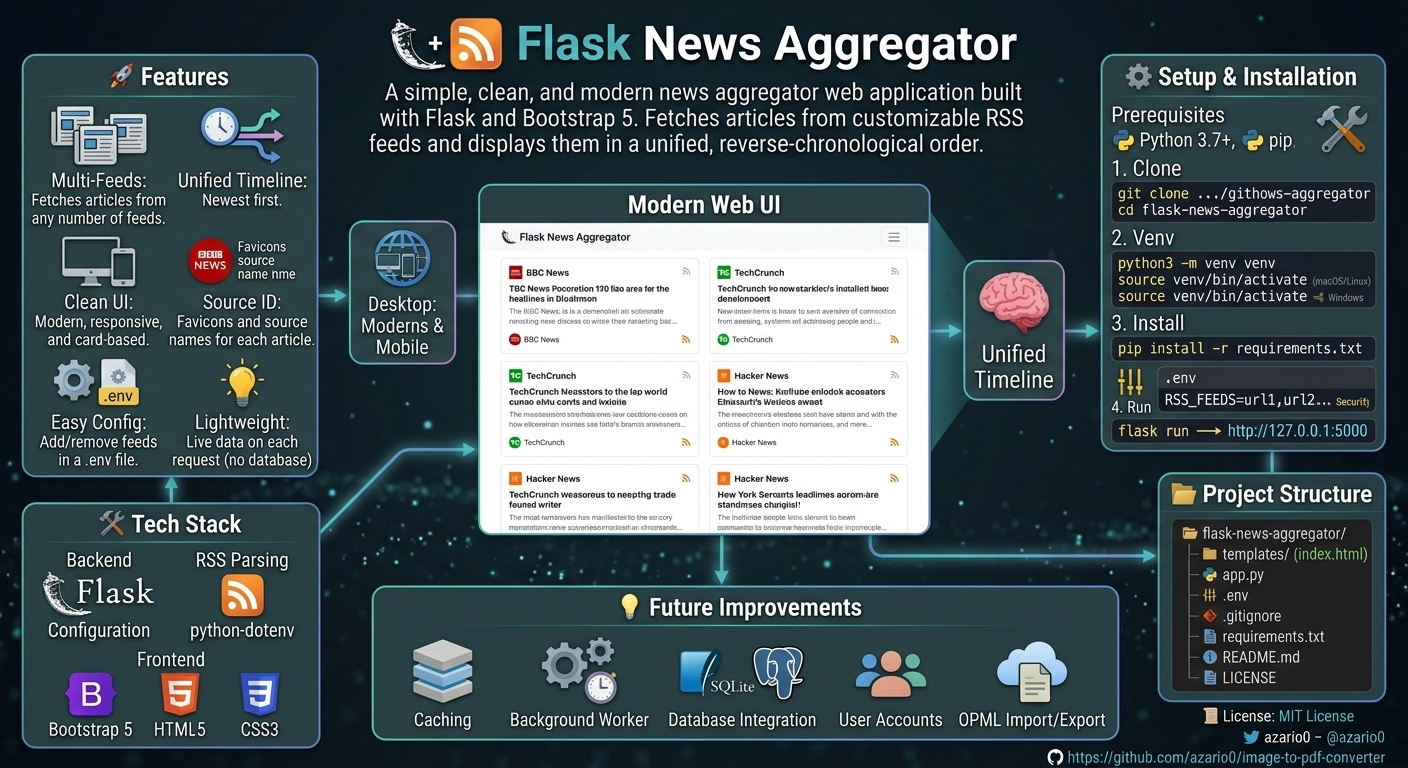
Inside a Minimal Flask News Aggregator: RSS Parsing, Jinja2, and Bootstrap Without a Database
Most “build a news aggregator” tutorials reach for a database, a background worker, and a caching layer before they’ve shown you a single headline. azario0/flask-news-aggregator takes the opposite approach: it’s a ~125-line Flask app that fetches RSS feeds live, on every request, and renders them with Jinja2 and Bootstrap 5. No models, no migrations, no ORM — just feedparser, a couple of helper functions, and a template.
That simplicity makes it a good specimen to dissect: every design decision is visible, and every trade-off is a deliberate omission rather than something buried under framework magic. Here’s how it’s put together.
Repository layout
flask-news-aggregator/
└── news-aggregator/
    ├── app.py
    ├── requirements.txt
    ├── static/
    │   └── css/style.css
    └── templates/
        ├── base.html
        └── index.html
Stack, per the project’s own README:
- Backend: Flask
- RSS/Atom parsing: feedparser
- Configuration: python-dotenv
- Frontend: Bootstrap 5 via CDN, plain HTML5/CSS3
requirements.txt confirms the entire dependency surface:
Flask
feedparser
python-dotenv
Three packages. No SQLAlchemy, no Celery, no Redis. That’s the whole point of this design — the app is stateless and disposable, which trades runtime performance for essentially zero operational overhead.
Configuration: environment variables over hardcoding
At the top of app.py, feeds are loaded from an environment variable rather than a config file or database table:
load_dotenv()

DEFAULT_FEEDS = [
    'https://feeds.bbci.co.uk/news/rss.xml',
    'http://rss.slashdot.org/Slashdot/slashdotMain'
]
RSS_FEEDS_STR = os.getenv('RSS_FEEDS')
if RSS_FEEDS_STR:
    FEEDS = [feed.strip() for feed in RSS_FEEDS_STR.split(',')]
else:
FEEDS = DEFAULT_FEEDSpython-dotenv’s load_dotenv() reads a .env file into os.environ at process start. RSS_FEEDS is expected as a single comma-separated string (e.g. RSS_FEEDS=url1,url2,url3), split and stripped into a Python list. If the variable is absent, it falls back to two hardcoded defaults (BBC News and Slashdot).
This is the classic twelve-factor app pattern: config lives in the environment, not in source. It’s a reasonable choice for a project this size, though it does mean feed lists can’t be changed without a restart — there’s no admin UI or hot-reload.
Pre-loading feed metadata for the filter dropdown
Before any request is handled, the app eagerly resolves human-readable titles for each configured feed:
def get_feed_details(url):
    try:
        feed = feedparser.parse(url)
        return {
            'url': url,
            'title': feed.feed.get('title', urlparse(url).netloc)
        }
    except Exception as e:
        print(f"Could not fetch details for {url}: {e}")
        return {'url': url, 'title': urlparse(url).netloc}

FEEDS_WITH_DETAILS = [get_feed_details(url) for url in FEEDS]
feedparser.parse(url) fetches and parses the feed, returning a FeedParserDict — a dict-like object with attribute access. feed.feed holds channel-level metadata (title, description, link), separate from feed.entries, which holds the individual articles. If the feed has no title field, or the request fails outright, the code falls back to the domain name via urlparse(url).netloc.
This runs once at import time — i.e., once per app process, not once per request — and the result (FEEDS_WITH_DETAILS) is cached in a module-level list for the lifetime of the process. It’s a reasonable micro-optimization, but it has a real consequence worth flagging: this network call happens synchronously at startup, so if a configured feed is slow or unreachable, flask run will hang or stall before the server starts accepting connections at all.
Fetching and merging articles
The core logic lives in fetch_articles():
def fetch_articles(selected_feed_url=None):
    articles = []
    feeds_to_process = [selected_feed_url] if selected_feed_url else FEEDS

    for url in feeds_to_process:
        try:
            feed = feedparser.parse(url)
            source_title = feed.feed.get('title', 'Unknown Source')
            source_icon = get_favicon_url(url)

            for entry in feed.entries:
                articles.append({
                    'title': entry.get('title', 'No Title'),
                    'link': entry.get('link', '#'),
                    'summary': entry.get('summary', ''),
                    'published_parsed': entry.get('published_parsed', time.gmtime()),
                    'source_title': source_title,
                    'source_icon': source_icon
                })
        except Exception as e:
            print(f"Error fetching or parsing feed {url}: {e}")

    articles.sort(key=lambda x: x['published_parsed'], reverse=True)
    return articles
A few things worth calling out here as an experienced reader:
- Normalization. Every feed entry, regardless of source format (RSS 2.0, Atom, RDF —
feedparserabstracts over all of them), gets flattened into a uniform dict withtitle,link,summary,published_parsed, plus the source’s display name and favicon. This is the app’s only real “data model,” and it’s implicit rather than declared as a class orTypedDict. - Sorting key.
published_parsedis atime.struct_time(already parsed byfeedparserfrom whatever date format the feed used — RFC 822, ISO 8601, etc.), which sorts correctly with a plain tuple comparison. Usingtime.gmtime()as a fallback for entries missing a publish date means undated entries sort as if published “now,” pushing them to the top rather than the bottom — a subtle default that could surprise you if a feed frequently omits dates. - Failure isolation. Each feed is fetched inside its own
try/except, so one broken or slow feed doesn’t take down the whole page — the loop just moves to the next URL and logs to stdout. There’s no timeout configured onfeedparser.parse, though, so a feed that hangs (rather than erroring) will still stall the request. - No caching. This function runs fully, over the network, on every single page load. It’s the most consequential simplification in the whole app — see “Trade-offs” below.
Favicons via a third-party service
def get_favicon_url(feed_url):
    domain = urlparse(feed_url).netloc
    return f"https://www.google.com/s2/favicons?domain={domain}&sz=32"
Rather than fetching and hosting favicons itself, the app delegates to Google’s public favicon service, requesting a 32px icon for the feed’s domain. This is a clever shortcut — zero local logic or storage — but it does introduce a hard dependency on a third-party, undocumented Google endpoint that could change behavior or rate-limit without notice.
Turning struct_time into readable text: a Jinja2 custom filter
@app.template_filter('datetimeformat')
def format_datetime(value):
    if not value:
        return ""
    dt_object = datetime.fromtimestamp(time.mktime(value))
    return dt_object.strftime('%a, %d %b %Y %H:%M')
@app.template_filter registers this function as a Jinja2 filter usable inside templates via the pipe syntax. time.mktime() converts the struct_time into a Unix timestamp, which datetime.fromtimestamp() turns into a datetime object, formatted with strftime. It’s invoked in index.html as:
{{ article.published_parsed | datetimeformat }}This is the idiomatic Flask way to keep presentation logic (date formatting) out of both the route handler and the raw template — it’s a small, testable, reusable unit.
The single route
@app.route('/')
def index():
    selected_feed = request.args.get('feed')

    if selected_feed and selected_feed not in FEEDS:
        selected_feed = None

    articles = fetch_articles(selected_feed)

    page_title = "All News"
    if selected_feed:
        for feed_info in FEEDS_WITH_DETAILS:
            if feed_info['url'] == selected_feed:
                page_title = feed_info['title']
                break

    return render_template(
        'index.html',
        articles=articles,
        feeds=FEEDS_WITH_DETAILS,
        selected_feed=selected_feed,
        page_title=page_title
    )
The entire app is one route. Filtering by source is done via a query parameter — /?feed=<url> — rather than a path segment or POST form, which keeps the filtered view bookmarkable and shareable. Note the validation step: selected_feed is checked against the known FEEDS list before use, which prevents a client from passing an arbitrary URL and turning this endpoint into an open SSRF proxy that fetches whatever feed URL they supply. That’s a small but important defensive detail easy to miss on first read.
Templates: inheritance and the safe filter
base.html defines the shared shell — Bootstrap CDN links, dark theme (data-bs-theme="dark"), navbar, footer — with a single {% block content %} for child templates to fill:
<html lang="en" data-bs-theme="dark">
  ...
  <main class="container my-4">
    {% block content %}{% endblock %}
  </main>
  ...
</html>
index.html extends it ({% extends "base.html" %}) and renders the article list inside a Bootstrap dropdown/card layout. The most notable line is:
{{ article.summary | safe }}Feed summaries frequently contain embedded HTML (<p>, <img>, <a> tags from the publisher). Jinja2 autoescapes variables by default, so without | safe this markup would render as literal text. Marking it safe disables that escaping and renders the HTML as-is.
This is worth pausing on if you’re evaluating the code for production use. Rendering unescaped HTML sourced from external, third-party feeds is a textbook stored/reflected XSS vector if any configured feed (or a compromised one) includes malicious markup or script-bearing tags in its summary field. For a personal read-it-yourself dashboard against trusted feeds like BBC or Slashdot, the risk is low. For anything with untrusted feed sources or multiple users, this line needs a sanitization pass (e.g. bleach or nh3) before shipping to production.
The dropdown menu iterates feeds (the pre-loaded FEEDS_WITH_DETAILS) and builds filter links with url_for('index', feed=feed.url), letting Flask handle URL encoding automatically — this is why the template comment calls out urlencode as “crucial,” though in this case it’s implicit via url_for rather than an explicit filter.
Styling
static/css/style.css is a small set of enhancement rules layered on top of Bootstrap’s dark theme: a hover transform and shadow on .article-card for a bit of interactivity, fixed 24px rounded favicons, and a rule ensuring images embedded in feed summaries stay responsive (max-width: 100%) instead of overflowing their card. Nothing framework-specific — it’s standard CSS transitions and box-shadow work riding on top of Bootstrap 5’s utility classes.
How it all fits together, end to end
- On process start:
.envis loaded,FEEDSis resolved, andFEEDS_WITH_DETAILSis populated by synchronously hitting every feed once. - On each
GET /: the optionalfeedquery param is validated against known feeds. fetch_articles()re-fetches the relevant feed(s) over the network, normalizes entries into plain dicts, and sorts by date.render_templatehandsarticles,feeds,selected_feed, andpage_titletoindex.html, which extendsbase.html.- Jinja2 renders the card list, applying the
datetimeformatfilter for timestamps andsafefor embedded HTML summaries. - Bootstrap 5 (via CDN) and the local
style.csshandle all layout and visual polish; no custom JavaScript is shipped.
Trade-offs worth naming explicitly
The project’s own README is candid about this being a starting point, listing exactly the gaps you’d expect:
- No caching — every page load re-fetches every feed over the network. Under any real traffic this is slow and unfriendly to the upstream feed servers.
- No background fetching — a scheduler (APScheduler) or task queue (Celery) would decouple fetching from request/response and make page loads instant.
- No persistence — nothing is stored, so there’s no read/unread state, no search, no history beyond what each feed currently exposes.
- No sanitization on feed HTML — flagged above, the
| safefilter is the one line most worth revisiting before any public deployment.
None of these are bugs — they’re the intentional scope boundary of a “simple, clean, and modern” reference implementation, and the README lists them itself as the natural next steps. As a teaching example, that scoping is exactly what makes the code readable in one sitting: every mechanism (feed parsing, template filters, query-param filtering, Jinja2 inheritance) is exposed rather than abstracted behind a framework layer, which is precisely what makes it a useful codebase to read end to end.
Source
Full code: github.com/azario0/flask-news-aggregator

Written by
Benmalek Zohir
Founder, AI Engineer & Full Stack Developer
Benmalek Zohir is an AI Engineer, Full Stack Developer, and technology enthusiast focused on artificial intelligence, software development, and emerging technologies. He is the founder of SoftwareJournal.blog, where he shares practical insights, software discoveries, AI tools, and the latest developments in technology.