Building a Gemini-Powered Translator with Flask: A Code Walkthrough
A deep dive into azario0/gemini-translator, a lightweight Flask app that uses Google's Gemini 1.5 Flash model to translate text between 20+ languages — covering its architecture, prompt design, and how the pieces fit together.
Building a Gemini-Powered Translator with Flask: A Code Walkthrough
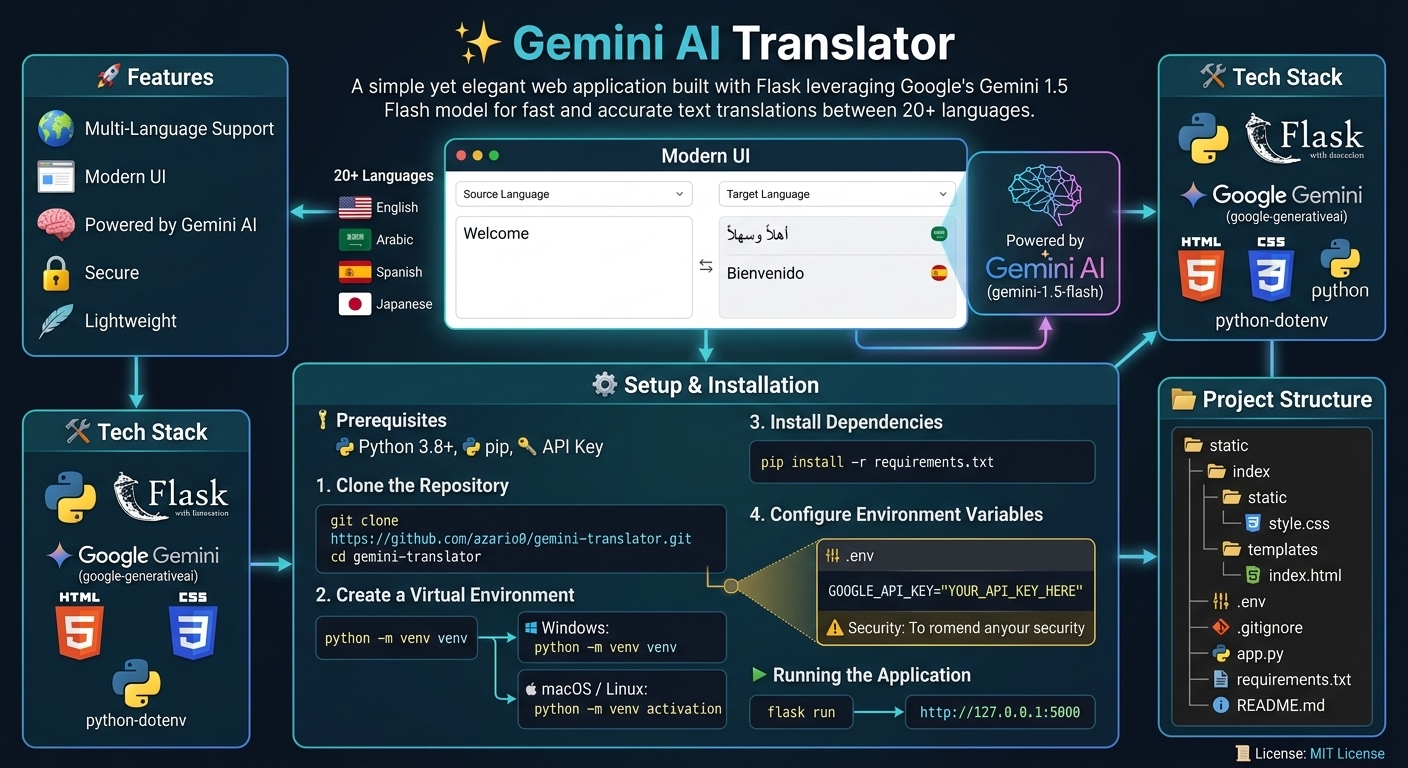
Not every AI project needs a vector database, a RAG pipeline, or a fine-tuned model. Sometimes the most useful thing you can build is a thin, well-designed wrapper around a foundation model’s API — and azario0/gemini-translator is a clean example of exactly that. It’s a small Flask web app that translates text between 20+ languages using Google’s gemini-1.5-flash model, and its entire logic fits in under 100 lines of Python.
That size is what makes it worth dissecting: there’s no framework magic hiding what’s actually happening. Every architectural decision is visible. This article walks through the stack, the file structure, the prompt design, and the request lifecycle, referencing the project’s own notebook.ipynb — which the author used as a prototyping sandbox before wiring the logic into the Flask app.
Tech stack at a glance
| Layer | Technology | Role |
|---|---|---|
| Backend framework | Flask | Routing, request handling, templating |
| AI model | Google Gemini via google-generativeai SDK | Translation via gemini-1.5-flash |
| Templating | Jinja2 (bundled with Flask) | Server-side HTML rendering |
| Config/secrets | python-dotenv | Loads GOOGLE_API_KEY from a .env file |
| Frontend | HTML5, CSS3 (no JS framework) | Form-based UI |
The requirements.txt confirms just three dependencies: Flask, google-generativeai, and python-dotenv. That minimalism is deliberate — this is a project meant to be read in one sitting, not a production-grade service with auth, rate limiting, or a database.
Project structure
/gemini-translator
|
|-- /static
|   |-- /css
|       |-- style.css         # All application styles
|
|-- /templates
|   |-- index.html            # Main HTML template for the UI
|
|-- .env                      # Stores secret keys (ignored by git)
|-- app.py                    # Main Flask application logic
|-- requirements.txt          # List of Python dependencies
This is the canonical Flask layout: templates/ for Jinja2 HTML, static/ for CSS/JS/images, and a single app.py as the entry point. There’s no models/, routes/, or blueprints/ directory — everything lives in one file because the app has exactly one route.
Where the app started: the notebook
Before touching Flask, the author prototyped the actual AI interaction in notebook.ipynb. This is a genuinely useful pattern worth stealing for your own projects: validate the model call in a notebook before wrapping it in a web framework. It isolates two very different classes of bugs — “is my prompt producing the output I want?” versus “is my Flask route wired correctly?” — so you’re never debugging both at once.
The notebook walks through four steps, each in its own cell:
1. Language selection
languages = [
    "english", "french", "arabic", "spanish", "german", "italian",
    "portuguese", "russian", "chinese (simplified)", "chinese (traditional)",
    "japanese", "korean", "turkish", "hindi", "bengali", "urdu",
    "swahili", "dutch", "greek", "polish"
]

language_selected = languages[0]   # english
language_target = languages[2]     # arabic
This static list is doing double duty: it’s the source of truth for what languages the UI dropdown will offer, and it’s the exact list later copy-pasted into app.py’s LANGUAGES constant (the code comment there literally says # Pulled from your notebook).
2. Sample input
user_text = "Hello everyone ! i'm zohir from algeria !"3. Model setup
import google.generativeai as genai

genai.configure(api_key="YOUR_API_KEY")
model = genai.GenerativeModel("gemini-1.5-flash")
Two calls are all that’s needed to get a usable model handle: configure() sets the API key globally for the SDK session, and GenerativeModel(...) instantiates a client bound to a specific model version. gemini-1.5-flash is chosen deliberately here — it’s Google’s lower-latency, lower-cost tier, well suited to a short, single-turn task like translation where you don’t need the deeper reasoning (or higher latency/cost) of a pro-tier model.
4. Prompt engineering and generation
prompt = f"""
You are a professional translator.

Task:
- Translate strictly from **{language_selected}** to **{language_target}**.
- Do not explain, comment, or add anything else.
- If the text is already in {language_target}, return it unchanged.
- Ensure the translation is natural and context-appropriate.

Text to translate:
\"\"\"{user_text}\"\"\"

Return only the translated text.
"""

response = model.generate_content(prompt)
print(response.text)
Running this in the notebook produced:
مرحبا بالجميع! أنا زاهر من الجزائر!This prompt is the intellectual core of the whole project, so it’s worth unpacking why it’s structured the way it is.
Anatomy of the prompt
Gemini is a general-purpose chat/completion model, not a translation-specific API — so getting a clean, single-string translation out of it (rather than a conversational reply, an explanation, or a refusal to “just translate”) requires constraining its behavior through the prompt itself. This one uses several techniques:
- Role assignment —
"You are a professional translator"primes the model into a narrow behavioral mode rather than a general assistant mode. - Explicit negative instruction —
"Do not explain, comment, or add anything else"heads off the model’s default tendency to add commentary like “Here’s the translation:” before the actual text, which would otherwise have to be stripped out downstream. - Edge-case handling — the instruction to return text unchanged if it’s already in the target language avoids a failure mode where the model might otherwise apologize or ask for clarification.
- Delimited input — wrapping
user_textin triple quotes (\"\"\"...\"\"\") clearly marks where user-supplied content starts and ends, separating instructions from data so the model doesn’t confuse text embedded in the input with an instruction directed at it. - Closing reinforcement —
"Return only the translated text"repeats the constraint at the very end of the prompt, which tends to weigh more heavily on generation than instructions placed earlier, since models weight recent context strongly.
This is a good micro-example of prompt engineering for structured output without a formal schema: no JSON mode, no function calling — just careful natural-language constraints doing the whole job.
From notebook to web app: app.py
The Flask application takes the exact logic validated above and wraps it in a single route. Let’s walk through it top to bottom.
1. Setup and configuration
import os
import google.generativeai as genai
from flask import Flask, render_template, request
from dotenv import load_dotenv

load_dotenv()
app = Flask(__name__)
load_dotenv() reads a local .env file and injects its key-value pairs into the process’s environment variables — this is how GOOGLE_API_KEY becomes available to os.getenv() without ever being hardcoded or committed to git.
2. Model initialization with graceful failure
try:
    api_key = os.getenv("GOOGLE_API_KEY")
    if not api_key:
        raise ValueError("API key not found. Please set the GOOGLE_API_KEY environment variable.")
    genai.configure(api_key=api_key)
    model = genai.GenerativeModel("gemini-1.5-flash")
except Exception as e:
    print(f"Error initializing Gemini model: {e}")
    model = None
This is a small but important design choice: model initialization happens once at import time (when the module loads, before any request arrives), not on every request. If it fails — missing key, invalid key, network issue — model is set to None rather than letting the exception crash the whole app. Every request handler then checks if model is None and degrades gracefully into an error message instead of a 500 stack trace. It’s a simple fail-safe pattern that’s easy to overlook in smaller projects.
3. The prompt template function
def create_translation_prompt(source_lang, target_lang, user_text):
    return f"""
    You are a professional translator.
    ...
    """
This is the notebook’s prompt string, lifted verbatim into a reusable function. Extracting it as a function (rather than inlining an f-string inside the route) is good practice even in a tiny app — it keeps the prompt-engineering concern separate from the request-handling concern, and it means the prompt could later be unit-tested or swapped out independently of the Flask logic.
4. The single route: GET and POST on /
@app.route('/', methods=['GET', 'POST'])
def index():
    ...
    if request.method == 'POST':
        source_lang_selected = request.form.get('source_language')
        target_lang_selected = request.form.get('target_language')
        original_text = request.form.get('user_text')

        if not original_text:
            error_message = "Please enter some text to translate."
        elif source_lang_selected == target_lang_selected:
            error_message = "Source and target languages cannot be the same."
        else:
            try:
                prompt = create_translation_prompt(...)
                response = model.generate_content(prompt)
                translation_result = response.text.strip()
            except Exception as e:
                error_message = f"An error occurred: {e}"

    return render_template('index.html', ...)
This is a classic form-post-render pattern, common in server-rendered web apps before the SPA era became dominant:
- A
GETrequest just renders the empty form with default language selections (English → Arabic). - A
POSTrequest (triggered by submitting the form) pulls the three form fields out ofrequest.form, validates them, calls Gemini, and re-renders the same template — but now populated with the translation result, the original text, and the previously selected languages, so the form doesn’t reset to a blank state after submission.
Two validation checks happen before the API call even fires: empty input and identical source/target languages. This matters for cost and latency — every unnecessary call to model.generate_content() is a wasted network round-trip and, in a metered API, wasted spend. Catching invalid states client-side (via required attributes in the HTML) and server-side (in the route) is defense in depth: the HTML required attribute stops most bad submissions, but the server-side check protects against someone bypassing the browser and posting directly to the endpoint.
5. Error handling around the API call
try:
    response = model.generate_content(prompt)
    translation_result = response.text.strip()
except Exception as e:
    print(f"An error occurred during translation: {e}")
    error_message = f"An error occurred: {e}"
Network calls to an external API are a prime failure point — timeouts, rate limits, malformed responses — so wrapping the call in a try/except and funneling any failure into the same error_message variable the template already knows how to render keeps the failure path visually consistent with the validation-error path.
The frontend: index.html and style.css
The template is standard Jinja2: a <form> posts to /, two <select> dropdowns are populated by looping over the languages list passed from Flask, and conditional blocks show either an error box or a result box depending on what the route returned.
<select name="source_language" id="source_language" required>
    {% for lang in languages %}
        <option value="{{ lang }}" {% if lang == source_language_selected %}selected{% endif %}>
            {{ lang.title() }}
        </option>
    {% endfor %}
</select>
Notice {{ lang.title() }} — Jinja2 templates can call Python string methods directly on the values passed into them, which is how "chinese (simplified)" (used internally as the option’s value, and therefore as the string sent to Gemini in the prompt) gets displayed to the user as "Chinese (Simplified)".
The CSS is a compact, CSS-custom-properties-driven design: colors, fonts, and shadows are all defined once as :root variables (--primary-color, --box-shadow, etc.) and reused throughout, which is a lightweight way to keep a small stylesheet consistent without reaching for a preprocessor like Sass. One nice detail: a swap icon (⇄) sits between the two language dropdowns with a transform: rotate(180deg) hover effect — a visual affordance suggesting swap functionality, though (worth noting for anyone extending this project) there’s no actual JavaScript wired up to swap the selected values; it’s currently decorative.
How a request flows end-to-end
Putting it all together, here’s what happens when a user submits the form:
- Browser sends a
POST /request withsource_language,target_language, anduser_textform fields. - Flask’s
index()view reads those fields viarequest.form.get(...). - Validation runs: is there text? Are the languages different?
create_translation_prompt()builds the constrained prompt string.model.generate_content(prompt)sends that prompt to the Gemini API over HTTPS.- Gemini returns a response object;
.text.strip()extracts the plain translated string. - Flask re-renders
index.htmlviarender_template, passing the translation, original text, and selected languages back in, so Jinja2 can populate the result box and preserve form state. - The browser receives a full HTML page (this is a traditional server-rendered app — no AJAX, no client-side state management).
What this project is a good template for
Stripped of its “translator” framing, this repo is really a minimal, readable pattern for any single-purpose LLM-backed web tool: summarizers, tone-rewriters, code explainers, sentiment classifiers, and so on. The reusable pieces are:
- Load secrets via
.env/python-dotenv, never hardcode API keys. - Initialize the model client once at startup, guard against
Noneeverywhere it’s used. - Isolate the prompt into its own function so it can evolve independently of routing logic.
- Validate user input before spending an API call on it.
- Prototype the model interaction in a notebook first, then port the proven logic into the web framework.
For a project this size, that’s a solid set of habits — and a good reason to read the full source even if you never send a single translation through it.

Written by
Benmalek Zohir
Founder, AI Engineer & Full Stack Developer
Benmalek Zohir is an AI Engineer, Full Stack Developer, and technology enthusiast focused on artificial intelligence, software development, and emerging technologies. He is the founder of SoftwareJournal.blog, where he shares practical insights, software discoveries, AI tools, and the latest developments in technology.