Building an AI Grammar Corrector with Flask and Google Gemini
A code walkthrough of azario0's AI Grammar Corrector — a Flask web app that uses Google's Gemini 1.5 Flash model to fix grammar, spelling, and punctuation in over 20 languages, with a look at its prompt design and Jupyter prototyping notebook.
Building an AI Grammar Corrector with Flask and Google Gemini
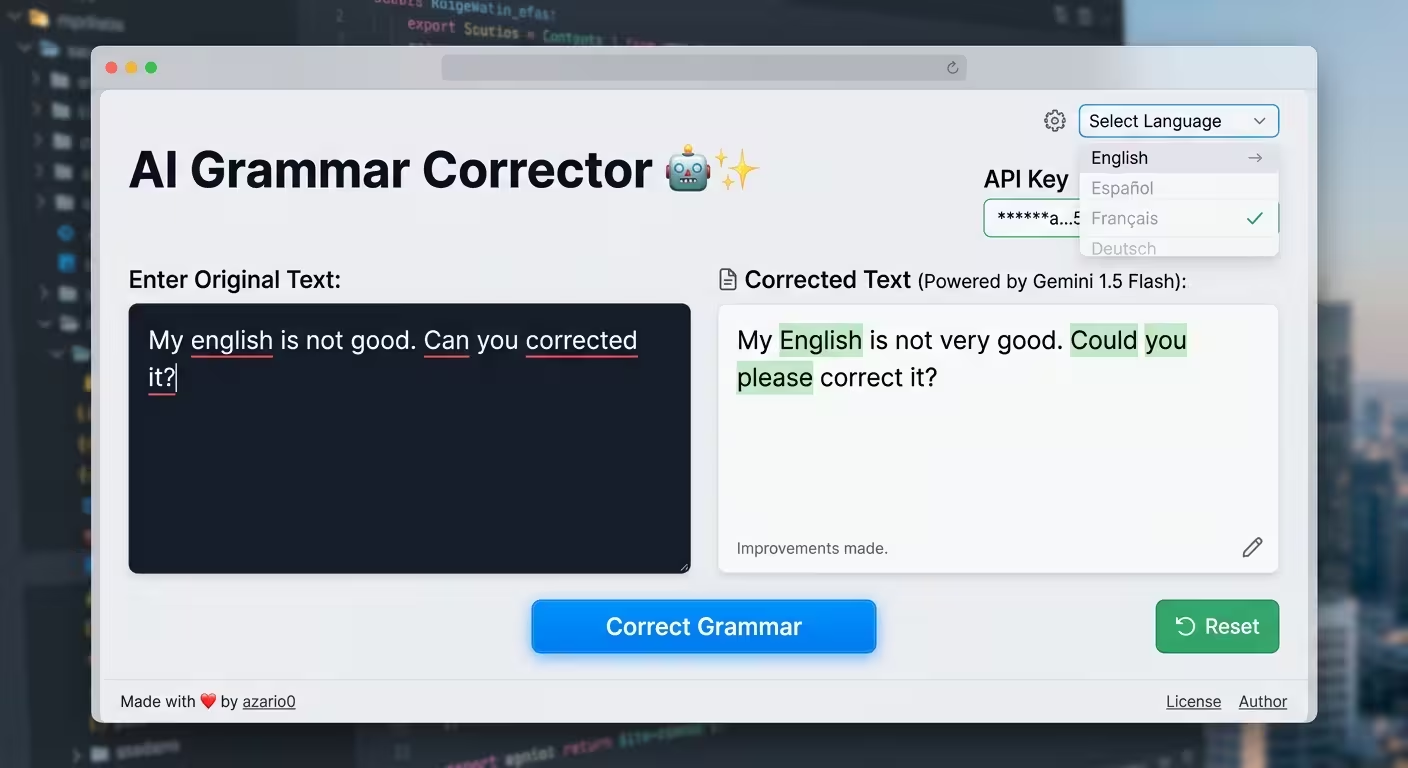
There’s a category of AI project that’s small enough to read in ten minutes but useful enough to actually explain a real pattern: take a general-purpose LLM, wrap it in a single well-crafted prompt, and expose that as a tiny web tool. azario0/ai-grammar-corrector is a good example of exactly this. It’s a Flask app that sends user text to Google’s Gemini 1.5 Flash model and returns a grammar-corrected version, in any of 20+ languages.
This article walks through the whole repo — the prototyping notebook, the Flask backend, the prompt itself, and the front end — and explains how the pieces fit together.
Project overview
At a high level, the app does one thing: you paste some text, pick the language it’s written in, and click a button. The backend builds a prompt around your text, sends it to Gemini, and renders the corrected version back into the page next to your original.
The repo is organized like this:
ai-grammar-corrector/
├── notebook.ipynb                 # prototyping / proof of concept
└── grammar-corrector-app/
    ├── app.py                     # Flask backend
    ├── requirements.txt           # dependencies
    ├── static/style.css           # styling
    └── templates/index.html       # the single page UI
That’s it — no database, no auth, no build step. It’s a deliberately minimal demonstration of wiring an LLM into a web request/response cycle.
Language and stack
Everything here is Python on the backend, using the classic combination for this kind of prototype:
- Flask — a lightweight WSGI web framework, handling routing and HTML templating
- google-generativeai — the official Python SDK for calling the Gemini API
- python-dotenv — loads the API key from a local
.envfile instead of hardcoding it - Jinja2 (bundled with Flask) — server-side templating for
index.html - Plain HTML5/CSS3 on the front end — no JavaScript framework, no build tooling
The full dependency list, from requirements.txt, is just three lines:
Flask
google-generativeai
python-dotenv
That minimalism is part of the point — this is meant to be a clear reference implementation, not a production framework.
The prototyping notebook
Before the Flask app, the author worked out the core logic in notebook.ipynb. It’s a nice illustration of a common AI-app workflow: prove the prompt works in a notebook first, then wrap it in a web interface. The notebook walks through four steps:
1. Pick a language from a hardcoded list
languages = [
    "english", "french", "arabic", "spanish", "german", "italian",
    "portuguese", "russian", "chinese (simplified)", "chinese (traditional)",
    "japanese", "korean", "turkish", "hindi", "bengali", "urdu", "swahili",
    "dutch", "greek", "polish"
]
language_selected = languages[0]
2. Provide some sample text with mistakes
user_text = "Hello everyone ! i'm zohir from algeria !"Note the deliberate errors: extra space before !, lowercase i'm, lowercase algeria.
3. Configure the Gemini client
import google.generativeai as genai

genai.configure(api_key="Your_api_key")
model = genai.GenerativeModel("gemini-1.5-flash")
4. Build the prompt and generate a response
prompt = f"""
You are a professional grammar corrector.
The following text is written in {language_selected}.
Your task: Correct any grammar, spelling, or punctuation mistakes, while keeping the original meaning and style.
Return only the corrected text, without explanations.

Text:
{user_text}
"""

response = model.generate_content(prompt)
print(response.text)
Output:
Hello everyone! I'm Zohir from Algeria!This confirms the core idea works before any web scaffolding gets involved — a sensible way to de-risk the “does the model actually do what I want” question early.
The Flask backend
app.py takes that notebook logic and turns it into a real (if minimal) web service. Let’s go through it piece by piece.
1. Configuration and model setup
import os
import google.generativeai as genai
from flask import Flask, render_template, request
from dotenv import load_dotenv

load_dotenv()
app = Flask(__name__)

try:
    api_key = os.getenv("GEMINI_API_KEY")
    if not api_key:
        raise ValueError("GEMINI_API_KEY not found in .env file.")
    genai.configure(api_key=api_key)
    model = genai.GenerativeModel("gemini-1.5-flash")
    print("Gemini model loaded successfully.")
except Exception as e:
    print(f"Error initializing Gemini model: {e}")
    model = None
Two things worth calling out here as good practice:
- Secrets stay out of source control.
load_dotenv()reads the key from a local.envfile (which is gitignored), rather than the notebook’s approach of pasting the key directly into code. - Fail gracefully at startup, not at request time. If the key is missing or
configure()throws,modelis set toNoneinstead of crashing the whole app. Every request handler checks for thatNonebefore trying to use it, so a misconfigured deployment shows a clean error message instead of a stack trace.
2. The language list
LANGUAGES = [
    "english", "french", "arabic", "spanish", "german", "italian",
    "portuguese", "russian", "chinese (simplified)", "chinese (traditional)",
    "japanese", "korean", "turkish", "hindi", "bengali", "urdu", "swahili",
    "dutch", "greek", "polish"
]
Same list as the notebook, promoted to a module-level constant so it can be passed into the template and rendered as a <select> dropdown.
3. The correction function — this is the core of the app
def generate_correction(language, text):
    if not model:
        return None, "The Gemini model could not be initialized. Please check your API key and configuration."

    prompt = f"""
    You are a professional grammar corrector.
    The following text is written in {language}.
    Your task: Correct any grammar, spelling, or punctuation mistakes, while keeping the original meaning and style.
    Return only the corrected text, without any explanations, introductions, or pleasantries.

    Original Text:
    "{text}"

    Corrected Text:
    """
    try:
        response = model.generate_content(prompt)
        return response.text.strip(), None
    except Exception as e:
        print(f"An error occurred during API call: {e}")
        return None, f"An error occurred while communicating with the Gemini API: {e}"
A few design choices here are worth studying if you’re building something similar:
- Prompt engineering by constraint. The prompt explicitly tells the model to return only the corrected text — no preamble, no “Here’s your corrected text:”, no explanation of what changed. This matters because Gemini, like most chat-tuned LLMs, defaults to conversational framing. Without that constraint you’d have to strip boilerplate out of every response.
- Role + task + context structure. The prompt follows a fairly standard three-part shape: assign a role (“You are a professional grammar corrector”), state the task and its constraints (“correct mistakes… keeping the original meaning and style”), then hand over the data (the quoted original text). This structure tends to produce more consistent output than dumping the instruction and text together.
- The function returns a tuple,
(result, error), rather than raising exceptions upward. This is a common pattern in small Flask apps — it lets the calling route decide what to render without needing atry/exceptof its own.
4. The route
@app.route('/', methods=['GET', 'POST'])
def index():
    corrected_text = None
    original_text = ""
    selected_language = "english"
    error_message = None

    if request.method == 'POST':
        selected_language = request.form.get('language')
        original_text = request.form.get('user_text')

        if not original_text:
            error_message = "Please enter some text to correct."
        else:
            corrected_text, error_message = generate_correction(selected_language, original_text)

    return render_template(
        'index.html',
        languages=LANGUAGES,
        selected_language=selected_language,
        original_text=original_text,
        corrected_text=corrected_text,
        error=error_message
    )
This is a classic single-route, form-post pattern: GET / renders an empty form, POST / processes it and re-renders the same template with results filled in. There’s no separate API endpoint or JSON response — the whole request/response cycle is a full-page reload, which keeps the app dependency-free (no client-side JS needed to handle async calls) at the cost of not being a “real” API.
The front end
templates/index.html is a single Jinja2 template. The interesting parts:
<select name="language" id="language" class="form-control">
    {% for lang in languages %}
        <option value="{{ lang }}" {% if lang == selected_language %}selected{% endif %}>{{ lang.title() }}</option>
    {% endfor %}
</select>
The dropdown is generated directly from the LANGUAGES list passed in from app.py — add a language to that Python list and it automatically shows up in the UI, no template changes needed.
{% if corrected_text %}
    <div class="results-card">
        <h2>Corrected Text</h2>
        <p class="corrected-text">{{ corrected_text }}</p>
        <div class="original-text">
            <strong>Original:</strong> "{{ original_text }}"
        </div>
    </div>
{% endif %}
Results and errors are conditionally rendered blocks — nothing shows until the form has actually been submitted and processed. Because original_text and corrected_text are threaded back through render_template, the form doesn’t lose your input on submit, and you get a side-by-side comparison of before/after.
The styling in static/style.css is plain, hand-written CSS: a centered card layout, a purple-to-blue gradient on the heading and button (--primary-color / --secondary-color CSS variables), the Poppins font pulled from Google Fonts, and a green left-border accent on the results card. Nothing framework-driven — just custom properties and flexbox.
How it all fits together
Putting the full request lifecycle together:
- Startup —
app.pyloads the Gemini API key from.envand initializes agemini-1.5-flashmodel instance once, at import time. - GET / — Flask renders
index.htmlwith an empty form and the language dropdown populated fromLANGUAGES. - User submits the form — a
POST /request carrieslanguageanduser_text. generate_correction()builds the role/task/context prompt, callsmodel.generate_content(prompt), and returns the cleaned-up text (or an error string).- Flask re-renders
index.html, this time withcorrected_textandoriginal_textpopulated, so the results card and the original-text comparison appear.
The notebook and the app share the exact same prompt logic — the notebook is essentially the app’s core function extracted and run standalone, which is a good pattern to notice: prototype the model interaction in an isolated, fast-iteration environment, then lift it directly into the web layer once it behaves the way you want.
Where this could grow
As a minimal reference project, there are some natural extensions if you wanted to build on it:
- Streaming responses using Gemini’s streaming API, so corrections appear incrementally instead of after a full round trip.
- Diff highlighting between original and corrected text (e.g. word-level diff) instead of just showing both blocks.
- A JSON API endpoint alongside the HTML form, so the correction logic could be consumed by other clients.
- Language auto-detection, removing the need for the user to manually pick a source language.
- Rate limiting / caching, since every submission is a live paid API call with no guard rails.
Wrapping up
There’s not a lot of code here, and that’s exactly what makes it a useful reference: it shows a complete, working path from “idea in a notebook” to “deployed-looking Flask app,” with sensible handling of API keys, a tightly-constrained prompt, and a UI that doesn’t try to do more than it needs to. If you’re looking to build your own small LLM-backed tool, this repo is a solid template to fork and adapt — swap out the prompt and the language list, and you’ve got a different tool entirely.
Repository: github.com/azario0/ai-grammar-corrector License: MIT Author: azario0

Written by
Benmalek Zohir
Founder, AI Engineer & Full Stack Developer
Benmalek Zohir is an AI Engineer, Full Stack Developer, and technology enthusiast focused on artificial intelligence, software development, and emerging technologies. He is the founder of SoftwareJournal.blog, where he shares practical insights, software discoveries, AI tools, and the latest developments in technology.